> ## Documentation Index
> Fetch the complete documentation index at: https://docs.hiveku.com/llms.txt
> Use this file to discover all available pages before exploring further.
# Your Helpdesk Agent
> An AI teammate in your Helpdesk that triages, drafts replies, finds stalled work and reports
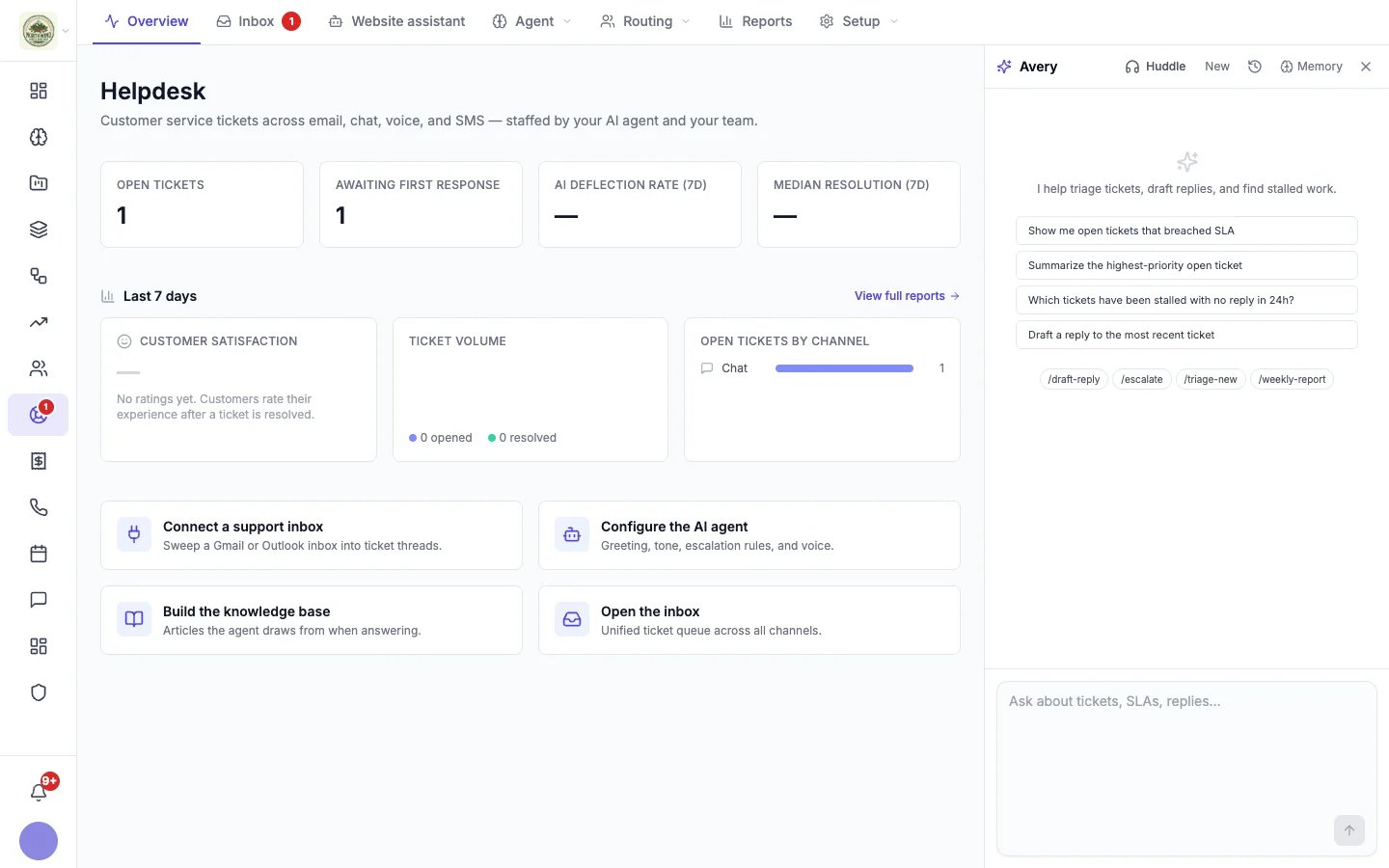
Your support department's AI agent sits in a side panel on the Helpdesk pages; in the inbox and in a website chat, it is the **Assistant** tab of the open conversation instead. It works with your team, not with your customers: it reads your conversations, help articles and response time targets, and helps you get through the queue. (Your customers talk to the [website assistant](/helpdesk/website-assistant), which has its own settings.)
The agent's name and picture come from its Profile. It is called Avery until you rename it.
 ## What to ask it
Type in plain words, or start from a suggestion:
* "Show me open tickets that breached SLA"
* "Summarize the highest-priority open ticket"
* "Which tickets have been stalled with no reply in 24h?"
* "Draft a reply to the most recent ticket"
Or use a shortcut:
| Command | What it does |
| - | - |
| `/triage-new` | Goes through every open conversation from the last 24 hours and returns a table: priority, channel, a summary and a proposed action for each. It waits for you to say "go" before it drafts any replies. |
| `/draft-reply` | Reads a conversation, the customer's contact record and any relevant help articles, and drafts a reply. |
| `/escalate` | Adds a private note explaining the hand-off, passes the conversation to your team, raises its priority when the customer is frustrated or it blocks a sale, and drafts a short reply telling the customer a teammate is coming. |
| `/weekly-report` | Sums up the last 7 days: volume, how much the website assistant resolved and the top reasons it passed chats on, recurring topics, customers worth checking on, and suggested new rules. |
These commands live in the agent's Memory, so you can change them or add your own.
Replies to customers never go out on their own: each one waits on an approval card for your OK.
## In a conversation
Open a conversation and switch the details panel to **Assistant**. The agent reads the conversation and can draft a reply straight into the reply box, for you to edit and send. You can also click **Draft with assistant** under the reply box. See [Working a conversation](/helpdesk/conversations).
## Huddle, history and memory
* **Huddle** starts a live voice conversation with the agent.
* **New** starts a fresh chat, and the clock icon shows your earlier chats.
* **Memory** (also under **Helpdesk → Agent**, named after your agent, for example **Avery's memory**) shows what the agent remembers about your business, customers and preferences. Correct it there, and it follows what you write.
## Settings
In **Helpdesk → Setup → Settings**, under your agent's name:
* **Most you spend per chat** caps what one chat in the panel can use (\$25 by default).
* **Post to Slack** sends things waiting for your OK, and the agent's reminders, to a Slack channel.
See [Helpdesk settings](/helpdesk/settings#your-helpdesk-agents-settings).
## Use your helpdesk from Claude Code
With the [Hiveku plugin for Claude Code](/integrations/claude-code-plugin), you can work your helpdesk from your editor: list and read conversations, see which ones are overdue, draft and send replies, assign them and change their status, and manage help articles and saved replies. What customers wrote is always marked as coming from outside your business, so an AI tool treats it as information, never as instructions.
This documentation is built and hosted on [Mintlify](https://mintlify.com), a developer documentation platform.
## What to ask it
Type in plain words, or start from a suggestion:
* "Show me open tickets that breached SLA"
* "Summarize the highest-priority open ticket"
* "Which tickets have been stalled with no reply in 24h?"
* "Draft a reply to the most recent ticket"
Or use a shortcut:
| Command | What it does |
| - | - |
| `/triage-new` | Goes through every open conversation from the last 24 hours and returns a table: priority, channel, a summary and a proposed action for each. It waits for you to say "go" before it drafts any replies. |
| `/draft-reply` | Reads a conversation, the customer's contact record and any relevant help articles, and drafts a reply. |
| `/escalate` | Adds a private note explaining the hand-off, passes the conversation to your team, raises its priority when the customer is frustrated or it blocks a sale, and drafts a short reply telling the customer a teammate is coming. |
| `/weekly-report` | Sums up the last 7 days: volume, how much the website assistant resolved and the top reasons it passed chats on, recurring topics, customers worth checking on, and suggested new rules. |
These commands live in the agent's Memory, so you can change them or add your own.
Replies to customers never go out on their own: each one waits on an approval card for your OK.
## In a conversation
Open a conversation and switch the details panel to **Assistant**. The agent reads the conversation and can draft a reply straight into the reply box, for you to edit and send. You can also click **Draft with assistant** under the reply box. See [Working a conversation](/helpdesk/conversations).
## Huddle, history and memory
* **Huddle** starts a live voice conversation with the agent.
* **New** starts a fresh chat, and the clock icon shows your earlier chats.
* **Memory** (also under **Helpdesk → Agent**, named after your agent, for example **Avery's memory**) shows what the agent remembers about your business, customers and preferences. Correct it there, and it follows what you write.
## Settings
In **Helpdesk → Setup → Settings**, under your agent's name:
* **Most you spend per chat** caps what one chat in the panel can use (\$25 by default).
* **Post to Slack** sends things waiting for your OK, and the agent's reminders, to a Slack channel.
See [Helpdesk settings](/helpdesk/settings#your-helpdesk-agents-settings).
## Use your helpdesk from Claude Code
With the [Hiveku plugin for Claude Code](/integrations/claude-code-plugin), you can work your helpdesk from your editor: list and read conversations, see which ones are overdue, draft and send replies, assign them and change their status, and manage help articles and saved replies. What customers wrote is always marked as coming from outside your business, so an AI tool treats it as information, never as instructions.
This documentation is built and hosted on [Mintlify](https://mintlify.com), a developer documentation platform.