

The chat on your website
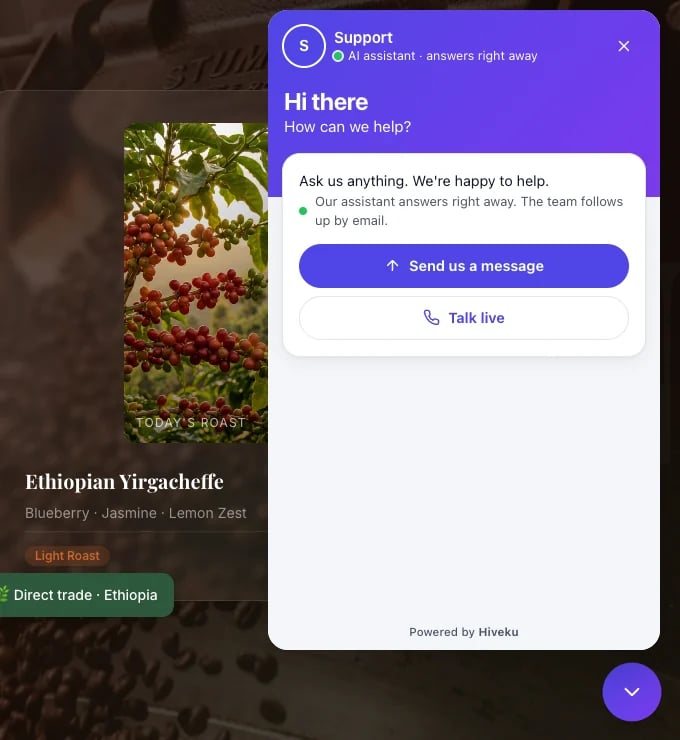
- The button sits in a corner of every page, in your colors and shape. A proactive message can pop up next to it after a visitor has been on a page for a while.
- The home screen shows your greeting, whether your team is in right now, the one-tap buttons you set up, Search for help (once you have published a public article), Send us a message, and Talk live (when it is on).
- Answers come right away from your website assistant, or from your team in Support desk mode.
- Talking to a person: when a visitor asks for a person, the chat goes to your team straight away and the visitor is told what happens next. If nobody can answer live, the chat says so honestly and your team replies by email. If nobody on your account takes chats, the assistant offers to take a message instead.
- Talk live is a voice call with your assistant, started from the chat.
- Text messages: if you allow it, visitors can carry on by text with their consent.
Emails from your helpdesk
Your confirmation and survey emails come from your own verified domain, in your business’s name and colors.Confirmation
Sent when a conversation opens: their reference number and a View your request button. See Helpdesk settings.
Satisfaction survey
Sent after a conversation is resolved, if you turned surveys on: Great, OK or Not great. See Satisfaction surveys.
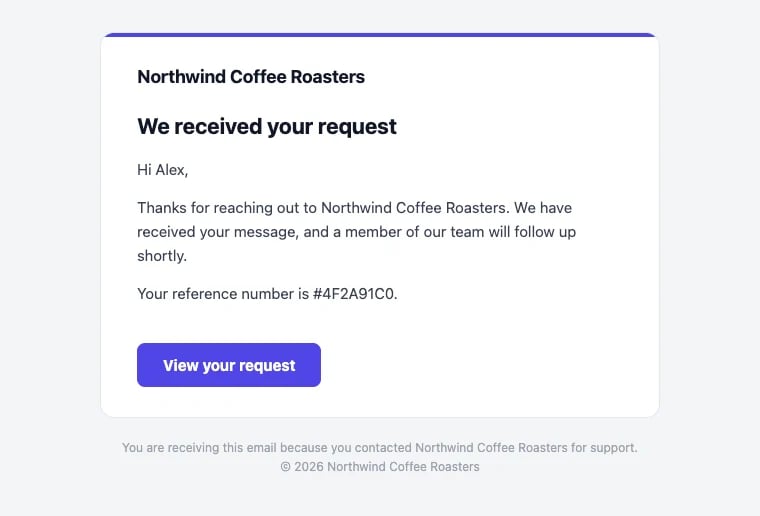
The confirmation email
Their help page
Every customer has a private help page. The buttons in your emails open it.- Your conversations lists their conversations with you, and a few of your public help articles.
- Opening a conversation shows the whole thread, except your team’s private notes.
- They can reply right there. A reply to a resolved conversation reopens it.
- Once a conversation is resolved, they can rate it (Great, OK or Not great) and add a comment, and change their rating later.