

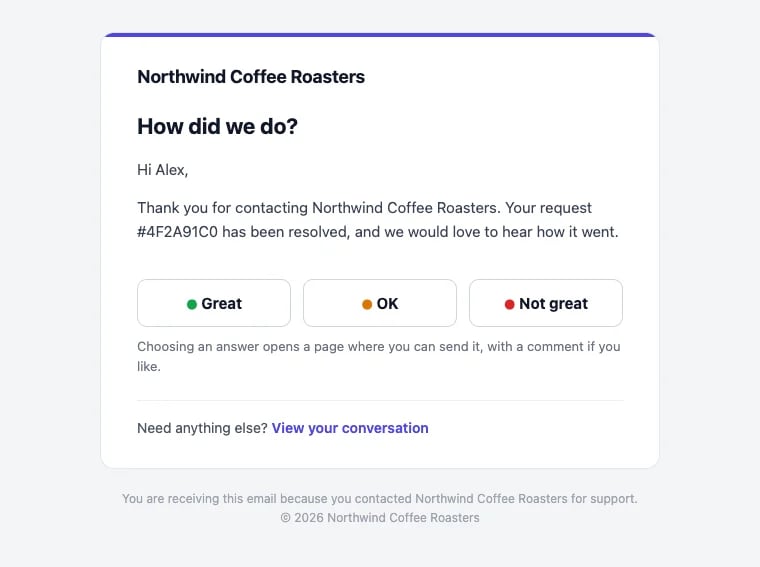
The survey email, in your business's name and colors
Turn it on
- Open Helpdesk → Setup → Settings and turn on CSAT survey.
- Set the Delay in minutes after a conversation is resolved (60 by default), so a quick reopen doesn’t trigger a survey.
- Edit the Subject template (“How was our support?” by default) and the Message if you want your own words. The email adds the Great, OK and Not great buttons for you.
- Click Preview the email to see it as your customers will. Use the default message brings back the default wording.
How customers answer
- The customer clicks Great, OK or Not great in the email.
- Their help page opens on that conversation with their answer already chosen.
- They tap Send rating, and can add a comment.
Who gets a survey
Hiveku sends at most one survey per conversation, and skips:- your own team: anyone on your account is never surveyed;
- conversations resolved in bulk, for example when you resolve a batch of old conversations at once;
- customers who already got a survey in the last 7 days, so someone with several conversations gets one survey, not one per conversation;
- conversations resolved more than 14 days ago;
- customers with no email address, or whose address bounced or complained before.
See the results
- On the conversation: a note shows the customer’s answer and comment, and the assigned teammate is told.
- In Reports: the CSAT — Great share, the CSAT trend over time, the latest CSAT responses (up to 50), and each teammate’s score under Top agents. See Reports.