Write a quote, share it by email, text or a link, let your client accept it online, and turn the accepted quote into an invoice
A quote, called an estimate in Hiveku, shows your client the price before any work starts. Your client opens it from a link, types their name to accept it, and you turn the accepted quote into an invoice in one click, with the same lines.This guide quotes Theo Nakamura at Lanternwick Café for the first month of Northwind’s rotating single-origin program. It shares the quote with a link, accepts it the way Theo would, and turns it into a draft invoice.
Click Commerce in the left rail, then Estimates, then New estimate at the top right.
Estimates, and New estimate
2
Client and dates
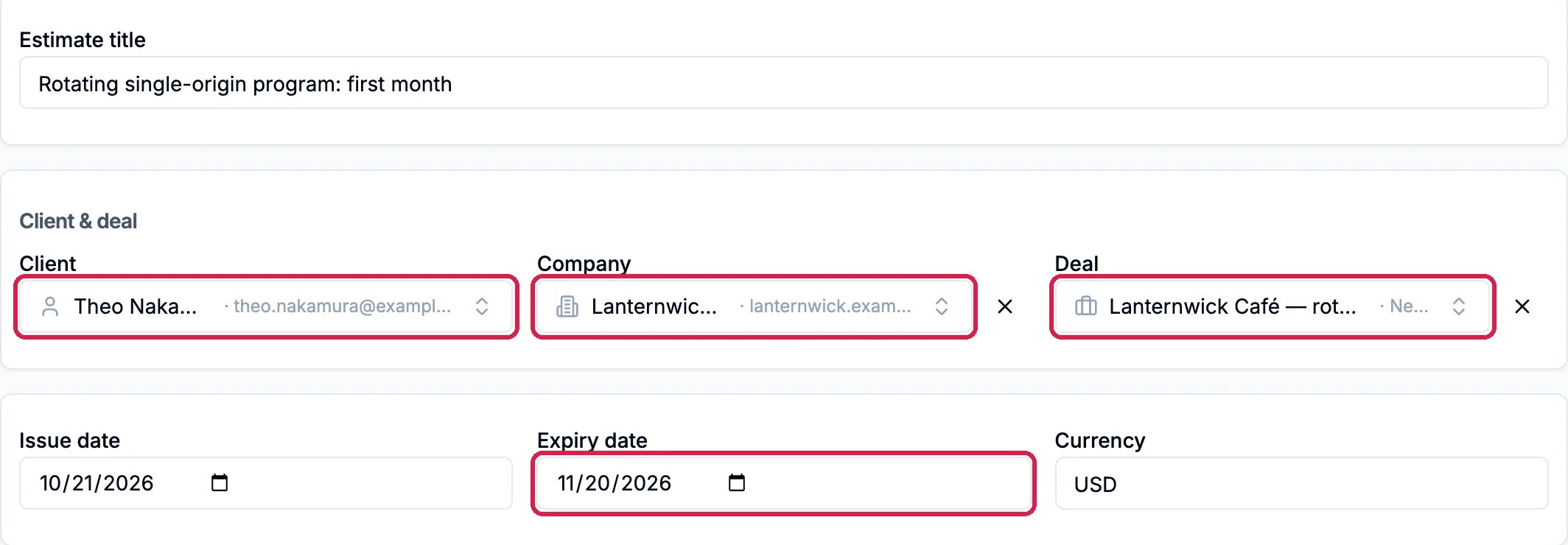
Give the quote an Estimate title if you like, and pick the Client. Company and Deal are optional and link the quote to them in your CRM.Set the Expiry date: from then on, your client can no longer accept the quote. In the US a quote stops taking acceptances on the afternoon or evening before its expiry date, so choose the day after the last day your price holds.
Theo Nakamura at Lanternwick Café, open for a month
3
Lines, notes and terms
Add the lines with Pick from catalog…, and write Notes and Terms, just as on an invoice (see Create and Send an Invoice). Northwind quotes eight bags of single origin, four bags of house espresso and three hours of barista training.
4
Signing and payment terms
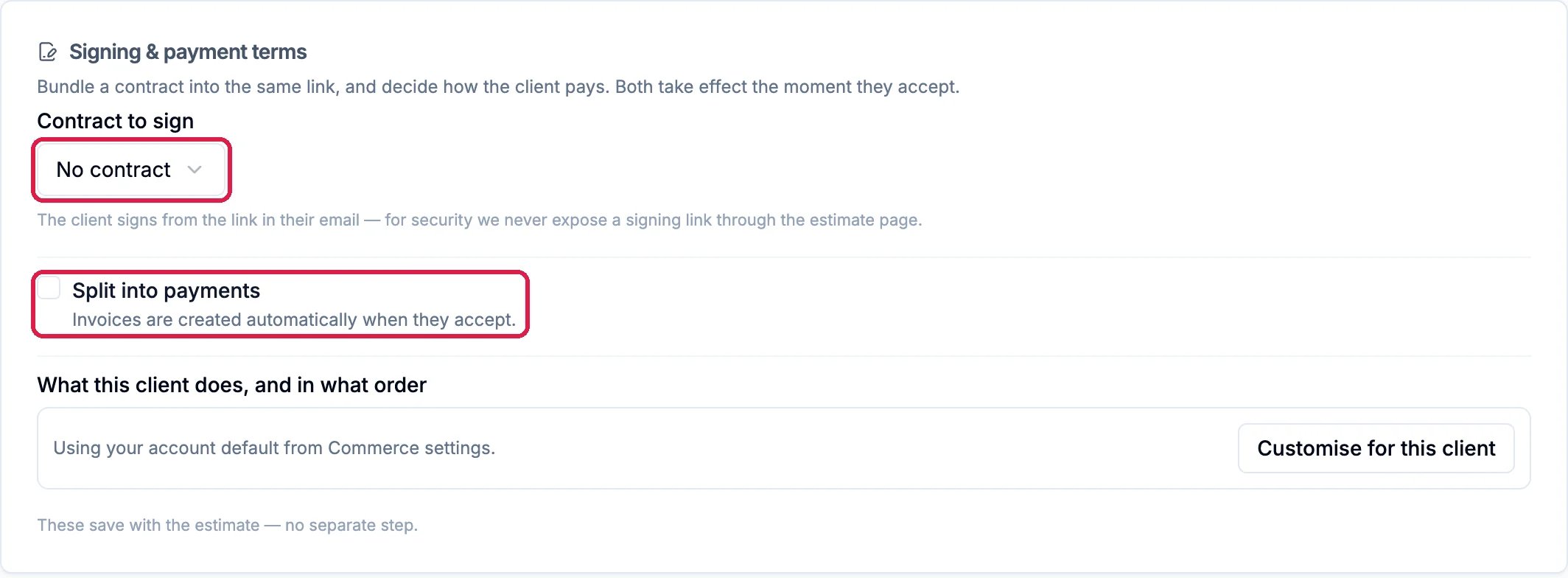
At the bottom, Signing & payment terms can add to what happens when your client accepts:
Contract to sign sends a contract with the quote. The client signs it from the link in their email.
Split into payments splits the price into installments, such as a deposit and a balance. The invoices are created for you when they accept, so you don’t add a deposit line yourself.
What this client does, and in what order uses your default from the Commerce settings. Customise for this client changes it for this quote.
Northwind leaves them as they are: no contract and one payment.
No contract, one payment
5
Save draft
Click Save draft at the top. Save & send saves it and opens the email for you to check before it goes.
The saved quote opens as a Draft. Preview as customer shows you exactly what your client will see, without recording a view or letting you accept it.
Preview as customer, and Copy link
1
Send it from Hiveku
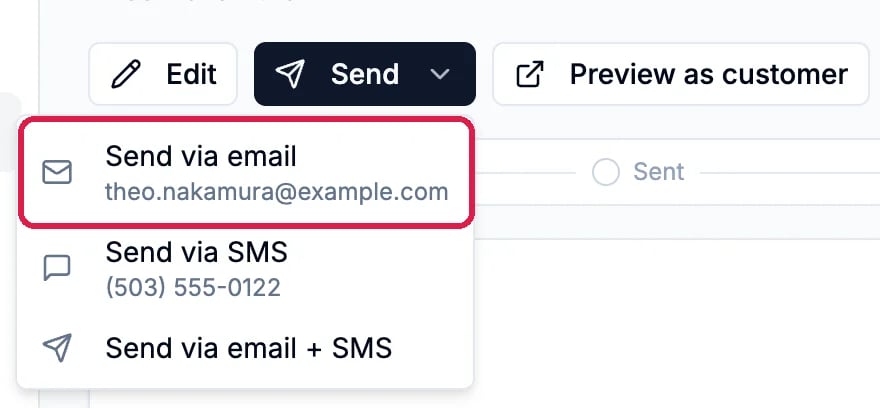
Click Send to choose Send via email, Send via SMS or Send via email + SMS. Each opens the message for you to check, and nothing goes out until you send it there.
The Send menu
2
Or share the link yourself
Click Copy link to copy your client’s link, then paste it into your own email or message. The button shows Copied. Northwind shares the quote this way.
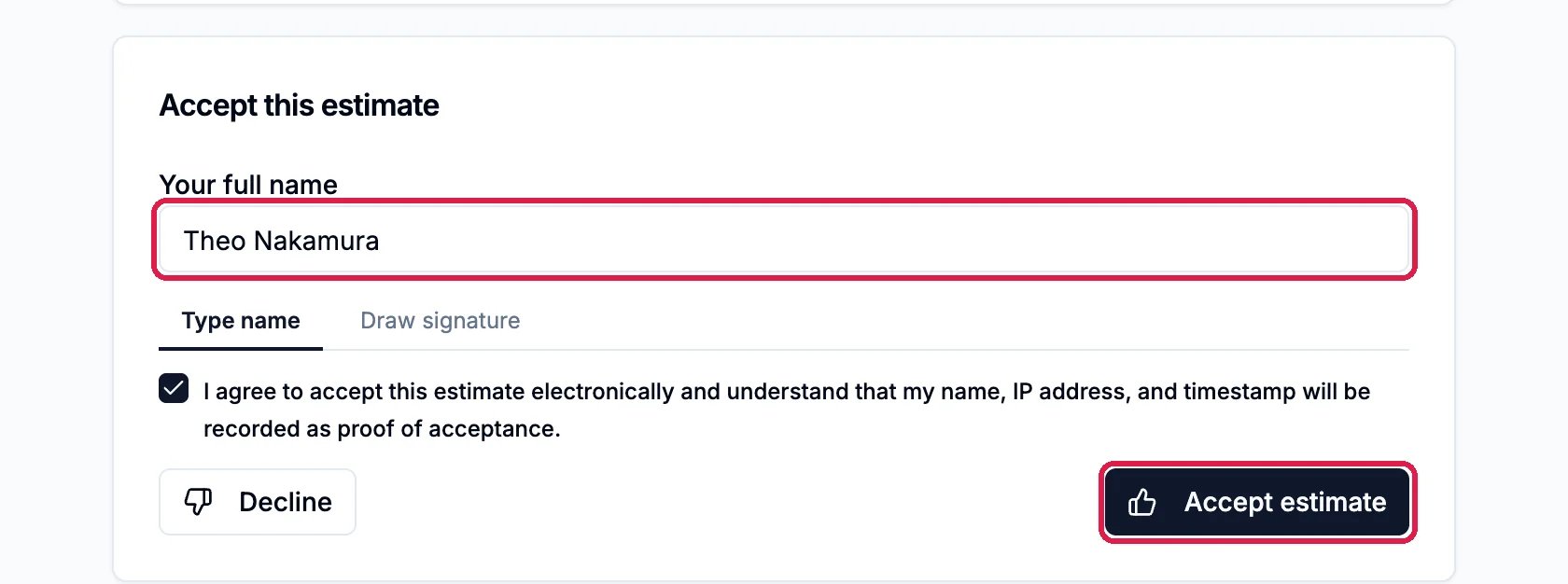
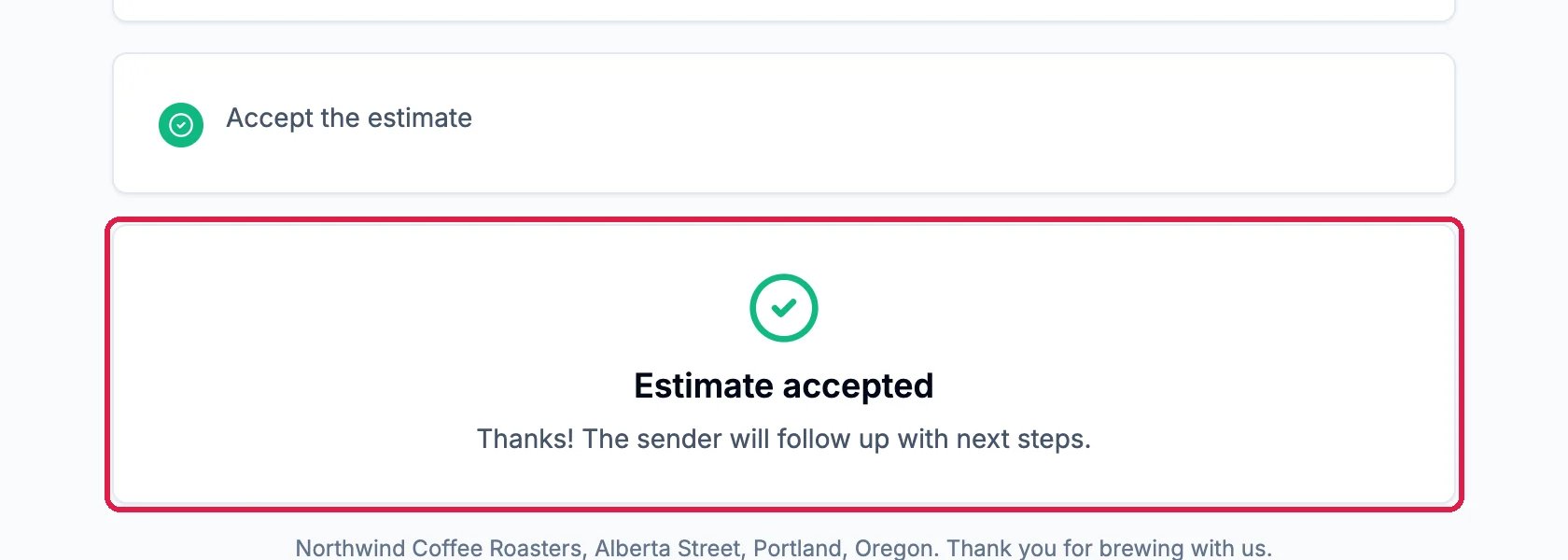
Your client opens the link and sees the quote, with your lines, notes and terms. Under it, they type their full name in Your full name, or switch to Draw signature, tick the agreement and click Accept estimate. Their name, IP address and the time are recorded as proof. Decline turns the quote down.
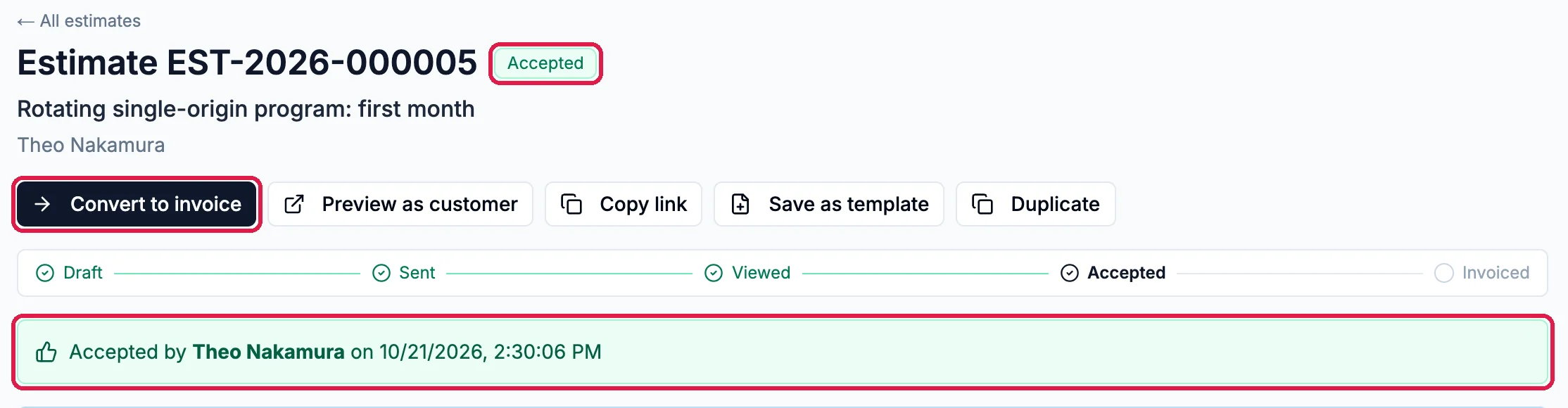
The quote is now Accepted, and says who accepted it and when. Hiveku also alerts the quote’s owner when the client opens, accepts or declines it. Click Convert to invoice.
Accepted by Theo Nakamura
2
Send it now, or keep it a draft
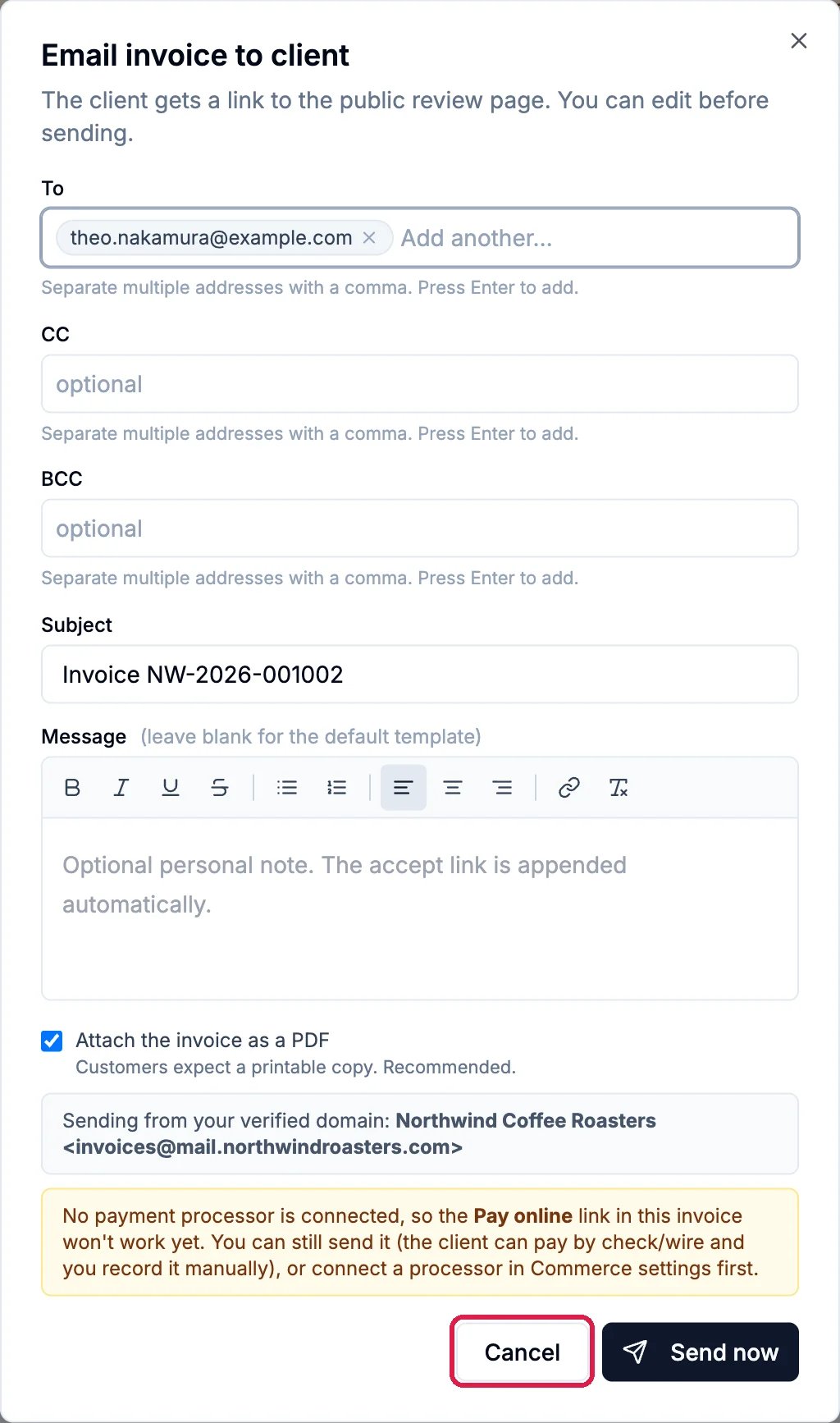
Hiveku makes a draft invoice with the quote’s lines, notes and terms, and opens its email straight away so you can send it. Check it and click Send now, or click Cancel to keep the invoice as a draft and send it later. Northwind keeps it a draft.
The invoice email opens by itself
3
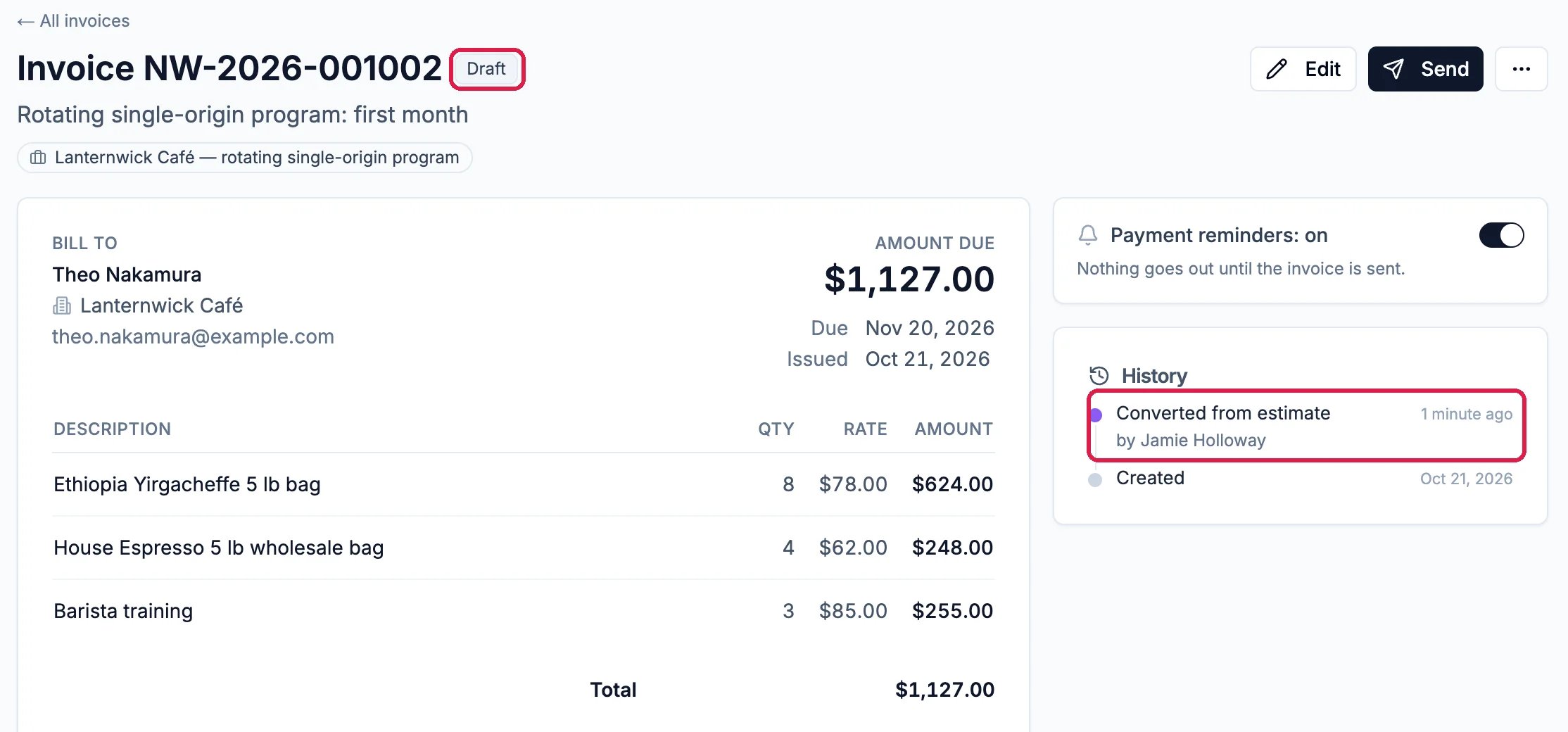
The draft invoice
The invoice is a Draft, and its History starts with Converted from estimate. The quote is now marked Converted, with View invoice to open the invoice, and the link your client used stops working.
Agreed by phone? Once you have sent the quote, Mark accepted manually on it records the acceptance, and Convert to invoice works the same.
An accepted quote can’t be edited. To change it, click Duplicate to make a new draft with the same lines, and send that.
Online payment needs a payment processor. Northwind has none connected, so the window for emailing its invoice warns that the Pay online link won’t work yet.
A copied link works for 30 days. Copy a new one if the quote stays open longer. With a Contract to sign, send the quote from Hiveku: the link can’t be copied until the contract has gone out.
{"docsConfig":{"theme":"maple","$schema":"https://mintlify.com/docs.json","name":"Hiveku Builder","colors":{"primary":"#F9A825","light":"#FBC02D","dark":"#F57F17"},"logo":{"light":"https://mintcdn.com/locusdigital/AodgChCDua_G2sAP/images/hiveku-logo-light.svg?fit=max\u0026auto=format\u0026n=AodgChCDua_G2sAP\u0026q=85\u0026s=5d69f2502059f8269d670b35be741ad2","dark":"https://mintcdn.com/locusdigital/AodgChCDua_G2sAP/images/hiveku-logo-dark.svg?fit=max\u0026auto=format\u0026n=AodgChCDua_G2sAP\u0026q=85\u0026s=a78cef8cf1c9ae13d3dcbe31c3ca498d","href":"https://hiveku.com"},"favicon":"https://mintcdn.com/locusdigital/AodgChCDua_G2sAP/images/favicon.svg?fit=max\u0026auto=format\u0026n=AodgChCDua_G2sAP\u0026q=85\u0026s=1b959fd7abfd376351a1216e201aa8cb","api":{},"appearance":{"default":"system"},"seo":{},"styling":{"latex":true},"navigation":{"global":{"anchors":[{"anchor":"Changelog","icon":"list","href":"/changelog"},{"anchor":"App","icon":"arrow-up-right-from-square","href":"https://app.hiveku.com"}]},"pages":[]}},"deployment":{"deploymentMetadataValue":{"subdomain":"locusdigital","hasAudioNarration":false,"actualSubdomain":"locusdigital","customDomains":["docs.hiveku.com"],"gitSource":{"type":"github","owner":"locus2012","repo":"hiveku_docs","deployBranch":"main","contentDirectory":"","isPrivate":true,"mountPath":"","label":""},"chroma":{"liveDeploymentHistoryId":"6ad93ef3dfce72f355a2cb4b","collectionId":"c5501d14-52a4-4aa3-b791-a0808b54c4da","schemaVersion":"v3","latestBuiltDeploymentHistoryId":"6ad93ef3dfce72f355a2cb4b"},"entitlements":{"AI_CHAT":{"status":"DISABLED"}},"buildId":"6ad93ef3dfce72f355a2cb4b","clientVersion":"0.0.3926","searchFilterCounts":[{"language":"default","tag":"Documentation","count":390},{"language":"default","tag":"How-Tos","count":200},{"language":"default","tag":"Growing Your Business","count":57},{"language":"default","tag":"Integrations","count":25},{"language":"default","tag":"Publishing","count":18},{"language":"default","tag":"Integrations \u0026 BYOK","count":16},{"language":"default","tag":"Helpdesk","count":15},{"language":"default","tag":"Workflow Recipes","count":15},{"language":"default","tag":"Marketing Delivery","count":12},{"language":"default","tag":"API Reference","count":11}]},"assistantConfig":{"enableAskAiButton":false,"enableStarterQuestions":false,"enableContextualStarterQuestions":false,"enableAskAiSearchBar":true},"hasChatPermissions":false,"hasWebMcpPermissions":false,"toggles":[{"name":"kill-isr","enabled":true,"variant":{"name":"disabled","enabled":false,"feature_enabled":true},"impressionData":false},{"name":"agent-mintlify-slack","enabled":true,"variant":{"name":"disabled","enabled":false,"feature_enabled":true},"impressionData":false},{"name":"editor-v7-file-tree","enabled":true,"variant":{"name":"disabled","enabled":false,"feature_enabled":true},"impressionData":false},{"name":"agent-integrations-settings","enabled":true,"variant":{"name":"disabled","enabled":false,"feature_enabled":true},"impressionData":false},{"name":"automations-pr-grouping","enabled":true,"variant":{"name":"disabled","enabled":false,"feature_enabled":true},"impressionData":false},{"name":"custom-prefix","enabled":true,"variant":{"name":"disabled","enabled":false,"feature_enabled":true},"impressionData":false},{"name":"analytics-v7","enabled":true,"variant":{"name":"disabled","enabled":false,"feature_enabled":true},"impressionData":false},{"name":"user-flows-analytics","enabled":true,"variant":{"name":"disabled","enabled":false,"feature_enabled":true},"impressionData":false},{"name":"no-publish-flow","enabled":true,"variant":{"name":"disabled","enabled":false,"feature_enabled":true},"impressionData":false},{"name":"workos-onboarding","enabled":true,"variant":{"name":"disabled","enabled":false,"feature_enabled":true},"impressionData":false},{"name":"llms-txt-v2","enabled":true,"variant":{"name":"disabled","enabled":false,"feature_enabled":true},"impressionData":false},{"name":"pause-universal-search-reconcile","enabled":true,"variant":{"name":"disabled","enabled":false,"feature_enabled":true},"impressionData":false},{"name":"snapshot-serving-live","enabled":true,"variant":{"name":"disabled","enabled":false,"feature_enabled":true},"impressionData":false},{"name":"stripTemperatureMiddleware","enabled":true,"variant":{"name":"disabled","enabled":false,"feature_enabled":true},"impressionData":false},{"name":"per-site-search-delta","enabled":true,"variant":{"name":"disabled","enabled":false,"feature_enabled":true},"impressionData":false},{"name":"support-platform-pylon-zendesk","enabled":true,"variant":{"name":"disabled","enabled":false,"feature_enabled":true},"impressionData":false},{"name":"snapshot-serving","enabled":true,"variant":{"name":"disabled","enabled":false,"feature_enabled":true},"impressionData":false},{"name":"instant-rollback","enabled":true,"variant":{"name":"disabled","enabled":false,"feature_enabled":true},"impressionData":false},{"name":"granular-notifications-server","enabled":true,"variant":{"name":"disabled","enabled":false,"feature_enabled":true},"impressionData":false},{"name":"granular-notifications","enabled":true,"variant":{"name":"disabled","enabled":false,"feature_enabled":true},"impressionData":false},{"name":"editor-private-page-search","enabled":true,"variant":{"name":"disabled","enabled":false,"feature_enabled":true},"impressionData":false},{"name":"automations-fable","enabled":true,"variant":{"name":"disabled","enabled":false,"feature_enabled":true},"impressionData":false},{"name":"fixed-ai-action-pricing","enabled":true,"variant":{"name":"disabled","enabled":false,"feature_enabled":true},"impressionData":false},{"name":"automation-resolve-merge-conflict","enabled":true,"variant":{"name":"disabled","enabled":false,"feature_enabled":true},"impressionData":false},{"name":"scoped-publishing","enabled":true,"variant":{"name":"disabled","enabled":false,"feature_enabled":true},"impressionData":false},{"name":"mintql","enabled":true,"variant":{"name":"disabled","enabled":false,"feature_enabled":true},"impressionData":false},{"name":"page-level-analytics","enabled":true,"variant":{"name":"disabled","enabled":false,"feature_enabled":true},"impressionData":false},{"name":"editor-version-history-v2","enabled":true,"variant":{"name":"disabled","enabled":false,"feature_enabled":true},"impressionData":false},{"name":"editor-nav-generations","enabled":true,"variant":{"name":"disabled","enabled":false,"feature_enabled":true},"impressionData":false},{"name":"billing-page-v2","enabled":true,"variant":{"name":"disabled","enabled":false,"feature_enabled":true},"impressionData":false},{"name":"vite-origin","enabled":true,"variant":{"name":"disabled","enabled":false,"feature_enabled":true},"impressionData":false},{"name":"workspace-projects","enabled":true,"variant":{"name":"disabled","enabled":false,"feature_enabled":true},"impressionData":false},{"name":"assistant-v5","enabled":true,"variant":{"name":"disabled","enabled":false,"feature_enabled":true},"impressionData":false},{"name":"byok-sep-25","enabled":true,"variant":{"name":"disabled","enabled":false,"feature_enabled":true},"impressionData":false},{"name":"fork-pr-previews","enabled":true,"variant":{"name":"disabled","enabled":false,"feature_enabled":true},"impressionData":false},{"name":"revalidation-jwt","enabled":true,"variant":{"name":"disabled","enabled":false,"feature_enabled":true},"impressionData":false},{"name":"editor-agent-model-picker","enabled":true,"variant":{"name":"disabled","enabled":false,"feature_enabled":true},"impressionData":false},{"name":"hobby-abuse-scan","enabled":true,"variant":{"name":"disabled","enabled":false,"feature_enabled":true},"impressionData":false},{"name":"dashboard-inbox","enabled":true,"variant":{"name":"disabled","enabled":false,"feature_enabled":true},"impressionData":false}],"isAtlas":false,"googleFontsInlined":false},"customCss":[],"page":{"pagePath":"how-tos/commerce/send-an-estimate","slug":"/how-tos/commerce/send-an-estimate","pageMetadata":{"title":"Send a Quote and Turn It into an Invoice","sidebarTitle":"Send a Quote","description":"Write a quote, share it by email, text or a link, let your client accept it online, and turn the accepted quote into an invoice","href":"/how-tos/commerce/send-an-estimate"},"description":{"compiledSource":"\"use strict\";\nconst {jsx: _jsx} = arguments[0];\nconst {useMDXComponents: _provideComponents} = arguments[0];\nfunction _createMdxContent(props) {\n const _components = {\n p: \"p\",\n ..._provideComponents(),\n ...props.components\n };\n return _jsx(_components.p, {\n children: \"Write a quote, share it by email, text or a link, let your client accept it online, and turn the accepted quote into an invoice\"\n });\n}\nfunction MDXContent(props = {}) {\n const {wrapper: MDXLayout} = {\n ..._provideComponents(),\n ...props.components\n };\n return MDXLayout ? _jsx(MDXLayout, {\n ...props,\n children: _jsx(_createMdxContent, {\n ...props\n })\n }) : _createMdxContent(props);\n}\nreturn {\n default: MDXContent\n};\n","frontmatter":{},"scope":{}},"pageType":"default","mdx":{"mdxSource":{"compiledSource":"\"use strict\";const{Fragment:_Fragment,jsx:_jsx,jsxs:_jsxs}=arguments[0];const{useMDXComponents:_provideComponents}=arguments[0];function _createMdxContent(props){const _components={a:`a`,li:`li`,p:`p`,strong:`strong`,ul:`ul`,..._provideComponents(),...props.components},{Frame,Heading,OptimizedImage,Step,Steps}=_components;if(!Frame)_missingMdxReference(`Frame`,true);if(!Heading)_missingMdxReference(`Heading`,true);if(!OptimizedImage)_missingMdxReference(`OptimizedImage`,true);if(!Step)_missingMdxReference(`Step`,true);if(!Steps)_missingMdxReference(`Steps`,true);return _jsxs(_Fragment,{children:[_jsx(_components.p,{children:`A quote, called an estimate in Hiveku, shows your client the price before any work starts. Your client opens it from a link, types their name to accept it, and you turn the accepted quote into an invoice in one click, with the same lines.`}),`\n`,_jsx(_components.p,{children:`This guide quotes Theo Nakamura at Lanternwick Café for the first month of Northwind’s rotating single-origin program. It shares the quote with a link, accepts it the way Theo would, and turns it into a draft invoice.`}),`\n`,_jsx(Heading,{level:`2`,id:`write-the-quote`,children:`Write the quote`}),`\n`,_jsxs(Steps,{children:[_jsxs(Step,{title:`Open Estimates`,children:[_jsxs(_components.p,{children:[`Click `,_jsx(_components.strong,{children:`Commerce`}),` in the left rail, then `,_jsx(_components.strong,{children:`Estimates`}),`, then `,_jsx(_components.strong,{children:`New estimate`}),` at the top right.`]}),_jsx(Frame,{caption:`Estimates, and New estimate`,children:_jsx(OptimizedImage,{src:`https://mintcdn.com/locusdigital/1ywMpzjC2c3D0oCJ/images/how-tos/commerce/est-01-new-estimate-closeup.webp?fit=max\u0026auto=format\u0026n=1ywMpzjC2c3D0oCJ\u0026q=85\u0026s=e4045dd054d6d5f7c2e7a738a35c990d`,alt:`The Commerce menu with Estimates outlined, and the Estimates list with its search, status and sort filters and the New estimate button outlined`,width:`1350`,\"data-og-width\":`2700`,\"data-og-height\":`472`,\"data-path\":`images/how-tos/commerce/est-01-new-estimate-closeup.webp`,\"data-optimize\":`true`,\"data-opv\":`3`,srcset:`https://mintcdn.com/locusdigital/1ywMpzjC2c3D0oCJ/images/how-tos/commerce/est-01-new-estimate-closeup.webp?w=280\u0026fit=max\u0026auto=format\u0026n=1ywMpzjC2c3D0oCJ\u0026q=85\u0026s=c2d62efd04d62c91a6be70b64eb05356 280w, https://mintcdn.com/locusdigital/1ywMpzjC2c3D0oCJ/images/how-tos/commerce/est-01-new-estimate-closeup.webp?w=560\u0026fit=max\u0026auto=format\u0026n=1ywMpzjC2c3D0oCJ\u0026q=85\u0026s=0ce957c8511ae3e3cb95ea27f3de863c 560w, https://mintcdn.com/locusdigital/1ywMpzjC2c3D0oCJ/images/how-tos/commerce/est-01-new-estimate-closeup.webp?w=840\u0026fit=max\u0026auto=format\u0026n=1ywMpzjC2c3D0oCJ\u0026q=85\u0026s=060fcf55e8e36c76baee6d64e6a48609 840w, https://mintcdn.com/locusdigital/1ywMpzjC2c3D0oCJ/images/how-tos/commerce/est-01-new-estimate-closeup.webp?w=1100\u0026fit=max\u0026auto=format\u0026n=1ywMpzjC2c3D0oCJ\u0026q=85\u0026s=8d8c457f704a0a2d761deb87577b5738 1100w, https://mintcdn.com/locusdigital/1ywMpzjC2c3D0oCJ/images/how-tos/commerce/est-01-new-estimate-closeup.webp?w=1650\u0026fit=max\u0026auto=format\u0026n=1ywMpzjC2c3D0oCJ\u0026q=85\u0026s=e9d14a8c2c2e3efe0bf51c63631cf401 1650w, https://mintcdn.com/locusdigital/1ywMpzjC2c3D0oCJ/images/how-tos/commerce/est-01-new-estimate-closeup.webp?w=2500\u0026fit=max\u0026auto=format\u0026n=1ywMpzjC2c3D0oCJ\u0026q=85\u0026s=a9fae76df1aa17da427812b2a48ea597 2500w`})})]}),_jsxs(Step,{title:`Client and dates`,children:[_jsxs(_components.p,{children:[`Give the quote an `,_jsx(_components.strong,{children:`Estimate title`}),` if you like, and pick the `,_jsx(_components.strong,{children:`Client`}),`. `,_jsx(_components.strong,{children:`Company`}),` and `,_jsx(_components.strong,{children:`Deal`}),` are optional and link the quote to them in your CRM.`]}),_jsxs(_components.p,{children:[`Set the `,_jsx(_components.strong,{children:`Expiry date`}),`: from then on, your client can no longer accept the quote. In the US a quote stops taking acceptances on the afternoon or evening before its expiry date, so choose the day after the last day your price holds.`]}),_jsx(Frame,{caption:`Theo Nakamura at Lanternwick Café, open for a month`,children:_jsx(OptimizedImage,{src:`https://mintcdn.com/locusdigital/1ywMpzjC2c3D0oCJ/images/how-tos/commerce/est-02-client-and-expiry-closeup.webp?fit=max\u0026auto=format\u0026n=1ywMpzjC2c3D0oCJ\u0026q=85\u0026s=d8899491ecf356485cf6fc0e845cb4e4`,alt:`Estimate title Rotating single-origin program: first month, the Client Theo Nakamura, the Company Lanternwick Café and the Lanternwick Café deal outlined, and the Expiry date 11/20/2026 outlined`,width:`1064`,\"data-og-width\":`2128`,\"data-og-height\":`740`,\"data-path\":`images/how-tos/commerce/est-02-client-and-expiry-closeup.webp`,\"data-optimize\":`true`,\"data-opv\":`3`,srcset:`https://mintcdn.com/locusdigital/1ywMpzjC2c3D0oCJ/images/how-tos/commerce/est-02-client-and-expiry-closeup.webp?w=280\u0026fit=max\u0026auto=format\u0026n=1ywMpzjC2c3D0oCJ\u0026q=85\u0026s=ea1cc345503fd11188a0ed2f26740725 280w, https://mintcdn.com/locusdigital/1ywMpzjC2c3D0oCJ/images/how-tos/commerce/est-02-client-and-expiry-closeup.webp?w=560\u0026fit=max\u0026auto=format\u0026n=1ywMpzjC2c3D0oCJ\u0026q=85\u0026s=9ae4f0ce9ef64751a4af839449f7a483 560w, https://mintcdn.com/locusdigital/1ywMpzjC2c3D0oCJ/images/how-tos/commerce/est-02-client-and-expiry-closeup.webp?w=840\u0026fit=max\u0026auto=format\u0026n=1ywMpzjC2c3D0oCJ\u0026q=85\u0026s=564617cde14bf53817c169a93ab6dcfc 840w, https://mintcdn.com/locusdigital/1ywMpzjC2c3D0oCJ/images/how-tos/commerce/est-02-client-and-expiry-closeup.webp?w=1100\u0026fit=max\u0026auto=format\u0026n=1ywMpzjC2c3D0oCJ\u0026q=85\u0026s=61aec0d2de39a9584b77075731edaf85 1100w, https://mintcdn.com/locusdigital/1ywMpzjC2c3D0oCJ/images/how-tos/commerce/est-02-client-and-expiry-closeup.webp?w=1650\u0026fit=max\u0026auto=format\u0026n=1ywMpzjC2c3D0oCJ\u0026q=85\u0026s=c2639a344d8a2ea283fdb6d6383a5e7e 1650w, https://mintcdn.com/locusdigital/1ywMpzjC2c3D0oCJ/images/how-tos/commerce/est-02-client-and-expiry-closeup.webp?w=2500\u0026fit=max\u0026auto=format\u0026n=1ywMpzjC2c3D0oCJ\u0026q=85\u0026s=14b3218feaf8fd8a8a7df85c8fd9ba05 2500w`})})]}),_jsx(Step,{title:`Lines, notes and terms`,children:_jsxs(_components.p,{children:[`Add the lines with `,_jsx(_components.strong,{children:`Pick from catalog…`}),`, and write `,_jsx(_components.strong,{children:`Notes`}),` and `,_jsx(_components.strong,{children:`Terms`}),`, just as on an invoice (see `,_jsx(_components.a,{href:`/how-tos/commerce/send-an-invoice`,children:`Create and Send an Invoice`}),`). Northwind quotes eight bags of single origin, four bags of house espresso and three hours of barista training.`]})}),_jsxs(Step,{title:`Signing and payment terms`,children:[_jsxs(_components.p,{children:[`At the bottom, `,_jsx(_components.strong,{children:`Signing \u0026 payment terms`}),` can add to what happens when your client accepts:`]}),_jsxs(_components.ul,{children:[`\n`,_jsxs(_components.li,{children:[_jsx(_components.strong,{children:`Contract to sign`}),` sends a contract with the quote. The client signs it from the link in their email.`]}),`\n`,_jsxs(_components.li,{children:[_jsx(_components.strong,{children:`Split into payments`}),` splits the price into installments, such as a deposit and a balance. The invoices are created for you when they accept, so you don’t add a deposit line yourself.`]}),`\n`,_jsxs(_components.li,{children:[_jsx(_components.strong,{children:`What this client does, and in what order`}),` uses your default from the Commerce settings. `,_jsx(_components.strong,{children:`Customise for this client`}),` changes it for this quote.`]}),`\n`]}),_jsx(_components.p,{children:`Northwind leaves them as they are: no contract and one payment.`}),_jsx(Frame,{caption:`No contract, one payment`,children:_jsx(OptimizedImage,{src:`https://mintcdn.com/locusdigital/1ywMpzjC2c3D0oCJ/images/how-tos/commerce/est-03-signing-terms-closeup.webp?fit=max\u0026auto=format\u0026n=1ywMpzjC2c3D0oCJ\u0026q=85\u0026s=2e55acf52000fdc89526138344bb370e`,alt:`Signing and payment terms with Contract to sign No contract outlined, Split into payments unticked and outlined, and What this client does, and in what order, using the account default`,width:`1064`,\"data-og-width\":`2128`,\"data-og-height\":`784`,\"data-path\":`images/how-tos/commerce/est-03-signing-terms-closeup.webp`,\"data-optimize\":`true`,\"data-opv\":`3`,srcset:`https://mintcdn.com/locusdigital/1ywMpzjC2c3D0oCJ/images/how-tos/commerce/est-03-signing-terms-closeup.webp?w=280\u0026fit=max\u0026auto=format\u0026n=1ywMpzjC2c3D0oCJ\u0026q=85\u0026s=1fb7c1f10e1df053dc36dc1e546e296a 280w, https://mintcdn.com/locusdigital/1ywMpzjC2c3D0oCJ/images/how-tos/commerce/est-03-signing-terms-closeup.webp?w=560\u0026fit=max\u0026auto=format\u0026n=1ywMpzjC2c3D0oCJ\u0026q=85\u0026s=addc3061bff2726f52b7437f73b14f57 560w, https://mintcdn.com/locusdigital/1ywMpzjC2c3D0oCJ/images/how-tos/commerce/est-03-signing-terms-closeup.webp?w=840\u0026fit=max\u0026auto=format\u0026n=1ywMpzjC2c3D0oCJ\u0026q=85\u0026s=0ddcab661dcf129e1617269d09c97485 840w, https://mintcdn.com/locusdigital/1ywMpzjC2c3D0oCJ/images/how-tos/commerce/est-03-signing-terms-closeup.webp?w=1100\u0026fit=max\u0026auto=format\u0026n=1ywMpzjC2c3D0oCJ\u0026q=85\u0026s=1a3a85ac5aa261acc7b3c8e149a40a00 1100w, https://mintcdn.com/locusdigital/1ywMpzjC2c3D0oCJ/images/how-tos/commerce/est-03-signing-terms-closeup.webp?w=1650\u0026fit=max\u0026auto=format\u0026n=1ywMpzjC2c3D0oCJ\u0026q=85\u0026s=378debc6e5b673d9796236da3736b8bb 1650w, https://mintcdn.com/locusdigital/1ywMpzjC2c3D0oCJ/images/how-tos/commerce/est-03-signing-terms-closeup.webp?w=2500\u0026fit=max\u0026auto=format\u0026n=1ywMpzjC2c3D0oCJ\u0026q=85\u0026s=924a93bb72c91de19dd2ec7335593216 2500w`})})]}),_jsxs(Step,{title:`Save draft`,children:[_jsxs(_components.p,{children:[`Click `,_jsx(_components.strong,{children:`Save draft`}),` at the top. `,_jsx(_components.strong,{children:`Save \u0026 send`}),` saves it and opens the email for you to check before it goes.`]}),_jsx(Frame,{caption:`Save draft`,children:_jsx(OptimizedImage,{src:`https://mintcdn.com/locusdigital/H11iBbs2xb2VsODA/images/how-tos/commerce/est-04-save-draft-closeup.webp?fit=max\u0026auto=format\u0026n=H11iBbs2xb2VsODA\u0026q=85\u0026s=7792489dbbd5206a5d51e46e25ca7a84`,alt:`New estimate with the Save draft button outlined next to Save and send`,width:`1084`,\"data-og-width\":`2168`,\"data-og-height\":`180`,\"data-path\":`images/how-tos/commerce/est-04-save-draft-closeup.webp`,\"data-optimize\":`true`,\"data-opv\":`3`,srcset:`https://mintcdn.com/locusdigital/H11iBbs2xb2VsODA/images/how-tos/commerce/est-04-save-draft-closeup.webp?w=280\u0026fit=max\u0026auto=format\u0026n=H11iBbs2xb2VsODA\u0026q=85\u0026s=0bf66ff3b0254895659b16fb60562522 280w, https://mintcdn.com/locusdigital/H11iBbs2xb2VsODA/images/how-tos/commerce/est-04-save-draft-closeup.webp?w=560\u0026fit=max\u0026auto=format\u0026n=H11iBbs2xb2VsODA\u0026q=85\u0026s=c96bf0aca3c193212615a1e4779c83cc 560w, https://mintcdn.com/locusdigital/H11iBbs2xb2VsODA/images/how-tos/commerce/est-04-save-draft-closeup.webp?w=840\u0026fit=max\u0026auto=format\u0026n=H11iBbs2xb2VsODA\u0026q=85\u0026s=e71cb0c179e9250e8d8cc8894e28a81d 840w, https://mintcdn.com/locusdigital/H11iBbs2xb2VsODA/images/how-tos/commerce/est-04-save-draft-closeup.webp?w=1100\u0026fit=max\u0026auto=format\u0026n=H11iBbs2xb2VsODA\u0026q=85\u0026s=e05c337860b76ff0ba7f9b0411cb4ee0 1100w, https://mintcdn.com/locusdigital/H11iBbs2xb2VsODA/images/how-tos/commerce/est-04-save-draft-closeup.webp?w=1650\u0026fit=max\u0026auto=format\u0026n=H11iBbs2xb2VsODA\u0026q=85\u0026s=5d0dc2fd794660b089c2fc1e7a3e2261 1650w, https://mintcdn.com/locusdigital/H11iBbs2xb2VsODA/images/how-tos/commerce/est-04-save-draft-closeup.webp?w=2500\u0026fit=max\u0026auto=format\u0026n=H11iBbs2xb2VsODA\u0026q=85\u0026s=491317bdc4557d27ff8cfcba94dc626c 2500w`})})]})]}),`\n`,_jsx(Heading,{level:`2`,id:`share-it-with-your-client`,children:`Share it with your client`}),`\n`,_jsxs(_components.p,{children:[`The saved quote opens as a `,_jsx(_components.strong,{children:`Draft`}),`. `,_jsx(_components.strong,{children:`Preview as customer`}),` shows you exactly what your client will see, without recording a view or letting you accept it.`]}),`\n`,_jsx(Frame,{caption:`Preview as customer, and Copy link`,children:_jsx(OptimizedImage,{src:`https://mintcdn.com/locusdigital/H11iBbs2xb2VsODA/images/how-tos/commerce/est-05-saved-draft-closeup.webp?fit=max\u0026auto=format\u0026n=H11iBbs2xb2VsODA\u0026q=85\u0026s=caddbeb4dd487ae36e7a5f12b59f56d6`,alt:`Estimate EST-2026-000005, Draft, with the Edit and Send buttons, Preview as customer and Copy link outlined, and the progress line from Draft to Invoiced`,width:`1114`,\"data-og-width\":`2228`,\"data-og-height\":`424`,\"data-path\":`images/how-tos/commerce/est-05-saved-draft-closeup.webp`,\"data-optimize\":`true`,\"data-opv\":`3`,srcset:`https://mintcdn.com/locusdigital/H11iBbs2xb2VsODA/images/how-tos/commerce/est-05-saved-draft-closeup.webp?w=280\u0026fit=max\u0026auto=format\u0026n=H11iBbs2xb2VsODA\u0026q=85\u0026s=80f49bf301021ae0bd6d245a07f3238c 280w, https://mintcdn.com/locusdigital/H11iBbs2xb2VsODA/images/how-tos/commerce/est-05-saved-draft-closeup.webp?w=560\u0026fit=max\u0026auto=format\u0026n=H11iBbs2xb2VsODA\u0026q=85\u0026s=3b478f763f78b3f1a9c5f35024bdf5ec 560w, https://mintcdn.com/locusdigital/H11iBbs2xb2VsODA/images/how-tos/commerce/est-05-saved-draft-closeup.webp?w=840\u0026fit=max\u0026auto=format\u0026n=H11iBbs2xb2VsODA\u0026q=85\u0026s=66baa26964bcb650af41cac9ae0bc442 840w, https://mintcdn.com/locusdigital/H11iBbs2xb2VsODA/images/how-tos/commerce/est-05-saved-draft-closeup.webp?w=1100\u0026fit=max\u0026auto=format\u0026n=H11iBbs2xb2VsODA\u0026q=85\u0026s=f865e8a223faf935f0c4923d2508ba5d 1100w, https://mintcdn.com/locusdigital/H11iBbs2xb2VsODA/images/how-tos/commerce/est-05-saved-draft-closeup.webp?w=1650\u0026fit=max\u0026auto=format\u0026n=H11iBbs2xb2VsODA\u0026q=85\u0026s=2948d0914fa8cd1813bebc9f615172e1 1650w, https://mintcdn.com/locusdigital/H11iBbs2xb2VsODA/images/how-tos/commerce/est-05-saved-draft-closeup.webp?w=2500\u0026fit=max\u0026auto=format\u0026n=H11iBbs2xb2VsODA\u0026q=85\u0026s=220b1f39abed8b9c024c82c89680ff44 2500w`})}),`\n`,_jsxs(Steps,{children:[_jsxs(Step,{title:`Send it from Hiveku`,children:[_jsxs(_components.p,{children:[`Click `,_jsx(_components.strong,{children:`Send`}),` to choose `,_jsx(_components.strong,{children:`Send via email`}),`, `,_jsx(_components.strong,{children:`Send via SMS`}),` or `,_jsx(_components.strong,{children:`Send via email + SMS`}),`. Each opens the message for you to check, and nothing goes out until you send it there.`]}),_jsx(Frame,{caption:`The Send menu`,children:_jsx(OptimizedImage,{src:`https://mintcdn.com/locusdigital/H11iBbs2xb2VsODA/images/how-tos/commerce/est-06-send-menu-closeup.webp?fit=max\u0026auto=format\u0026n=H11iBbs2xb2VsODA\u0026q=85\u0026s=6fb05c5d2e97031e8aaa6db5fe201cc0`,alt:`The Send menu open with Send via email to theo.nakamura@example.com outlined, Send via SMS to (503) 555-0122, and Send via email + SMS`,width:`440`,\"data-og-width\":`880`,\"data-og-height\":`408`,\"data-path\":`images/how-tos/commerce/est-06-send-menu-closeup.webp`,\"data-optimize\":`true`,\"data-opv\":`3`,srcset:`https://mintcdn.com/locusdigital/H11iBbs2xb2VsODA/images/how-tos/commerce/est-06-send-menu-closeup.webp?w=280\u0026fit=max\u0026auto=format\u0026n=H11iBbs2xb2VsODA\u0026q=85\u0026s=3281315ef9864eec151721870df49412 280w, https://mintcdn.com/locusdigital/H11iBbs2xb2VsODA/images/how-tos/commerce/est-06-send-menu-closeup.webp?w=560\u0026fit=max\u0026auto=format\u0026n=H11iBbs2xb2VsODA\u0026q=85\u0026s=8d81eca7c12ed85e533d570bb7c4f805 560w, https://mintcdn.com/locusdigital/H11iBbs2xb2VsODA/images/how-tos/commerce/est-06-send-menu-closeup.webp?w=840\u0026fit=max\u0026auto=format\u0026n=H11iBbs2xb2VsODA\u0026q=85\u0026s=b4cb350977f0578a60832abe5bbd547e 840w, https://mintcdn.com/locusdigital/H11iBbs2xb2VsODA/images/how-tos/commerce/est-06-send-menu-closeup.webp?w=1100\u0026fit=max\u0026auto=format\u0026n=H11iBbs2xb2VsODA\u0026q=85\u0026s=a7c3b2553b9f0d4d279c9b54a5096507 1100w, https://mintcdn.com/locusdigital/H11iBbs2xb2VsODA/images/how-tos/commerce/est-06-send-menu-closeup.webp?w=1650\u0026fit=max\u0026auto=format\u0026n=H11iBbs2xb2VsODA\u0026q=85\u0026s=56a4bf9546265cacad3d9a201c5fcd1f 1650w, https://mintcdn.com/locusdigital/H11iBbs2xb2VsODA/images/how-tos/commerce/est-06-send-menu-closeup.webp?w=2500\u0026fit=max\u0026auto=format\u0026n=H11iBbs2xb2VsODA\u0026q=85\u0026s=328700f1843a73a9eb16931f818fc084 2500w`})})]}),_jsxs(Step,{title:`Or share the link yourself`,children:[_jsxs(_components.p,{children:[`Click `,_jsx(_components.strong,{children:`Copy link`}),` to copy your client’s link, then paste it into your own email or message. The button shows `,_jsx(_components.strong,{children:`Copied`}),`. Northwind shares the quote this way.`]}),_jsx(Frame,{caption:`The link, copied`,children:_jsx(OptimizedImage,{src:`https://mintcdn.com/locusdigital/H11iBbs2xb2VsODA/images/how-tos/commerce/est-07-copied-closeup.webp?fit=max\u0026auto=format\u0026n=H11iBbs2xb2VsODA\u0026q=85\u0026s=77cecb847568fce1743c896e48d749b9`,alt:`The estimate's buttons with Copy link now reading Copied, outlined`,width:`1114`,\"data-og-width\":`2228`,\"data-og-height\":`424`,\"data-path\":`images/how-tos/commerce/est-07-copied-closeup.webp`,\"data-optimize\":`true`,\"data-opv\":`3`,srcset:`https://mintcdn.com/locusdigital/H11iBbs2xb2VsODA/images/how-tos/commerce/est-07-copied-closeup.webp?w=280\u0026fit=max\u0026auto=format\u0026n=H11iBbs2xb2VsODA\u0026q=85\u0026s=dde73aefc835ee1459a96e14f49b22ad 280w, https://mintcdn.com/locusdigital/H11iBbs2xb2VsODA/images/how-tos/commerce/est-07-copied-closeup.webp?w=560\u0026fit=max\u0026auto=format\u0026n=H11iBbs2xb2VsODA\u0026q=85\u0026s=503d3722cf9871d9c68d9b34cb2ee811 560w, https://mintcdn.com/locusdigital/H11iBbs2xb2VsODA/images/how-tos/commerce/est-07-copied-closeup.webp?w=840\u0026fit=max\u0026auto=format\u0026n=H11iBbs2xb2VsODA\u0026q=85\u0026s=4a8049c7522eebe9fb980e7f90a3932d 840w, https://mintcdn.com/locusdigital/H11iBbs2xb2VsODA/images/how-tos/commerce/est-07-copied-closeup.webp?w=1100\u0026fit=max\u0026auto=format\u0026n=H11iBbs2xb2VsODA\u0026q=85\u0026s=6fac442caa6f2d9ed9cac9fcf02b23d8 1100w, https://mintcdn.com/locusdigital/H11iBbs2xb2VsODA/images/how-tos/commerce/est-07-copied-closeup.webp?w=1650\u0026fit=max\u0026auto=format\u0026n=H11iBbs2xb2VsODA\u0026q=85\u0026s=b3dddcb02620b088737dde3df983338a 1650w, https://mintcdn.com/locusdigital/H11iBbs2xb2VsODA/images/how-tos/commerce/est-07-copied-closeup.webp?w=2500\u0026fit=max\u0026auto=format\u0026n=H11iBbs2xb2VsODA\u0026q=85\u0026s=4421b889160e714d36052212704ac04e 2500w`})})]})]}),`\n`,_jsx(Heading,{level:`2`,id:`what-your-client-sees`,children:`What your client sees`}),`\n`,_jsxs(_components.p,{children:[`Your client opens the link and sees the quote, with your lines, notes and terms. Under it, they type their full name in `,_jsx(_components.strong,{children:`Your full name`}),`, or switch to `,_jsx(_components.strong,{children:`Draw signature`}),`, tick the agreement and click `,_jsx(_components.strong,{children:`Accept estimate`}),`. Their name, IP address and the time are recorded as proof. `,_jsx(_components.strong,{children:`Decline`}),` turns the quote down.`]}),`\n`,_jsx(Frame,{caption:`Accepting, on the client's page`,children:_jsx(OptimizedImage,{src:`https://mintcdn.com/locusdigital/H11iBbs2xb2VsODA/images/how-tos/commerce/est-08-client-accept-closeup.webp?fit=max\u0026auto=format\u0026n=H11iBbs2xb2VsODA\u0026q=85\u0026s=23eb1eb00fd406ea97def7c134cf68c1`,alt:`The client's Accept this estimate form with Your full name Theo Nakamura outlined, Type name and Draw signature, the agreement ticked, and the Accept estimate button outlined next to Decline`,width:`840`,\"data-og-width\":`1680`,\"data-og-height\":`626`,\"data-path\":`images/how-tos/commerce/est-08-client-accept-closeup.webp`,\"data-optimize\":`true`,\"data-opv\":`3`,srcset:`https://mintcdn.com/locusdigital/H11iBbs2xb2VsODA/images/how-tos/commerce/est-08-client-accept-closeup.webp?w=280\u0026fit=max\u0026auto=format\u0026n=H11iBbs2xb2VsODA\u0026q=85\u0026s=40d4fbb7fd7dcf913263a3b2adabe9e8 280w, https://mintcdn.com/locusdigital/H11iBbs2xb2VsODA/images/how-tos/commerce/est-08-client-accept-closeup.webp?w=560\u0026fit=max\u0026auto=format\u0026n=H11iBbs2xb2VsODA\u0026q=85\u0026s=b85e15ee889db1b06b14bcea5b092a17 560w, https://mintcdn.com/locusdigital/H11iBbs2xb2VsODA/images/how-tos/commerce/est-08-client-accept-closeup.webp?w=840\u0026fit=max\u0026auto=format\u0026n=H11iBbs2xb2VsODA\u0026q=85\u0026s=e25ebc200a0155536179ee5b5744af59 840w, https://mintcdn.com/locusdigital/H11iBbs2xb2VsODA/images/how-tos/commerce/est-08-client-accept-closeup.webp?w=1100\u0026fit=max\u0026auto=format\u0026n=H11iBbs2xb2VsODA\u0026q=85\u0026s=fd7b85b653298792893e7caf606b5b99 1100w, https://mintcdn.com/locusdigital/H11iBbs2xb2VsODA/images/how-tos/commerce/est-08-client-accept-closeup.webp?w=1650\u0026fit=max\u0026auto=format\u0026n=H11iBbs2xb2VsODA\u0026q=85\u0026s=9be2d9191bba968ec946593ff9df68b1 1650w, https://mintcdn.com/locusdigital/H11iBbs2xb2VsODA/images/how-tos/commerce/est-08-client-accept-closeup.webp?w=2500\u0026fit=max\u0026auto=format\u0026n=H11iBbs2xb2VsODA\u0026q=85\u0026s=0190a6d8dc6e33c6f09f89d2255a8c3d 2500w`})}),`\n`,_jsx(Frame,{caption:`The client sees Estimate accepted`,children:_jsx(OptimizedImage,{src:`https://mintcdn.com/locusdigital/H11iBbs2xb2VsODA/images/how-tos/commerce/est-09-client-accepted-closeup.webp?fit=max\u0026auto=format\u0026n=H11iBbs2xb2VsODA\u0026q=85\u0026s=db657fb988cf35f6ceabf779048b88a3`,alt:`The client's page after accepting: Accept the estimate ticked, and Estimate accepted, Thanks! The sender will follow up with next steps, outlined`,width:`840`,\"data-og-width\":`1680`,\"data-og-height\":`600`,\"data-path\":`images/how-tos/commerce/est-09-client-accepted-closeup.webp`,\"data-optimize\":`true`,\"data-opv\":`3`,srcset:`https://mintcdn.com/locusdigital/H11iBbs2xb2VsODA/images/how-tos/commerce/est-09-client-accepted-closeup.webp?w=280\u0026fit=max\u0026auto=format\u0026n=H11iBbs2xb2VsODA\u0026q=85\u0026s=c0065d93051fa2e44b11265985b70496 280w, https://mintcdn.com/locusdigital/H11iBbs2xb2VsODA/images/how-tos/commerce/est-09-client-accepted-closeup.webp?w=560\u0026fit=max\u0026auto=format\u0026n=H11iBbs2xb2VsODA\u0026q=85\u0026s=cf887a5ef5b256622da2219f18bfd84b 560w, https://mintcdn.com/locusdigital/H11iBbs2xb2VsODA/images/how-tos/commerce/est-09-client-accepted-closeup.webp?w=840\u0026fit=max\u0026auto=format\u0026n=H11iBbs2xb2VsODA\u0026q=85\u0026s=34b838b4dcd9670cb1a948886b0668b7 840w, https://mintcdn.com/locusdigital/H11iBbs2xb2VsODA/images/how-tos/commerce/est-09-client-accepted-closeup.webp?w=1100\u0026fit=max\u0026auto=format\u0026n=H11iBbs2xb2VsODA\u0026q=85\u0026s=eb9416f6a0c976e0372d082af11661ee 1100w, https://mintcdn.com/locusdigital/H11iBbs2xb2VsODA/images/how-tos/commerce/est-09-client-accepted-closeup.webp?w=1650\u0026fit=max\u0026auto=format\u0026n=H11iBbs2xb2VsODA\u0026q=85\u0026s=daae0ff832142897d65bc9a2f0396c4f 1650w, https://mintcdn.com/locusdigital/H11iBbs2xb2VsODA/images/how-tos/commerce/est-09-client-accepted-closeup.webp?w=2500\u0026fit=max\u0026auto=format\u0026n=H11iBbs2xb2VsODA\u0026q=85\u0026s=5ab6ea1783b9a882594c704fb2278964 2500w`})}),`\n`,_jsx(Heading,{level:`2`,id:`turn-it-into-an-invoice`,children:`Turn it into an invoice`}),`\n`,_jsxs(Steps,{children:[_jsxs(Step,{title:`Open the accepted quote`,children:[_jsxs(_components.p,{children:[`The quote is now `,_jsx(_components.strong,{children:`Accepted`}),`, and says who accepted it and when. Hiveku also alerts the quote’s owner when the client opens, accepts or declines it. Click `,_jsx(_components.strong,{children:`Convert to invoice`}),`.`]}),_jsx(Frame,{caption:`Accepted by Theo Nakamura`,children:_jsx(OptimizedImage,{src:`https://mintcdn.com/locusdigital/H11iBbs2xb2VsODA/images/how-tos/commerce/est-10-accepted-closeup.webp?fit=max\u0026auto=format\u0026n=H11iBbs2xb2VsODA\u0026q=85\u0026s=c226b1366b20194cad91a2ae02d7dcb8`,alt:`Estimate EST-2026-000005 with the Accepted badge outlined, the Convert to invoice button outlined, and Accepted by Theo Nakamura on 10/21/2026, 2:30:06 PM, outlined`,width:`1114`,\"data-og-width\":`2228`,\"data-og-height\":`580`,\"data-path\":`images/how-tos/commerce/est-10-accepted-closeup.webp`,\"data-optimize\":`true`,\"data-opv\":`3`,srcset:`https://mintcdn.com/locusdigital/H11iBbs2xb2VsODA/images/how-tos/commerce/est-10-accepted-closeup.webp?w=280\u0026fit=max\u0026auto=format\u0026n=H11iBbs2xb2VsODA\u0026q=85\u0026s=669cd8654c22c3c4805a6c8a5066c91f 280w, https://mintcdn.com/locusdigital/H11iBbs2xb2VsODA/images/how-tos/commerce/est-10-accepted-closeup.webp?w=560\u0026fit=max\u0026auto=format\u0026n=H11iBbs2xb2VsODA\u0026q=85\u0026s=960b9c9536acaacacaae0893e6aaa5bb 560w, https://mintcdn.com/locusdigital/H11iBbs2xb2VsODA/images/how-tos/commerce/est-10-accepted-closeup.webp?w=840\u0026fit=max\u0026auto=format\u0026n=H11iBbs2xb2VsODA\u0026q=85\u0026s=b56d1af806fa1cdf436c5ba0323873db 840w, https://mintcdn.com/locusdigital/H11iBbs2xb2VsODA/images/how-tos/commerce/est-10-accepted-closeup.webp?w=1100\u0026fit=max\u0026auto=format\u0026n=H11iBbs2xb2VsODA\u0026q=85\u0026s=c85313be977042a9e439f7db8fc67dda 1100w, https://mintcdn.com/locusdigital/H11iBbs2xb2VsODA/images/how-tos/commerce/est-10-accepted-closeup.webp?w=1650\u0026fit=max\u0026auto=format\u0026n=H11iBbs2xb2VsODA\u0026q=85\u0026s=b6e22a3ebf683df6f87b597485a2cc98 1650w, https://mintcdn.com/locusdigital/H11iBbs2xb2VsODA/images/how-tos/commerce/est-10-accepted-closeup.webp?w=2500\u0026fit=max\u0026auto=format\u0026n=H11iBbs2xb2VsODA\u0026q=85\u0026s=9d5d7918012d0df6c21469760fca5a26 2500w`})})]}),_jsxs(Step,{title:`Send it now, or keep it a draft`,children:[_jsxs(_components.p,{children:[`Hiveku makes a draft invoice with the quote’s lines, notes and terms, and opens its email straight away so you can send it. Check it and click `,_jsx(_components.strong,{children:`Send now`}),`, or click `,_jsx(_components.strong,{children:`Cancel`}),` to keep the invoice as a draft and send it later. Northwind keeps it a draft.`]}),_jsx(Frame,{caption:`The invoice email opens by itself`,children:_jsx(OptimizedImage,{src:`https://mintcdn.com/locusdigital/H11iBbs2xb2VsODA/images/how-tos/commerce/est-11-send-dialog-cancel-closeup.webp?fit=max\u0026auto=format\u0026n=H11iBbs2xb2VsODA\u0026q=85\u0026s=a93a9fe33be982eb1e5ffb50e4ff985f`,alt:`The Email invoice to client dialog for Invoice NW-2026-001002, To theo.nakamura@example.com, the payment processor warning, and the Cancel button outlined next to Send now`,width:`512`,\"data-og-width\":`1024`,\"data-og-height\":`1734`,\"data-path\":`images/how-tos/commerce/est-11-send-dialog-cancel-closeup.webp`,\"data-optimize\":`true`,\"data-opv\":`3`,srcset:`https://mintcdn.com/locusdigital/H11iBbs2xb2VsODA/images/how-tos/commerce/est-11-send-dialog-cancel-closeup.webp?w=280\u0026fit=max\u0026auto=format\u0026n=H11iBbs2xb2VsODA\u0026q=85\u0026s=dc490c326d89858f1c045ba05a272428 280w, https://mintcdn.com/locusdigital/H11iBbs2xb2VsODA/images/how-tos/commerce/est-11-send-dialog-cancel-closeup.webp?w=560\u0026fit=max\u0026auto=format\u0026n=H11iBbs2xb2VsODA\u0026q=85\u0026s=409c7f62f57c468e807a56a08990038b 560w, https://mintcdn.com/locusdigital/H11iBbs2xb2VsODA/images/how-tos/commerce/est-11-send-dialog-cancel-closeup.webp?w=840\u0026fit=max\u0026auto=format\u0026n=H11iBbs2xb2VsODA\u0026q=85\u0026s=f4d819fafe215e817a96c8c54b0484da 840w, https://mintcdn.com/locusdigital/H11iBbs2xb2VsODA/images/how-tos/commerce/est-11-send-dialog-cancel-closeup.webp?w=1100\u0026fit=max\u0026auto=format\u0026n=H11iBbs2xb2VsODA\u0026q=85\u0026s=8573de334365ff4bb62b23b0fe839943 1100w, https://mintcdn.com/locusdigital/H11iBbs2xb2VsODA/images/how-tos/commerce/est-11-send-dialog-cancel-closeup.webp?w=1650\u0026fit=max\u0026auto=format\u0026n=H11iBbs2xb2VsODA\u0026q=85\u0026s=c67c06758a98c863d26c73e11d253725 1650w, https://mintcdn.com/locusdigital/H11iBbs2xb2VsODA/images/how-tos/commerce/est-11-send-dialog-cancel-closeup.webp?w=2500\u0026fit=max\u0026auto=format\u0026n=H11iBbs2xb2VsODA\u0026q=85\u0026s=82443d056f358b53507a0fd3f6646321 2500w`})})]}),_jsxs(Step,{title:`The draft invoice`,children:[_jsxs(_components.p,{children:[`The invoice is a `,_jsx(_components.strong,{children:`Draft`}),`, and its `,_jsx(_components.strong,{children:`History`}),` starts with `,_jsx(_components.strong,{children:`Converted from estimate`}),`. The quote is now marked `,_jsx(_components.strong,{children:`Converted`}),`, with `,_jsx(_components.strong,{children:`View invoice`}),` to open the invoice, and the link your client used stops working.`]}),_jsx(Frame,{caption:`NW-2026-001002, from the quote`,children:_jsx(OptimizedImage,{src:`https://mintcdn.com/locusdigital/H11iBbs2xb2VsODA/images/how-tos/commerce/est-12-converted-draft-closeup.webp?fit=max\u0026auto=format\u0026n=H11iBbs2xb2VsODA\u0026q=85\u0026s=59e648dd1e940ed74fe897e6a1cc6da6`,alt:`Invoice NW-2026-001002, Draft, outlined, for Theo Nakamura at Lanternwick Café with the quote's three lines and a total of $1,127.00, and the History entry Converted from estimate outlined`,width:`1114`,\"data-og-width\":`2228`,\"data-og-height\":`1040`,\"data-path\":`images/how-tos/commerce/est-12-converted-draft-closeup.webp`,\"data-optimize\":`true`,\"data-opv\":`3`,srcset:`https://mintcdn.com/locusdigital/H11iBbs2xb2VsODA/images/how-tos/commerce/est-12-converted-draft-closeup.webp?w=280\u0026fit=max\u0026auto=format\u0026n=H11iBbs2xb2VsODA\u0026q=85\u0026s=2c30e884d45c70089f6548338ef93754 280w, https://mintcdn.com/locusdigital/H11iBbs2xb2VsODA/images/how-tos/commerce/est-12-converted-draft-closeup.webp?w=560\u0026fit=max\u0026auto=format\u0026n=H11iBbs2xb2VsODA\u0026q=85\u0026s=efe1d9eafa9842e8194572c3dd03b760 560w, https://mintcdn.com/locusdigital/H11iBbs2xb2VsODA/images/how-tos/commerce/est-12-converted-draft-closeup.webp?w=840\u0026fit=max\u0026auto=format\u0026n=H11iBbs2xb2VsODA\u0026q=85\u0026s=d7c3f11acdef47ceefb286b7c110b91a 840w, https://mintcdn.com/locusdigital/H11iBbs2xb2VsODA/images/how-tos/commerce/est-12-converted-draft-closeup.webp?w=1100\u0026fit=max\u0026auto=format\u0026n=H11iBbs2xb2VsODA\u0026q=85\u0026s=e04abe91376195a533809b653a5acb05 1100w, https://mintcdn.com/locusdigital/H11iBbs2xb2VsODA/images/how-tos/commerce/est-12-converted-draft-closeup.webp?w=1650\u0026fit=max\u0026auto=format\u0026n=H11iBbs2xb2VsODA\u0026q=85\u0026s=ea80d5d18d32fa9cae2cf26e528bb3cc 1650w, https://mintcdn.com/locusdigital/H11iBbs2xb2VsODA/images/how-tos/commerce/est-12-converted-draft-closeup.webp?w=2500\u0026fit=max\u0026auto=format\u0026n=H11iBbs2xb2VsODA\u0026q=85\u0026s=505845be8fe58d79db4d4ae2abe13053 2500w`})})]})]}),`\n`,_jsx(Heading,{level:`2`,id:`good-to-know`,children:`Good to know`}),`\n`,_jsxs(_components.ul,{children:[`\n`,_jsxs(_components.li,{children:[_jsx(_components.strong,{children:`Agreed by phone?`}),` Once you have sent the quote, `,_jsx(_components.strong,{children:`Mark accepted manually`}),` on it records the acceptance, and `,_jsx(_components.strong,{children:`Convert to invoice`}),` works the same.`]}),`\n`,_jsxs(_components.li,{children:[_jsx(_components.strong,{children:`An accepted quote can’t be edited.`}),` To change it, click `,_jsx(_components.strong,{children:`Duplicate`}),` to make a new draft with the same lines, and send that.`]}),`\n`,_jsxs(_components.li,{children:[_jsx(_components.strong,{children:`Online payment needs a payment processor.`}),` Northwind has none connected, so the window for emailing its invoice warns that the `,_jsx(_components.strong,{children:`Pay online`}),` link won’t work yet.`]}),`\n`,_jsxs(_components.li,{children:[_jsx(_components.strong,{children:`A copied link works for 30 days.`}),` Copy a new one if the quote stays open longer. With a `,_jsx(_components.strong,{children:`Contract to sign`}),`, send the quote from Hiveku: the link can’t be copied until the contract has gone out.`]}),`\n`,_jsxs(_components.li,{children:[_jsx(_components.strong,{children:`More:`}),` `,_jsx(_components.a,{href:`/commerce/estimates`,children:`Estimates`}),` covers every quote setting. To record the payment when it comes, see `,_jsx(_components.a,{href:`/how-tos/commerce/record-a-payment`,children:`Record a Payment by Check, Cash or Transfer`}),`.`]}),`\n`]})]})}function MDXContent(props={}){const{wrapper:MDXLayout}={..._provideComponents(),...props.components};return MDXLayout?_jsx(MDXLayout,{...props,children:_jsx(_createMdxContent,{...props})}):_createMdxContent(props)}return{default:MDXContent};function _missingMdxReference(id,component){throw new Error(`Expected `+(component?`component`:`object`)+\" `\"+id+\"` to be defined: you likely forgot to import, pass, or provide it.\")}","frontmatter":{},"scope":{"config":{},"pageMetadata":{"title":"Send a Quote and Turn It into an Invoice","sidebarTitle":"Send a Quote","description":"Write a quote, share it by email, text or a link, let your client accept it online, and turn the accepted quote into an invoice","href":"/how-tos/commerce/send-an-estimate"}}},"mdxSourceWithNoJs":null},"mdxExtracts":{"tableOfContents":[{"title":"Write the quote","slug":"write-the-quote","depth":2,"children":[]},{"title":"Share it with your client","slug":"share-it-with-your-client","depth":2,"children":[]},{"title":"What your client sees","slug":"what-your-client-sees","depth":2,"children":[]},{"title":"Turn it into an invoice","slug":"turn-it-into-an-invoice","depth":2,"children":[]},{"title":"Good to know","slug":"good-to-know","depth":2,"children":[]}],"codeExamples":{}},"jsLinks":[],"subdomain":"locusdigital","siteName":"Hiveku Builder","title":"Send a Quote and Turn It into an Invoice - Hiveku Builder","navMaps":{"firstHrefInVersion":{},"firstHrefInLanguage":{}},"lastModified":"2026-10-21T22:22:39.873Z","originalFileLocation":"how-tos/commerce/send-an-estimate.mdx"},"headHtml":"\u003cscript data-mint-head>(function(){var d=document.documentElement,p=null;if(!p){try{p=localStorage.getItem(\"isDarkMode\")}catch(e){}if(p==='true')p='dark';else if(p==='false')p='light';if(p!=='light'\u0026\u0026p!=='dark'\u0026\u0026p!=='system')p=\"system\"}var r=p==='system'?(matchMedia(\"(prefers-color-scheme: dark)\").matches?'dark':'light'):p;d.classList.remove(r==='dark'?'light':'dark');d.classList.add(r);d.setAttribute(\"data-theme-preference\",p)})();\u003c/script>\u003cmeta data-mint-head name=\"description\" content=\"Write a quote, share it by email, text or a link, let your client accept it online, and turn the accepted quote into an invoice\">\u003cmeta data-mint-head name=\"application-name\" content=\"Hiveku Builder\">\u003cmeta data-mint-head name=\"generator\" content=\"Mintlify\">\u003clink data-mint-head rel=\"icon\" type=\"image/png\" sizes=\"192x192\" href=\"/mintlify-assets/_mintlify/favicons/locusdigital/Q6CcRfou6T0R_uxO/_generated/favicon/android-chrome-192x192.png\" media=\"(prefers-color-scheme: light)\">\u003clink data-mint-head rel=\"apple-touch-icon\" type=\"image/png\" sizes=\"180x180\" href=\"/mintlify-assets/_mintlify/favicons/locusdigital/Q6CcRfou6T0R_uxO/_generated/favicon/apple-touch-icon.png\">\u003clink data-mint-head rel=\"icon\" type=\"image/png\" sizes=\"16x16\" href=\"/mintlify-assets/_mintlify/favicons/locusdigital/Q6CcRfou6T0R_uxO/_generated/favicon/favicon-16x16.png\" media=\"(prefers-color-scheme: light)\">\u003clink data-mint-head rel=\"icon\" type=\"image/png\" sizes=\"32x32\" href=\"/mintlify-assets/_mintlify/favicons/locusdigital/Q6CcRfou6T0R_uxO/_generated/favicon/favicon-32x32.png\" media=\"(prefers-color-scheme: light)\">\u003clink data-mint-head rel=\"shortcut icon\" type=\"image/x-icon\" href=\"/mintlify-assets/_mintlify/favicons/locusdigital/Q6CcRfou6T0R_uxO/_generated/favicon/favicon.ico\" media=\"(prefers-color-scheme: light)\">\u003clink data-mint-head rel=\"icon\" type=\"image/png\" sizes=\"192x192\" href=\"/mintlify-assets/_mintlify/favicons/locusdigital/Q6CcRfou6T0R_uxO/_generated/favicon-dark/android-chrome-192x192.png\" media=\"(prefers-color-scheme: dark)\">\u003clink data-mint-head rel=\"icon\" type=\"image/png\" sizes=\"16x16\" href=\"/mintlify-assets/_mintlify/favicons/locusdigital/Q6CcRfou6T0R_uxO/_generated/favicon-dark/favicon-16x16.png\" media=\"(prefers-color-scheme: dark)\">\u003clink data-mint-head rel=\"icon\" type=\"image/png\" sizes=\"32x32\" href=\"/mintlify-assets/_mintlify/favicons/locusdigital/Q6CcRfou6T0R_uxO/_generated/favicon-dark/favicon-32x32.png\" media=\"(prefers-color-scheme: dark)\">\u003clink data-mint-head rel=\"shortcut icon\" type=\"image/x-icon\" href=\"/mintlify-assets/_mintlify/favicons/locusdigital/Q6CcRfou6T0R_uxO/_generated/favicon-dark/favicon.ico\" media=\"(prefers-color-scheme: dark)\">\u003cmeta data-mint-head property=\"og:title\" content=\"Send a Quote and Turn It into an Invoice - Hiveku Builder\">\u003cmeta data-mint-head property=\"og:description\" content=\"Write a quote, share it by email, text or a link, let your client accept it online, and turn the accepted quote into an invoice\">\u003cmeta data-mint-head property=\"og:site_name\" content=\"Hiveku Builder\">\u003cmeta data-mint-head property=\"og:url\" content=\"https://docs.hiveku.com/how-tos/commerce/send-an-estimate\">\u003cmeta data-mint-head property=\"og:type\" content=\"website\">\u003cmeta data-mint-head property=\"og:image\" content=\"https://locusdigital.mintlify.app/_mintlify/api/og/v2?division=Commerce%3A+Step+by+Step\u0026amp;title=Send+a+Quote+and+Turn+It+into+an+Invoice\u0026amp;description=Write+a+quote%2C+share+it+by+email%2C+text+or+a+link%2C+let+your+client+accept+it+online%2C+and+turn+the+accepted+quote+into+an+invoice\u0026amp;theme=ba4ac0880b4e71dea3d42bfa\u0026amp;signature=17d841c79786780929795e0f8895b00b68ba10931996b7090dc1af53f3319602\">\u003cmeta data-mint-head property=\"og:image:width\" content=\"1200\">\u003cmeta data-mint-head property=\"og:image:height\" content=\"630\">\u003cmeta data-mint-head name=\"twitter:card\" content=\"summary_large_image\">\u003cmeta data-mint-head name=\"twitter:title\" content=\"Send a Quote and Turn It into an Invoice - Hiveku Builder\">\u003cmeta data-mint-head name=\"twitter:description\" content=\"Write a quote, share it by email, text or a link, let your client accept it online, and turn the accepted quote into an invoice\">\u003cmeta data-mint-head name=\"twitter:image\" content=\"https://locusdigital.mintlify.app/_mintlify/api/og/v2?division=Commerce%3A+Step+by+Step\u0026amp;title=Send+a+Quote+and+Turn+It+into+an+Invoice\u0026amp;description=Write+a+quote%2C+share+it+by+email%2C+text+or+a+link%2C+let+your+client+accept+it+online%2C+and+turn+the+accepted+quote+into+an+invoice\u0026amp;theme=ba4ac0880b4e71dea3d42bfa\u0026amp;signature=17d841c79786780929795e0f8895b00b68ba10931996b7090dc1af53f3319602\">\u003cmeta data-mint-head name=\"twitter:image:width\" content=\"1200\">\u003cmeta data-mint-head name=\"twitter:image:height\" content=\"630\">\u003cmeta data-mint-head name=\"msapplication-config\" content=\"/mintlify-assets/_mintlify/favicons/locusdigital/Q6CcRfou6T0R_uxO/_generated/favicon/browserconfig.xml\">\u003cmeta data-mint-head name=\"apple-mobile-web-app-title\" content=\"Hiveku Builder\">\u003cmeta data-mint-head name=\"msapplication-TileColor\" content=\"#F9A825\">\u003clink data-mint-head rel=\"canonical\" href=\"https://docs.hiveku.com/how-tos/commerce/send-an-estimate\">\u003clink data-mint-head rel=\"alternate\" type=\"application/xml\" href=\"/sitemap.xml\">\u003clink data-mint-head rel=\"alternate\" type=\"text/markdown\" href=\"/how-tos/commerce/send-an-estimate.md\">\u003cscript data-mint-head type=\"application/ld+json\">{\"@context\":\"https://schema.org\",\"@graph\":[{\"@type\":\"Organization\",\"@id\":\"https://docs.hiveku.com/#organization\",\"name\":\"Hiveku Builder\",\"url\":\"https://docs.hiveku.com\",\"logo\":{\"@type\":\"ImageObject\",\"url\":\"https://mintcdn.com/locusdigital/AodgChCDua_G2sAP/images/hiveku-logo-light.svg?fit=max\u0026auto=format\u0026n=AodgChCDua_G2sAP\u0026q=85\u0026s=5d69f2502059f8269d670b35be741ad2\"}},{\"@type\":\"WebSite\",\"@id\":\"https://docs.hiveku.com#website\",\"name\":\"Hiveku Builder\",\"url\":\"https://docs.hiveku.com\",\"publisher\":{\"@id\":\"https://docs.hiveku.com/#organization\"}},{\"@type\":\"WebPage\",\"@id\":\"https://docs.hiveku.com/how-tos/commerce/send-an-estimate#webpage\",\"url\":\"https://docs.hiveku.com/how-tos/commerce/send-an-estimate\",\"name\":\"Send a Quote and Turn It into an Invoice\",\"description\":\"Write a quote, share it by email, text or a link, let your client accept it online, and turn the accepted quote into an invoice\",\"dateModified\":\"2026-10-21T22:22:39.873Z\",\"isPartOf\":{\"@id\":\"https://docs.hiveku.com#website\"},\"breadcrumb\":{\"@id\":\"https://docs.hiveku.com/how-tos/commerce/send-an-estimate#breadcrumb\"}},{\"@type\":\"BreadcrumbList\",\"@id\":\"https://docs.hiveku.com/how-tos/commerce/send-an-estimate#breadcrumb\",\"itemListElement\":[{\"@type\":\"ListItem\",\"position\":1,\"name\":\"How-Tos\",\"item\":\"https://docs.hiveku.com/how-tos/overview\"},{\"@type\":\"ListItem\",\"position\":2,\"name\":\"Commerce: Step by Step\",\"item\":\"https://docs.hiveku.com/how-tos/commerce/set-up-invoicing\"},{\"@type\":\"ListItem\",\"position\":3,\"name\":\"Send a Quote and Turn It into an Invoice\",\"item\":\"https://docs.hiveku.com/how-tos/commerce/send-an-estimate\"}]},{\"@type\":[\"Article\",\"TechArticle\"],\"@id\":\"https://docs.hiveku.com/how-tos/commerce/send-an-estimate#article\",\"headline\":\"Send a Quote and Turn It into an Invoice\",\"name\":\"Send a Quote and Turn It into an Invoice\",\"description\":\"Write a quote, share it by email, text or a link, let your client accept it online, and turn the accepted quote into an invoice\",\"url\":\"https://docs.hiveku.com/how-tos/commerce/send-an-estimate\",\"mainEntityOfPage\":{\"@id\":\"https://docs.hiveku.com/how-tos/commerce/send-an-estimate#webpage\"},\"dateModified\":\"2026-10-21T22:22:39.873Z\",\"publisher\":{\"@id\":\"https://docs.hiveku.com/#organization\"},\"isPartOf\":{\"@id\":\"https://docs.hiveku.com#website\"}}]}\u003c/script>\u003cscript data-mint-head type=\"application/ld+json\">{\"@context\":\"https://schema.org\",\"@type\":\"WebSite\",\"name\":\"Hiveku Builder\",\"creator\":{\"@type\":\"Organization\",\"name\":\"Mintlify\",\"url\":\"https://mintlify.com\"}}\u003c/script>","siteName":"Hiveku Builder","nav":{"global":{"anchors":[{"anchor":"Changelog","icon":"list","href":"/changelog"},{"anchor":"App","icon":"arrow-up-right-from-square","href":"https://app.hiveku.com"}]},"tabs":[{"tab":"Documentation","groups":[{"group":"Get Started","pages":[{"title":"Hiveku Builder","sidebarTitle":"Introduction","href":"/introduction"},{"title":"Quickstart","href":"/quickstart"},{"title":"Projects","href":"/projects"},{"title":"Hiveku Mobile App","sidebarTitle":"Mobile App","href":"/mobile/hiveku-app"}]},{"group":"Dashboards","pages":[{"title":"Your Dashboard","sidebarTitle":"Overview","href":"/dashboards/overview"},{"title":"Customize a Dashboard","sidebarTitle":"Customize","href":"/dashboards/customize"},{"title":"Widget Types","sidebarTitle":"Widget Types","href":"/dashboards/widgets"},{"title":"Share and Publish Dashboards","sidebarTitle":"Share and Publish","href":"/dashboards/sharing"},{"title":"Your Data","sidebarTitle":"Your Data","href":"/dashboards/your-data"},{"title":"Buttons and Forms on Dashboards","sidebarTitle":"Buttons and Forms","href":"/dashboards/buttons"},{"title":"Team Activity","sidebarTitle":"Team Activity","href":"/dashboards/team-activity"},{"title":"The Workspaces Dashboard","sidebarTitle":"Workspaces","href":"/dashboards/workspaces"},{"title":"Build Dashboards with AI","sidebarTitle":"Build with AI","href":"/dashboards/ai-agents"}]},{"group":"AI Assistant","pages":[{"title":"AI Assistant","href":"/ai/overview"},{"title":"Message Queue","href":"/ai/message-queue"},{"title":"Undo an AI Turn","href":"/ai/undo-turn"},{"title":"AI Modes","href":"/ai/modes"},{"title":"AI Tools","href":"/ai/tools"},{"title":"AI Models","href":"/ai/models"},{"title":"AI Ops Inbox","sidebarTitle":"Ops Inbox","href":"/ai/ops-inbox"},{"title":"Reporting Problems to Hiveku","sidebarTitle":"Reporting Problems","href":"/ai/reporting-problems"}]},{"group":"Code Editor","pages":[{"title":"Code Editor","href":"/editor/overview"},{"title":"File Management","href":"/editor/files"},{"title":"Live Preview","sidebarTitle":"Live Preview","href":"/editor/live-preview"},{"title":"Branches and environments","sidebarTitle":"Branches","href":"/editor/branches"},{"title":"Versions","sidebarTitle":"Versions","href":"/editor/versions"},{"title":"Reviews and merging","sidebarTitle":"Reviews and merging","href":"/editor/reviews"},{"title":"The merge line and branch settings","sidebarTitle":"Merge line","href":"/editor/merge-line"},{"title":"Project history","sidebarTitle":"Project history","href":"/editor/project-history"},{"title":"Branches and AI tools","sidebarTitle":"Branches and AI tools","href":"/editor/branches-and-ai"},{"title":"Git Panel","sidebarTitle":"Git Panel","href":"/editor/github"}]},{"group":"Design Studio","pages":[{"title":"Design Studio Overview","sidebarTitle":"Overview","href":"/design/overview"},{"title":"Motion Graphics","sidebarTitle":"Motion Graphics","href":"/design/motion-graphics"},{"title":"Animation Editor","sidebarTitle":"Animation Editor","href":"/design/animation-editor"},{"title":"Animated Templates","sidebarTitle":"Templates","href":"/design/templates"},{"title":"AI Video Generation","sidebarTitle":"AI Video","href":"/design/ai-video"},{"title":"Exporting Designs","sidebarTitle":"Exporting","href":"/design/exporting"},{"title":"Media Library and AI Images","sidebarTitle":"Media Library","href":"/design/media-library"},{"title":"Section Library","sidebarTitle":"Section Library","href":"/design/section-library"}]},{"group":"CMS","pages":[{"title":"CMS Overview","sidebarTitle":"Overview","href":"/cms/overview"},{"title":"The Manifest (hiveku.cms.json)","sidebarTitle":"Manifest","href":"/cms/manifest"},{"title":"Field Types","sidebarTitle":"Field Types","href":"/cms/field-types"},{"title":"Collections","sidebarTitle":"Collections","href":"/cms/collections"},{"title":"Editing Content in the CMS Panel","sidebarTitle":"Editing Content","href":"/cms/editing-content"},{"title":"Scheduled Publishing","sidebarTitle":"Scheduled Publishing","href":"/cms/scheduled-publishing"},{"title":"Bulk Import Content","sidebarTitle":"Bulk Import","href":"/cms/bulk-import"},{"title":"How AI Agents Use the CMS","sidebarTitle":"AI Integration","href":"/cms/agent-integration"}]},{"group":"Email Marketing","pages":[{"title":"Email Marketing Overview","sidebarTitle":"Overview","href":"/email-marketing/overview"},{"title":"Quickstart","sidebarTitle":"Quickstart","href":"/email-marketing/quickstart"},{"title":"Before you can send","sidebarTitle":"Setup Checklist","href":"/email-marketing/setup-checklist"},{"title":"Audiences","href":"/email-marketing/audiences"},{"title":"Campaigns","href":"/email-marketing/campaigns"},{"title":"Templates","href":"/email-marketing/templates"},{"title":"Sequences (Drip Campaigns)","sidebarTitle":"Sequences","href":"/email-marketing/sequences"},{"title":"Deliverability Dashboard","sidebarTitle":"Deliverability","href":"/email-marketing/deliverability"},{"title":"Using the AI Email Coach","sidebarTitle":"AI Email Coach","href":"/email-marketing/email-coach"}]},{"group":"Social Media","pages":[{"title":"Social Media Overview","sidebarTitle":"Overview","href":"/social/overview"},{"title":"Connecting Social Accounts","sidebarTitle":"Connecting Accounts","href":"/social/connecting-accounts"},{"title":"The Social Composer","sidebarTitle":"Composer","href":"/social/composer"},{"title":"Social AI Assistant","sidebarTitle":"AI Assistant","href":"/social/ai-assistant"},{"title":"Social Analytics","sidebarTitle":"Analytics","href":"/social/analytics"},{"title":"Social Engagement Inbox","sidebarTitle":"Engagement","href":"/social/engagement"}]},{"group":"Advertising","pages":[{"title":"Advertising (PPC) Overview","sidebarTitle":"Overview","href":"/advertising/overview"},{"title":"Connecting Ad Accounts","sidebarTitle":"Connecting Accounts","href":"/advertising/connecting-accounts"},{"title":"Advertising Campaigns","sidebarTitle":"Campaigns","href":"/advertising/campaigns"},{"title":"Streaming TV \u0026 CTV Ads","sidebarTitle":"Streaming TV","href":"/advertising/streaming-tv"},{"title":"AI Advertising Strategist","sidebarTitle":"AI Strategist","href":"/advertising/ai-strategist"},{"title":"Reports Hub \u0026 Client Reports","sidebarTitle":"Reports Hub","href":"/advertising/reports"},{"title":"Listings \u0026 Local Presence","sidebarTitle":"Listings","href":"/advertising/listings"}]},{"group":"Marketing Delivery","pages":[{"title":"How Attribution Works","sidebarTitle":"How Attribution Works","href":"/marketing/attribution"},{"title":"Conversion Uploads","sidebarTitle":"Conversion Uploads","href":"/marketing/conversion-uploads"},{"title":"PPC Depth Tools","sidebarTitle":"PPC Depth Tools","href":"/marketing/ppc-depth-tools"},{"title":"SEO Delivery Tools","sidebarTitle":"SEO Delivery Tools","href":"/marketing/seo-delivery-tools"},{"title":"Client Reporting \u0026 Approvals","sidebarTitle":"Client Reporting \u0026 Approvals","href":"/marketing/client-reporting"},{"title":"Standing Playbooks","sidebarTitle":"Standing Playbooks","href":"/marketing/standing-playbooks"},{"title":"The Content Department","sidebarTitle":"Content Department","href":"/marketing/content-department"},{"title":"Pre-Publish SEO Check","sidebarTitle":"Pre-Publish Check","href":"/marketing/content-seo-check"},{"title":"Scheduling and the Content Calendar","sidebarTitle":"Schedule \u0026 Calendar","href":"/marketing/content-calendar"},{"title":"Distribution, Performance, Proof and Research","sidebarTitle":"Distribution and Proof","href":"/marketing/content-program"},{"title":"Authors, the SERP Brief, Positioning and Titles","sidebarTitle":"Authors, Briefs and Titles","href":"/marketing/content-briefs-and-titles"},{"title":"Site Architecture, Bottom-Funnel Pages, the Decision Loop and Conversion","sidebarTitle":"Architecture, Decisions and Conversion","href":"/marketing/content-architecture"}]},{"group":"Commerce","pages":[{"title":"Commerce Overview","sidebarTitle":"Overview","href":"/commerce/overview"},{"title":"Products \u0026 Services Catalog","sidebarTitle":"Products","href":"/commerce/products"},{"title":"Invoices","sidebarTitle":"Invoices","href":"/commerce/invoices"},{"title":"Estimates (Quotes)","sidebarTitle":"Estimates","href":"/commerce/estimates"},{"title":"Contracts \u0026 E-Signatures","sidebarTitle":"Contracts","href":"/commerce/contracts"},{"title":"Subscriptions","sidebarTitle":"Subscriptions","href":"/commerce/subscriptions"},{"title":"Client Portal","sidebarTitle":"Client Portal","href":"/commerce/client-portal"},{"title":"Payment Processing","sidebarTitle":"Payments","href":"/commerce/payments"},{"title":"Payment Pages","sidebarTitle":"Payment Pages","href":"/commerce/payment-pages"},{"title":"Reports \u0026 Analytics","sidebarTitle":"Reports","href":"/commerce/reports"}]},{"group":"Calendar","pages":[{"title":"Calendar Overview","sidebarTitle":"Overview","href":"/calendar/overview"},{"title":"Meeting Types","href":"/calendar/meeting-types"},{"title":"Availability","href":"/calendar/availability"},{"title":"Manage Bookings","href":"/calendar/bookings"},{"title":"Team Calendars","href":"/calendar/team-calendars"},{"title":"Embed the Booking Widget","href":"/calendar/embed-booking-widget"},{"title":"Calendar Automations","href":"/calendar/automations"}]},{"group":"Communications","pages":[{"title":"Communications Overview","sidebarTitle":"Overview","href":"/communications/overview"},{"title":"Phone Numbers (DIDs)","href":"/communications/phone-numbers"},{"title":"Number Porting","href":"/communications/porting"},{"title":"Extensions and Devices","href":"/communications/extensions"},{"title":"Ring Groups","href":"/communications/ring-groups"},{"title":"IVR Auto-Attendants","href":"/communications/ivr"},{"title":"Call Queues","href":"/communications/queues"},{"title":"SMS Messaging","href":"/communications/sms"},{"title":"Phone Tracking (DNI)","href":"/communications/phone-tracking"},{"title":"AI Voice Agent","href":"/communications/voice-ai-agent"},{"title":"Compliance and Recording","href":"/communications/compliance"}]},{"group":"Helpdesk","pages":[{"title":"Helpdesk Overview","sidebarTitle":"Overview","href":"/helpdesk/overview"},{"title":"The Inbox","sidebarTitle":"Inbox","href":"/helpdesk/inbox"},{"title":"Working a Conversation","sidebarTitle":"Working a conversation","href":"/helpdesk/conversations"},{"title":"Website Chat","sidebarTitle":"Website chat","href":"/helpdesk/chat-widget"},{"title":"Website Assistant","sidebarTitle":"Website assistant","href":"/helpdesk/website-assistant"},{"title":"Help Articles","sidebarTitle":"Help articles","href":"/helpdesk/knowledge-base"},{"title":"Saved Replies and Saved Answers","sidebarTitle":"Saved replies","href":"/helpdesk/saved-replies"},{"title":"Email","sidebarTitle":"Email","href":"/helpdesk/email"},{"title":"Routing and Response Times","sidebarTitle":"Routing and response times","href":"/helpdesk/routing"},{"title":"Alerts","sidebarTitle":"Alerts","href":"/helpdesk/alerts"},{"title":"Helpdesk Settings","sidebarTitle":"Settings","href":"/helpdesk/settings"},{"title":"Satisfaction Surveys","sidebarTitle":"Satisfaction surveys","href":"/helpdesk/satisfaction-surveys"},{"title":"Helpdesk Reports","sidebarTitle":"Reports","href":"/helpdesk/reports"},{"title":"What Customers See","sidebarTitle":"What customers see","href":"/helpdesk/customer-experience"},{"title":"Your Helpdesk Agent","sidebarTitle":"Helpdesk agent","href":"/helpdesk/helpdesk-agent"}]},{"group":"Sales","pages":[{"title":"Sales AI Co-pilot Overview","sidebarTitle":"Overview","href":"/sales/overview"},{"title":"Using the Sales Co-pilot","href":"/sales/using-co-pilot"},{"title":"Pending Actions Queue","href":"/sales/pending-actions"},{"title":"Outbound Lead Pipeline","href":"/sales/outbound-pipeline"}]},{"group":"Publishing","pages":[{"title":"Hosting","href":"/publishing/hosting"},{"title":"Serverless Hosting Guide","sidebarTitle":"Serverless Guide","href":"/publishing/serverless-guide"},{"title":"Custom Domains","href":"/publishing/custom-domains"},{"title":"Deployments","href":"/publishing/deployments"},{"title":"Social Share Cards","sidebarTitle":"Social Share Cards","href":"/design/social-share-cards"}]},{"group":"Native Mobile","pages":[{"title":"Native Mobile Overview","sidebarTitle":"Overview","href":"/mobile/overview"},{"title":"Mobile Quickstart","sidebarTitle":"Quickstart","href":"/mobile/quickstart"},{"title":"Mobile Credentials","sidebarTitle":"Credentials","href":"/mobile/credentials"},{"title":"Phone-Frame Preview","sidebarTitle":"Preview","href":"/mobile/preview"},{"title":"Builds \u0026 Submissions","sidebarTitle":"Builds","href":"/mobile/builds"},{"title":"App Store Assets","sidebarTitle":"App Store Assets","href":"/mobile/app-store-assets"},{"title":"Native Modules","sidebarTitle":"Native Modules","href":"/mobile/native-modules"}]},{"group":"Email","pages":[{"title":"Email Overview","sidebarTitle":"Overview","href":"/email/overview"},{"title":"Quickstart","href":"/email/quickstart"},{"title":"Domains","href":"/email/domains"},{"title":"API Keys","href":"/email/api-keys"},{"title":"Sending Emails","href":"/email/sending"},{"title":"Templates","href":"/email/templates"},{"title":"Webhooks","href":"/email/webhooks"},{"title":"Dedicated IPs","href":"/email/dedicated-ips"},{"title":"Deliverability","href":"/email/deliverability"}]},{"group":"Integrations","pages":[{"title":"GitHub","href":"/integrations/github"},{"title":"Figma Import","href":"/integrations/figma"},{"title":"Workflows","href":"/integrations/workflows"},{"title":"Workflow Node Reference","href":"/integrations/workflow-nodes"},{"title":"Set up Claude Code with Hiveku","sidebarTitle":"Claude Code: Setup","href":"/integrations/claude-code-setup"},{"title":"Hiveku for Claude Code","sidebarTitle":"Claude Code Plugin","href":"/integrations/claude-code-plugin"},{"title":"Hiveku Gateway","sidebarTitle":"Hiveku Gateway","href":"/integrations/hiveku-gateway"},{"title":"Gateway runbook","sidebarTitle":"Runbook","href":"/integrations/gateway-runbook"},{"title":"LLM Connectors (MCP)","sidebarTitle":"LLM Connectors","href":"/integrations/llm-connectors"},{"group":"Webflow","pages":[{"title":"Webflow Overview","sidebarTitle":"Overview","href":"/integrations/webflow/overview"},{"title":"Connecting Webflow","sidebarTitle":"Connecting","href":"/integrations/webflow/connecting"},{"title":"The Webflow Workspace","sidebarTitle":"Workspace","href":"/integrations/webflow/workspace"},{"title":"Webflow as the Content Source","sidebarTitle":"Content Source","href":"/integrations/webflow/content"},{"title":"The Webflow AI Chat","sidebarTitle":"AI Chat","href":"/integrations/webflow/ai-chat"},{"title":"Webflow Automations","sidebarTitle":"Automations","href":"/integrations/webflow/automations"},{"title":"Webflow for Developers","sidebarTitle":"For Developers","href":"/integrations/webflow/developers"}]},{"group":"Shopify","pages":[{"title":"Shopify Overview","sidebarTitle":"Overview","href":"/integrations/shopify/overview"},{"title":"Connecting Shopify","sidebarTitle":"Connecting","href":"/integrations/shopify/connecting"},{"title":"Using Shopify in a Project","sidebarTitle":"Using in a Project","href":"/integrations/shopify/using-in-projects"},{"title":"Storefront Scaffolding","sidebarTitle":"Storefront","href":"/integrations/shopify/storefront"},{"title":"Hiveku Subscriptions","sidebarTitle":"Subscriptions","href":"/integrations/shopify/subscriptions"},{"title":"Hiveku Reviews","sidebarTitle":"Reviews","href":"/integrations/shopify/reviews"},{"title":"CRO Defaults Bundle","sidebarTitle":"CRO Bundle","href":"/integrations/shopify/cro-bundle"},{"title":"Retrofitting an Existing Project","sidebarTitle":"Retrofitting","href":"/integrations/shopify/retrofitting"},{"title":"Shopify for Developers","sidebarTitle":"For Developers","href":"/integrations/shopify/developers"}]}]},{"group":"How-Tos","pages":[{"title":"How-Tos","sidebarTitle":"Overview","href":"/how-tos/overview"},{"group":"Getting Started","pages":[{"title":"Sign Up \u0026 Create Your First Project","sidebarTitle":"Sign Up","href":"/how-tos/sign-up"},{"title":"Invite Team Members","sidebarTitle":"Invite Team","href":"/how-tos/invite-team"}]},{"group":"Site Builder Walkthrough","pages":[{"title":"Open Your Site in the Builder","sidebarTitle":"1. Open Your Site","href":"/how-tos/site-builder/open-your-site"},{"title":"Make a Change with the AI Chat","sidebarTitle":"2. Change with AI","href":"/how-tos/site-builder/change-with-ai"},{"title":"Edit Text and Styles by Clicking","sidebarTitle":"3. Edit Visually","href":"/how-tos/site-builder/edit-visually"},{"title":"Add a New Page","sidebarTitle":"4. Add a Page","href":"/how-tos/site-builder/add-a-page"},{"title":"Check Your Site on Phone and Tablet","sidebarTitle":"5. Phone and Tablet","href":"/how-tos/site-builder/phone-and-tablet"},{"title":"Undo a Change","sidebarTitle":"6. Undo a Change","href":"/how-tos/site-builder/undo-a-change"},{"title":"Publish Your Changes","sidebarTitle":"7. Publish","href":"/how-tos/site-builder/publish"}]},{"group":"Site Builder: Next Steps","pages":[{"title":"Edit Your Content in the CMS","sidebarTitle":"Edit CMS Content","href":"/how-tos/site-builder/edit-cms-content"},{"title":"Write and Publish a Blog Post","sidebarTitle":"Write a Blog Post","href":"/how-tos/site-builder/write-a-blog-post"},{"title":"Try a Change on a Branch First","sidebarTitle":"Try It on a Branch","href":"/how-tos/site-builder/try-on-a-branch"},{"title":"Improve How a Page Shows in Google","sidebarTitle":"Titles for Google","href":"/how-tos/site-builder/page-titles-for-google"},{"title":"Check a Page for Problems","sidebarTitle":"Check a Page for Problems","href":"/how-tos/site-builder/check-a-page-for-problems"},{"title":"Replace a Photo on Your Site","sidebarTitle":"Replace a Photo","href":"/how-tos/site-builder/replace-a-photo"},{"title":"See Who Filled In Your Forms","sidebarTitle":"Form Submissions","href":"/how-tos/site-builder/form-submissions"},{"title":"Follow Up a Lead from Your Website","sidebarTitle":"Follow Up a Lead","href":"/how-tos/site-builder/follow-up-a-lead"},{"title":"Teach Your Website Assistant","sidebarTitle":"Teach Your Website Assistant","href":"/how-tos/site-builder/teach-your-website-assistant"},{"title":"Add a Chat to Your Website","sidebarTitle":"Add a Website Chat","href":"/how-tos/site-builder/add-website-chat"},{"title":"Reply to New Leads Automatically","sidebarTitle":"Reply to New Leads","href":"/how-tos/site-builder/reply-to-new-leads"}]},{"group":"Helpdesk: Step by Step","pages":[{"title":"Write a Help Article","sidebarTitle":"Write a Help Article","href":"/how-tos/helpdesk/write-a-help-article"},{"title":"Turn Your Website Pages into Help Articles","sidebarTitle":"Help Articles from Your Website","href":"/how-tos/helpdesk/help-articles-from-your-website"},{"title":"Save Replies You Send Often","sidebarTitle":"Save Replies You Send Often","href":"/how-tos/helpdesk/save-replies"},{"title":"Answer a Visitor Who Asked for a Person","sidebarTitle":"Answer a Waiting Visitor","href":"/how-tos/helpdesk/answer-a-waiting-visitor"},{"title":"Get Alerted When a Visitor Is Waiting","sidebarTitle":"Get Alerted When a Visitor Waits","href":"/how-tos/helpdesk/get-alerted-when-a-visitor-waits"}]},{"group":"Workflows: Step by Step","pages":[{"title":"Start a Workflow from a Template","sidebarTitle":"Start from a Template","href":"/how-tos/workflows/start-from-a-template"},{"title":"Add and Connect Workflow Steps Yourself","sidebarTitle":"Add Steps Yourself","href":"/how-tos/workflows/build-a-workflow-by-hand"},{"title":"Run a Workflow on a Schedule","sidebarTitle":"Run on a Schedule","href":"/how-tos/workflows/run-on-a-schedule"},{"title":"See What a Workflow Did","sidebarTitle":"See What a Workflow Did","href":"/how-tos/workflows/see-what-a-workflow-did"}]},{"group":"Calendar: Step by Step","pages":[{"title":"Set Up Your Booking Page","sidebarTitle":"Set Up Your Booking Page","href":"/how-tos/calendar/booking-page"},{"title":"Create a Meeting Type People Can Book","sidebarTitle":"Create a Meeting Type","href":"/how-tos/calendar/meeting-type"},{"title":"Set Your Weekly Hours and Days Off","sidebarTitle":"Set Your Hours and Days Off","href":"/how-tos/calendar/availability"},{"title":"Share Your Booking Link and QR Code","sidebarTitle":"Share Your Booking Link","href":"/how-tos/calendar/share-booking-link"}]},{"group":"CRM and Sales: Step by Step","pages":[{"title":"Bring Your Contacts In from a Spreadsheet","sidebarTitle":"Import Contacts","href":"/how-tos/crm/import-contacts"},{"title":"Add a Business and Link Its People and Deals","sidebarTitle":"Add a Business","href":"/how-tos/crm/add-a-company"},{"title":"Set Up Your Sales Pipeline and Its Stages","sidebarTitle":"Pipeline and Stages","href":"/how-tos/crm/pipeline-stages"},{"title":"Plan Your Follow-Ups with Tasks","sidebarTitle":"Follow-Up Tasks","href":"/how-tos/crm/follow-up-tasks"},{"title":"Add Your Own Fields to Contacts, Companies and Deals","sidebarTitle":"Add Your Own Fields","href":"/how-tos/crm/custom-fields"},{"title":"Stop Contacting Someone Who Asked You To","sidebarTitle":"Stop Contacting Someone","href":"/how-tos/crm/do-not-contact"},{"title":"Ask Your Sales Agent About Your Pipeline","sidebarTitle":"Ask Your Sales Agent","href":"/how-tos/crm/ask-your-sales-agent"}]},{"group":"Commerce: Step by Step","pages":[{"title":"Set Up Invoicing: Your Name, Colors, Tax and Numbers","sidebarTitle":"Set Up Invoicing","href":"/how-tos/commerce/set-up-invoicing"},{"title":"Add Your Products and Services","sidebarTitle":"Add Products and Services","href":"/how-tos/commerce/add-products-and-services"},{"title":"Create and Send an Invoice","sidebarTitle":"Send an Invoice","href":"/how-tos/commerce/send-an-invoice"},{"title":"Record a Payment by Check, Cash or Transfer","sidebarTitle":"Record a Payment","description":"Record a check, cash, ACH or wire payment on an invoice, part or all of it, and correct or delete a payment you recorded by mistake","href":"/how-tos/commerce/record-a-payment"},{"title":"Send a Quote and Turn It into an Invoice","sidebarTitle":"Send a Quote","href":"/how-tos/commerce/send-an-estimate"},{"title":"Bill a Client Every Month","sidebarTitle":"Bill Every Month","description":"Set up a recurring invoice that bills a client the same lines every week, month or year, emailed ahead of its date, and check what will happen before you start it","href":"/how-tos/commerce/recurring-invoice"}]},{"group":"AI Team: Step by Step","pages":[{"title":"Tell Your AI Team About Your Business","sidebarTitle":"Tell Your AI Team About Your Business","href":"/how-tos/ai-team/tell-your-ai-team-about-your-business"},{"title":"Give an Agent a Rule or a Skill","sidebarTitle":"Give an Agent a Rule or a Skill","href":"/how-tos/ai-team/give-an-agent-a-rule-or-skill"},{"title":"Ask Your Chief of Staff to Get Something Done","sidebarTitle":"Ask Your Chief of Staff","href":"/how-tos/ai-team/ask-your-chief-of-staff"},{"title":"Steer a Room: Pace, Decisions and Spending","sidebarTitle":"Steer a Room","href":"/how-tos/ai-team/steer-a-room"}]},{"group":"Phone: Step by Step","pages":[{"title":"Get a Local or Toll-Free Number","sidebarTitle":"Get a Phone Number","href":"/how-tos/phone/get-a-phone-number"}]},{"group":"Websites: Step by Step","pages":[{"title":"Create a New Website","sidebarTitle":"Create a New Website","href":"/how-tos/websites/create-a-new-site"},{"title":"Copy a Site to Start a New One","sidebarTitle":"Copy a Site","href":"/how-tos/websites/copy-a-site"},{"title":"Rename or Delete a Site","sidebarTitle":"Rename or Delete a Site","href":"/how-tos/websites/rename-or-delete-a-site"},{"title":"Connect Your Own Domain","sidebarTitle":"Connect Your Domain","href":"/how-tos/websites/connect-your-domain"},{"title":"Check Your Domain's DNS and Email Records","sidebarTitle":"Check Your Domain","href":"/how-tos/websites/check-your-domain"},{"title":"Download a Backup of Your Whole Site","sidebarTitle":"Back Up Your Site","href":"/how-tos/websites/back-up-your-site"},{"title":"Send an Old Page Address to a New One","sidebarTitle":"Redirect an Old Address","href":"/how-tos/websites/redirect-an-old-address"}]},{"group":"Content and Brand: Step by Step","pages":[{"title":"Set Up Your Logo, Colors and Fonts","sidebarTitle":"Logo, Colors and Fonts","href":"/how-tos/content/logo-colors-and-fonts"},{"title":"Tell the AI How Your Brand Sounds","sidebarTitle":"Brand Voice","href":"/how-tos/content/brand-voice"},{"title":"Upload and Organize Your Photos","sidebarTitle":"Upload and Organize Photos","href":"/how-tos/content/upload-and-organize-media"},{"title":"Create or Edit a Picture with AI","sidebarTitle":"Create a Picture with AI","href":"/how-tos/content/ai-images"},{"title":"Have the AI Write a Blog Post","sidebarTitle":"Have the AI Write a Post","href":"/how-tos/content/ai-write-a-post"},{"title":"Schedule a Post and See It on the Calendar","sidebarTitle":"Schedule a Post","href":"/how-tos/content/schedule-a-post"}]},{"group":"Marketing: Step by Step","pages":[{"title":"Collect Reviews and Testimonials","sidebarTitle":"Collect Testimonials","href":"/how-tos/marketing/collect-testimonials"},{"title":"Find Keywords Worth Targeting","sidebarTitle":"Find Keywords Worth Targeting","href":"/how-tos/marketing/keyword-research"},{"title":"Track Where You Rank on Google","sidebarTitle":"Track Where You Rank","href":"/how-tos/marketing/track-rankings"},{"title":"Run a Site Audit and Fix What It Finds","sidebarTitle":"Run a Site Audit","href":"/how-tos/marketing/site-audit"}]},{"group":"Email Marketing: Step by Step","pages":[{"title":"Get Set Up to Send Marketing Email","sidebarTitle":"Get Set Up to Send","href":"/how-tos/email-marketing/set-up-sending"},{"title":"Design an Email in the Visual Builder","sidebarTitle":"Design an Email","href":"/how-tos/email-marketing/design-an-email"},{"title":"Build an Audience to Email","sidebarTitle":"Build an Audience","href":"/how-tos/email-marketing/build-an-audience"},{"title":"Create, Test and Send an Email Campaign","sidebarTitle":"Send a Campaign","href":"/how-tos/email-marketing/send-a-campaign"}]},{"group":"Teamwork: Step by Step","pages":[{"title":"Plan a Project and Add Its Tasks","sidebarTitle":"Plan a Project","href":"/how-tos/teamwork/plan-a-project"},{"title":"Work a Task from Start to Done","sidebarTitle":"Work a Task to Done","href":"/how-tos/teamwork/work-a-task"},{"title":"Map Ideas on a Hiveboard","sidebarTitle":"Map Ideas on a Hiveboard","href":"/how-tos/teamwork/hiveboard"}]},{"group":"Building Your Site","pages":[{"title":"Manage Website Pages","sidebarTitle":"Manage Pages","href":"/how-tos/manage-pages"},{"title":"Import a Figma Design","sidebarTitle":"Import from Figma","href":"/how-tos/import-figma"},{"title":"Set Up User Authentication","sidebarTitle":"Set Up Auth","href":"/how-tos/setup-auth"},{"title":"Create Database Tables","sidebarTitle":"Create Tables","href":"/how-tos/create-tables"},{"title":"Customize Authentication Email Templates","sidebarTitle":"Auth Email Templates","href":"/how-tos/auth-email-templates"},{"title":"Initialize Your CMS","sidebarTitle":"Initialize CMS","href":"/how-tos/initialize-cms"},{"title":"Migrate an Existing Site to the CMS","sidebarTitle":"Migrate to CMS","href":"/how-tos/migrate-site-to-cms"},{"title":"Add a New Collection to Your CMS","sidebarTitle":"Add a Collection","href":"/how-tos/add-collection"},{"title":"Link Collections with References","sidebarTitle":"CMS References","href":"/how-tos/cms-references"}]},{"group":"Publishing","pages":[{"title":"Deploy Your Site","sidebarTitle":"Deploy","href":"/how-tos/deploy-site"},{"title":"Set Up a Custom Domain","sidebarTitle":"Custom Domain","href":"/how-tos/custom-domain"},{"title":"Set Up a Database for Your Site","sidebarTitle":"Set Up Database","href":"/how-tos/setup-database"},{"title":"Configure Environment Variables","sidebarTitle":"Env Vars","href":"/how-tos/env-vars"},{"title":"Share Variables Across Sites","sidebarTitle":"Environment Groups","href":"/how-tos/environment-groups"},{"title":"Schedule Recurring Tasks with Cron Jobs","sidebarTitle":"Cron Jobs","href":"/how-tos/cron-jobs"},{"title":"Manage URL Redirects","sidebarTitle":"Redirects","href":"/how-tos/manage-redirects"},{"title":"Enable Site Enhancements","sidebarTitle":"Site Enhancements","href":"/how-tos/site-enhancements"},{"title":"Allow a Monitor Through the Firewall","sidebarTitle":"Firewall","href":"/how-tos/site-firewall"},{"title":"Organize Your Sitemap","sidebarTitle":"Organize Sitemap","href":"/how-tos/organize-sitemap"},{"title":"View Deployment \u0026 Runtime Logs","sidebarTitle":"View Logs","href":"/how-tos/view-logs"},{"title":"Back Up Your Database","sidebarTitle":"Back Up Database","href":"/how-tos/backup-database"},{"title":"Use the Terminal in Your Dev Container","sidebarTitle":"Use the Terminal","href":"/how-tos/use-terminal"}]},{"group":"Growing Your Business","pages":[{"title":"Send Transactional Emails","sidebarTitle":"Send Emails","href":"/how-tos/send-emails"},{"title":"Track Site Analytics","sidebarTitle":"Track Analytics","href":"/how-tos/track-analytics"},{"title":"Manage Form Submissions","sidebarTitle":"Form Submissions","href":"/how-tos/manage-form-submissions"},{"title":"Optimize Your Site for SEO","sidebarTitle":"SEO","href":"/how-tos/seo"},{"title":"Connect Social Media Accounts","sidebarTitle":"Connect Social Accounts","href":"/how-tos/connect-social-accounts"},{"title":"Schedule Social Media Posts","sidebarTitle":"Social Posts","href":"/how-tos/social-posts"},{"title":"Run a Cold Email Campaign","sidebarTitle":"Cold Email","href":"/how-tos/cold-email"},{"title":"Add and Manage CRM Contacts","sidebarTitle":"CRM Contacts","href":"/how-tos/crm-contacts"},{"title":"Run Sales Sequences from Your Own Inbox","sidebarTitle":"Sales Sequences","href":"/how-tos/crm-sales-sequences"},{"title":"Work with the AI SDR","sidebarTitle":"AI SDR","href":"/how-tos/ai-sdr"},{"title":"AI SDR Reminders","sidebarTitle":"AI SDR Reminders","href":"/how-tos/ai-sdr-reminders"},{"title":"Set Up Email Webhooks","sidebarTitle":"Email Webhooks","href":"/how-tos/email-webhooks"},{"title":"Request a Dedicated Email IP","sidebarTitle":"Dedicated Email IP","href":"/how-tos/dedicated-email-ip"},{"title":"Manage Email Suppressions","sidebarTitle":"Email Suppressions","href":"/how-tos/email-suppressions"},{"title":"Run an AI SEO Site Audit","sidebarTitle":"SEO Site Audit","href":"/how-tos/seo-audit"},{"title":"Run SEO from Claude Code","sidebarTitle":"SEO from Claude Code","href":"/how-tos/seo-from-claude-code"},{"title":"Add Google Analytics to Your Site","sidebarTitle":"Add Google Analytics","href":"/how-tos/add-google-analytics"},{"title":"Add Stripe Payments","sidebarTitle":"Add Stripe","href":"/how-tos/add-stripe"},{"title":"Add a Chat Widget","sidebarTitle":"Add Chat Widget","href":"/how-tos/add-chat-widget"},{"title":"Set Up Content Pillars for Social Strategy","sidebarTitle":"Content Pillars","href":"/how-tos/content-pillars"},{"title":"Add LinkedIn Organization Pages","sidebarTitle":"LinkedIn Org Pages","href":"/how-tos/linkedin-org-pages"},{"title":"Build a Customer Journey Map","sidebarTitle":"Customer Journey","href":"/how-tos/customer-journey"},{"title":"Set Up a Brand Guide","sidebarTitle":"Brand Guide","href":"/how-tos/brand-guide"},{"title":"Research SEO Keywords","sidebarTitle":"Keyword Research","href":"/how-tos/keyword-research"},{"title":"Track Keyword Rankings","sidebarTitle":"Track Rankings","href":"/how-tos/track-rankings"},{"title":"Monitor Your Backlinks","sidebarTitle":"Backlinks","href":"/how-tos/backlinks-tracker"},{"title":"Create Before/After Comparison Grids","sidebarTitle":"Before/After Grids","href":"/how-tos/before-after-grid"},{"title":"Use the Marketing Content Review Workflow","sidebarTitle":"Content Reviews","href":"/how-tos/content-review-workflow"},{"title":"Connect Hiveku to Zapier","sidebarTitle":"Connect Zapier","href":"/how-tos/connect-zapier"},{"title":"Connect External Services with Webhooks","sidebarTitle":"Webhook Patterns","href":"/how-tos/webhook-patterns"},{"title":"Connect HubSpot","sidebarTitle":"Connect HubSpot","href":"/how-tos/connect-hubspot"},{"title":"Connect Mailchimp","sidebarTitle":"Connect Mailchimp","href":"/how-tos/connect-mailchimp"},{"title":"Manage PPC Campaigns","sidebarTitle":"Manage PPC","href":"/how-tos/manage-ppc-campaigns"},{"title":"Add a Newsletter Signup Form","sidebarTitle":"Newsletter Signup","href":"/how-tos/add-newsletter-signup"},{"title":"Add Customer Reviews \u0026 Testimonials","sidebarTitle":"Testimonials","href":"/how-tos/add-testimonials"},{"title":"Optimize Core Web Vitals","sidebarTitle":"Optimize Performance","href":"/how-tos/optimize-performance"},{"title":"Connect Notion","sidebarTitle":"Connect Notion","href":"/how-tos/connect-notion"},{"title":"Send SMS with Twilio","sidebarTitle":"Connect Twilio","href":"/how-tos/connect-twilio"},{"title":"Build Product Pages with Checkout","sidebarTitle":"Product Pages","href":"/how-tos/add-product-pages"},{"title":"Set up your Shopify store on Hiveku","sidebarTitle":"Set up Shopify store","href":"/how-tos/setup-shopify-store"},{"title":"Add Structured Data (Schema.org)","sidebarTitle":"Structured Data","href":"/how-tos/add-structured-data"},{"title":"Track UTM Campaigns \u0026 Attribution","sidebarTitle":"UTM Tracking","href":"/how-tos/track-utm-campaigns"},{"title":"Add Rate Limiting to Your API","sidebarTitle":"Rate Limiting","href":"/how-tos/rate-limit-api"},{"title":"Add Search to Your Site","sidebarTitle":"Site Search","href":"/how-tos/add-search"},{"title":"Set Up a Drip Email Sequence","sidebarTitle":"Drip Sequence","href":"/how-tos/setup-drip-sequence"},{"title":"A/B Test Subject Lines","sidebarTitle":"A/B Test Subjects","href":"/how-tos/ab-test-subject-lines"},{"title":"Diagnose Email Deliverability Issues","sidebarTitle":"Diagnose Deliverability","href":"/how-tos/diagnose-deliverability"},{"title":"Set Up Recurring Subscriptions","sidebarTitle":"Setup Subscription","href":"/how-tos/setup-recurring-subscription"},{"title":"Send a Contract for E-Signature","sidebarTitle":"Send Contract","href":"/how-tos/send-contract-for-signing"},{"title":"Set Up the Client Portal","sidebarTitle":"Setup Client Portal","href":"/how-tos/setup-client-portal"},{"title":"Use Your Own Domain for Billing","sidebarTitle":"Billing Custom Domain","href":"/how-tos/portal-custom-domain"},{"title":"Track Accounts Receivable (AR Aging)","sidebarTitle":"Track AR Aging","href":"/how-tos/track-ar-aging"},{"title":"Embed Bookings on Your Hiveku Site","href":"/how-tos/embed-booking-on-site"},{"title":"Buy and Configure a Phone Number","href":"/how-tos/buy-phone-number"},{"title":"Set Up an IVR Auto-Attendant","href":"/how-tos/setup-ivr"},{"title":"Set Up the AI Voice Receptionist","href":"/how-tos/setup-ai-receptionist"},{"title":"Enable the Sales AI Co-pilot","href":"/how-tos/enable-sales-copilot"}]},{"group":"Workflow Recipes","pages":[{"title":"Workflow Recipe: Slack Notifications for Form Submissions","sidebarTitle":"Slack Notifications","href":"/how-tos/workflow-slack-notifications"},{"title":"Workflow Recipe: Auto-Sync Leads to Your CRM","sidebarTitle":"Leads to CRM","href":"/how-tos/workflow-leads-to-crm"},{"title":"Workflow Recipe: Auto-Post New Blog Articles to LinkedIn","sidebarTitle":"Blog to LinkedIn","href":"/how-tos/workflow-blog-to-linkedin"},{"title":"Workflow Recipe: Alert on SEO Ranking Drops","sidebarTitle":"SEO Rank Alerts","href":"/how-tos/workflow-seo-rank-alert"},{"title":"Workflow Recipe: Send a Weekly Team Digest","sidebarTitle":"Weekly Digest","href":"/how-tos/workflow-weekly-digest"},{"title":"Workflow Recipe: Welcome Email Sequence for New Signups","sidebarTitle":"Welcome Sequence","href":"/how-tos/workflow-welcome-sequence"},{"title":"Workflow Recipe: AI-Generated Form Responses","sidebarTitle":"AI Form Responses","href":"/how-tos/workflow-ai-form-response"},{"title":"Workflow Recipe: Automated Daily Database Backup","sidebarTitle":"Database Backup","href":"/how-tos/workflow-database-backup"},{"title":"Workflow Recipe: Abandoned Cart Recovery","sidebarTitle":"Abandoned Cart","href":"/how-tos/workflow-abandoned-cart"},{"title":"Workflow Recipe: Re-engagement Campaign for Inactive Users","sidebarTitle":"Re-engagement","href":"/how-tos/workflow-re-engagement"},{"title":"Workflow Recipe: Auto-Request Reviews After Purchase","sidebarTitle":"Request Reviews","href":"/how-tos/workflow-request-reviews"},{"title":"Workflow Recipe: Lead Scoring Based on Behavior","sidebarTitle":"Lead Scoring","href":"/how-tos/workflow-lead-scoring"},{"title":"Workflow Recipe: Subscription Renewal Reminders","sidebarTitle":"Renewal Reminders","href":"/how-tos/workflow-subscription-renewal"},{"title":"Workflow Recipe: Low-Stock Inventory Alerts","sidebarTitle":"Low-Stock Alerts","href":"/how-tos/workflow-low-stock"},{"title":"Workflow Recipe: Auto-Route Support Tickets","sidebarTitle":"Ticket Routing","href":"/how-tos/workflow-support-routing"}]},{"group":"Integrations \u0026 BYOK","pages":[{"title":"Set Up a Google Cloud OAuth App","sidebarTitle":"Google OAuth App","href":"/how-tos/google-oauth-app"},{"title":"Set Up a Microsoft Azure OAuth App","sidebarTitle":"Microsoft OAuth App","href":"/how-tos/microsoft-oauth-app"},{"title":"Connect Gmail","sidebarTitle":"Connect Gmail","href":"/how-tos/connect-gmail"},{"title":"Connect Google Calendar","sidebarTitle":"Connect Google Calendar","href":"/how-tos/connect-google-calendar"},{"title":"Connect Google Search Console","sidebarTitle":"Connect Search Console","href":"/how-tos/connect-gsc"},{"title":"Connect Google Business Profile","sidebarTitle":"Connect Business Profile","href":"/how-tos/connect-gbp"},{"title":"Connect Facebook \u0026 Instagram for Social Posting","sidebarTitle":"Facebook \u0026 Instagram","href":"/how-tos/connect-meta-social"},{"title":"Connect LinkedIn for Social Posting","sidebarTitle":"LinkedIn","href":"/how-tos/connect-linkedin-social"},{"title":"Connect X (Twitter) for Social Posting","sidebarTitle":"X (Twitter)","href":"/how-tos/connect-x"},{"title":"Connect TikTok for Social Posting","sidebarTitle":"TikTok","href":"/how-tos/connect-tiktok"},{"title":"Post to Google Business Profile","sidebarTitle":"Google Business Posts","href":"/how-tos/connect-gbp-social"},{"title":"Connect Google Ads","sidebarTitle":"Connect Google Ads","href":"/how-tos/connect-google-ads"},{"title":"Connect Outlook","sidebarTitle":"Connect Outlook","href":"/how-tos/connect-outlook"},{"title":"Connect Meta Ads (Facebook \u0026 Instagram)","sidebarTitle":"Connect Meta Ads","href":"/how-tos/connect-meta-ads"},{"title":"Connect TikTok Ads","sidebarTitle":"Connect TikTok Ads","href":"/how-tos/connect-tiktok-ads"},{"title":"Connect GoHighLevel (GHL)","sidebarTitle":"Connect GHL","href":"/how-tos/connect-ghl"}]},{"group":"Collaborating","pages":[{"title":"Set Up Site Review \u0026 Feedback","sidebarTitle":"Site Review","href":"/how-tos/site-review"},{"title":"Automate Tasks with Workflows","sidebarTitle":"Workflows","href":"/how-tos/workflows"},{"title":"Connect GitHub","sidebarTitle":"Connect GitHub","href":"/how-tos/connect-github"},{"title":"Use Project Discussions","sidebarTitle":"Discussions","href":"/how-tos/project-discussions"},{"title":"Project Management","sidebarTitle":"Project Management","href":"/how-tos/pm-projects"},{"title":"Manage Project Tasks","sidebarTitle":"Project Tasks","href":"/how-tos/manage-tasks"}]},{"group":"Account","pages":[{"title":"Manage Team Members \u0026 Roles","sidebarTitle":"Team Roles","href":"/how-tos/team-roles"},{"title":"Build a Custom Role","sidebarTitle":"Custom Roles","href":"/how-tos/manage-permissions"},{"title":"Bring Your Own AI API Key (BYOK)","sidebarTitle":"BYOK","href":"/how-tos/byok-ai"},{"title":"Clone a Project","sidebarTitle":"Clone Project","href":"/how-tos/clone-project"},{"title":"Monitor Usage \u0026 Costs","sidebarTitle":"Monitor Usage","href":"/how-tos/monitor-usage"},{"title":"Switch Between Accounts","sidebarTitle":"Switch Accounts","href":"/how-tos/switch-accounts"},{"title":"Rename or Delete a Project","sidebarTitle":"Rename / Delete","href":"/how-tos/rename-delete-project"}]},{"title":"Migrate from CallRail","href":"/how-tos/migrate-from-callrail"}]},{"group":"Account \u0026 Settings","pages":[{"title":"Team Members","href":"/settings/team"},{"title":"Your Home Account","sidebarTitle":"Home Account","href":"/settings/home-account"},{"title":"Roles \u0026 Permissions","sidebarTitle":"Permissions","href":"/settings/permissions"},{"title":"AI Credits","href":"/settings/ai-credits"},{"title":"Domains","href":"/settings/domains"},{"title":"Buying a Domain","href":"/settings/buying-domains"},{"title":"Transferring a Domain In","href":"/settings/transferring-domains"},{"title":"Billing","href":"/settings/billing"},{"title":"Data Retention \u0026 Storage","sidebarTitle":"Data Retention","href":"/settings/data-retention"},{"title":"Export Your Data","sidebarTitle":"Export Your Data","href":"/settings/export-your-data"}]},{"group":"Partners","pages":[{"title":"Partner Program","sidebarTitle":"Overview","href":"/partners/overview"},{"title":"Commissions \u0026 Tiers","sidebarTitle":"Commissions","href":"/partners/commissions"},{"title":"Referral Links","sidebarTitle":"Referrals","href":"/partners/referrals"},{"title":"Managing Clients","sidebarTitle":"Managing clients","href":"/partners/managing-clients"},{"title":"Whitelabel","sidebarTitle":"Whitelabel","href":"/partners/whitelabel"},{"title":"Partner Badges","sidebarTitle":"Badges","href":"/partners/badges"}]}]},{"tab":"API Reference","pages":[{"title":"API Reference","href":"/api-reference/overview"}]},{"tab":"Help Center","pages":[{"title":"Help Center","href":"/help-center/faq"}]}]},"title":"Send a Quote and Turn It into an Invoice - Hiveku Builder","buildId":"dpl_9DauxEjb9gzCtcuhPQFbquJvx7FJ","deploymentId":"dpl_9DauxEjb9gzCtcuhPQFbquJvx7FJ","dynamics":["07c022d89b","a74be98ba7"],"chunks":["Frame-DpBmNN95.js","DynamicMarkdown-BY_qDhTn.js","zoom-image-lightbox-D4WcYaf4.js","PlusIcon-CwhPVjTe.js","lightbox-handle-r17bVUz3.js"]}