Write an invoice from your catalog, choose reminders, receipts and the email your client gets, check the PDF, and send it or record one your client already has
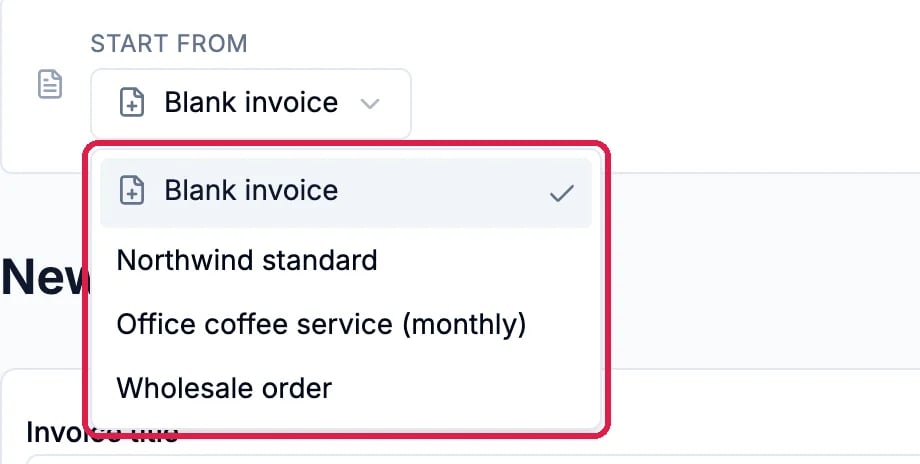
An invoice in Hiveku is the bill itself and the email that delivers it. You choose who it is for, add the lines from your catalog, decide whether reminders and receipts go out, and then either email it to your client or save it as already sent.This guide bills Lena Ortiz at Quillfeather Bakehouse for Northwind’s October wholesale order. Lena already has the order’s paperwork, so the invoice is saved as sent, which emails nobody. The last section shows the email you would send.
Until you connect a payment processor, your clients can’t pay online: the Pay online link in the invoice email won’t work yet. You can still send invoices and record checks, cash and transfers yourself. Northwind has no processor connected, so online payment isn’t shown here.
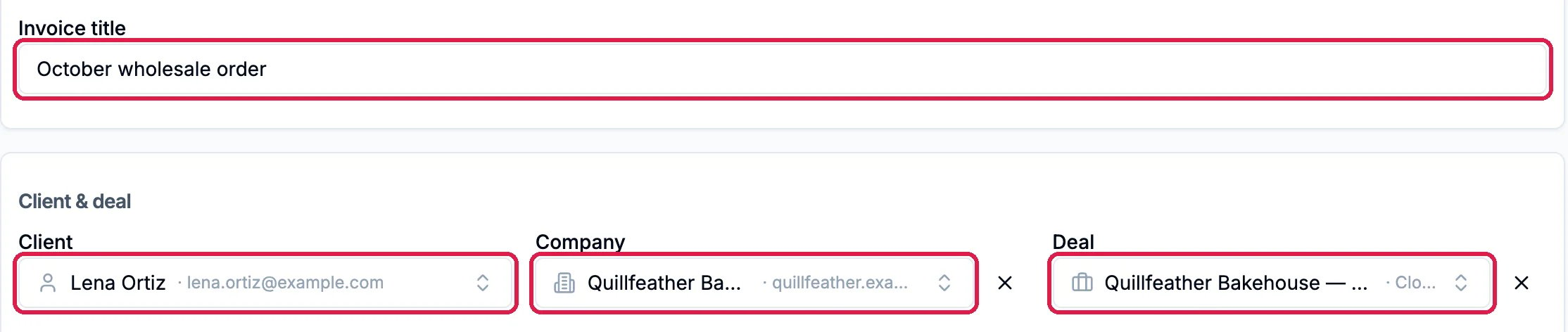
The Invoice title is an optional headline shown above the lines. Pick the Client: the invoice is emailed to them. Company and Deal are optional and link the invoice to that company and deal in your CRM.
Lena Ortiz at Quillfeather Bakehouse
2
Number and dates
Invoice # shows the number the invoice will get. Leave it blank to use it, or type the number of an invoice you are moving over from another app. Payment terms start from your default terms, and Due date follows them.
NW-2026-001001, Net 30
3
Line items
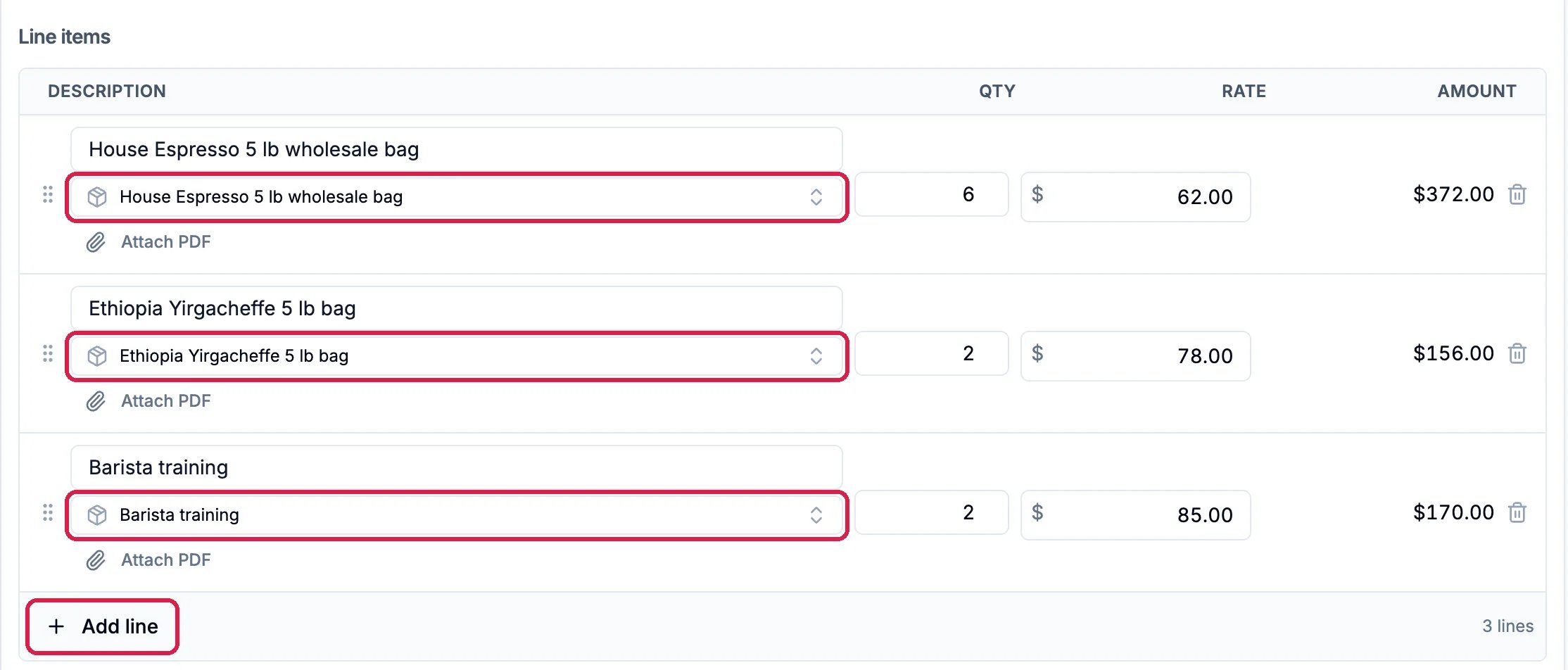
Click Pick from catalog… on a line, choose a product and type the quantity. Click Add line for the next one. To add your products first, see Add Your Products and Services.
Espresso, single origin and training
4
Notes, terms and tax
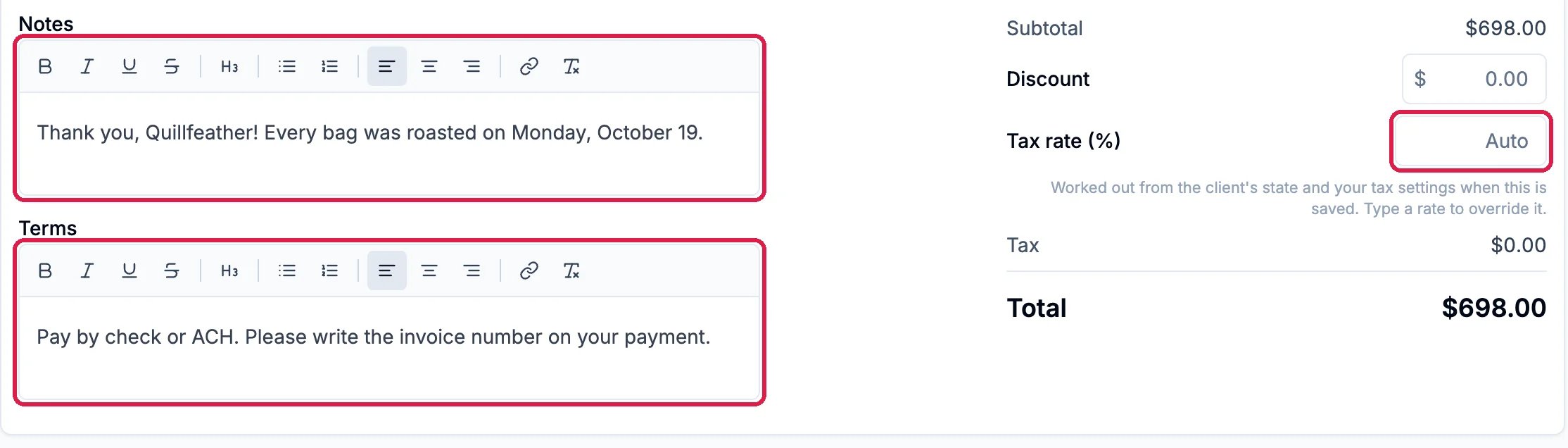
Write a thank-you or a delivery note in Notes, and how to pay in Terms. Both print on the invoice.Tax rate (%) says Auto: the rate is worked out from the client’s state and your tax settings when you save. Type a rate only to override it. Add a Discount if you give one.
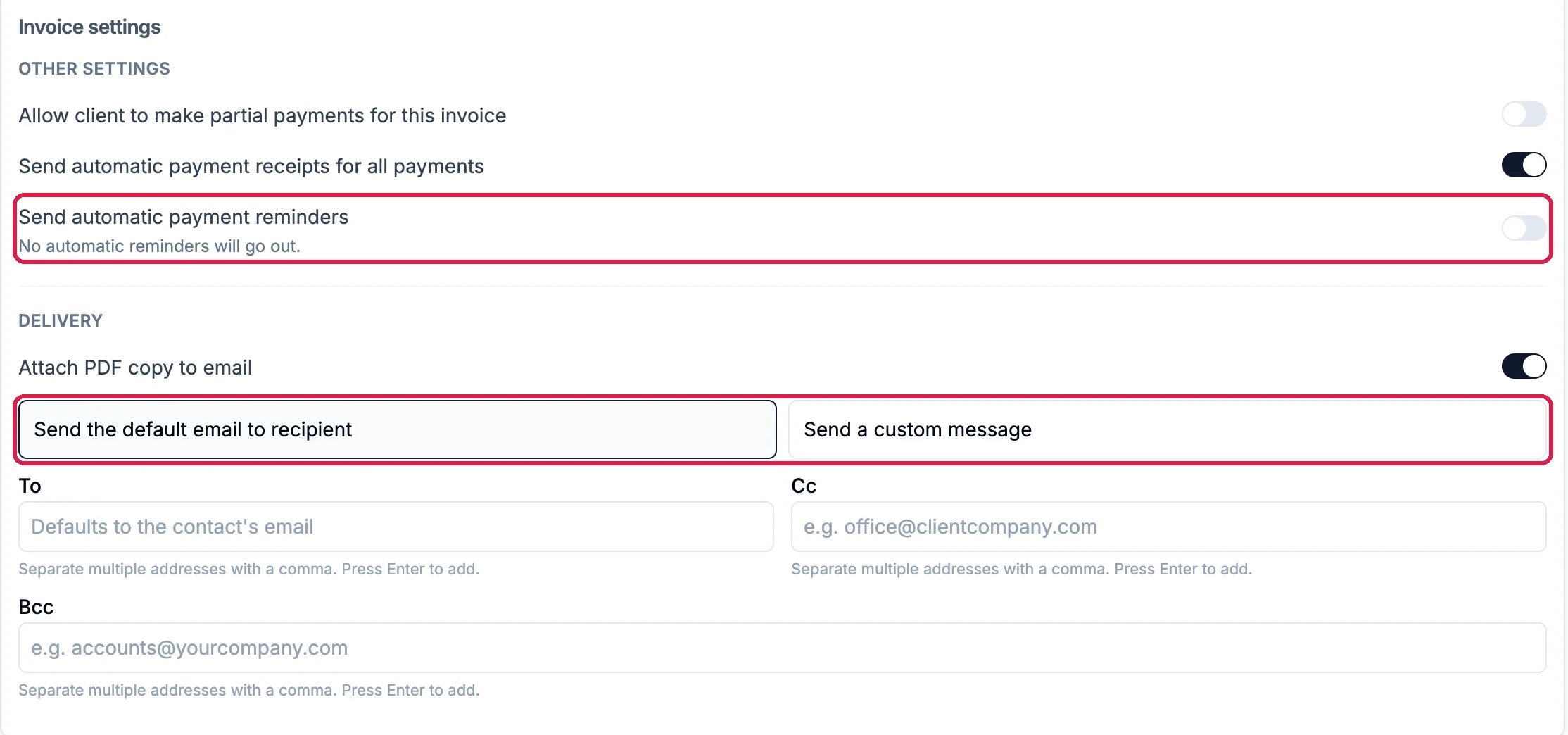
Under Invoice settings, three switches decide what Hiveku does for this invoice:
Allow client to make partial payments for this invoice: lets the client pay part of it online.
Send automatic payment receipts for all payments: emails the client a receipt for each payment.
Send automatic payment reminders: emails reminders as the due date comes and goes. Off, it says No automatic reminders will go out.
Under Delivery, Attach PDF copy to email adds the invoice PDF to the email. Send the default email to recipient sends Hiveku’s standard invoice email. To starts as the client’s email; add anyone else in Cc or Bcc.
Reminders off, the default email
2
Your own words, if you like
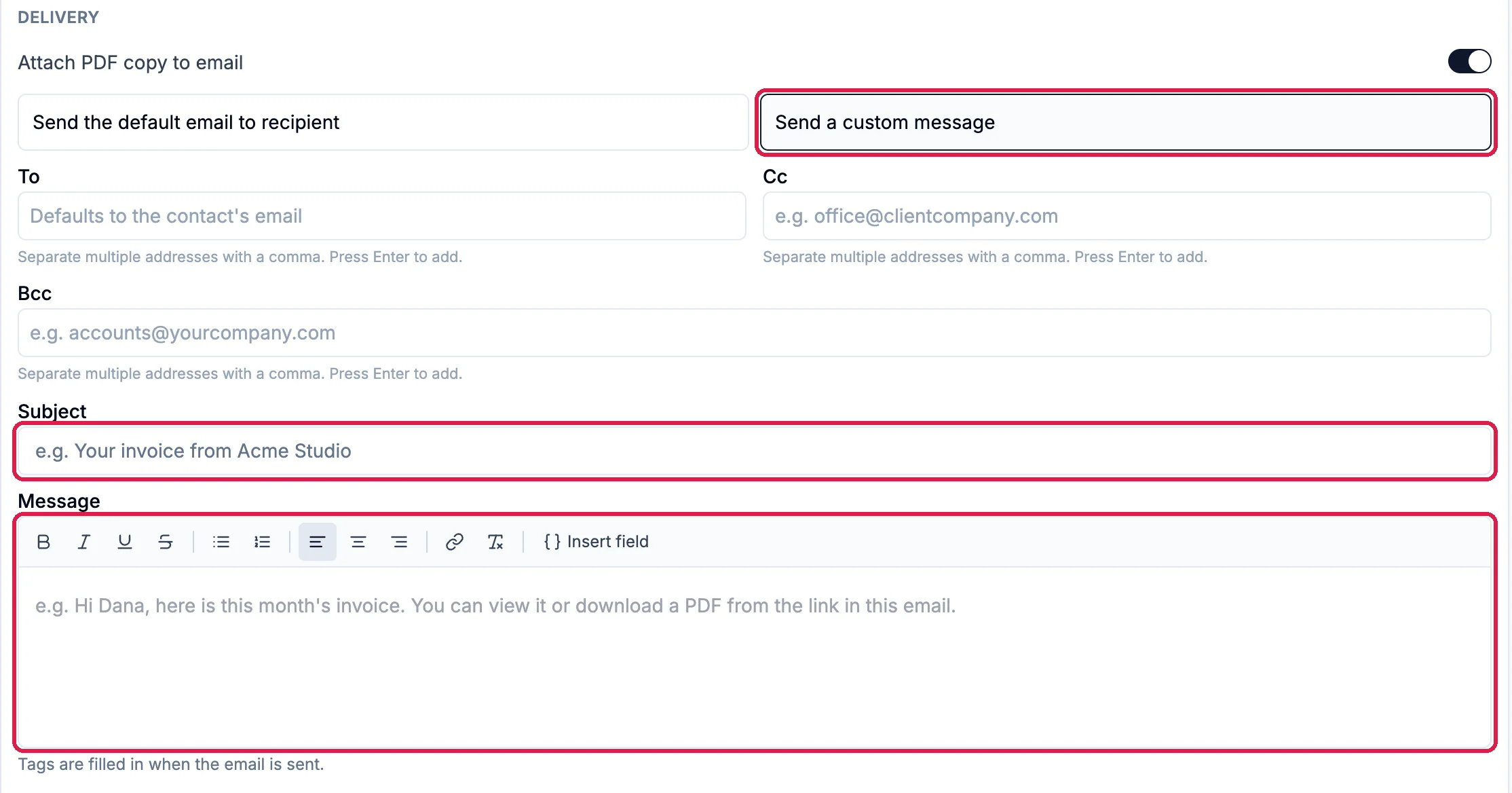
Click Send a custom message to write the email yourself: a Subject and a Message. Insert field adds a tag, such as the client’s first name or the amount due, that is filled in when the email is sent. Northwind keeps the default email.
The three buttons at the top of the page do different things:
Save draft saves it and sends nothing. Open it later to send it.
Save as sent is for an invoice your client already has, such as one you are moving over from another app. Nothing is emailed or texted.
Save & send saves it and emails your client straight away, with no review step. To read the email first, use Save draft, then Send on the saved invoice (see the last section).
Save draft, Save as sent and Save & send
1
Save as sent
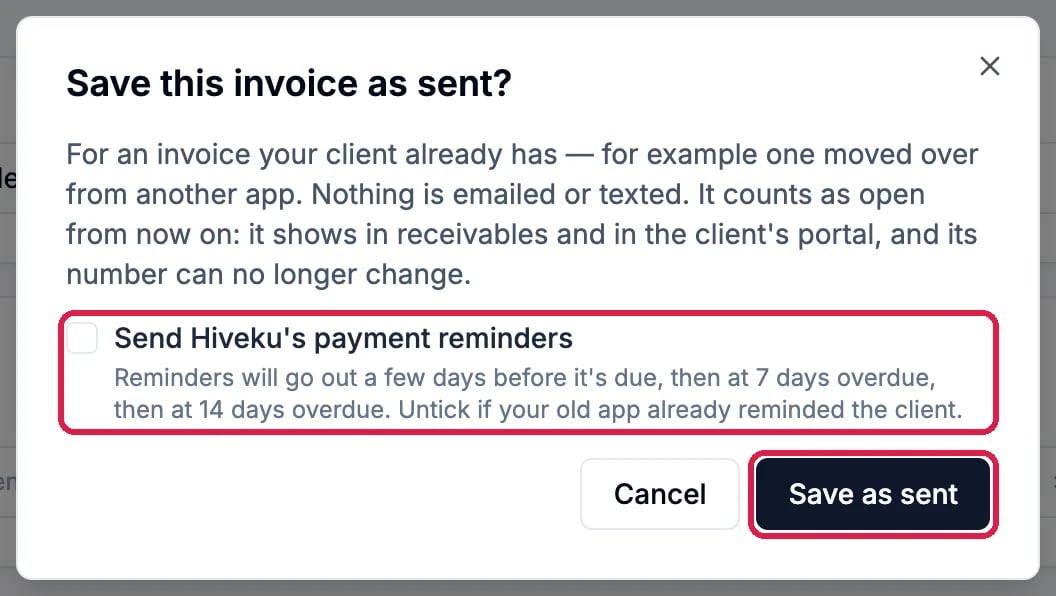
Northwind clicks Save as sent. The dialog explains that the invoice counts as open from now on: it shows in your receivables and in the client’s portal, and its number can no longer change.Send Hiveku’s payment reminders sends reminders a few days before the due date, then at 7 and 14 days overdue. Leave it unticked if your old app already reminded the client. Then click Save as sent.
Nothing is emailed or texted
2
The saved invoice
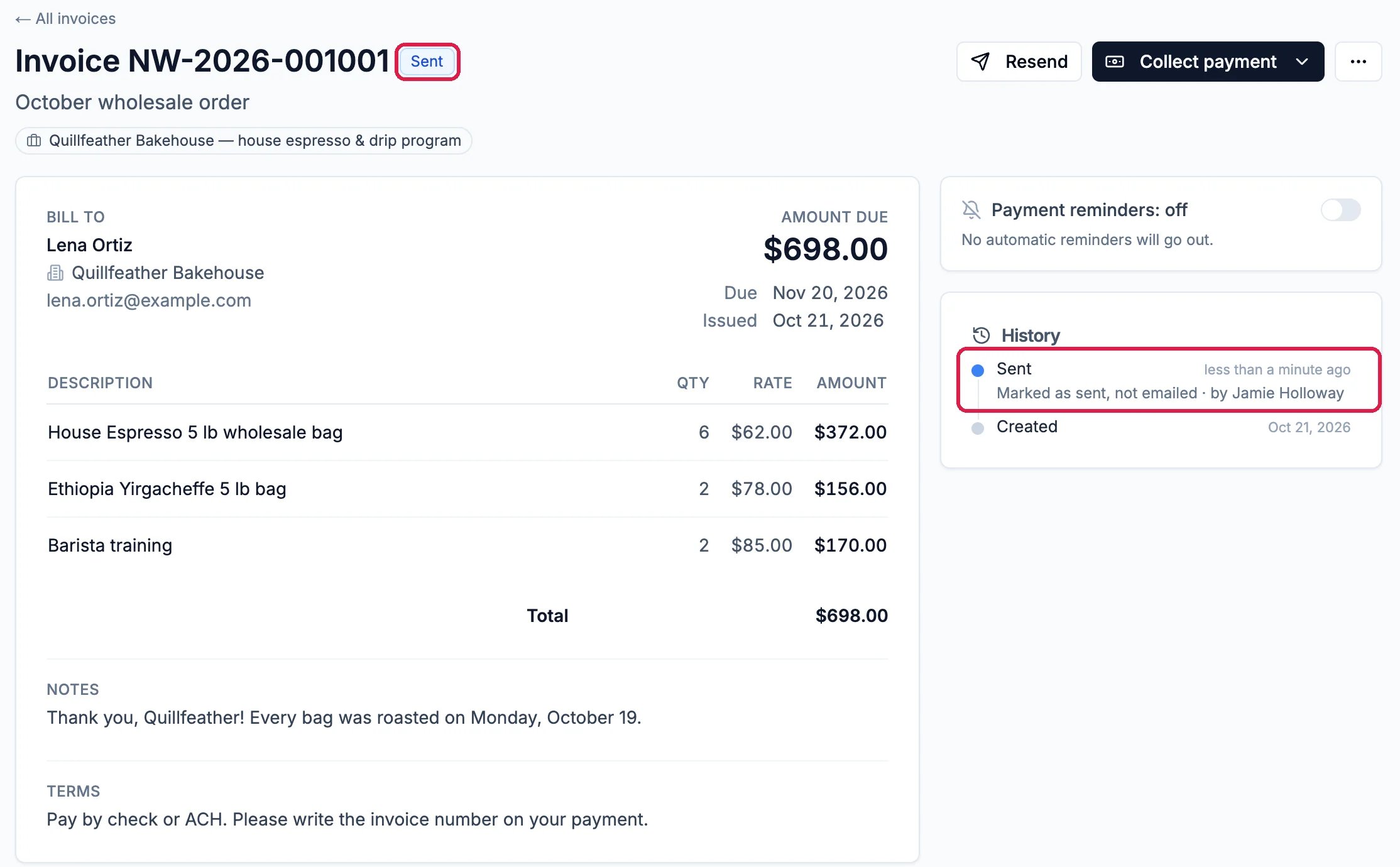
The invoice opens marked Sent, and its History says Marked as sent, not emailed. The Payment reminders card on the right shows whether reminders will go out, with a switch to change it.
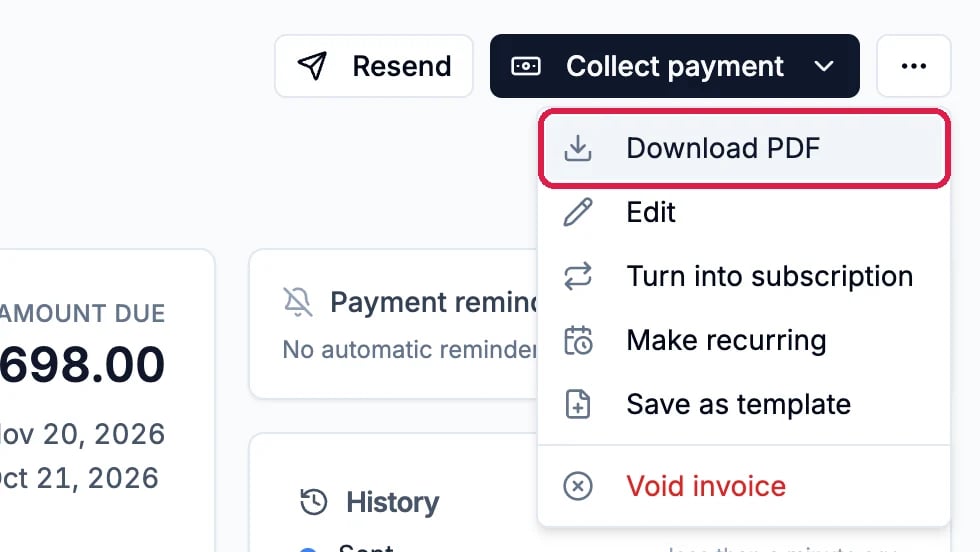
Click the … button at the top right, then Download PDF. The same menu has Edit, Turn into subscription, Make recurring, Save as template and Void invoice.
Download PDF, in the ... menu
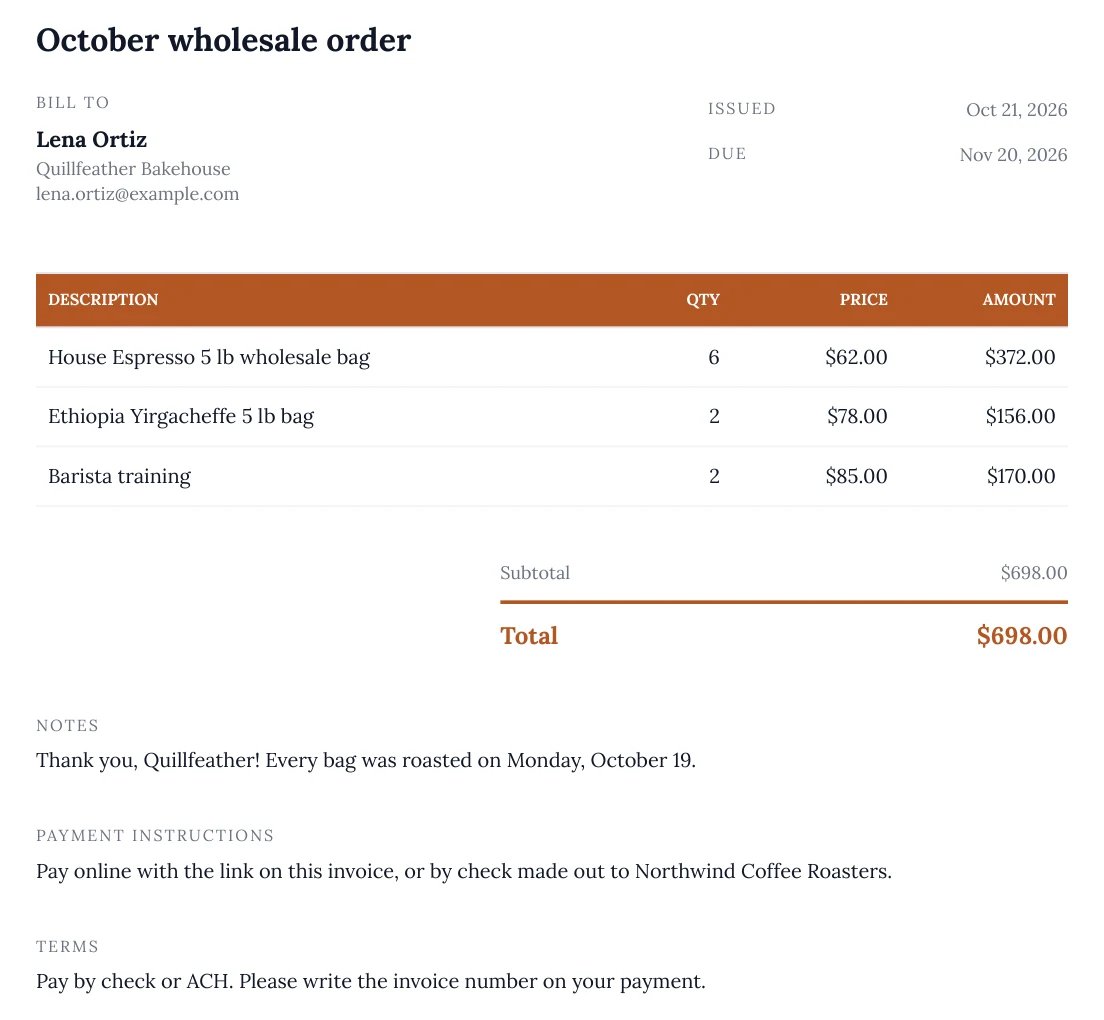
The PDF uses your default invoice design. To change the design, see Set Up Invoicing.
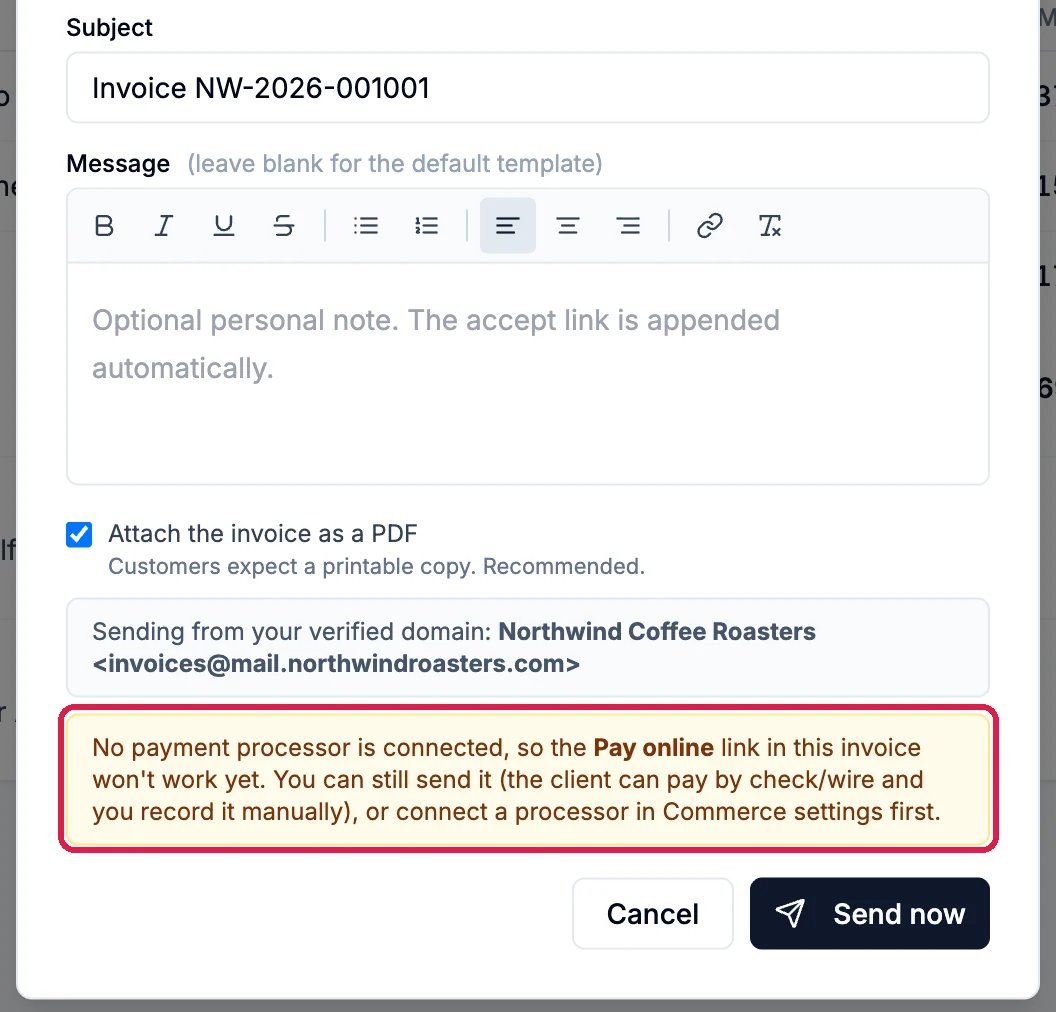
On a saved invoice, click Send at the top. The email opens for you to check before it goes: To, Subject, an optional Message, and Attach the invoice as a PDF. Send now emails it. Northwind’s invoice was saved as sent, so its button reads Resend, and nothing was sent.When no payment processor is connected, this window warns that the Pay online link in the email won’t work yet. Your client can still pay by check or transfer, and you record the payment yourself.
{"docsConfig":{"theme":"maple","$schema":"https://mintlify.com/docs.json","name":"Hiveku Builder","colors":{"primary":"#F9A825","light":"#FBC02D","dark":"#F57F17"},"logo":{"light":"https://mintcdn.com/locusdigital/AodgChCDua_G2sAP/images/hiveku-logo-light.svg?fit=max\u0026auto=format\u0026n=AodgChCDua_G2sAP\u0026q=85\u0026s=5d69f2502059f8269d670b35be741ad2","dark":"https://mintcdn.com/locusdigital/AodgChCDua_G2sAP/images/hiveku-logo-dark.svg?fit=max\u0026auto=format\u0026n=AodgChCDua_G2sAP\u0026q=85\u0026s=a78cef8cf1c9ae13d3dcbe31c3ca498d","href":"https://hiveku.com"},"favicon":"https://mintcdn.com/locusdigital/AodgChCDua_G2sAP/images/favicon.svg?fit=max\u0026auto=format\u0026n=AodgChCDua_G2sAP\u0026q=85\u0026s=1b959fd7abfd376351a1216e201aa8cb","api":{},"appearance":{"default":"system"},"seo":{},"styling":{"latex":true},"navigation":{"global":{"anchors":[{"anchor":"Changelog","icon":"list","href":"/changelog"},{"anchor":"App","icon":"arrow-up-right-from-square","href":"https://app.hiveku.com"}]},"pages":[]}},"deployment":{"deploymentMetadataValue":{"subdomain":"locusdigital","hasAudioNarration":false,"actualSubdomain":"locusdigital","customDomains":["docs.hiveku.com"],"gitSource":{"type":"github","owner":"locus2012","repo":"hiveku_docs","deployBranch":"main","contentDirectory":"","isPrivate":true,"mountPath":"","label":""},"chroma":{"liveDeploymentHistoryId":"6ad93ef3dfce72f355a2cb4b","collectionId":"c5501d14-52a4-4aa3-b791-a0808b54c4da","schemaVersion":"v3","latestBuiltDeploymentHistoryId":"6ad93ef3dfce72f355a2cb4b"},"entitlements":{"AI_CHAT":{"status":"DISABLED"}},"buildId":"6ad93ef3dfce72f355a2cb4b","clientVersion":"0.0.3926","searchFilterCounts":[{"language":"default","tag":"Documentation","count":390},{"language":"default","tag":"How-Tos","count":200},{"language":"default","tag":"Growing Your Business","count":57},{"language":"default","tag":"Integrations","count":25},{"language":"default","tag":"Publishing","count":18},{"language":"default","tag":"Integrations \u0026 BYOK","count":16},{"language":"default","tag":"Helpdesk","count":15},{"language":"default","tag":"Workflow Recipes","count":15},{"language":"default","tag":"Marketing Delivery","count":12},{"language":"default","tag":"API Reference","count":11}]},"assistantConfig":{"enableAskAiButton":false,"enableStarterQuestions":false,"enableContextualStarterQuestions":false,"enableAskAiSearchBar":true},"hasChatPermissions":false,"hasWebMcpPermissions":false,"toggles":[],"isAtlas":false,"googleFontsInlined":false},"customCss":[],"page":{"pagePath":"how-tos/commerce/send-an-invoice","slug":"/how-tos/commerce/send-an-invoice","pageMetadata":{"title":"Create and Send an Invoice","sidebarTitle":"Send an Invoice","description":"Write an invoice from your catalog, choose reminders, receipts and the email your client gets, check the PDF, and send it or record one your client already has","href":"/how-tos/commerce/send-an-invoice"},"description":{"compiledSource":"\"use strict\";\nconst {jsx: _jsx} = arguments[0];\nconst {useMDXComponents: _provideComponents} = arguments[0];\nfunction _createMdxContent(props) {\n const _components = {\n p: \"p\",\n ..._provideComponents(),\n ...props.components\n };\n return _jsx(_components.p, {\n children: \"Write an invoice from your catalog, choose reminders, receipts and the email your client gets, check the PDF, and send it or record one your client already has\"\n });\n}\nfunction MDXContent(props = {}) {\n const {wrapper: MDXLayout} = {\n ..._provideComponents(),\n ...props.components\n };\n return MDXLayout ? _jsx(MDXLayout, {\n ...props,\n children: _jsx(_createMdxContent, {\n ...props\n })\n }) : _createMdxContent(props);\n}\nreturn {\n default: MDXContent\n};\n","frontmatter":{},"scope":{}},"pageType":"default","mdx":{"mdxSource":{"compiledSource":"\"use strict\";const{Fragment:_Fragment,jsx:_jsx,jsxs:_jsxs}=arguments[0];const{useMDXComponents:_provideComponents}=arguments[0];function _createMdxContent(props){const _components={a:`a`,li:`li`,p:`p`,strong:`strong`,ul:`ul`,..._provideComponents(),...props.components},{Frame,Heading,Note,OptimizedImage,Step,Steps}=_components;if(!Frame)_missingMdxReference(`Frame`,true);if(!Heading)_missingMdxReference(`Heading`,true);if(!Note)_missingMdxReference(`Note`,true);if(!OptimizedImage)_missingMdxReference(`OptimizedImage`,true);if(!Step)_missingMdxReference(`Step`,true);if(!Steps)_missingMdxReference(`Steps`,true);return _jsxs(_Fragment,{children:[_jsx(_components.p,{children:`An invoice in Hiveku is the bill itself and the email that delivers it. You choose who it is for, add the lines from your catalog, decide whether reminders and receipts go out, and then either email it to your client or save it as already sent.`}),`\n`,_jsx(_components.p,{children:`This guide bills Lena Ortiz at Quillfeather Bakehouse for Northwind’s October wholesale order. Lena already has the order’s paperwork, so the invoice is saved as sent, which emails nobody. The last section shows the email you would send.`}),`\n`,_jsx(Note,{children:_jsxs(_components.p,{children:[`Until you connect a payment processor, your clients can’t pay online: the `,_jsx(_components.strong,{children:`Pay online`}),` link in the invoice email won’t work yet. You can still send invoices and record checks, cash and transfers yourself. Northwind has no processor connected, so online payment isn’t shown here.`]})}),`\n`,_jsx(Heading,{level:`2`,id:`start-a-new-invoice`,children:`Start a new invoice`}),`\n`,_jsxs(Steps,{children:[_jsxs(Step,{title:`Open Invoices`,children:[_jsxs(_components.p,{children:[`Click `,_jsx(_components.strong,{children:`Commerce`}),` in the left rail, then `,_jsx(_components.strong,{children:`Invoices`}),`, then `,_jsx(_components.strong,{children:`New invoice`}),` at the top right.`]}),_jsx(Frame,{caption:`Invoices, and New invoice`,children:_jsx(OptimizedImage,{src:`https://mintcdn.com/locusdigital/H11iBbs2xb2VsODA/images/how-tos/commerce/sinv-01-new-invoice-closeup.webp?fit=max\u0026auto=format\u0026n=H11iBbs2xb2VsODA\u0026q=85\u0026s=b47116fc97a2af4fd1e9e54dc7a0e8e8`,alt:`The Commerce menu with Invoices outlined, and the Invoices page with its Invoices and Recurring tabs and the New invoice button outlined`,width:`1350`,\"data-og-width\":`2700`,\"data-og-height\":`300`,\"data-path\":`images/how-tos/commerce/sinv-01-new-invoice-closeup.webp`,\"data-optimize\":`true`,\"data-opv\":`3`,srcset:`https://mintcdn.com/locusdigital/H11iBbs2xb2VsODA/images/how-tos/commerce/sinv-01-new-invoice-closeup.webp?w=280\u0026fit=max\u0026auto=format\u0026n=H11iBbs2xb2VsODA\u0026q=85\u0026s=b51d4af2b41c0663a4baf43b1f8befca 280w, https://mintcdn.com/locusdigital/H11iBbs2xb2VsODA/images/how-tos/commerce/sinv-01-new-invoice-closeup.webp?w=560\u0026fit=max\u0026auto=format\u0026n=H11iBbs2xb2VsODA\u0026q=85\u0026s=33ba17ba3ecfc11da2476cc462369342 560w, https://mintcdn.com/locusdigital/H11iBbs2xb2VsODA/images/how-tos/commerce/sinv-01-new-invoice-closeup.webp?w=840\u0026fit=max\u0026auto=format\u0026n=H11iBbs2xb2VsODA\u0026q=85\u0026s=a45f54b3a514bfbb621919ec6f7adebc 840w, https://mintcdn.com/locusdigital/H11iBbs2xb2VsODA/images/how-tos/commerce/sinv-01-new-invoice-closeup.webp?w=1100\u0026fit=max\u0026auto=format\u0026n=H11iBbs2xb2VsODA\u0026q=85\u0026s=72c009b7c1398067ab94e24431506c2f 1100w, https://mintcdn.com/locusdigital/H11iBbs2xb2VsODA/images/how-tos/commerce/sinv-01-new-invoice-closeup.webp?w=1650\u0026fit=max\u0026auto=format\u0026n=H11iBbs2xb2VsODA\u0026q=85\u0026s=2dcba79b96540a4299b81a168a2fc89d 1650w, https://mintcdn.com/locusdigital/H11iBbs2xb2VsODA/images/how-tos/commerce/sinv-01-new-invoice-closeup.webp?w=2500\u0026fit=max\u0026auto=format\u0026n=H11iBbs2xb2VsODA\u0026q=85\u0026s=1c0e0358c7d971428909df8e778f1eb6 2500w`})})]}),_jsxs(Step,{title:`Start blank or from a template`,children:[_jsxs(_components.p,{children:[_jsx(_components.strong,{children:`Start from`}),` at the top is `,_jsx(_components.strong,{children:`Blank invoice`}),`. Pick one of your invoice templates instead to start with its lines, notes and terms already filled in.`]}),_jsx(Frame,{caption:`Northwind's templates under Start from`,children:_jsx(OptimizedImage,{src:`https://mintcdn.com/locusdigital/H11iBbs2xb2VsODA/images/how-tos/commerce/sinv-02-start-from-closeup.webp?fit=max\u0026auto=format\u0026n=H11iBbs2xb2VsODA\u0026q=85\u0026s=c985cd11df05787ad6d070578d54b4ac`,alt:`The Start from list open with Blank invoice ticked, then Northwind standard, Office coffee service (monthly) and Wholesale order, outlined`,width:`460`,\"data-og-width\":`920`,\"data-og-height\":`464`,\"data-path\":`images/how-tos/commerce/sinv-02-start-from-closeup.webp`,\"data-optimize\":`true`,\"data-opv\":`3`,srcset:`https://mintcdn.com/locusdigital/H11iBbs2xb2VsODA/images/how-tos/commerce/sinv-02-start-from-closeup.webp?w=280\u0026fit=max\u0026auto=format\u0026n=H11iBbs2xb2VsODA\u0026q=85\u0026s=2edb4b2faf589c8e67b229e5478e25f2 280w, https://mintcdn.com/locusdigital/H11iBbs2xb2VsODA/images/how-tos/commerce/sinv-02-start-from-closeup.webp?w=560\u0026fit=max\u0026auto=format\u0026n=H11iBbs2xb2VsODA\u0026q=85\u0026s=01ef5a414bac0932b4e12b059f3ee633 560w, https://mintcdn.com/locusdigital/H11iBbs2xb2VsODA/images/how-tos/commerce/sinv-02-start-from-closeup.webp?w=840\u0026fit=max\u0026auto=format\u0026n=H11iBbs2xb2VsODA\u0026q=85\u0026s=65d378a84761beaea62ab1b266e4a763 840w, https://mintcdn.com/locusdigital/H11iBbs2xb2VsODA/images/how-tos/commerce/sinv-02-start-from-closeup.webp?w=1100\u0026fit=max\u0026auto=format\u0026n=H11iBbs2xb2VsODA\u0026q=85\u0026s=f8caf7ee8a3b10223f9521a034308e10 1100w, https://mintcdn.com/locusdigital/H11iBbs2xb2VsODA/images/how-tos/commerce/sinv-02-start-from-closeup.webp?w=1650\u0026fit=max\u0026auto=format\u0026n=H11iBbs2xb2VsODA\u0026q=85\u0026s=36d2ae40bcc3dfeb3907f99703955c2c 1650w, https://mintcdn.com/locusdigital/H11iBbs2xb2VsODA/images/how-tos/commerce/sinv-02-start-from-closeup.webp?w=2500\u0026fit=max\u0026auto=format\u0026n=H11iBbs2xb2VsODA\u0026q=85\u0026s=d25feae58494e788b3f3329d3be99974 2500w`})})]})]}),`\n`,_jsx(Heading,{level:`2`,id:`say-who-it’s-for-and-what-they’re-paying-for`,children:`Say who it’s for and what they’re paying for`}),`\n`,_jsxs(Steps,{children:[_jsxs(Step,{title:`Title and client`,children:[_jsxs(_components.p,{children:[`The `,_jsx(_components.strong,{children:`Invoice title`}),` is an optional headline shown above the lines. Pick the `,_jsx(_components.strong,{children:`Client`}),`: the invoice is emailed to them. `,_jsx(_components.strong,{children:`Company`}),` and `,_jsx(_components.strong,{children:`Deal`}),` are optional and link the invoice to that company and deal in your CRM.`]}),_jsx(Frame,{caption:`Lena Ortiz at Quillfeather Bakehouse`,children:_jsx(OptimizedImage,{src:`https://mintcdn.com/locusdigital/H11iBbs2xb2VsODA/images/how-tos/commerce/sinv-03-client-closeup.webp?fit=max\u0026auto=format\u0026n=H11iBbs2xb2VsODA\u0026q=85\u0026s=53979484dd9301e98875fabf34e82e1d`,alt:`Invoice title October wholesale order outlined, and under Client and deal the Client Lena Ortiz, the Company Quillfeather Bakehouse and the Quillfeather Bakehouse deal, each outlined`,width:`1114`,\"data-og-width\":`2228`,\"data-og-height\":`472`,\"data-path\":`images/how-tos/commerce/sinv-03-client-closeup.webp`,\"data-optimize\":`true`,\"data-opv\":`3`,srcset:`https://mintcdn.com/locusdigital/H11iBbs2xb2VsODA/images/how-tos/commerce/sinv-03-client-closeup.webp?w=280\u0026fit=max\u0026auto=format\u0026n=H11iBbs2xb2VsODA\u0026q=85\u0026s=79e70f9b6b587b000cda13e59cea860a 280w, https://mintcdn.com/locusdigital/H11iBbs2xb2VsODA/images/how-tos/commerce/sinv-03-client-closeup.webp?w=560\u0026fit=max\u0026auto=format\u0026n=H11iBbs2xb2VsODA\u0026q=85\u0026s=c0d99db038901bd96c0f9c2b8b586a76 560w, https://mintcdn.com/locusdigital/H11iBbs2xb2VsODA/images/how-tos/commerce/sinv-03-client-closeup.webp?w=840\u0026fit=max\u0026auto=format\u0026n=H11iBbs2xb2VsODA\u0026q=85\u0026s=694b353c0a0d9e44f69825affe01f124 840w, https://mintcdn.com/locusdigital/H11iBbs2xb2VsODA/images/how-tos/commerce/sinv-03-client-closeup.webp?w=1100\u0026fit=max\u0026auto=format\u0026n=H11iBbs2xb2VsODA\u0026q=85\u0026s=3f21b1094bc8f258afd518b66e85ec2d 1100w, https://mintcdn.com/locusdigital/H11iBbs2xb2VsODA/images/how-tos/commerce/sinv-03-client-closeup.webp?w=1650\u0026fit=max\u0026auto=format\u0026n=H11iBbs2xb2VsODA\u0026q=85\u0026s=d04a0ade4942b2c8e8bffc8473fda055 1650w, https://mintcdn.com/locusdigital/H11iBbs2xb2VsODA/images/how-tos/commerce/sinv-03-client-closeup.webp?w=2500\u0026fit=max\u0026auto=format\u0026n=H11iBbs2xb2VsODA\u0026q=85\u0026s=5947280b7fc8f29c390532489e6446f7 2500w`})})]}),_jsxs(Step,{title:`Number and dates`,children:[_jsxs(_components.p,{children:[_jsx(_components.strong,{children:`Invoice #`}),` shows the number the invoice will get. Leave it blank to use it, or type the number of an invoice you are moving over from another app. `,_jsx(_components.strong,{children:`Payment terms`}),` start from your default terms, and `,_jsx(_components.strong,{children:`Due date`}),` follows them.`]}),_jsx(Frame,{caption:`NW-2026-001001, Net 30`,children:_jsx(OptimizedImage,{src:`https://mintcdn.com/locusdigital/H11iBbs2xb2VsODA/images/how-tos/commerce/sinv-04-number-and-dates-closeup.webp?fit=max\u0026auto=format\u0026n=H11iBbs2xb2VsODA\u0026q=85\u0026s=10a912c3a634cf26e4505002aabfbac3`,alt:`Invoice # NW-2026-001001 outlined, Issue date 10/21/2026, and Payment terms Net 30 with Due date 11/20/2026 outlined`,width:`1114`,\"data-og-width\":`2228`,\"data-og-height\":`400`,\"data-path\":`images/how-tos/commerce/sinv-04-number-and-dates-closeup.webp`,\"data-optimize\":`true`,\"data-opv\":`3`,srcset:`https://mintcdn.com/locusdigital/H11iBbs2xb2VsODA/images/how-tos/commerce/sinv-04-number-and-dates-closeup.webp?w=280\u0026fit=max\u0026auto=format\u0026n=H11iBbs2xb2VsODA\u0026q=85\u0026s=fc9685509eddc24a404675b66efa4c00 280w, https://mintcdn.com/locusdigital/H11iBbs2xb2VsODA/images/how-tos/commerce/sinv-04-number-and-dates-closeup.webp?w=560\u0026fit=max\u0026auto=format\u0026n=H11iBbs2xb2VsODA\u0026q=85\u0026s=adb72b5f3ba7ad56f4418c56a677f542 560w, https://mintcdn.com/locusdigital/H11iBbs2xb2VsODA/images/how-tos/commerce/sinv-04-number-and-dates-closeup.webp?w=840\u0026fit=max\u0026auto=format\u0026n=H11iBbs2xb2VsODA\u0026q=85\u0026s=4815ce76466a038a373b3a3fce37b134 840w, https://mintcdn.com/locusdigital/H11iBbs2xb2VsODA/images/how-tos/commerce/sinv-04-number-and-dates-closeup.webp?w=1100\u0026fit=max\u0026auto=format\u0026n=H11iBbs2xb2VsODA\u0026q=85\u0026s=0b813e1ecaf67a6896b44a1fac5fae59 1100w, https://mintcdn.com/locusdigital/H11iBbs2xb2VsODA/images/how-tos/commerce/sinv-04-number-and-dates-closeup.webp?w=1650\u0026fit=max\u0026auto=format\u0026n=H11iBbs2xb2VsODA\u0026q=85\u0026s=11d7400bd586793a042f0abe4efbd466 1650w, https://mintcdn.com/locusdigital/H11iBbs2xb2VsODA/images/how-tos/commerce/sinv-04-number-and-dates-closeup.webp?w=2500\u0026fit=max\u0026auto=format\u0026n=H11iBbs2xb2VsODA\u0026q=85\u0026s=ecdaa677a46775200793f487bafa7133 2500w`})})]}),_jsxs(Step,{title:`Line items`,children:[_jsxs(_components.p,{children:[`Click `,_jsx(_components.strong,{children:`Pick from catalog…`}),` on a line, choose a product and type the quantity. Click `,_jsx(_components.strong,{children:`Add line`}),` for the next one. To add your products first, see `,_jsx(_components.a,{href:`/how-tos/commerce/add-products-and-services`,children:`Add Your Products and Services`}),`.`]}),_jsx(Frame,{caption:`Espresso, single origin and training`,children:_jsx(OptimizedImage,{src:`https://mintcdn.com/locusdigital/H11iBbs2xb2VsODA/images/how-tos/commerce/sinv-05-line-items-closeup.webp?fit=max\u0026auto=format\u0026n=H11iBbs2xb2VsODA\u0026q=85\u0026s=a23c9f816e30ed693f1d5a0db5902449`,alt:`Three lines, each picked from the catalog and outlined: 6 House Espresso 5 lb wholesale bags at 62.00, 2 Ethiopia Yirgacheffe 5 lb bags at 78.00 and 2 hours of Barista training at 85.00, and the Add line button outlined`,width:`1114`,\"data-og-width\":`2228`,\"data-og-height\":`952`,\"data-path\":`images/how-tos/commerce/sinv-05-line-items-closeup.webp`,\"data-optimize\":`true`,\"data-opv\":`3`,srcset:`https://mintcdn.com/locusdigital/H11iBbs2xb2VsODA/images/how-tos/commerce/sinv-05-line-items-closeup.webp?w=280\u0026fit=max\u0026auto=format\u0026n=H11iBbs2xb2VsODA\u0026q=85\u0026s=77450d89b9fafe6a2b420fc0f0dc4cd5 280w, https://mintcdn.com/locusdigital/H11iBbs2xb2VsODA/images/how-tos/commerce/sinv-05-line-items-closeup.webp?w=560\u0026fit=max\u0026auto=format\u0026n=H11iBbs2xb2VsODA\u0026q=85\u0026s=60273c05d121384d3de7a690efd01a80 560w, https://mintcdn.com/locusdigital/H11iBbs2xb2VsODA/images/how-tos/commerce/sinv-05-line-items-closeup.webp?w=840\u0026fit=max\u0026auto=format\u0026n=H11iBbs2xb2VsODA\u0026q=85\u0026s=8755e3a99e80ab0085a55d72c12e21fc 840w, https://mintcdn.com/locusdigital/H11iBbs2xb2VsODA/images/how-tos/commerce/sinv-05-line-items-closeup.webp?w=1100\u0026fit=max\u0026auto=format\u0026n=H11iBbs2xb2VsODA\u0026q=85\u0026s=8ffd80d47d41f6c32a0d0e54785d7a38 1100w, https://mintcdn.com/locusdigital/H11iBbs2xb2VsODA/images/how-tos/commerce/sinv-05-line-items-closeup.webp?w=1650\u0026fit=max\u0026auto=format\u0026n=H11iBbs2xb2VsODA\u0026q=85\u0026s=411904c7381d3ba1eb84fb29d2056108 1650w, https://mintcdn.com/locusdigital/H11iBbs2xb2VsODA/images/how-tos/commerce/sinv-05-line-items-closeup.webp?w=2500\u0026fit=max\u0026auto=format\u0026n=H11iBbs2xb2VsODA\u0026q=85\u0026s=39b951458fd1f663555f51b121df03b3 2500w`})})]}),_jsxs(Step,{title:`Notes, terms and tax`,children:[_jsxs(_components.p,{children:[`Write a thank-you or a delivery note in `,_jsx(_components.strong,{children:`Notes`}),`, and how to pay in `,_jsx(_components.strong,{children:`Terms`}),`. Both print on the invoice.`]}),_jsxs(_components.p,{children:[_jsx(_components.strong,{children:`Tax rate (%)`}),` says `,_jsx(_components.strong,{children:`Auto`}),`: the rate is worked out from the client’s state and your tax settings when you save. Type a rate only to override it. Add a `,_jsx(_components.strong,{children:`Discount`}),` if you give one.`]}),_jsx(Frame,{caption:`Notes, Terms, and Tax rate on Auto`,children:_jsx(OptimizedImage,{src:`https://mintcdn.com/locusdigital/H11iBbs2xb2VsODA/images/how-tos/commerce/sinv-06-notes-terms-closeup.webp?fit=max\u0026auto=format\u0026n=H11iBbs2xb2VsODA\u0026q=85\u0026s=03e35286572c3fe06c3dc9369306013b`,alt:`The Notes and Terms boxes with Northwind's text outlined, and on the right Subtotal $698.00, Discount, Tax rate (%) Auto outlined, Tax $0.00 and Total $698.00`,width:`1114`,\"data-og-width\":`2228`,\"data-og-height\":`636`,\"data-path\":`images/how-tos/commerce/sinv-06-notes-terms-closeup.webp`,\"data-optimize\":`true`,\"data-opv\":`3`,srcset:`https://mintcdn.com/locusdigital/H11iBbs2xb2VsODA/images/how-tos/commerce/sinv-06-notes-terms-closeup.webp?w=280\u0026fit=max\u0026auto=format\u0026n=H11iBbs2xb2VsODA\u0026q=85\u0026s=90e0a181a34f8514688d1b7cd74f9ef1 280w, https://mintcdn.com/locusdigital/H11iBbs2xb2VsODA/images/how-tos/commerce/sinv-06-notes-terms-closeup.webp?w=560\u0026fit=max\u0026auto=format\u0026n=H11iBbs2xb2VsODA\u0026q=85\u0026s=452c73526ff87371390fa2e5ae231bf3 560w, https://mintcdn.com/locusdigital/H11iBbs2xb2VsODA/images/how-tos/commerce/sinv-06-notes-terms-closeup.webp?w=840\u0026fit=max\u0026auto=format\u0026n=H11iBbs2xb2VsODA\u0026q=85\u0026s=8a08325e153ed01667a45608bfe3e019 840w, https://mintcdn.com/locusdigital/H11iBbs2xb2VsODA/images/how-tos/commerce/sinv-06-notes-terms-closeup.webp?w=1100\u0026fit=max\u0026auto=format\u0026n=H11iBbs2xb2VsODA\u0026q=85\u0026s=f6ab0556b6de1ed51fd1b48c7e57a717 1100w, https://mintcdn.com/locusdigital/H11iBbs2xb2VsODA/images/how-tos/commerce/sinv-06-notes-terms-closeup.webp?w=1650\u0026fit=max\u0026auto=format\u0026n=H11iBbs2xb2VsODA\u0026q=85\u0026s=1175862a707a2ac0f5babbc7d60b3b44 1650w, https://mintcdn.com/locusdigital/H11iBbs2xb2VsODA/images/how-tos/commerce/sinv-06-notes-terms-closeup.webp?w=2500\u0026fit=max\u0026auto=format\u0026n=H11iBbs2xb2VsODA\u0026q=85\u0026s=8536ef29614816e70d4ff62fd45e700d 2500w`})})]})]}),`\n`,_jsx(Heading,{level:`2`,id:`choose-reminders-receipts-and-the-email`,children:`Choose reminders, receipts and the email`}),`\n`,_jsxs(Steps,{children:[_jsxs(Step,{title:`Invoice settings`,children:[_jsxs(_components.p,{children:[`Under `,_jsx(_components.strong,{children:`Invoice settings`}),`, three switches decide what Hiveku does for this invoice:`]}),_jsxs(_components.ul,{children:[`\n`,_jsxs(_components.li,{children:[_jsx(_components.strong,{children:`Allow client to make partial payments for this invoice`}),`: lets the client pay part of it online.`]}),`\n`,_jsxs(_components.li,{children:[_jsx(_components.strong,{children:`Send automatic payment receipts for all payments`}),`: emails the client a receipt for each payment.`]}),`\n`,_jsxs(_components.li,{children:[_jsx(_components.strong,{children:`Send automatic payment reminders`}),`: emails reminders as the due date comes and goes. Off, it says `,_jsx(_components.strong,{children:`No automatic reminders will go out.`})]}),`\n`]}),_jsxs(_components.p,{children:[`Under `,_jsx(_components.strong,{children:`Delivery`}),`, `,_jsx(_components.strong,{children:`Attach PDF copy to email`}),` adds the invoice PDF to the email. `,_jsx(_components.strong,{children:`Send the default email to recipient`}),` sends Hiveku’s standard invoice email. `,_jsx(_components.strong,{children:`To`}),` starts as the client’s email; add anyone else in `,_jsx(_components.strong,{children:`Cc`}),` or `,_jsx(_components.strong,{children:`Bcc`}),`.`]}),_jsx(Frame,{caption:`Reminders off, the default email`,children:_jsx(OptimizedImage,{src:`https://mintcdn.com/locusdigital/H11iBbs2xb2VsODA/images/how-tos/commerce/sinv-07-settings-closeup.webp?fit=max\u0026auto=format\u0026n=H11iBbs2xb2VsODA\u0026q=85\u0026s=d9573d1e8f84c94fb002991115355bf1`,alt:`Invoice settings: Allow client to make partial payments off, Send automatic payment receipts on, Send automatic payment reminders off and outlined, and under Delivery Attach PDF copy to email on, with Send the default email to recipient and Send a custom message outlined, and the To, Cc and Bcc boxes`,width:`1114`,\"data-og-width\":`2228`,\"data-og-height\":`1044`,\"data-path\":`images/how-tos/commerce/sinv-07-settings-closeup.webp`,\"data-optimize\":`true`,\"data-opv\":`3`,srcset:`https://mintcdn.com/locusdigital/H11iBbs2xb2VsODA/images/how-tos/commerce/sinv-07-settings-closeup.webp?w=280\u0026fit=max\u0026auto=format\u0026n=H11iBbs2xb2VsODA\u0026q=85\u0026s=7ea6a2a620186c03ae04207b06ee0700 280w, https://mintcdn.com/locusdigital/H11iBbs2xb2VsODA/images/how-tos/commerce/sinv-07-settings-closeup.webp?w=560\u0026fit=max\u0026auto=format\u0026n=H11iBbs2xb2VsODA\u0026q=85\u0026s=c3edaed3bfa53b884eb36355ccd78361 560w, https://mintcdn.com/locusdigital/H11iBbs2xb2VsODA/images/how-tos/commerce/sinv-07-settings-closeup.webp?w=840\u0026fit=max\u0026auto=format\u0026n=H11iBbs2xb2VsODA\u0026q=85\u0026s=69b86fa3ffae4b8df369ccdd30382486 840w, https://mintcdn.com/locusdigital/H11iBbs2xb2VsODA/images/how-tos/commerce/sinv-07-settings-closeup.webp?w=1100\u0026fit=max\u0026auto=format\u0026n=H11iBbs2xb2VsODA\u0026q=85\u0026s=c09bebe8fb1b60b7b8242874c53e94c8 1100w, https://mintcdn.com/locusdigital/H11iBbs2xb2VsODA/images/how-tos/commerce/sinv-07-settings-closeup.webp?w=1650\u0026fit=max\u0026auto=format\u0026n=H11iBbs2xb2VsODA\u0026q=85\u0026s=2954fe7cef03babaf278ec3acf97831a 1650w, https://mintcdn.com/locusdigital/H11iBbs2xb2VsODA/images/how-tos/commerce/sinv-07-settings-closeup.webp?w=2500\u0026fit=max\u0026auto=format\u0026n=H11iBbs2xb2VsODA\u0026q=85\u0026s=024e45a350e1662fc26bab4be21dc4d5 2500w`})})]}),_jsxs(Step,{title:`Your own words, if you like`,children:[_jsxs(_components.p,{children:[`Click `,_jsx(_components.strong,{children:`Send a custom message`}),` to write the email yourself: a `,_jsx(_components.strong,{children:`Subject`}),` and a `,_jsx(_components.strong,{children:`Message`}),`. `,_jsx(_components.strong,{children:`Insert field`}),` adds a tag, such as the client’s first name or the amount due, that is filled in when the email is sent. Northwind keeps the default email.`]}),_jsx(Frame,{caption:`Subject and Message, for a custom email`,children:_jsx(OptimizedImage,{src:`https://mintcdn.com/locusdigital/H11iBbs2xb2VsODA/images/how-tos/commerce/sinv-08-custom-message-closeup.webp?fit=max\u0026auto=format\u0026n=H11iBbs2xb2VsODA\u0026q=85\u0026s=ec336dfff5e89e924d5f177d2ea05805`,alt:`Send a custom message selected and outlined, with the Subject box and the Message editor with its Insert field button, both outlined`,width:`1114`,\"data-og-width\":`2228`,\"data-og-height\":`1168`,\"data-path\":`images/how-tos/commerce/sinv-08-custom-message-closeup.webp`,\"data-optimize\":`true`,\"data-opv\":`3`,srcset:`https://mintcdn.com/locusdigital/H11iBbs2xb2VsODA/images/how-tos/commerce/sinv-08-custom-message-closeup.webp?w=280\u0026fit=max\u0026auto=format\u0026n=H11iBbs2xb2VsODA\u0026q=85\u0026s=5329bc085b9ddbe0d505aeb9202b67b5 280w, https://mintcdn.com/locusdigital/H11iBbs2xb2VsODA/images/how-tos/commerce/sinv-08-custom-message-closeup.webp?w=560\u0026fit=max\u0026auto=format\u0026n=H11iBbs2xb2VsODA\u0026q=85\u0026s=68043ba2a8dcaafaf1b34f32d072c490 560w, https://mintcdn.com/locusdigital/H11iBbs2xb2VsODA/images/how-tos/commerce/sinv-08-custom-message-closeup.webp?w=840\u0026fit=max\u0026auto=format\u0026n=H11iBbs2xb2VsODA\u0026q=85\u0026s=55efe30166cbedf351abfbe8ffc0ecfe 840w, https://mintcdn.com/locusdigital/H11iBbs2xb2VsODA/images/how-tos/commerce/sinv-08-custom-message-closeup.webp?w=1100\u0026fit=max\u0026auto=format\u0026n=H11iBbs2xb2VsODA\u0026q=85\u0026s=53cdd26614fe8b436d9bd394e31b3383 1100w, https://mintcdn.com/locusdigital/H11iBbs2xb2VsODA/images/how-tos/commerce/sinv-08-custom-message-closeup.webp?w=1650\u0026fit=max\u0026auto=format\u0026n=H11iBbs2xb2VsODA\u0026q=85\u0026s=a533b140e7a7faf681fef70843cf5e85 1650w, https://mintcdn.com/locusdigital/H11iBbs2xb2VsODA/images/how-tos/commerce/sinv-08-custom-message-closeup.webp?w=2500\u0026fit=max\u0026auto=format\u0026n=H11iBbs2xb2VsODA\u0026q=85\u0026s=8417deaa28645421bce26305e685335d 2500w`})})]})]}),`\n`,_jsx(Heading,{level:`2`,id:`save-it`,children:`Save it`}),`\n`,_jsx(_components.p,{children:`The three buttons at the top of the page do different things:`}),`\n`,_jsxs(_components.ul,{children:[`\n`,_jsxs(_components.li,{children:[_jsx(_components.strong,{children:`Save draft`}),` saves it and sends nothing. Open it later to send it.`]}),`\n`,_jsxs(_components.li,{children:[_jsx(_components.strong,{children:`Save as sent`}),` is for an invoice your client already has, such as one you are moving over from another app. Nothing is emailed or texted.`]}),`\n`,_jsxs(_components.li,{children:[_jsx(_components.strong,{children:`Save \u0026 send`}),` saves it and emails your client straight away, with no review step. To read the email first, use `,_jsx(_components.strong,{children:`Save draft`}),`, then `,_jsx(_components.strong,{children:`Send`}),` on the saved invoice (see the last section).`]}),`\n`]}),`\n`,_jsx(Frame,{caption:`Save draft, Save as sent and Save \u0026 send`,children:_jsx(OptimizedImage,{src:`https://mintcdn.com/locusdigital/H11iBbs2xb2VsODA/images/how-tos/commerce/sinv-09-save-buttons-closeup.webp?fit=max\u0026auto=format\u0026n=H11iBbs2xb2VsODA\u0026q=85\u0026s=0dbef4e14d296d37d02c2c50e70019e4`,alt:`New invoice with the Save draft, Save as sent and Save and send buttons outlined, and PDF will be attached under them`,width:`1140`,\"data-og-width\":`2280`,\"data-og-height\":`200`,\"data-path\":`images/how-tos/commerce/sinv-09-save-buttons-closeup.webp`,\"data-optimize\":`true`,\"data-opv\":`3`,srcset:`https://mintcdn.com/locusdigital/H11iBbs2xb2VsODA/images/how-tos/commerce/sinv-09-save-buttons-closeup.webp?w=280\u0026fit=max\u0026auto=format\u0026n=H11iBbs2xb2VsODA\u0026q=85\u0026s=d5744aae038fb31c8f853cbb429bd21f 280w, https://mintcdn.com/locusdigital/H11iBbs2xb2VsODA/images/how-tos/commerce/sinv-09-save-buttons-closeup.webp?w=560\u0026fit=max\u0026auto=format\u0026n=H11iBbs2xb2VsODA\u0026q=85\u0026s=f8938ded804e68794a092cba72df4996 560w, https://mintcdn.com/locusdigital/H11iBbs2xb2VsODA/images/how-tos/commerce/sinv-09-save-buttons-closeup.webp?w=840\u0026fit=max\u0026auto=format\u0026n=H11iBbs2xb2VsODA\u0026q=85\u0026s=e5cbb9c21acbe3a25bb00839f727de01 840w, https://mintcdn.com/locusdigital/H11iBbs2xb2VsODA/images/how-tos/commerce/sinv-09-save-buttons-closeup.webp?w=1100\u0026fit=max\u0026auto=format\u0026n=H11iBbs2xb2VsODA\u0026q=85\u0026s=812f62214c8fd1a1c3a3c355d02d62f7 1100w, https://mintcdn.com/locusdigital/H11iBbs2xb2VsODA/images/how-tos/commerce/sinv-09-save-buttons-closeup.webp?w=1650\u0026fit=max\u0026auto=format\u0026n=H11iBbs2xb2VsODA\u0026q=85\u0026s=ac5c856bf6bc95909edf863288013a0e 1650w, https://mintcdn.com/locusdigital/H11iBbs2xb2VsODA/images/how-tos/commerce/sinv-09-save-buttons-closeup.webp?w=2500\u0026fit=max\u0026auto=format\u0026n=H11iBbs2xb2VsODA\u0026q=85\u0026s=4c0c7b69a5074bb4193770f14f66b2e5 2500w`})}),`\n`,_jsxs(Steps,{children:[_jsxs(Step,{title:`Save as sent`,children:[_jsxs(_components.p,{children:[`Northwind clicks `,_jsx(_components.strong,{children:`Save as sent`}),`. The dialog explains that the invoice counts as open from now on: it shows in your receivables and in the client’s portal, and its number can no longer change.`]}),_jsxs(_components.p,{children:[_jsx(_components.strong,{children:`Send Hiveku’s payment reminders`}),` sends reminders a few days before the due date, then at 7 and 14 days overdue. Leave it unticked if your old app already reminded the client. Then click `,_jsx(_components.strong,{children:`Save as sent`}),`.`]}),_jsx(Frame,{caption:`Nothing is emailed or texted`,children:_jsx(OptimizedImage,{src:`https://mintcdn.com/locusdigital/H11iBbs2xb2VsODA/images/how-tos/commerce/sinv-10-save-as-sent-closeup.webp?fit=max\u0026auto=format\u0026n=H11iBbs2xb2VsODA\u0026q=85\u0026s=47d00d3e433af9597bb5a706561fecf3`,alt:`The Save this invoice as sent dialog, with Send Hiveku's payment reminders unticked and outlined, and the Save as sent button outlined`,width:`528`,\"data-og-width\":`1056`,\"data-og-height\":`596`,\"data-path\":`images/how-tos/commerce/sinv-10-save-as-sent-closeup.webp`,\"data-optimize\":`true`,\"data-opv\":`3`,srcset:`https://mintcdn.com/locusdigital/H11iBbs2xb2VsODA/images/how-tos/commerce/sinv-10-save-as-sent-closeup.webp?w=280\u0026fit=max\u0026auto=format\u0026n=H11iBbs2xb2VsODA\u0026q=85\u0026s=4abe038c59fb8068854e776286b35e01 280w, https://mintcdn.com/locusdigital/H11iBbs2xb2VsODA/images/how-tos/commerce/sinv-10-save-as-sent-closeup.webp?w=560\u0026fit=max\u0026auto=format\u0026n=H11iBbs2xb2VsODA\u0026q=85\u0026s=b05f113c898456d2c70d23fe00dabf71 560w, https://mintcdn.com/locusdigital/H11iBbs2xb2VsODA/images/how-tos/commerce/sinv-10-save-as-sent-closeup.webp?w=840\u0026fit=max\u0026auto=format\u0026n=H11iBbs2xb2VsODA\u0026q=85\u0026s=13b28e041f11557c14f065b6397abe3c 840w, https://mintcdn.com/locusdigital/H11iBbs2xb2VsODA/images/how-tos/commerce/sinv-10-save-as-sent-closeup.webp?w=1100\u0026fit=max\u0026auto=format\u0026n=H11iBbs2xb2VsODA\u0026q=85\u0026s=6feea6184e709ba1c74f44a83101703b 1100w, https://mintcdn.com/locusdigital/H11iBbs2xb2VsODA/images/how-tos/commerce/sinv-10-save-as-sent-closeup.webp?w=1650\u0026fit=max\u0026auto=format\u0026n=H11iBbs2xb2VsODA\u0026q=85\u0026s=d0036cffa426d24a82546b6ff62050c3 1650w, https://mintcdn.com/locusdigital/H11iBbs2xb2VsODA/images/how-tos/commerce/sinv-10-save-as-sent-closeup.webp?w=2500\u0026fit=max\u0026auto=format\u0026n=H11iBbs2xb2VsODA\u0026q=85\u0026s=a5ecc2de5ea9083577112407bcf5b39e 2500w`})})]}),_jsxs(Step,{title:`The saved invoice`,children:[_jsxs(_components.p,{children:[`The invoice opens marked `,_jsx(_components.strong,{children:`Sent`}),`, and its `,_jsx(_components.strong,{children:`History`}),` says `,_jsx(_components.strong,{children:`Marked as sent, not emailed`}),`. The `,_jsx(_components.strong,{children:`Payment reminders`}),` card on the right shows whether reminders will go out, with a switch to change it.`]}),_jsx(Frame,{caption:`NW-2026-001001, sent but not emailed`,children:_jsx(OptimizedImage,{src:`https://mintcdn.com/locusdigital/H11iBbs2xb2VsODA/images/how-tos/commerce/sinv-11-saved-as-sent-closeup.webp?fit=max\u0026auto=format\u0026n=H11iBbs2xb2VsODA\u0026q=85\u0026s=90ccbda78e3db1b7412f0788287b0f20`,alt:`Invoice NW-2026-001001 with the Sent badge outlined, Lena Ortiz, the three lines and a total of $698.00, Payment reminders: off, and the History entry Sent, Marked as sent, not emailed, outlined`,width:`1114`,\"data-og-width\":`2228`,\"data-og-height\":`1380`,\"data-path\":`images/how-tos/commerce/sinv-11-saved-as-sent-closeup.webp`,\"data-optimize\":`true`,\"data-opv\":`3`,srcset:`https://mintcdn.com/locusdigital/H11iBbs2xb2VsODA/images/how-tos/commerce/sinv-11-saved-as-sent-closeup.webp?w=280\u0026fit=max\u0026auto=format\u0026n=H11iBbs2xb2VsODA\u0026q=85\u0026s=09fcd19468797fb6140f56f0cda2a6c1 280w, https://mintcdn.com/locusdigital/H11iBbs2xb2VsODA/images/how-tos/commerce/sinv-11-saved-as-sent-closeup.webp?w=560\u0026fit=max\u0026auto=format\u0026n=H11iBbs2xb2VsODA\u0026q=85\u0026s=6c2d77a6c0f75787b3c8daea4de6b326 560w, https://mintcdn.com/locusdigital/H11iBbs2xb2VsODA/images/how-tos/commerce/sinv-11-saved-as-sent-closeup.webp?w=840\u0026fit=max\u0026auto=format\u0026n=H11iBbs2xb2VsODA\u0026q=85\u0026s=c65d02e6bc697cfe1857b48541262277 840w, https://mintcdn.com/locusdigital/H11iBbs2xb2VsODA/images/how-tos/commerce/sinv-11-saved-as-sent-closeup.webp?w=1100\u0026fit=max\u0026auto=format\u0026n=H11iBbs2xb2VsODA\u0026q=85\u0026s=a638f5c72a2a5117fcf9d3145d7bece0 1100w, https://mintcdn.com/locusdigital/H11iBbs2xb2VsODA/images/how-tos/commerce/sinv-11-saved-as-sent-closeup.webp?w=1650\u0026fit=max\u0026auto=format\u0026n=H11iBbs2xb2VsODA\u0026q=85\u0026s=72d99138b2191fe699626eb3b0a8452a 1650w, https://mintcdn.com/locusdigital/H11iBbs2xb2VsODA/images/how-tos/commerce/sinv-11-saved-as-sent-closeup.webp?w=2500\u0026fit=max\u0026auto=format\u0026n=H11iBbs2xb2VsODA\u0026q=85\u0026s=564cc1b0393d8d3a49bcf2b9232aeb95 2500w`})})]})]}),`\n`,_jsx(Heading,{level:`2`,id:`check-the-pdf`,children:`Check the PDF`}),`\n`,_jsxs(_components.p,{children:[`Click the `,_jsx(_components.strong,{children:`…`}),` button at the top right, then `,_jsx(_components.strong,{children:`Download PDF`}),`. The same menu has `,_jsx(_components.strong,{children:`Edit`}),`, `,_jsx(_components.strong,{children:`Turn into subscription`}),`, `,_jsx(_components.strong,{children:`Make recurring`}),`, `,_jsx(_components.strong,{children:`Save as template`}),` and `,_jsx(_components.strong,{children:`Void invoice`}),`.`]}),`\n`,_jsx(Frame,{caption:`Download PDF, in the ... menu`,children:_jsx(OptimizedImage,{src:`https://mintcdn.com/locusdigital/H11iBbs2xb2VsODA/images/how-tos/commerce/sinv-12-download-pdf-closeup.webp?fit=max\u0026auto=format\u0026n=H11iBbs2xb2VsODA\u0026q=85\u0026s=31779db4aab5fdb56f3116b6057e76f3`,alt:`The ... menu open under Resend and Collect payment, with Download PDF outlined above Edit, Turn into subscription, Make recurring, Save as template and Void invoice`,width:`490`,\"data-og-width\":`980`,\"data-og-height\":`552`,\"data-path\":`images/how-tos/commerce/sinv-12-download-pdf-closeup.webp`,\"data-optimize\":`true`,\"data-opv\":`3`,srcset:`https://mintcdn.com/locusdigital/H11iBbs2xb2VsODA/images/how-tos/commerce/sinv-12-download-pdf-closeup.webp?w=280\u0026fit=max\u0026auto=format\u0026n=H11iBbs2xb2VsODA\u0026q=85\u0026s=61cb7628f3e1c8a8d8fa69311f89feac 280w, https://mintcdn.com/locusdigital/H11iBbs2xb2VsODA/images/how-tos/commerce/sinv-12-download-pdf-closeup.webp?w=560\u0026fit=max\u0026auto=format\u0026n=H11iBbs2xb2VsODA\u0026q=85\u0026s=57d4ff45320aed9c5e9f9292f9229d8a 560w, https://mintcdn.com/locusdigital/H11iBbs2xb2VsODA/images/how-tos/commerce/sinv-12-download-pdf-closeup.webp?w=840\u0026fit=max\u0026auto=format\u0026n=H11iBbs2xb2VsODA\u0026q=85\u0026s=c65fc1c265c121dbff7083ba602dd840 840w, https://mintcdn.com/locusdigital/H11iBbs2xb2VsODA/images/how-tos/commerce/sinv-12-download-pdf-closeup.webp?w=1100\u0026fit=max\u0026auto=format\u0026n=H11iBbs2xb2VsODA\u0026q=85\u0026s=6ee7a1f13d37055e05dd96835d30107b 1100w, https://mintcdn.com/locusdigital/H11iBbs2xb2VsODA/images/how-tos/commerce/sinv-12-download-pdf-closeup.webp?w=1650\u0026fit=max\u0026auto=format\u0026n=H11iBbs2xb2VsODA\u0026q=85\u0026s=a0217383dfc450c9b6e1630b5071ed7e 1650w, https://mintcdn.com/locusdigital/H11iBbs2xb2VsODA/images/how-tos/commerce/sinv-12-download-pdf-closeup.webp?w=2500\u0026fit=max\u0026auto=format\u0026n=H11iBbs2xb2VsODA\u0026q=85\u0026s=e8e1419d6241ba7d1201bece38d34530 2500w`})}),`\n`,_jsxs(_components.p,{children:[`The PDF uses your default invoice design. To change the design, see `,_jsx(_components.a,{href:`/how-tos/commerce/set-up-invoicing`,children:`Set Up Invoicing`}),`.`]}),`\n`,_jsx(Frame,{caption:`Lena's invoice, as a PDF`,children:_jsx(OptimizedImage,{src:`https://mintcdn.com/locusdigital/H11iBbs2xb2VsODA/images/how-tos/commerce/sinv-13-pdf.webp?fit=max\u0026auto=format\u0026n=H11iBbs2xb2VsODA\u0026q=85\u0026s=44351a9e57036feaee9ff22a8ece416d`,alt:`The invoice PDF: October wholesale order, Bill to Lena Ortiz, Quillfeather Bakehouse, the three lines with an orange table header, Total $698.00, the notes, payment instructions and terms`,width:`552`,\"data-og-width\":`1104`,\"data-og-height\":`1020`,\"data-path\":`images/how-tos/commerce/sinv-13-pdf.webp`,\"data-optimize\":`true`,\"data-opv\":`3`,srcset:`https://mintcdn.com/locusdigital/H11iBbs2xb2VsODA/images/how-tos/commerce/sinv-13-pdf.webp?w=280\u0026fit=max\u0026auto=format\u0026n=H11iBbs2xb2VsODA\u0026q=85\u0026s=6576200d965a2e0a3d29a82379ff57a9 280w, https://mintcdn.com/locusdigital/H11iBbs2xb2VsODA/images/how-tos/commerce/sinv-13-pdf.webp?w=560\u0026fit=max\u0026auto=format\u0026n=H11iBbs2xb2VsODA\u0026q=85\u0026s=61fba1dad15f24f18a863410b9b1ec1d 560w, https://mintcdn.com/locusdigital/H11iBbs2xb2VsODA/images/how-tos/commerce/sinv-13-pdf.webp?w=840\u0026fit=max\u0026auto=format\u0026n=H11iBbs2xb2VsODA\u0026q=85\u0026s=0fd4c923e6f525a3e38a1b2fedc34214 840w, https://mintcdn.com/locusdigital/H11iBbs2xb2VsODA/images/how-tos/commerce/sinv-13-pdf.webp?w=1100\u0026fit=max\u0026auto=format\u0026n=H11iBbs2xb2VsODA\u0026q=85\u0026s=5852dad740d65dad891f1281b23106b8 1100w, https://mintcdn.com/locusdigital/H11iBbs2xb2VsODA/images/how-tos/commerce/sinv-13-pdf.webp?w=1650\u0026fit=max\u0026auto=format\u0026n=H11iBbs2xb2VsODA\u0026q=85\u0026s=1044bbe29b61e0bf5fb195437884a511 1650w, https://mintcdn.com/locusdigital/H11iBbs2xb2VsODA/images/how-tos/commerce/sinv-13-pdf.webp?w=2500\u0026fit=max\u0026auto=format\u0026n=H11iBbs2xb2VsODA\u0026q=85\u0026s=703912faae6a5eac02703a89954a1c9e 2500w`})}),`\n`,_jsx(Heading,{level:`2`,id:`email-it-to-your-client`,children:`Email it to your client`}),`\n`,_jsxs(_components.p,{children:[`On a saved invoice, click `,_jsx(_components.strong,{children:`Send`}),` at the top. The email opens for you to check before it goes: `,_jsx(_components.strong,{children:`To`}),`, `,_jsx(_components.strong,{children:`Subject`}),`, an optional `,_jsx(_components.strong,{children:`Message`}),`, and `,_jsx(_components.strong,{children:`Attach the invoice as a PDF`}),`. `,_jsx(_components.strong,{children:`Send now`}),` emails it. Northwind’s invoice was saved as sent, so its button reads `,_jsx(_components.strong,{children:`Resend`}),`, and nothing was sent.`]}),`\n`,_jsxs(_components.p,{children:[`When no payment processor is connected, this window warns that the `,_jsx(_components.strong,{children:`Pay online`}),` link in the email won’t work yet. Your client can still pay by check or transfer, and you record the payment yourself.`]}),`\n`,_jsx(Frame,{caption:`The email, with the payment warning`,children:_jsx(OptimizedImage,{src:`https://mintcdn.com/locusdigital/H11iBbs2xb2VsODA/images/how-tos/commerce/sinv-14-send-dialog-closeup.webp?fit=max\u0026auto=format\u0026n=H11iBbs2xb2VsODA\u0026q=85\u0026s=71d735936403dbbbd2e503edd38e6bf1`,alt:`The invoice email dialog with Subject Invoice NW-2026-001001, an empty Message, Attach the invoice as a PDF ticked, Sending from your verified domain Northwind Coffee Roasters, the warning that no payment processor is connected so the Pay online link won't work yet, outlined, and the Cancel and Send now buttons`,width:`528`,\"data-og-width\":`1056`,\"data-og-height\":`1012`,\"data-path\":`images/how-tos/commerce/sinv-14-send-dialog-closeup.webp`,\"data-optimize\":`true`,\"data-opv\":`3`,srcset:`https://mintcdn.com/locusdigital/H11iBbs2xb2VsODA/images/how-tos/commerce/sinv-14-send-dialog-closeup.webp?w=280\u0026fit=max\u0026auto=format\u0026n=H11iBbs2xb2VsODA\u0026q=85\u0026s=601a516e76b5cc53dbb078a6bd1408bf 280w, https://mintcdn.com/locusdigital/H11iBbs2xb2VsODA/images/how-tos/commerce/sinv-14-send-dialog-closeup.webp?w=560\u0026fit=max\u0026auto=format\u0026n=H11iBbs2xb2VsODA\u0026q=85\u0026s=f4ca37e557589c1919f80c9a953e78e7 560w, https://mintcdn.com/locusdigital/H11iBbs2xb2VsODA/images/how-tos/commerce/sinv-14-send-dialog-closeup.webp?w=840\u0026fit=max\u0026auto=format\u0026n=H11iBbs2xb2VsODA\u0026q=85\u0026s=e858bd775692baa5f27145c2e233733c 840w, https://mintcdn.com/locusdigital/H11iBbs2xb2VsODA/images/how-tos/commerce/sinv-14-send-dialog-closeup.webp?w=1100\u0026fit=max\u0026auto=format\u0026n=H11iBbs2xb2VsODA\u0026q=85\u0026s=420b4cf4ec110a2b3c16740258694f85 1100w, https://mintcdn.com/locusdigital/H11iBbs2xb2VsODA/images/how-tos/commerce/sinv-14-send-dialog-closeup.webp?w=1650\u0026fit=max\u0026auto=format\u0026n=H11iBbs2xb2VsODA\u0026q=85\u0026s=55d4e66d34c143f2b0a5d1ce158b2d06 1650w, https://mintcdn.com/locusdigital/H11iBbs2xb2VsODA/images/how-tos/commerce/sinv-14-send-dialog-closeup.webp?w=2500\u0026fit=max\u0026auto=format\u0026n=H11iBbs2xb2VsODA\u0026q=85\u0026s=6eb09c58341e266deed3178d69b205be 2500w`})}),`\n`,_jsx(Heading,{level:`2`,id:`good-to-know`,children:`Good to know`}),`\n`,_jsxs(_components.ul,{children:[`\n`,_jsxs(_components.li,{children:[_jsx(_components.strong,{children:`Reminders follow the switch on the invoice.`}),` Turn them on or off on the `,_jsx(_components.strong,{children:`Payment reminders`}),` card at any time; nothing goes out from a draft.`]}),`\n`,_jsxs(_components.li,{children:[_jsx(_components.strong,{children:`A sent invoice can still be edited.`}),` Click `,_jsx(_components.strong,{children:`…`}),` > `,_jsx(_components.strong,{children:`Edit`}),` to fix a line or a date. Its number stays the same.`]}),`\n`,_jsxs(_components.li,{children:[_jsx(_components.strong,{children:`Your client’s portal shows it.`}),` Once an invoice is sent or saved as sent, it appears in the client’s portal.`]}),`\n`,_jsxs(_components.li,{children:[_jsx(_components.strong,{children:`More:`}),` `,_jsx(_components.a,{href:`/commerce/invoices`,children:`Invoices`}),` covers every invoice setting. Next, `,_jsx(_components.a,{href:`/how-tos/commerce/record-a-payment`,children:`record a payment`}),` when the check arrives.`]}),`\n`]})]})}function MDXContent(props={}){const{wrapper:MDXLayout}={..._provideComponents(),...props.components};return MDXLayout?_jsx(MDXLayout,{...props,children:_jsx(_createMdxContent,{...props})}):_createMdxContent(props)}return{default:MDXContent};function _missingMdxReference(id,component){throw new Error(`Expected `+(component?`component`:`object`)+\" `\"+id+\"` to be defined: you likely forgot to import, pass, or provide it.\")}","frontmatter":{},"scope":{"config":{},"pageMetadata":{"title":"Create and Send an Invoice","sidebarTitle":"Send an Invoice","description":"Write an invoice from your catalog, choose reminders, receipts and the email your client gets, check the PDF, and send it or record one your client already has","href":"/how-tos/commerce/send-an-invoice"}}},"mdxSourceWithNoJs":null},"mdxExtracts":{"tableOfContents":[{"title":"Start a new invoice","slug":"start-a-new-invoice","depth":2,"children":[]},{"title":"Say who it’s for and what they’re paying for","slug":"say-who-it’s-for-and-what-they’re-paying-for","depth":2,"children":[]},{"title":"Choose reminders, receipts and the email","slug":"choose-reminders-receipts-and-the-email","depth":2,"children":[]},{"title":"Save it","slug":"save-it","depth":2,"children":[]},{"title":"Check the PDF","slug":"check-the-pdf","depth":2,"children":[]},{"title":"Email it to your client","slug":"email-it-to-your-client","depth":2,"children":[]},{"title":"Good to know","slug":"good-to-know","depth":2,"children":[]}],"codeExamples":{}},"jsLinks":[],"subdomain":"locusdigital","siteName":"Hiveku Builder","title":"Create and Send an Invoice - Hiveku Builder","navMaps":{"firstHrefInVersion":{},"firstHrefInLanguage":{}},"lastModified":"2026-10-21T22:22:39.873Z","originalFileLocation":"how-tos/commerce/send-an-invoice.mdx"},"headHtml":"\u003cscript data-mint-head>(function(){var d=document.documentElement,p=null;if(!p){try{p=localStorage.getItem(\"isDarkMode\")}catch(e){}if(p==='true')p='dark';else if(p==='false')p='light';if(p!=='light'\u0026\u0026p!=='dark'\u0026\u0026p!=='system')p=\"system\"}var r=p==='system'?(matchMedia(\"(prefers-color-scheme: dark)\").matches?'dark':'light'):p;d.classList.remove(r==='dark'?'light':'dark');d.classList.add(r);d.setAttribute(\"data-theme-preference\",p)})();\u003c/script>\u003cmeta data-mint-head name=\"description\" content=\"Write an invoice from your catalog, choose reminders, receipts and the email your client gets, check the PDF, and send it or record one your client already has\">\u003cmeta data-mint-head name=\"application-name\" content=\"Hiveku Builder\">\u003cmeta data-mint-head name=\"generator\" content=\"Mintlify\">\u003clink data-mint-head rel=\"icon\" type=\"image/png\" sizes=\"192x192\" href=\"/mintlify-assets/_mintlify/favicons/locusdigital/Q6CcRfou6T0R_uxO/_generated/favicon/android-chrome-192x192.png\" media=\"(prefers-color-scheme: light)\">\u003clink data-mint-head rel=\"apple-touch-icon\" type=\"image/png\" sizes=\"180x180\" href=\"/mintlify-assets/_mintlify/favicons/locusdigital/Q6CcRfou6T0R_uxO/_generated/favicon/apple-touch-icon.png\">\u003clink data-mint-head rel=\"icon\" type=\"image/png\" sizes=\"16x16\" href=\"/mintlify-assets/_mintlify/favicons/locusdigital/Q6CcRfou6T0R_uxO/_generated/favicon/favicon-16x16.png\" media=\"(prefers-color-scheme: light)\">\u003clink data-mint-head rel=\"icon\" type=\"image/png\" sizes=\"32x32\" href=\"/mintlify-assets/_mintlify/favicons/locusdigital/Q6CcRfou6T0R_uxO/_generated/favicon/favicon-32x32.png\" media=\"(prefers-color-scheme: light)\">\u003clink data-mint-head rel=\"shortcut icon\" type=\"image/x-icon\" href=\"/mintlify-assets/_mintlify/favicons/locusdigital/Q6CcRfou6T0R_uxO/_generated/favicon/favicon.ico\" media=\"(prefers-color-scheme: light)\">\u003clink data-mint-head rel=\"icon\" type=\"image/png\" sizes=\"192x192\" href=\"/mintlify-assets/_mintlify/favicons/locusdigital/Q6CcRfou6T0R_uxO/_generated/favicon-dark/android-chrome-192x192.png\" media=\"(prefers-color-scheme: dark)\">\u003clink data-mint-head rel=\"icon\" type=\"image/png\" sizes=\"16x16\" href=\"/mintlify-assets/_mintlify/favicons/locusdigital/Q6CcRfou6T0R_uxO/_generated/favicon-dark/favicon-16x16.png\" media=\"(prefers-color-scheme: dark)\">\u003clink data-mint-head rel=\"icon\" type=\"image/png\" sizes=\"32x32\" href=\"/mintlify-assets/_mintlify/favicons/locusdigital/Q6CcRfou6T0R_uxO/_generated/favicon-dark/favicon-32x32.png\" media=\"(prefers-color-scheme: dark)\">\u003clink data-mint-head rel=\"shortcut icon\" type=\"image/x-icon\" href=\"/mintlify-assets/_mintlify/favicons/locusdigital/Q6CcRfou6T0R_uxO/_generated/favicon-dark/favicon.ico\" media=\"(prefers-color-scheme: dark)\">\u003cmeta data-mint-head property=\"og:title\" content=\"Create and Send an Invoice - Hiveku Builder\">\u003cmeta data-mint-head property=\"og:description\" content=\"Write an invoice from your catalog, choose reminders, receipts and the email your client gets, check the PDF, and send it or record one your client already has\">\u003cmeta data-mint-head property=\"og:site_name\" content=\"Hiveku Builder\">\u003cmeta data-mint-head property=\"og:url\" content=\"https://docs.hiveku.com/how-tos/commerce/send-an-invoice\">\u003cmeta data-mint-head property=\"og:type\" content=\"website\">\u003cmeta data-mint-head property=\"og:image\" content=\"https://locusdigital.mintlify.app/_mintlify/api/og/v2?division=Commerce%3A+Step+by+Step\u0026amp;title=Create+and+Send+an+Invoice\u0026amp;description=Write+an+invoice+from+your+catalog%2C+choose+reminders%2C+receipts+and+the+email+your+client+gets%2C+check+the+PDF%2C+and+send+it+or+record+one+your+client+already+has\u0026amp;theme=ba4ac0880b4e71dea3d42bfa\u0026amp;signature=1fac17faf98738ee92a7fe26c2ed4efaa038d637af9b17f1a6b66ba73f09731b\">\u003cmeta data-mint-head property=\"og:image:width\" content=\"1200\">\u003cmeta data-mint-head property=\"og:image:height\" content=\"630\">\u003cmeta data-mint-head name=\"twitter:card\" content=\"summary_large_image\">\u003cmeta data-mint-head name=\"twitter:title\" content=\"Create and Send an Invoice - Hiveku Builder\">\u003cmeta data-mint-head name=\"twitter:description\" content=\"Write an invoice from your catalog, choose reminders, receipts and the email your client gets, check the PDF, and send it or record one your client already has\">\u003cmeta data-mint-head name=\"twitter:image\" content=\"https://locusdigital.mintlify.app/_mintlify/api/og/v2?division=Commerce%3A+Step+by+Step\u0026amp;title=Create+and+Send+an+Invoice\u0026amp;description=Write+an+invoice+from+your+catalog%2C+choose+reminders%2C+receipts+and+the+email+your+client+gets%2C+check+the+PDF%2C+and+send+it+or+record+one+your+client+already+has\u0026amp;theme=ba4ac0880b4e71dea3d42bfa\u0026amp;signature=1fac17faf98738ee92a7fe26c2ed4efaa038d637af9b17f1a6b66ba73f09731b\">\u003cmeta data-mint-head name=\"twitter:image:width\" content=\"1200\">\u003cmeta data-mint-head name=\"twitter:image:height\" content=\"630\">\u003cmeta data-mint-head name=\"msapplication-config\" content=\"/mintlify-assets/_mintlify/favicons/locusdigital/Q6CcRfou6T0R_uxO/_generated/favicon/browserconfig.xml\">\u003cmeta data-mint-head name=\"apple-mobile-web-app-title\" content=\"Hiveku Builder\">\u003cmeta data-mint-head name=\"msapplication-TileColor\" content=\"#F9A825\">\u003clink data-mint-head rel=\"canonical\" href=\"https://docs.hiveku.com/how-tos/commerce/send-an-invoice\">\u003clink data-mint-head rel=\"alternate\" type=\"application/xml\" href=\"/sitemap.xml\">\u003clink data-mint-head rel=\"alternate\" type=\"text/markdown\" href=\"/how-tos/commerce/send-an-invoice.md\">\u003cscript data-mint-head type=\"application/ld+json\">{\"@context\":\"https://schema.org\",\"@graph\":[{\"@type\":\"Organization\",\"@id\":\"https://docs.hiveku.com/#organization\",\"name\":\"Hiveku Builder\",\"url\":\"https://docs.hiveku.com\",\"logo\":{\"@type\":\"ImageObject\",\"url\":\"https://mintcdn.com/locusdigital/AodgChCDua_G2sAP/images/hiveku-logo-light.svg?fit=max\u0026auto=format\u0026n=AodgChCDua_G2sAP\u0026q=85\u0026s=5d69f2502059f8269d670b35be741ad2\"}},{\"@type\":\"WebSite\",\"@id\":\"https://docs.hiveku.com#website\",\"name\":\"Hiveku Builder\",\"url\":\"https://docs.hiveku.com\",\"publisher\":{\"@id\":\"https://docs.hiveku.com/#organization\"}},{\"@type\":\"WebPage\",\"@id\":\"https://docs.hiveku.com/how-tos/commerce/send-an-invoice#webpage\",\"url\":\"https://docs.hiveku.com/how-tos/commerce/send-an-invoice\",\"name\":\"Create and Send an Invoice\",\"description\":\"Write an invoice from your catalog, choose reminders, receipts and the email your client gets, check the PDF, and send it or record one your client already has\",\"dateModified\":\"2026-10-21T22:22:39.873Z\",\"isPartOf\":{\"@id\":\"https://docs.hiveku.com#website\"},\"breadcrumb\":{\"@id\":\"https://docs.hiveku.com/how-tos/commerce/send-an-invoice#breadcrumb\"}},{\"@type\":\"BreadcrumbList\",\"@id\":\"https://docs.hiveku.com/how-tos/commerce/send-an-invoice#breadcrumb\",\"itemListElement\":[{\"@type\":\"ListItem\",\"position\":1,\"name\":\"How-Tos\",\"item\":\"https://docs.hiveku.com/how-tos/overview\"},{\"@type\":\"ListItem\",\"position\":2,\"name\":\"Commerce: Step by Step\",\"item\":\"https://docs.hiveku.com/how-tos/commerce/set-up-invoicing\"},{\"@type\":\"ListItem\",\"position\":3,\"name\":\"Create and Send an Invoice\",\"item\":\"https://docs.hiveku.com/how-tos/commerce/send-an-invoice\"}]},{\"@type\":[\"Article\",\"TechArticle\"],\"@id\":\"https://docs.hiveku.com/how-tos/commerce/send-an-invoice#article\",\"headline\":\"Create and Send an Invoice\",\"name\":\"Create and Send an Invoice\",\"description\":\"Write an invoice from your catalog, choose reminders, receipts and the email your client gets, check the PDF, and send it or record one your client already has\",\"url\":\"https://docs.hiveku.com/how-tos/commerce/send-an-invoice\",\"mainEntityOfPage\":{\"@id\":\"https://docs.hiveku.com/how-tos/commerce/send-an-invoice#webpage\"},\"dateModified\":\"2026-10-21T22:22:39.873Z\",\"publisher\":{\"@id\":\"https://docs.hiveku.com/#organization\"},\"isPartOf\":{\"@id\":\"https://docs.hiveku.com#website\"}}]}\u003c/script>\u003cscript data-mint-head type=\"application/ld+json\">{\"@context\":\"https://schema.org\",\"@type\":\"WebSite\",\"name\":\"Hiveku Builder\",\"creator\":{\"@type\":\"Organization\",\"name\":\"Mintlify\",\"url\":\"https://mintlify.com\"}}\u003c/script>","siteName":"Hiveku Builder","nav":{"global":{"anchors":[{"anchor":"Changelog","icon":"list","href":"/changelog"},{"anchor":"App","icon":"arrow-up-right-from-square","href":"https://app.hiveku.com"}]},"tabs":[{"tab":"Documentation","groups":[{"group":"Get Started","pages":[{"title":"Hiveku Builder","sidebarTitle":"Introduction","href":"/introduction"},{"title":"Quickstart","href":"/quickstart"},{"title":"Projects","href":"/projects"},{"title":"Hiveku Mobile App","sidebarTitle":"Mobile App","href":"/mobile/hiveku-app"}]},{"group":"Dashboards","pages":[{"title":"Your Dashboard","sidebarTitle":"Overview","href":"/dashboards/overview"},{"title":"Customize a Dashboard","sidebarTitle":"Customize","href":"/dashboards/customize"},{"title":"Widget Types","sidebarTitle":"Widget Types","href":"/dashboards/widgets"},{"title":"Share and Publish Dashboards","sidebarTitle":"Share and Publish","href":"/dashboards/sharing"},{"title":"Your Data","sidebarTitle":"Your Data","href":"/dashboards/your-data"},{"title":"Buttons and Forms on Dashboards","sidebarTitle":"Buttons and Forms","href":"/dashboards/buttons"},{"title":"Team Activity","sidebarTitle":"Team Activity","href":"/dashboards/team-activity"},{"title":"The Workspaces Dashboard","sidebarTitle":"Workspaces","href":"/dashboards/workspaces"},{"title":"Build Dashboards with AI","sidebarTitle":"Build with AI","href":"/dashboards/ai-agents"}]},{"group":"AI Assistant","pages":[{"title":"AI Assistant","href":"/ai/overview"},{"title":"Message Queue","href":"/ai/message-queue"},{"title":"Undo an AI Turn","href":"/ai/undo-turn"},{"title":"AI Modes","href":"/ai/modes"},{"title":"AI Tools","href":"/ai/tools"},{"title":"AI Models","href":"/ai/models"},{"title":"AI Ops Inbox","sidebarTitle":"Ops Inbox","href":"/ai/ops-inbox"},{"title":"Reporting Problems to Hiveku","sidebarTitle":"Reporting Problems","href":"/ai/reporting-problems"}]},{"group":"Code Editor","pages":[{"title":"Code Editor","href":"/editor/overview"},{"title":"File Management","href":"/editor/files"},{"title":"Live Preview","sidebarTitle":"Live Preview","href":"/editor/live-preview"},{"title":"Branches and environments","sidebarTitle":"Branches","href":"/editor/branches"},{"title":"Versions","sidebarTitle":"Versions","href":"/editor/versions"},{"title":"Reviews and merging","sidebarTitle":"Reviews and merging","href":"/editor/reviews"},{"title":"The merge line and branch settings","sidebarTitle":"Merge line","href":"/editor/merge-line"},{"title":"Project history","sidebarTitle":"Project history","href":"/editor/project-history"},{"title":"Branches and AI tools","sidebarTitle":"Branches and AI tools","href":"/editor/branches-and-ai"},{"title":"Git Panel","sidebarTitle":"Git Panel","href":"/editor/github"}]},{"group":"Design Studio","pages":[{"title":"Design Studio Overview","sidebarTitle":"Overview","href":"/design/overview"},{"title":"Motion Graphics","sidebarTitle":"Motion Graphics","href":"/design/motion-graphics"},{"title":"Animation Editor","sidebarTitle":"Animation Editor","href":"/design/animation-editor"},{"title":"Animated Templates","sidebarTitle":"Templates","href":"/design/templates"},{"title":"AI Video Generation","sidebarTitle":"AI Video","href":"/design/ai-video"},{"title":"Exporting Designs","sidebarTitle":"Exporting","href":"/design/exporting"},{"title":"Media Library and AI Images","sidebarTitle":"Media Library","href":"/design/media-library"},{"title":"Section Library","sidebarTitle":"Section Library","href":"/design/section-library"}]},{"group":"CMS","pages":[{"title":"CMS Overview","sidebarTitle":"Overview","href":"/cms/overview"},{"title":"The Manifest (hiveku.cms.json)","sidebarTitle":"Manifest","href":"/cms/manifest"},{"title":"Field Types","sidebarTitle":"Field Types","href":"/cms/field-types"},{"title":"Collections","sidebarTitle":"Collections","href":"/cms/collections"},{"title":"Editing Content in the CMS Panel","sidebarTitle":"Editing Content","href":"/cms/editing-content"},{"title":"Scheduled Publishing","sidebarTitle":"Scheduled Publishing","href":"/cms/scheduled-publishing"},{"title":"Bulk Import Content","sidebarTitle":"Bulk Import","href":"/cms/bulk-import"},{"title":"How AI Agents Use the CMS","sidebarTitle":"AI Integration","href":"/cms/agent-integration"}]},{"group":"Email Marketing","pages":[{"title":"Email Marketing Overview","sidebarTitle":"Overview","href":"/email-marketing/overview"},{"title":"Quickstart","sidebarTitle":"Quickstart","href":"/email-marketing/quickstart"},{"title":"Before you can send","sidebarTitle":"Setup Checklist","href":"/email-marketing/setup-checklist"},{"title":"Audiences","href":"/email-marketing/audiences"},{"title":"Campaigns","href":"/email-marketing/campaigns"},{"title":"Templates","href":"/email-marketing/templates"},{"title":"Sequences (Drip Campaigns)","sidebarTitle":"Sequences","href":"/email-marketing/sequences"},{"title":"Deliverability Dashboard","sidebarTitle":"Deliverability","href":"/email-marketing/deliverability"},{"title":"Using the AI Email Coach","sidebarTitle":"AI Email Coach","href":"/email-marketing/email-coach"}]},{"group":"Social Media","pages":[{"title":"Social Media Overview","sidebarTitle":"Overview","href":"/social/overview"},{"title":"Connecting Social Accounts","sidebarTitle":"Connecting Accounts","href":"/social/connecting-accounts"},{"title":"The Social Composer","sidebarTitle":"Composer","href":"/social/composer"},{"title":"Social AI Assistant","sidebarTitle":"AI Assistant","href":"/social/ai-assistant"},{"title":"Social Analytics","sidebarTitle":"Analytics","href":"/social/analytics"},{"title":"Social Engagement Inbox","sidebarTitle":"Engagement","href":"/social/engagement"}]},{"group":"Advertising","pages":[{"title":"Advertising (PPC) Overview","sidebarTitle":"Overview","href":"/advertising/overview"},{"title":"Connecting Ad Accounts","sidebarTitle":"Connecting Accounts","href":"/advertising/connecting-accounts"},{"title":"Advertising Campaigns","sidebarTitle":"Campaigns","href":"/advertising/campaigns"},{"title":"Streaming TV \u0026 CTV Ads","sidebarTitle":"Streaming TV","href":"/advertising/streaming-tv"},{"title":"AI Advertising Strategist","sidebarTitle":"AI Strategist","href":"/advertising/ai-strategist"},{"title":"Reports Hub \u0026 Client Reports","sidebarTitle":"Reports Hub","href":"/advertising/reports"},{"title":"Listings \u0026 Local Presence","sidebarTitle":"Listings","href":"/advertising/listings"}]},{"group":"Marketing Delivery","pages":[{"title":"How Attribution Works","sidebarTitle":"How Attribution Works","href":"/marketing/attribution"},{"title":"Conversion Uploads","sidebarTitle":"Conversion Uploads","href":"/marketing/conversion-uploads"},{"title":"PPC Depth Tools","sidebarTitle":"PPC Depth Tools","href":"/marketing/ppc-depth-tools"},{"title":"SEO Delivery Tools","sidebarTitle":"SEO Delivery Tools","href":"/marketing/seo-delivery-tools"},{"title":"Client Reporting \u0026 Approvals","sidebarTitle":"Client Reporting \u0026 Approvals","href":"/marketing/client-reporting"},{"title":"Standing Playbooks","sidebarTitle":"Standing Playbooks","href":"/marketing/standing-playbooks"},{"title":"The Content Department","sidebarTitle":"Content Department","href":"/marketing/content-department"},{"title":"Pre-Publish SEO Check","sidebarTitle":"Pre-Publish Check","href":"/marketing/content-seo-check"},{"title":"Scheduling and the Content Calendar","sidebarTitle":"Schedule \u0026 Calendar","href":"/marketing/content-calendar"},{"title":"Distribution, Performance, Proof and Research","sidebarTitle":"Distribution and Proof","href":"/marketing/content-program"},{"title":"Authors, the SERP Brief, Positioning and Titles","sidebarTitle":"Authors, Briefs and Titles","href":"/marketing/content-briefs-and-titles"},{"title":"Site Architecture, Bottom-Funnel Pages, the Decision Loop and Conversion","sidebarTitle":"Architecture, Decisions and Conversion","href":"/marketing/content-architecture"}]},{"group":"Commerce","pages":[{"title":"Commerce Overview","sidebarTitle":"Overview","href":"/commerce/overview"},{"title":"Products \u0026 Services Catalog","sidebarTitle":"Products","href":"/commerce/products"},{"title":"Invoices","sidebarTitle":"Invoices","href":"/commerce/invoices"},{"title":"Estimates (Quotes)","sidebarTitle":"Estimates","href":"/commerce/estimates"},{"title":"Contracts \u0026 E-Signatures","sidebarTitle":"Contracts","href":"/commerce/contracts"},{"title":"Subscriptions","sidebarTitle":"Subscriptions","href":"/commerce/subscriptions"},{"title":"Client Portal","sidebarTitle":"Client Portal","href":"/commerce/client-portal"},{"title":"Payment Processing","sidebarTitle":"Payments","href":"/commerce/payments"},{"title":"Payment Pages","sidebarTitle":"Payment Pages","href":"/commerce/payment-pages"},{"title":"Reports \u0026 Analytics","sidebarTitle":"Reports","href":"/commerce/reports"}]},{"group":"Calendar","pages":[{"title":"Calendar Overview","sidebarTitle":"Overview","href":"/calendar/overview"},{"title":"Meeting Types","href":"/calendar/meeting-types"},{"title":"Availability","href":"/calendar/availability"},{"title":"Manage Bookings","href":"/calendar/bookings"},{"title":"Team Calendars","href":"/calendar/team-calendars"},{"title":"Embed the Booking Widget","href":"/calendar/embed-booking-widget"},{"title":"Calendar Automations","href":"/calendar/automations"}]},{"group":"Communications","pages":[{"title":"Communications Overview","sidebarTitle":"Overview","href":"/communications/overview"},{"title":"Phone Numbers (DIDs)","href":"/communications/phone-numbers"},{"title":"Number Porting","href":"/communications/porting"},{"title":"Extensions and Devices","href":"/communications/extensions"},{"title":"Ring Groups","href":"/communications/ring-groups"},{"title":"IVR Auto-Attendants","href":"/communications/ivr"},{"title":"Call Queues","href":"/communications/queues"},{"title":"SMS Messaging","href":"/communications/sms"},{"title":"Phone Tracking (DNI)","href":"/communications/phone-tracking"},{"title":"AI Voice Agent","href":"/communications/voice-ai-agent"},{"title":"Compliance and Recording","href":"/communications/compliance"}]},{"group":"Helpdesk","pages":[{"title":"Helpdesk Overview","sidebarTitle":"Overview","href":"/helpdesk/overview"},{"title":"The Inbox","sidebarTitle":"Inbox","href":"/helpdesk/inbox"},{"title":"Working a Conversation","sidebarTitle":"Working a conversation","href":"/helpdesk/conversations"},{"title":"Website Chat","sidebarTitle":"Website chat","href":"/helpdesk/chat-widget"},{"title":"Website Assistant","sidebarTitle":"Website assistant","href":"/helpdesk/website-assistant"},{"title":"Help Articles","sidebarTitle":"Help articles","href":"/helpdesk/knowledge-base"},{"title":"Saved Replies and Saved Answers","sidebarTitle":"Saved replies","href":"/helpdesk/saved-replies"},{"title":"Email","sidebarTitle":"Email","href":"/helpdesk/email"},{"title":"Routing and Response Times","sidebarTitle":"Routing and response times","href":"/helpdesk/routing"},{"title":"Alerts","sidebarTitle":"Alerts","href":"/helpdesk/alerts"},{"title":"Helpdesk Settings","sidebarTitle":"Settings","href":"/helpdesk/settings"},{"title":"Satisfaction Surveys","sidebarTitle":"Satisfaction surveys","href":"/helpdesk/satisfaction-surveys"},{"title":"Helpdesk Reports","sidebarTitle":"Reports","href":"/helpdesk/reports"},{"title":"What Customers See","sidebarTitle":"What customers see","href":"/helpdesk/customer-experience"},{"title":"Your Helpdesk Agent","sidebarTitle":"Helpdesk agent","href":"/helpdesk/helpdesk-agent"}]},{"group":"Sales","pages":[{"title":"Sales AI Co-pilot Overview","sidebarTitle":"Overview","href":"/sales/overview"},{"title":"Using the Sales Co-pilot","href":"/sales/using-co-pilot"},{"title":"Pending Actions Queue","href":"/sales/pending-actions"},{"title":"Outbound Lead Pipeline","href":"/sales/outbound-pipeline"}]},{"group":"Publishing","pages":[{"title":"Hosting","href":"/publishing/hosting"},{"title":"Serverless Hosting Guide","sidebarTitle":"Serverless Guide","href":"/publishing/serverless-guide"},{"title":"Custom Domains","href":"/publishing/custom-domains"},{"title":"Deployments","href":"/publishing/deployments"},{"title":"Social Share Cards","sidebarTitle":"Social Share Cards","href":"/design/social-share-cards"}]},{"group":"Native Mobile","pages":[{"title":"Native Mobile Overview","sidebarTitle":"Overview","href":"/mobile/overview"},{"title":"Mobile Quickstart","sidebarTitle":"Quickstart","href":"/mobile/quickstart"},{"title":"Mobile Credentials","sidebarTitle":"Credentials","href":"/mobile/credentials"},{"title":"Phone-Frame Preview","sidebarTitle":"Preview","href":"/mobile/preview"},{"title":"Builds \u0026 Submissions","sidebarTitle":"Builds","href":"/mobile/builds"},{"title":"App Store Assets","sidebarTitle":"App Store Assets","href":"/mobile/app-store-assets"},{"title":"Native Modules","sidebarTitle":"Native Modules","href":"/mobile/native-modules"}]},{"group":"Email","pages":[{"title":"Email Overview","sidebarTitle":"Overview","href":"/email/overview"},{"title":"Quickstart","href":"/email/quickstart"},{"title":"Domains","href":"/email/domains"},{"title":"API Keys","href":"/email/api-keys"},{"title":"Sending Emails","href":"/email/sending"},{"title":"Templates","href":"/email/templates"},{"title":"Webhooks","href":"/email/webhooks"},{"title":"Dedicated IPs","href":"/email/dedicated-ips"},{"title":"Deliverability","href":"/email/deliverability"}]},{"group":"Integrations","pages":[{"title":"GitHub","href":"/integrations/github"},{"title":"Figma Import","href":"/integrations/figma"},{"title":"Workflows","href":"/integrations/workflows"},{"title":"Workflow Node Reference","href":"/integrations/workflow-nodes"},{"title":"Set up Claude Code with Hiveku","sidebarTitle":"Claude Code: Setup","href":"/integrations/claude-code-setup"},{"title":"Hiveku for Claude Code","sidebarTitle":"Claude Code Plugin","href":"/integrations/claude-code-plugin"},{"title":"Hiveku Gateway","sidebarTitle":"Hiveku Gateway","href":"/integrations/hiveku-gateway"},{"title":"Gateway runbook","sidebarTitle":"Runbook","href":"/integrations/gateway-runbook"},{"title":"LLM Connectors (MCP)","sidebarTitle":"LLM Connectors","href":"/integrations/llm-connectors"},{"group":"Webflow","pages":[{"title":"Webflow Overview","sidebarTitle":"Overview","href":"/integrations/webflow/overview"},{"title":"Connecting Webflow","sidebarTitle":"Connecting","href":"/integrations/webflow/connecting"},{"title":"The Webflow Workspace","sidebarTitle":"Workspace","href":"/integrations/webflow/workspace"},{"title":"Webflow as the Content Source","sidebarTitle":"Content Source","href":"/integrations/webflow/content"},{"title":"The Webflow AI Chat","sidebarTitle":"AI Chat","href":"/integrations/webflow/ai-chat"},{"title":"Webflow Automations","sidebarTitle":"Automations","href":"/integrations/webflow/automations"},{"title":"Webflow for Developers","sidebarTitle":"For Developers","href":"/integrations/webflow/developers"}]},{"group":"Shopify","pages":[{"title":"Shopify Overview","sidebarTitle":"Overview","href":"/integrations/shopify/overview"},{"title":"Connecting Shopify","sidebarTitle":"Connecting","href":"/integrations/shopify/connecting"},{"title":"Using Shopify in a Project","sidebarTitle":"Using in a Project","href":"/integrations/shopify/using-in-projects"},{"title":"Storefront Scaffolding","sidebarTitle":"Storefront","href":"/integrations/shopify/storefront"},{"title":"Hiveku Subscriptions","sidebarTitle":"Subscriptions","href":"/integrations/shopify/subscriptions"},{"title":"Hiveku Reviews","sidebarTitle":"Reviews","href":"/integrations/shopify/reviews"},{"title":"CRO Defaults Bundle","sidebarTitle":"CRO Bundle","href":"/integrations/shopify/cro-bundle"},{"title":"Retrofitting an Existing Project","sidebarTitle":"Retrofitting","href":"/integrations/shopify/retrofitting"},{"title":"Shopify for Developers","sidebarTitle":"For Developers","href":"/integrations/shopify/developers"}]}]},{"group":"How-Tos","pages":[{"title":"How-Tos","sidebarTitle":"Overview","href":"/how-tos/overview"},{"group":"Getting Started","pages":[{"title":"Sign Up \u0026 Create Your First Project","sidebarTitle":"Sign Up","href":"/how-tos/sign-up"},{"title":"Invite Team Members","sidebarTitle":"Invite Team","href":"/how-tos/invite-team"}]},{"group":"Site Builder Walkthrough","pages":[{"title":"Open Your Site in the Builder","sidebarTitle":"1. Open Your Site","href":"/how-tos/site-builder/open-your-site"},{"title":"Make a Change with the AI Chat","sidebarTitle":"2. Change with AI","href":"/how-tos/site-builder/change-with-ai"},{"title":"Edit Text and Styles by Clicking","sidebarTitle":"3. Edit Visually","href":"/how-tos/site-builder/edit-visually"},{"title":"Add a New Page","sidebarTitle":"4. Add a Page","href":"/how-tos/site-builder/add-a-page"},{"title":"Check Your Site on Phone and Tablet","sidebarTitle":"5. Phone and Tablet","href":"/how-tos/site-builder/phone-and-tablet"},{"title":"Undo a Change","sidebarTitle":"6. Undo a Change","href":"/how-tos/site-builder/undo-a-change"},{"title":"Publish Your Changes","sidebarTitle":"7. Publish","href":"/how-tos/site-builder/publish"}]},{"group":"Site Builder: Next Steps","pages":[{"title":"Edit Your Content in the CMS","sidebarTitle":"Edit CMS Content","href":"/how-tos/site-builder/edit-cms-content"},{"title":"Write and Publish a Blog Post","sidebarTitle":"Write a Blog Post","href":"/how-tos/site-builder/write-a-blog-post"},{"title":"Try a Change on a Branch First","sidebarTitle":"Try It on a Branch","href":"/how-tos/site-builder/try-on-a-branch"},{"title":"Improve How a Page Shows in Google","sidebarTitle":"Titles for Google","href":"/how-tos/site-builder/page-titles-for-google"},{"title":"Check a Page for Problems","sidebarTitle":"Check a Page for Problems","href":"/how-tos/site-builder/check-a-page-for-problems"},{"title":"Replace a Photo on Your Site","sidebarTitle":"Replace a Photo","href":"/how-tos/site-builder/replace-a-photo"},{"title":"See Who Filled In Your Forms","sidebarTitle":"Form Submissions","href":"/how-tos/site-builder/form-submissions"},{"title":"Follow Up a Lead from Your Website","sidebarTitle":"Follow Up a Lead","href":"/how-tos/site-builder/follow-up-a-lead"},{"title":"Teach Your Website Assistant","sidebarTitle":"Teach Your Website Assistant","href":"/how-tos/site-builder/teach-your-website-assistant"},{"title":"Add a Chat to Your Website","sidebarTitle":"Add a Website Chat","href":"/how-tos/site-builder/add-website-chat"},{"title":"Reply to New Leads Automatically","sidebarTitle":"Reply to New Leads","href":"/how-tos/site-builder/reply-to-new-leads"}]},{"group":"Helpdesk: Step by Step","pages":[{"title":"Write a Help Article","sidebarTitle":"Write a Help Article","href":"/how-tos/helpdesk/write-a-help-article"},{"title":"Turn Your Website Pages into Help Articles","sidebarTitle":"Help Articles from Your Website","href":"/how-tos/helpdesk/help-articles-from-your-website"},{"title":"Save Replies You Send Often","sidebarTitle":"Save Replies You Send Often","href":"/how-tos/helpdesk/save-replies"},{"title":"Answer a Visitor Who Asked for a Person","sidebarTitle":"Answer a Waiting Visitor","href":"/how-tos/helpdesk/answer-a-waiting-visitor"},{"title":"Get Alerted When a Visitor Is Waiting","sidebarTitle":"Get Alerted When a Visitor Waits","href":"/how-tos/helpdesk/get-alerted-when-a-visitor-waits"}]},{"group":"Workflows: Step by Step","pages":[{"title":"Start a Workflow from a Template","sidebarTitle":"Start from a Template","href":"/how-tos/workflows/start-from-a-template"},{"title":"Add and Connect Workflow Steps Yourself","sidebarTitle":"Add Steps Yourself","href":"/how-tos/workflows/build-a-workflow-by-hand"},{"title":"Run a Workflow on a Schedule","sidebarTitle":"Run on a Schedule","href":"/how-tos/workflows/run-on-a-schedule"},{"title":"See What a Workflow Did","sidebarTitle":"See What a Workflow Did","href":"/how-tos/workflows/see-what-a-workflow-did"}]},{"group":"Calendar: Step by Step","pages":[{"title":"Set Up Your Booking Page","sidebarTitle":"Set Up Your Booking Page","href":"/how-tos/calendar/booking-page"},{"title":"Create a Meeting Type People Can Book","sidebarTitle":"Create a Meeting Type","href":"/how-tos/calendar/meeting-type"},{"title":"Set Your Weekly Hours and Days Off","sidebarTitle":"Set Your Hours and Days Off","href":"/how-tos/calendar/availability"},{"title":"Share Your Booking Link and QR Code","sidebarTitle":"Share Your Booking Link","href":"/how-tos/calendar/share-booking-link"}]},{"group":"CRM and Sales: Step by Step","pages":[{"title":"Bring Your Contacts In from a Spreadsheet","sidebarTitle":"Import Contacts","href":"/how-tos/crm/import-contacts"},{"title":"Add a Business and Link Its People and Deals","sidebarTitle":"Add a Business","href":"/how-tos/crm/add-a-company"},{"title":"Set Up Your Sales Pipeline and Its Stages","sidebarTitle":"Pipeline and Stages","href":"/how-tos/crm/pipeline-stages"},{"title":"Plan Your Follow-Ups with Tasks","sidebarTitle":"Follow-Up Tasks","href":"/how-tos/crm/follow-up-tasks"},{"title":"Add Your Own Fields to Contacts, Companies and Deals","sidebarTitle":"Add Your Own Fields","href":"/how-tos/crm/custom-fields"},{"title":"Stop Contacting Someone Who Asked You To","sidebarTitle":"Stop Contacting Someone","href":"/how-tos/crm/do-not-contact"},{"title":"Ask Your Sales Agent About Your Pipeline","sidebarTitle":"Ask Your Sales Agent","href":"/how-tos/crm/ask-your-sales-agent"}]},{"group":"Commerce: Step by Step","pages":[{"title":"Set Up Invoicing: Your Name, Colors, Tax and Numbers","sidebarTitle":"Set Up Invoicing","href":"/how-tos/commerce/set-up-invoicing"},{"title":"Add Your Products and Services","sidebarTitle":"Add Products and Services","description":"Keep what you sell in one catalog, with a price, unit and SKU, and pick it onto invoices, estimates (quotes) and recurring invoices instead of typing it each time","href":"/how-tos/commerce/add-products-and-services"},{"title":"Create and Send an Invoice","sidebarTitle":"Send an Invoice","href":"/how-tos/commerce/send-an-invoice"},{"title":"Record a Payment by Check, Cash or Transfer","sidebarTitle":"Record a Payment","description":"Record a check, cash, ACH or wire payment on an invoice, part or all of it, and correct or delete a payment you recorded by mistake","href":"/how-tos/commerce/record-a-payment"},{"title":"Send a Quote and Turn It into an Invoice","sidebarTitle":"Send a Quote","href":"/how-tos/commerce/send-an-estimate"},{"title":"Bill a Client Every Month","sidebarTitle":"Bill Every Month","href":"/how-tos/commerce/recurring-invoice"}]},{"group":"AI Team: Step by Step","pages":[{"title":"Tell Your AI Team About Your Business","sidebarTitle":"Tell Your AI Team About Your Business","href":"/how-tos/ai-team/tell-your-ai-team-about-your-business"},{"title":"Give an Agent a Rule or a Skill","sidebarTitle":"Give an Agent a Rule or a Skill","href":"/how-tos/ai-team/give-an-agent-a-rule-or-skill"},{"title":"Ask Your Chief of Staff to Get Something Done","sidebarTitle":"Ask Your Chief of Staff","href":"/how-tos/ai-team/ask-your-chief-of-staff"},{"title":"Steer a Room: Pace, Decisions and Spending","sidebarTitle":"Steer a Room","href":"/how-tos/ai-team/steer-a-room"}]},{"group":"Phone: Step by Step","pages":[{"title":"Get a Local or Toll-Free Number","sidebarTitle":"Get a Phone Number","href":"/how-tos/phone/get-a-phone-number"}]},{"group":"Websites: Step by Step","pages":[{"title":"Create a New Website","sidebarTitle":"Create a New Website","href":"/how-tos/websites/create-a-new-site"},{"title":"Copy a Site to Start a New One","sidebarTitle":"Copy a Site","href":"/how-tos/websites/copy-a-site"},{"title":"Rename or Delete a Site","sidebarTitle":"Rename or Delete a Site","href":"/how-tos/websites/rename-or-delete-a-site"},{"title":"Connect Your Own Domain","sidebarTitle":"Connect Your Domain","href":"/how-tos/websites/connect-your-domain"},{"title":"Check Your Domain's DNS and Email Records","sidebarTitle":"Check Your Domain","href":"/how-tos/websites/check-your-domain"},{"title":"Download a Backup of Your Whole Site","sidebarTitle":"Back Up Your Site","href":"/how-tos/websites/back-up-your-site"},{"title":"Send an Old Page Address to a New One","sidebarTitle":"Redirect an Old Address","href":"/how-tos/websites/redirect-an-old-address"}]},{"group":"Content and Brand: Step by Step","pages":[{"title":"Set Up Your Logo, Colors and Fonts","sidebarTitle":"Logo, Colors and Fonts","href":"/how-tos/content/logo-colors-and-fonts"},{"title":"Tell the AI How Your Brand Sounds","sidebarTitle":"Brand Voice","href":"/how-tos/content/brand-voice"},{"title":"Upload and Organize Your Photos","sidebarTitle":"Upload and Organize Photos","href":"/how-tos/content/upload-and-organize-media"},{"title":"Create or Edit a Picture with AI","sidebarTitle":"Create a Picture with AI","href":"/how-tos/content/ai-images"},{"title":"Have the AI Write a Blog Post","sidebarTitle":"Have the AI Write a Post","href":"/how-tos/content/ai-write-a-post"},{"title":"Schedule a Post and See It on the Calendar","sidebarTitle":"Schedule a Post","href":"/how-tos/content/schedule-a-post"}]},{"group":"Marketing: Step by Step","pages":[{"title":"Collect Reviews and Testimonials","sidebarTitle":"Collect Testimonials","href":"/how-tos/marketing/collect-testimonials"},{"title":"Find Keywords Worth Targeting","sidebarTitle":"Find Keywords Worth Targeting","href":"/how-tos/marketing/keyword-research"},{"title":"Track Where You Rank on Google","sidebarTitle":"Track Where You Rank","href":"/how-tos/marketing/track-rankings"},{"title":"Run a Site Audit and Fix What It Finds","sidebarTitle":"Run a Site Audit","href":"/how-tos/marketing/site-audit"}]},{"group":"Email Marketing: Step by Step","pages":[{"title":"Get Set Up to Send Marketing Email","sidebarTitle":"Get Set Up to Send","href":"/how-tos/email-marketing/set-up-sending"},{"title":"Design an Email in the Visual Builder","sidebarTitle":"Design an Email","href":"/how-tos/email-marketing/design-an-email"},{"title":"Build an Audience to Email","sidebarTitle":"Build an Audience","href":"/how-tos/email-marketing/build-an-audience"},{"title":"Create, Test and Send an Email Campaign","sidebarTitle":"Send a Campaign","href":"/how-tos/email-marketing/send-a-campaign"}]},{"group":"Teamwork: Step by Step","pages":[{"title":"Plan a Project and Add Its Tasks","sidebarTitle":"Plan a Project","href":"/how-tos/teamwork/plan-a-project"},{"title":"Work a Task from Start to Done","sidebarTitle":"Work a Task to Done","href":"/how-tos/teamwork/work-a-task"},{"title":"Map Ideas on a Hiveboard","sidebarTitle":"Map Ideas on a Hiveboard","href":"/how-tos/teamwork/hiveboard"}]},{"group":"Building Your Site","pages":[{"title":"Manage Website Pages","sidebarTitle":"Manage Pages","href":"/how-tos/manage-pages"},{"title":"Import a Figma Design","sidebarTitle":"Import from Figma","href":"/how-tos/import-figma"},{"title":"Set Up User Authentication","sidebarTitle":"Set Up Auth","href":"/how-tos/setup-auth"},{"title":"Create Database Tables","sidebarTitle":"Create Tables","href":"/how-tos/create-tables"},{"title":"Customize Authentication Email Templates","sidebarTitle":"Auth Email Templates","href":"/how-tos/auth-email-templates"},{"title":"Initialize Your CMS","sidebarTitle":"Initialize CMS","href":"/how-tos/initialize-cms"},{"title":"Migrate an Existing Site to the CMS","sidebarTitle":"Migrate to CMS","href":"/how-tos/migrate-site-to-cms"},{"title":"Add a New Collection to Your CMS","sidebarTitle":"Add a Collection","href":"/how-tos/add-collection"},{"title":"Link Collections with References","sidebarTitle":"CMS References","href":"/how-tos/cms-references"}]},{"group":"Publishing","pages":[{"title":"Deploy Your Site","sidebarTitle":"Deploy","href":"/how-tos/deploy-site"},{"title":"Set Up a Custom Domain","sidebarTitle":"Custom Domain","href":"/how-tos/custom-domain"},{"title":"Set Up a Database for Your Site","sidebarTitle":"Set Up Database","href":"/how-tos/setup-database"},{"title":"Configure Environment Variables","sidebarTitle":"Env Vars","href":"/how-tos/env-vars"},{"title":"Share Variables Across Sites","sidebarTitle":"Environment Groups","href":"/how-tos/environment-groups"},{"title":"Schedule Recurring Tasks with Cron Jobs","sidebarTitle":"Cron Jobs","href":"/how-tos/cron-jobs"},{"title":"Manage URL Redirects","sidebarTitle":"Redirects","href":"/how-tos/manage-redirects"},{"title":"Enable Site Enhancements","sidebarTitle":"Site Enhancements","href":"/how-tos/site-enhancements"},{"title":"Allow a Monitor Through the Firewall","sidebarTitle":"Firewall","href":"/how-tos/site-firewall"},{"title":"Organize Your Sitemap","sidebarTitle":"Organize Sitemap","href":"/how-tos/organize-sitemap"},{"title":"View Deployment \u0026 Runtime Logs","sidebarTitle":"View Logs","href":"/how-tos/view-logs"},{"title":"Back Up Your Database","sidebarTitle":"Back Up Database","href":"/how-tos/backup-database"},{"title":"Use the Terminal in Your Dev Container","sidebarTitle":"Use the Terminal","href":"/how-tos/use-terminal"}]},{"group":"Growing Your Business","pages":[{"title":"Send Transactional Emails","sidebarTitle":"Send Emails","href":"/how-tos/send-emails"},{"title":"Track Site Analytics","sidebarTitle":"Track Analytics","href":"/how-tos/track-analytics"},{"title":"Manage Form Submissions","sidebarTitle":"Form Submissions","href":"/how-tos/manage-form-submissions"},{"title":"Optimize Your Site for SEO","sidebarTitle":"SEO","href":"/how-tos/seo"},{"title":"Connect Social Media Accounts","sidebarTitle":"Connect Social Accounts","href":"/how-tos/connect-social-accounts"},{"title":"Schedule Social Media Posts","sidebarTitle":"Social Posts","href":"/how-tos/social-posts"},{"title":"Run a Cold Email Campaign","sidebarTitle":"Cold Email","href":"/how-tos/cold-email"},{"title":"Add and Manage CRM Contacts","sidebarTitle":"CRM Contacts","href":"/how-tos/crm-contacts"},{"title":"Run Sales Sequences from Your Own Inbox","sidebarTitle":"Sales Sequences","href":"/how-tos/crm-sales-sequences"},{"title":"Work with the AI SDR","sidebarTitle":"AI SDR","href":"/how-tos/ai-sdr"},{"title":"AI SDR Reminders","sidebarTitle":"AI SDR Reminders","href":"/how-tos/ai-sdr-reminders"},{"title":"Set Up Email Webhooks","sidebarTitle":"Email Webhooks","href":"/how-tos/email-webhooks"},{"title":"Request a Dedicated Email IP","sidebarTitle":"Dedicated Email IP","href":"/how-tos/dedicated-email-ip"},{"title":"Manage Email Suppressions","sidebarTitle":"Email Suppressions","href":"/how-tos/email-suppressions"},{"title":"Run an AI SEO Site Audit","sidebarTitle":"SEO Site Audit","href":"/how-tos/seo-audit"},{"title":"Run SEO from Claude Code","sidebarTitle":"SEO from Claude Code","href":"/how-tos/seo-from-claude-code"},{"title":"Add Google Analytics to Your Site","sidebarTitle":"Add Google Analytics","href":"/how-tos/add-google-analytics"},{"title":"Add Stripe Payments","sidebarTitle":"Add Stripe","href":"/how-tos/add-stripe"},{"title":"Add a Chat Widget","sidebarTitle":"Add Chat Widget","href":"/how-tos/add-chat-widget"},{"title":"Set Up Content Pillars for Social Strategy","sidebarTitle":"Content Pillars","href":"/how-tos/content-pillars"},{"title":"Add LinkedIn Organization Pages","sidebarTitle":"LinkedIn Org Pages","href":"/how-tos/linkedin-org-pages"},{"title":"Build a Customer Journey Map","sidebarTitle":"Customer Journey","href":"/how-tos/customer-journey"},{"title":"Set Up a Brand Guide","sidebarTitle":"Brand Guide","href":"/how-tos/brand-guide"},{"title":"Research SEO Keywords","sidebarTitle":"Keyword Research","href":"/how-tos/keyword-research"},{"title":"Track Keyword Rankings","sidebarTitle":"Track Rankings","href":"/how-tos/track-rankings"},{"title":"Monitor Your Backlinks","sidebarTitle":"Backlinks","href":"/how-tos/backlinks-tracker"},{"title":"Create Before/After Comparison Grids","sidebarTitle":"Before/After Grids","href":"/how-tos/before-after-grid"},{"title":"Use the Marketing Content Review Workflow","sidebarTitle":"Content Reviews","href":"/how-tos/content-review-workflow"},{"title":"Connect Hiveku to Zapier","sidebarTitle":"Connect Zapier","href":"/how-tos/connect-zapier"},{"title":"Connect External Services with Webhooks","sidebarTitle":"Webhook Patterns","href":"/how-tos/webhook-patterns"},{"title":"Connect HubSpot","sidebarTitle":"Connect HubSpot","href":"/how-tos/connect-hubspot"},{"title":"Connect Mailchimp","sidebarTitle":"Connect Mailchimp","href":"/how-tos/connect-mailchimp"},{"title":"Manage PPC Campaigns","sidebarTitle":"Manage PPC","href":"/how-tos/manage-ppc-campaigns"},{"title":"Add a Newsletter Signup Form","sidebarTitle":"Newsletter Signup","href":"/how-tos/add-newsletter-signup"},{"title":"Add Customer Reviews \u0026 Testimonials","sidebarTitle":"Testimonials","href":"/how-tos/add-testimonials"},{"title":"Optimize Core Web Vitals","sidebarTitle":"Optimize Performance","href":"/how-tos/optimize-performance"},{"title":"Connect Notion","sidebarTitle":"Connect Notion","href":"/how-tos/connect-notion"},{"title":"Send SMS with Twilio","sidebarTitle":"Connect Twilio","href":"/how-tos/connect-twilio"},{"title":"Build Product Pages with Checkout","sidebarTitle":"Product Pages","href":"/how-tos/add-product-pages"},{"title":"Set up your Shopify store on Hiveku","sidebarTitle":"Set up Shopify store","href":"/how-tos/setup-shopify-store"},{"title":"Add Structured Data (Schema.org)","sidebarTitle":"Structured Data","href":"/how-tos/add-structured-data"},{"title":"Track UTM Campaigns \u0026 Attribution","sidebarTitle":"UTM Tracking","href":"/how-tos/track-utm-campaigns"},{"title":"Add Rate Limiting to Your API","sidebarTitle":"Rate Limiting","href":"/how-tos/rate-limit-api"},{"title":"Add Search to Your Site","sidebarTitle":"Site Search","href":"/how-tos/add-search"},{"title":"Set Up a Drip Email Sequence","sidebarTitle":"Drip Sequence","href":"/how-tos/setup-drip-sequence"},{"title":"A/B Test Subject Lines","sidebarTitle":"A/B Test Subjects","href":"/how-tos/ab-test-subject-lines"},{"title":"Diagnose Email Deliverability Issues","sidebarTitle":"Diagnose Deliverability","href":"/how-tos/diagnose-deliverability"},{"title":"Set Up Recurring Subscriptions","sidebarTitle":"Setup Subscription","href":"/how-tos/setup-recurring-subscription"},{"title":"Send a Contract for E-Signature","sidebarTitle":"Send Contract","href":"/how-tos/send-contract-for-signing"},{"title":"Set Up the Client Portal","sidebarTitle":"Setup Client Portal","href":"/how-tos/setup-client-portal"},{"title":"Use Your Own Domain for Billing","sidebarTitle":"Billing Custom Domain","href":"/how-tos/portal-custom-domain"},{"title":"Track Accounts Receivable (AR Aging)","sidebarTitle":"Track AR Aging","href":"/how-tos/track-ar-aging"},{"title":"Embed Bookings on Your Hiveku Site","href":"/how-tos/embed-booking-on-site"},{"title":"Buy and Configure a Phone Number","href":"/how-tos/buy-phone-number"},{"title":"Set Up an IVR Auto-Attendant","href":"/how-tos/setup-ivr"},{"title":"Set Up the AI Voice Receptionist","href":"/how-tos/setup-ai-receptionist"},{"title":"Enable the Sales AI Co-pilot","href":"/how-tos/enable-sales-copilot"}]},{"group":"Workflow Recipes","pages":[{"title":"Workflow Recipe: Slack Notifications for Form Submissions","sidebarTitle":"Slack Notifications","href":"/how-tos/workflow-slack-notifications"},{"title":"Workflow Recipe: Auto-Sync Leads to Your CRM","sidebarTitle":"Leads to CRM","href":"/how-tos/workflow-leads-to-crm"},{"title":"Workflow Recipe: Auto-Post New Blog Articles to LinkedIn","sidebarTitle":"Blog to LinkedIn","href":"/how-tos/workflow-blog-to-linkedin"},{"title":"Workflow Recipe: Alert on SEO Ranking Drops","sidebarTitle":"SEO Rank Alerts","href":"/how-tos/workflow-seo-rank-alert"},{"title":"Workflow Recipe: Send a Weekly Team Digest","sidebarTitle":"Weekly Digest","href":"/how-tos/workflow-weekly-digest"},{"title":"Workflow Recipe: Welcome Email Sequence for New Signups","sidebarTitle":"Welcome Sequence","href":"/how-tos/workflow-welcome-sequence"},{"title":"Workflow Recipe: AI-Generated Form Responses","sidebarTitle":"AI Form Responses","href":"/how-tos/workflow-ai-form-response"},{"title":"Workflow Recipe: Automated Daily Database Backup","sidebarTitle":"Database Backup","href":"/how-tos/workflow-database-backup"},{"title":"Workflow Recipe: Abandoned Cart Recovery","sidebarTitle":"Abandoned Cart","href":"/how-tos/workflow-abandoned-cart"},{"title":"Workflow Recipe: Re-engagement Campaign for Inactive Users","sidebarTitle":"Re-engagement","href":"/how-tos/workflow-re-engagement"},{"title":"Workflow Recipe: Auto-Request Reviews After Purchase","sidebarTitle":"Request Reviews","href":"/how-tos/workflow-request-reviews"},{"title":"Workflow Recipe: Lead Scoring Based on Behavior","sidebarTitle":"Lead Scoring","href":"/how-tos/workflow-lead-scoring"},{"title":"Workflow Recipe: Subscription Renewal Reminders","sidebarTitle":"Renewal Reminders","href":"/how-tos/workflow-subscription-renewal"},{"title":"Workflow Recipe: Low-Stock Inventory Alerts","sidebarTitle":"Low-Stock Alerts","href":"/how-tos/workflow-low-stock"},{"title":"Workflow Recipe: Auto-Route Support Tickets","sidebarTitle":"Ticket Routing","href":"/how-tos/workflow-support-routing"}]},{"group":"Integrations \u0026 BYOK","pages":[{"title":"Set Up a Google Cloud OAuth App","sidebarTitle":"Google OAuth App","href":"/how-tos/google-oauth-app"},{"title":"Set Up a Microsoft Azure OAuth App","sidebarTitle":"Microsoft OAuth App","href":"/how-tos/microsoft-oauth-app"},{"title":"Connect Gmail","sidebarTitle":"Connect Gmail","href":"/how-tos/connect-gmail"},{"title":"Connect Google Calendar","sidebarTitle":"Connect Google Calendar","href":"/how-tos/connect-google-calendar"},{"title":"Connect Google Search Console","sidebarTitle":"Connect Search Console","href":"/how-tos/connect-gsc"},{"title":"Connect Google Business Profile","sidebarTitle":"Connect Business Profile","href":"/how-tos/connect-gbp"},{"title":"Connect Facebook \u0026 Instagram for Social Posting","sidebarTitle":"Facebook \u0026 Instagram","href":"/how-tos/connect-meta-social"},{"title":"Connect LinkedIn for Social Posting","sidebarTitle":"LinkedIn","href":"/how-tos/connect-linkedin-social"},{"title":"Connect X (Twitter) for Social Posting","sidebarTitle":"X (Twitter)","href":"/how-tos/connect-x"},{"title":"Connect TikTok for Social Posting","sidebarTitle":"TikTok","href":"/how-tos/connect-tiktok"},{"title":"Post to Google Business Profile","sidebarTitle":"Google Business Posts","href":"/how-tos/connect-gbp-social"},{"title":"Connect Google Ads","sidebarTitle":"Connect Google Ads","href":"/how-tos/connect-google-ads"},{"title":"Connect Outlook","sidebarTitle":"Connect Outlook","href":"/how-tos/connect-outlook"},{"title":"Connect Meta Ads (Facebook \u0026 Instagram)","sidebarTitle":"Connect Meta Ads","href":"/how-tos/connect-meta-ads"},{"title":"Connect TikTok Ads","sidebarTitle":"Connect TikTok Ads","href":"/how-tos/connect-tiktok-ads"},{"title":"Connect GoHighLevel (GHL)","sidebarTitle":"Connect GHL","href":"/how-tos/connect-ghl"}]},{"group":"Collaborating","pages":[{"title":"Set Up Site Review \u0026 Feedback","sidebarTitle":"Site Review","href":"/how-tos/site-review"},{"title":"Automate Tasks with Workflows","sidebarTitle":"Workflows","href":"/how-tos/workflows"},{"title":"Connect GitHub","sidebarTitle":"Connect GitHub","href":"/how-tos/connect-github"},{"title":"Use Project Discussions","sidebarTitle":"Discussions","href":"/how-tos/project-discussions"},{"title":"Project Management","sidebarTitle":"Project Management","href":"/how-tos/pm-projects"},{"title":"Manage Project Tasks","sidebarTitle":"Project Tasks","href":"/how-tos/manage-tasks"}]},{"group":"Account","pages":[{"title":"Manage Team Members \u0026 Roles","sidebarTitle":"Team Roles","href":"/how-tos/team-roles"},{"title":"Build a Custom Role","sidebarTitle":"Custom Roles","href":"/how-tos/manage-permissions"},{"title":"Bring Your Own AI API Key (BYOK)","sidebarTitle":"BYOK","href":"/how-tos/byok-ai"},{"title":"Clone a Project","sidebarTitle":"Clone Project","href":"/how-tos/clone-project"},{"title":"Monitor Usage \u0026 Costs","sidebarTitle":"Monitor Usage","href":"/how-tos/monitor-usage"},{"title":"Switch Between Accounts","sidebarTitle":"Switch Accounts","href":"/how-tos/switch-accounts"},{"title":"Rename or Delete a Project","sidebarTitle":"Rename / Delete","href":"/how-tos/rename-delete-project"}]},{"title":"Migrate from CallRail","href":"/how-tos/migrate-from-callrail"}]},{"group":"Account \u0026 Settings","pages":[{"title":"Team Members","href":"/settings/team"},{"title":"Your Home Account","sidebarTitle":"Home Account","href":"/settings/home-account"},{"title":"Roles \u0026 Permissions","sidebarTitle":"Permissions","href":"/settings/permissions"},{"title":"AI Credits","href":"/settings/ai-credits"},{"title":"Domains","href":"/settings/domains"},{"title":"Buying a Domain","href":"/settings/buying-domains"},{"title":"Transferring a Domain In","href":"/settings/transferring-domains"},{"title":"Billing","href":"/settings/billing"},{"title":"Data Retention \u0026 Storage","sidebarTitle":"Data Retention","href":"/settings/data-retention"},{"title":"Export Your Data","sidebarTitle":"Export Your Data","href":"/settings/export-your-data"}]},{"group":"Partners","pages":[{"title":"Partner Program","sidebarTitle":"Overview","href":"/partners/overview"},{"title":"Commissions \u0026 Tiers","sidebarTitle":"Commissions","href":"/partners/commissions"},{"title":"Referral Links","sidebarTitle":"Referrals","href":"/partners/referrals"},{"title":"Managing Clients","sidebarTitle":"Managing clients","href":"/partners/managing-clients"},{"title":"Whitelabel","sidebarTitle":"Whitelabel","href":"/partners/whitelabel"},{"title":"Partner Badges","sidebarTitle":"Badges","href":"/partners/badges"}]}]},{"tab":"API Reference","pages":[{"title":"API Reference","href":"/api-reference/overview"}]},{"tab":"Help Center","pages":[{"title":"Help Center","href":"/help-center/faq"}]}]},"title":"Create and Send an Invoice - Hiveku Builder","buildId":"dpl_9DauxEjb9gzCtcuhPQFbquJvx7FJ","deploymentId":"dpl_9DauxEjb9gzCtcuhPQFbquJvx7FJ","dynamics":["07c022d89b","a74be98ba7","a9bb46feb3"],"chunks":["Frame-DpBmNN95.js","DynamicMarkdown-BY_qDhTn.js","zoom-image-lightbox-D4WcYaf4.js","PlusIcon-CwhPVjTe.js","lightbox-handle-r17bVUz3.js","Markdown-BA8elm3x.js","clsx-D-31Aetf.js","lib--scc4DXi.js","lib-B8HbPgcC.js","html-void-elements-mCSPHezU.js","dist-Bd0qg17S.js","katex-YMM-FMeD.js","marked.esm-CZWythHk.js","AssistantPageLink-DM8kDBn3.js"]}