Write down your mission, the feel of your brand and your writing rules, plus the one idea your brand argues, so the posts the AI writes sound like you
The AI writes posts, emails and captions for you. Brand Voice tells it how: your mission, the feel of your brand, and plain rules for what to do and what to avoid. Positioning adds the one idea every piece argues and the proof behind it.This guide adds two rules to Northwind’s voice, “Name the farm and the region” and “No exclamation marks”, writes its positioning, and checks the next post the AI wrote.
Click Marketing in the left rail, then the Brand Guides card, then your guide. Click Edit at the top right, then the Brand Voice tab. (See Set Up Your Logo, Colors and Fonts for the first steps with pictures.)
Under Copy Do’s, type what every piece should do, one rule per line. Under Copy Don’ts, type what it should never do. To add a rule at the end, type it right after the last one, then click just before your new words and press Enter to move them to their own line. Short and specific works best: “Name the farm and the region” is easier to follow than “Be authentic”.
2
Save
Click Save changes in the bar at the bottom of the page (or Save Changes at the top).
The save bar
The rules now show as two lists, with the new ones at the end.
Click the Positioning tab. It has its own Save positioning button.
2
Write the thesis and the category
Thesis: the one sentence every piece argues.
Category name: what you call what you sell, in your own words.
Northwind's thesis and category
3
Add beliefs, what you are against, and proof
Click Add next to Beliefs and We are against to add a line to each. Under Proof points, click Add proof point, type the claim, and type where it comes from in the box next to it. A claim with no source is refused when you save.
A belief, a stance, and a proof point with its source
4
Click Save positioning
Click Save positioning. The page says Positioning saved.
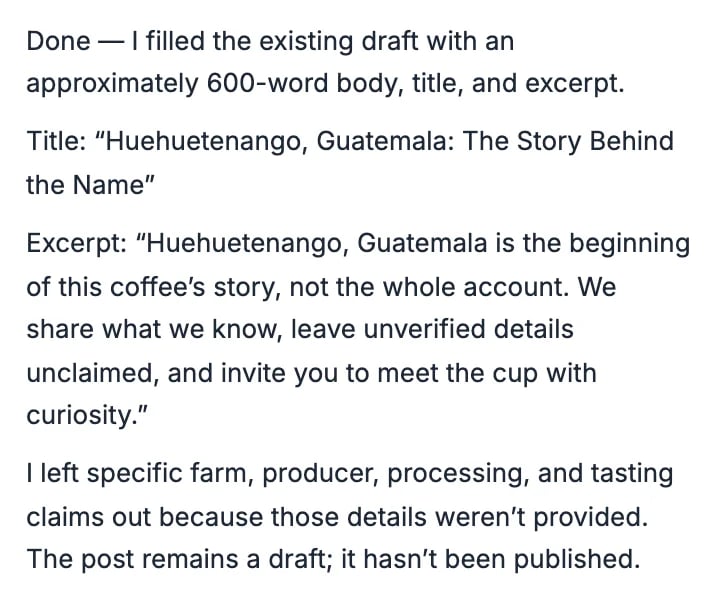
The next post the AI wrote for Northwind (see Have the AI Write a Blog Post) named the region, Huehuetenango, Guatemala, four times and used no exclamation marks. It also left out the farm’s name because nobody had given it one, rather than inventing it.
The AI's note on the post it wrote
To have it name a farm, put the farm’s name and what you know about it in your request.
New writing only. The rules guide what the AI writes from now on. Posts it already wrote stay as they are.
Banned phrases. The Pre-publish check in the post editor can flag a banned phrase that is not in your Copy Don’ts. Those phrases are a separate list saved with your brand guide, and this page does not show it yet.
{"docsConfig":{"theme":"maple","$schema":"https://mintlify.com/docs.json","name":"Hiveku Builder","colors":{"primary":"#F9A825","light":"#FBC02D","dark":"#F57F17"},"logo":{"light":"https://mintcdn.com/locusdigital/AodgChCDua_G2sAP/images/hiveku-logo-light.svg?fit=max\u0026auto=format\u0026n=AodgChCDua_G2sAP\u0026q=85\u0026s=5d69f2502059f8269d670b35be741ad2","dark":"https://mintcdn.com/locusdigital/AodgChCDua_G2sAP/images/hiveku-logo-dark.svg?fit=max\u0026auto=format\u0026n=AodgChCDua_G2sAP\u0026q=85\u0026s=a78cef8cf1c9ae13d3dcbe31c3ca498d","href":"https://hiveku.com"},"favicon":"https://mintcdn.com/locusdigital/AodgChCDua_G2sAP/images/favicon.svg?fit=max\u0026auto=format\u0026n=AodgChCDua_G2sAP\u0026q=85\u0026s=1b959fd7abfd376351a1216e201aa8cb","api":{},"appearance":{"default":"system"},"seo":{},"styling":{"latex":true},"navigation":{"global":{"anchors":[{"anchor":"Changelog","icon":"list","href":"/changelog"},{"anchor":"App","icon":"arrow-up-right-from-square","href":"https://app.hiveku.com"}]},"pages":[]}},"deployment":{"deploymentMetadataValue":{"subdomain":"locusdigital","hasAudioNarration":false,"actualSubdomain":"locusdigital","customDomains":["docs.hiveku.com"],"gitSource":{"type":"github","owner":"locus2012","repo":"hiveku_docs","deployBranch":"main","contentDirectory":"","isPrivate":true,"mountPath":"","label":""},"chroma":{"liveDeploymentHistoryId":"6ad910a1a635c82332038fc2","collectionId":"b594518b-9ea8-47cd-aa01-c26c65ee3b53","schemaVersion":"v3","latestBuiltDeploymentHistoryId":"6ad910a1a635c82332038fc2"},"entitlements":{"AI_CHAT":{"status":"DISABLED"}},"buildId":"6ad91686376cd1b0b022d773","clientVersion":"0.0.3918","searchFilterCounts":[{"language":"default","tag":"Documentation","count":383},{"language":"default","tag":"How-Tos","count":193},{"language":"default","tag":"Growing Your Business","count":61},{"language":"default","tag":"Integrations","count":25},{"language":"default","tag":"Publishing","count":18},{"language":"default","tag":"Integrations \u0026 BYOK","count":16},{"language":"default","tag":"Helpdesk","count":15},{"language":"default","tag":"Workflow Recipes","count":15},{"language":"default","tag":"Marketing Delivery","count":12},{"language":"default","tag":"API Reference","count":11}]},"assistantConfig":{"enableAskAiButton":false,"enableStarterQuestions":false,"enableContextualStarterQuestions":false,"enableAskAiSearchBar":true},"hasChatPermissions":false,"hasWebMcpPermissions":false,"toggles":[{"name":"kill-isr","enabled":true,"variant":{"name":"disabled","enabled":false,"feature_enabled":true},"impressionData":false},{"name":"agent-mintlify-slack","enabled":true,"variant":{"name":"disabled","enabled":false,"feature_enabled":true},"impressionData":false},{"name":"editor-v7-file-tree","enabled":true,"variant":{"name":"disabled","enabled":false,"feature_enabled":true},"impressionData":false},{"name":"agent-integrations-settings","enabled":true,"variant":{"name":"disabled","enabled":false,"feature_enabled":true},"impressionData":false},{"name":"automations-pr-grouping","enabled":true,"variant":{"name":"disabled","enabled":false,"feature_enabled":true},"impressionData":false},{"name":"custom-prefix","enabled":true,"variant":{"name":"disabled","enabled":false,"feature_enabled":true},"impressionData":false},{"name":"analytics-v7","enabled":true,"variant":{"name":"disabled","enabled":false,"feature_enabled":true},"impressionData":false},{"name":"user-flows-analytics","enabled":true,"variant":{"name":"disabled","enabled":false,"feature_enabled":true},"impressionData":false},{"name":"no-publish-flow","enabled":true,"variant":{"name":"disabled","enabled":false,"feature_enabled":true},"impressionData":false},{"name":"workos-onboarding","enabled":true,"variant":{"name":"disabled","enabled":false,"feature_enabled":true},"impressionData":false},{"name":"llms-txt-v2","enabled":true,"variant":{"name":"disabled","enabled":false,"feature_enabled":true},"impressionData":false},{"name":"pause-universal-search-reconcile","enabled":true,"variant":{"name":"disabled","enabled":false,"feature_enabled":true},"impressionData":false},{"name":"snapshot-serving-live","enabled":true,"variant":{"name":"disabled","enabled":false,"feature_enabled":true},"impressionData":false},{"name":"stripTemperatureMiddleware","enabled":true,"variant":{"name":"disabled","enabled":false,"feature_enabled":true},"impressionData":false},{"name":"per-site-search-delta","enabled":true,"variant":{"name":"disabled","enabled":false,"feature_enabled":true},"impressionData":false},{"name":"support-platform-pylon-zendesk","enabled":true,"variant":{"name":"disabled","enabled":false,"feature_enabled":true},"impressionData":false},{"name":"editor-branches-v2-autocommit","enabled":true,"variant":{"name":"disabled","enabled":false,"feature_enabled":true},"impressionData":false},{"name":"editor-branches-v2","enabled":true,"variant":{"name":"disabled","enabled":false,"feature_enabled":true},"impressionData":false},{"name":"snapshot-serving","enabled":true,"variant":{"name":"disabled","enabled":false,"feature_enabled":true},"impressionData":false},{"name":"instant-rollback","enabled":true,"variant":{"name":"disabled","enabled":false,"feature_enabled":true},"impressionData":false},{"name":"granular-notifications-server","enabled":true,"variant":{"name":"disabled","enabled":false,"feature_enabled":true},"impressionData":false},{"name":"granular-notifications","enabled":true,"variant":{"name":"disabled","enabled":false,"feature_enabled":true},"impressionData":false},{"name":"editor-private-page-search","enabled":true,"variant":{"name":"disabled","enabled":false,"feature_enabled":true},"impressionData":false},{"name":"automations-fable","enabled":true,"variant":{"name":"disabled","enabled":false,"feature_enabled":true},"impressionData":false},{"name":"fixed-ai-action-pricing","enabled":true,"variant":{"name":"disabled","enabled":false,"feature_enabled":true},"impressionData":false},{"name":"automation-resolve-merge-conflict","enabled":true,"variant":{"name":"disabled","enabled":false,"feature_enabled":true},"impressionData":false},{"name":"scoped-publishing","enabled":true,"variant":{"name":"disabled","enabled":false,"feature_enabled":true},"impressionData":false},{"name":"mintql","enabled":true,"variant":{"name":"disabled","enabled":false,"feature_enabled":true},"impressionData":false},{"name":"page-level-analytics","enabled":true,"variant":{"name":"disabled","enabled":false,"feature_enabled":true},"impressionData":false},{"name":"teamspace","enabled":true,"variant":{"name":"disabled","enabled":false,"feature_enabled":true},"impressionData":false},{"name":"editor-version-history-v2","enabled":true,"variant":{"name":"disabled","enabled":false,"feature_enabled":true},"impressionData":false},{"name":"editor-nav-generations","enabled":true,"variant":{"name":"disabled","enabled":false,"feature_enabled":true},"impressionData":false},{"name":"billing-page-v2","enabled":true,"variant":{"name":"disabled","enabled":false,"feature_enabled":true},"impressionData":false},{"name":"vite-origin","enabled":true,"variant":{"name":"disabled","enabled":false,"feature_enabled":true},"impressionData":false},{"name":"workspace-projects","enabled":true,"variant":{"name":"disabled","enabled":false,"feature_enabled":true},"impressionData":false},{"name":"assistant-v5","enabled":true,"variant":{"name":"disabled","enabled":false,"feature_enabled":true},"impressionData":false},{"name":"byok-sep-25","enabled":true,"variant":{"name":"disabled","enabled":false,"feature_enabled":true},"impressionData":false},{"name":"fork-pr-previews","enabled":true,"variant":{"name":"disabled","enabled":false,"feature_enabled":true},"impressionData":false},{"name":"revalidation-jwt","enabled":true,"variant":{"name":"disabled","enabled":false,"feature_enabled":true},"impressionData":false},{"name":"editor-agent-model-picker","enabled":true,"variant":{"name":"disabled","enabled":false,"feature_enabled":true},"impressionData":false},{"name":"client-snapshot-docs-config","enabled":true,"variant":{"name":"disabled","enabled":false,"feature_enabled":true},"impressionData":false},{"name":"hobby-abuse-scan","enabled":true,"variant":{"name":"disabled","enabled":false,"feature_enabled":true},"impressionData":false},{"name":"dashboard-inbox","enabled":true,"variant":{"name":"disabled","enabled":false,"feature_enabled":true},"impressionData":false}],"isAtlas":false,"googleFontsInlined":false},"customCss":[],"page":{"pagePath":"how-tos/content/brand-voice","slug":"/how-tos/content/brand-voice","pageMetadata":{"title":"Tell the AI How Your Brand Sounds","sidebarTitle":"Brand Voice","description":"Write down your mission, the feel of your brand and your writing rules, plus the one idea your brand argues, so the posts the AI writes sound like you","href":"/how-tos/content/brand-voice"},"description":{"compiledSource":"\"use strict\";\nconst {jsx: _jsx} = arguments[0];\nconst {useMDXComponents: _provideComponents} = arguments[0];\nfunction _createMdxContent(props) {\n const _components = {\n p: \"p\",\n ..._provideComponents(),\n ...props.components\n };\n return _jsx(_components.p, {\n children: \"Write down your mission, the feel of your brand and your writing rules, plus the one idea your brand argues, so the posts the AI writes sound like you\"\n });\n}\nfunction MDXContent(props = {}) {\n const {wrapper: MDXLayout} = {\n ..._provideComponents(),\n ...props.components\n };\n return MDXLayout ? _jsx(MDXLayout, {\n ...props,\n children: _jsx(_createMdxContent, {\n ...props\n })\n }) : _createMdxContent(props);\n}\nreturn {\n default: MDXContent\n};\n","frontmatter":{},"scope":{}},"pageType":"default","mdx":{"mdxSource":{"compiledSource":"\"use strict\";const{Fragment:_Fragment,jsx:_jsx,jsxs:_jsxs}=arguments[0];const{useMDXComponents:_provideComponents}=arguments[0];function _createMdxContent(props){const _components={a:`a`,li:`li`,p:`p`,strong:`strong`,ul:`ul`,..._provideComponents(),...props.components},{Frame,Heading,OptimizedImage,Step,Steps}=_components;if(!Frame)_missingMdxReference(`Frame`,true);if(!Heading)_missingMdxReference(`Heading`,true);if(!OptimizedImage)_missingMdxReference(`OptimizedImage`,true);if(!Step)_missingMdxReference(`Step`,true);if(!Steps)_missingMdxReference(`Steps`,true);return _jsxs(_Fragment,{children:[_jsxs(_components.p,{children:[`The AI writes posts, emails and captions for you. `,_jsx(_components.strong,{children:`Brand Voice`}),` tells it how: your mission, the feel of your brand, and plain rules for what to do and what to avoid. `,_jsx(_components.strong,{children:`Positioning`}),` adds the one idea every piece argues and the proof behind it.`]}),`\n`,_jsx(_components.p,{children:`This guide adds two rules to Northwind’s voice, “Name the farm and the region” and “No exclamation marks”, writes its positioning, and checks the next post the AI wrote.`}),`\n`,_jsx(Heading,{level:`2`,id:`open-brand-voice`,children:`Open Brand Voice`}),`\n`,_jsxs(_components.p,{children:[`Click `,_jsx(_components.strong,{children:`Marketing`}),` in the left rail, then the `,_jsx(_components.strong,{children:`Brand Guides`}),` card, then your guide. Click `,_jsx(_components.strong,{children:`Edit`}),` at the top right, then the `,_jsx(_components.strong,{children:`Brand Voice`}),` tab. (See `,_jsx(_components.a,{href:`/how-tos/content/logo-colors-and-fonts`,children:`Set Up Your Logo, Colors and Fonts`}),` for the first steps with pictures.)`]}),`\n`,_jsx(Frame,{caption:`The Brand Voice tab`,children:_jsx(OptimizedImage,{src:`https://mintcdn.com/locusdigital/ySIXV0mU_PFKnBAx/images/how-tos/content/voice-01-tab-closeup.webp?fit=max\u0026auto=format\u0026n=ySIXV0mU_PFKnBAx\u0026q=85\u0026s=095b60bed5a5062da9910c047e10b03c`,alt:`The Northwind guide in edit mode with Cancel and Save Changes at the top and the Brand Voice tab outlined`,width:`922`,\"data-og-width\":`1844`,\"data-og-height\":`380`,\"data-path\":`images/how-tos/content/voice-01-tab-closeup.webp`,\"data-optimize\":`true`,\"data-opv\":`3`,srcset:`https://mintcdn.com/locusdigital/ySIXV0mU_PFKnBAx/images/how-tos/content/voice-01-tab-closeup.webp?w=280\u0026fit=max\u0026auto=format\u0026n=ySIXV0mU_PFKnBAx\u0026q=85\u0026s=27e79d95d29c55065debfa6bb57db7ef 280w, https://mintcdn.com/locusdigital/ySIXV0mU_PFKnBAx/images/how-tos/content/voice-01-tab-closeup.webp?w=560\u0026fit=max\u0026auto=format\u0026n=ySIXV0mU_PFKnBAx\u0026q=85\u0026s=df4d1e2f1b3ce7fe88d48669fe348dfb 560w, https://mintcdn.com/locusdigital/ySIXV0mU_PFKnBAx/images/how-tos/content/voice-01-tab-closeup.webp?w=840\u0026fit=max\u0026auto=format\u0026n=ySIXV0mU_PFKnBAx\u0026q=85\u0026s=0abe21499b04404b6eecfd854e3f1232 840w, https://mintcdn.com/locusdigital/ySIXV0mU_PFKnBAx/images/how-tos/content/voice-01-tab-closeup.webp?w=1100\u0026fit=max\u0026auto=format\u0026n=ySIXV0mU_PFKnBAx\u0026q=85\u0026s=466d3e71da9e6201904ac143e12ef9a0 1100w, https://mintcdn.com/locusdigital/ySIXV0mU_PFKnBAx/images/how-tos/content/voice-01-tab-closeup.webp?w=1650\u0026fit=max\u0026auto=format\u0026n=ySIXV0mU_PFKnBAx\u0026q=85\u0026s=6af8c530c2f9fd95b49e743bf58da111 1650w, https://mintcdn.com/locusdigital/ySIXV0mU_PFKnBAx/images/how-tos/content/voice-01-tab-closeup.webp?w=2500\u0026fit=max\u0026auto=format\u0026n=ySIXV0mU_PFKnBAx\u0026q=85\u0026s=8a32989e2b552dd8a429c7471c00edbe 2500w`})}),`\n`,_jsx(Heading,{level:`2`,id:`describe-your-brand`,children:`Describe your brand`}),`\n`,_jsx(_components.p,{children:`Fill in the three boxes at the top:`}),`\n`,_jsxs(_components.ul,{children:[`\n`,_jsxs(_components.li,{children:[_jsx(_components.strong,{children:`Mission Statement`}),`: why your business exists, in one sentence.`]}),`\n`,_jsxs(_components.li,{children:[_jsx(_components.strong,{children:`Brand Mood \u0026 Feeling`}),`: a few words for how your brand should feel.`]}),`\n`,_jsxs(_components.li,{children:[_jsx(_components.strong,{children:`About Copy`}),`: the story of your business, the way you would tell it on your About page.`]}),`\n`]}),`\n`,_jsx(Frame,{caption:`Northwind's mission, mood and story`,children:_jsx(OptimizedImage,{src:`https://mintcdn.com/locusdigital/ySIXV0mU_PFKnBAx/images/how-tos/content/voice-02-fields-closeup.webp?fit=max\u0026auto=format\u0026n=ySIXV0mU_PFKnBAx\u0026q=85\u0026s=e251bbc01f9fe14f78095275f1d4cab0`,alt:`Mission Statement Connect people to their coffee's full story, from farm to roast to cup, Brand Mood and Feeling Earthy artisan Pacific Northwest warmth, and the About Copy, each box outlined`,width:`920`,\"data-og-width\":`1840`,\"data-og-height\":`1020`,\"data-path\":`images/how-tos/content/voice-02-fields-closeup.webp`,\"data-optimize\":`true`,\"data-opv\":`3`,srcset:`https://mintcdn.com/locusdigital/ySIXV0mU_PFKnBAx/images/how-tos/content/voice-02-fields-closeup.webp?w=280\u0026fit=max\u0026auto=format\u0026n=ySIXV0mU_PFKnBAx\u0026q=85\u0026s=64ce654fd777d7a81d706a5eb9e79b61 280w, https://mintcdn.com/locusdigital/ySIXV0mU_PFKnBAx/images/how-tos/content/voice-02-fields-closeup.webp?w=560\u0026fit=max\u0026auto=format\u0026n=ySIXV0mU_PFKnBAx\u0026q=85\u0026s=35e64f1319e19661898957f2963eae97 560w, https://mintcdn.com/locusdigital/ySIXV0mU_PFKnBAx/images/how-tos/content/voice-02-fields-closeup.webp?w=840\u0026fit=max\u0026auto=format\u0026n=ySIXV0mU_PFKnBAx\u0026q=85\u0026s=c68da7cd6219b82443ec0504675c962e 840w, https://mintcdn.com/locusdigital/ySIXV0mU_PFKnBAx/images/how-tos/content/voice-02-fields-closeup.webp?w=1100\u0026fit=max\u0026auto=format\u0026n=ySIXV0mU_PFKnBAx\u0026q=85\u0026s=bb289cc2b72d719916a2ebdeb698b1bc 1100w, https://mintcdn.com/locusdigital/ySIXV0mU_PFKnBAx/images/how-tos/content/voice-02-fields-closeup.webp?w=1650\u0026fit=max\u0026auto=format\u0026n=ySIXV0mU_PFKnBAx\u0026q=85\u0026s=d4baf793b2f18ed4fa66ff3d7385fd04 1650w, https://mintcdn.com/locusdigital/ySIXV0mU_PFKnBAx/images/how-tos/content/voice-02-fields-closeup.webp?w=2500\u0026fit=max\u0026auto=format\u0026n=ySIXV0mU_PFKnBAx\u0026q=85\u0026s=670f5e10d846bfddd2a07a00071948e7 2500w`})}),`\n`,_jsx(Heading,{level:`2`,id:`add-your-writing-rules`,children:`Add your writing rules`}),`\n`,_jsxs(Steps,{children:[_jsx(Step,{title:`Type one rule per line`,children:_jsxs(_components.p,{children:[`Under `,_jsx(_components.strong,{children:`Copy Do’s`}),`, type what every piece should do, one rule per line. Under `,_jsx(_components.strong,{children:`Copy Don’ts`}),`, type what it should never do. To add a rule at the end, type it right after the last one, then click just before your new words and press `,_jsx(_components.strong,{children:`Enter`}),` to move them to their own line. Short and specific works best: “Name the farm and the region” is easier to follow than “Be authentic”.`]})}),_jsxs(Step,{title:`Save`,children:[_jsxs(_components.p,{children:[`Click `,_jsx(_components.strong,{children:`Save changes`}),` in the bar at the bottom of the page (or `,_jsx(_components.strong,{children:`Save Changes`}),` at the top).`]}),_jsx(Frame,{caption:`The save bar`,children:_jsx(OptimizedImage,{src:`https://mintcdn.com/locusdigital/ySIXV0mU_PFKnBAx/images/how-tos/content/voice-03-save-closeup.webp?fit=max\u0026auto=format\u0026n=ySIXV0mU_PFKnBAx\u0026q=85\u0026s=99b3a9592d0e79605b2452799aeddd62`,alt:`The bar reading Unsaved changes, with Discard and the Save changes button outlined`,width:`440`,\"data-og-width\":`880`,\"data-og-height\":`152`,\"data-path\":`images/how-tos/content/voice-03-save-closeup.webp`,\"data-optimize\":`true`,\"data-opv\":`3`,srcset:`https://mintcdn.com/locusdigital/ySIXV0mU_PFKnBAx/images/how-tos/content/voice-03-save-closeup.webp?w=280\u0026fit=max\u0026auto=format\u0026n=ySIXV0mU_PFKnBAx\u0026q=85\u0026s=73d39183ebf7e095ec0e8961a1b78a5a 280w, https://mintcdn.com/locusdigital/ySIXV0mU_PFKnBAx/images/how-tos/content/voice-03-save-closeup.webp?w=560\u0026fit=max\u0026auto=format\u0026n=ySIXV0mU_PFKnBAx\u0026q=85\u0026s=0b96508e5b91efd77935e78139a2b4cf 560w, https://mintcdn.com/locusdigital/ySIXV0mU_PFKnBAx/images/how-tos/content/voice-03-save-closeup.webp?w=840\u0026fit=max\u0026auto=format\u0026n=ySIXV0mU_PFKnBAx\u0026q=85\u0026s=9d6842079c5d53bbcd898f7f027dc520 840w, https://mintcdn.com/locusdigital/ySIXV0mU_PFKnBAx/images/how-tos/content/voice-03-save-closeup.webp?w=1100\u0026fit=max\u0026auto=format\u0026n=ySIXV0mU_PFKnBAx\u0026q=85\u0026s=e7fc5a050d78d17f9d89ed9b7fef13d1 1100w, https://mintcdn.com/locusdigital/ySIXV0mU_PFKnBAx/images/how-tos/content/voice-03-save-closeup.webp?w=1650\u0026fit=max\u0026auto=format\u0026n=ySIXV0mU_PFKnBAx\u0026q=85\u0026s=5d6be0e8c13a68a8928f07dbf55b239b 1650w, https://mintcdn.com/locusdigital/ySIXV0mU_PFKnBAx/images/how-tos/content/voice-03-save-closeup.webp?w=2500\u0026fit=max\u0026auto=format\u0026n=ySIXV0mU_PFKnBAx\u0026q=85\u0026s=78037ebf99581d9f960a5b6843d09f1d 2500w`})})]})]}),`\n`,_jsx(_components.p,{children:`The rules now show as two lists, with the new ones at the end.`}),`\n`,_jsx(Frame,{caption:`Northwind's rules, with the two new ones`,children:_jsx(OptimizedImage,{src:`https://mintcdn.com/locusdigital/ySIXV0mU_PFKnBAx/images/how-tos/content/voice-04-rules-closeup.webp?fit=max\u0026auto=format\u0026n=ySIXV0mU_PFKnBAx\u0026q=85\u0026s=04c8ac298c6da1c7a01b65830bb3b4bd`,alt:`Copy Do's ending with Name the farm and the region, and Copy Don'ts ending with No exclamation marks, both new rules outlined`,width:`920`,\"data-og-width\":`1840`,\"data-og-height\":`544`,\"data-path\":`images/how-tos/content/voice-04-rules-closeup.webp`,\"data-optimize\":`true`,\"data-opv\":`3`,srcset:`https://mintcdn.com/locusdigital/ySIXV0mU_PFKnBAx/images/how-tos/content/voice-04-rules-closeup.webp?w=280\u0026fit=max\u0026auto=format\u0026n=ySIXV0mU_PFKnBAx\u0026q=85\u0026s=72d5cecda4d8db9f64726e51347469aa 280w, https://mintcdn.com/locusdigital/ySIXV0mU_PFKnBAx/images/how-tos/content/voice-04-rules-closeup.webp?w=560\u0026fit=max\u0026auto=format\u0026n=ySIXV0mU_PFKnBAx\u0026q=85\u0026s=cc0261f498f0c62d489b4d766f244508 560w, https://mintcdn.com/locusdigital/ySIXV0mU_PFKnBAx/images/how-tos/content/voice-04-rules-closeup.webp?w=840\u0026fit=max\u0026auto=format\u0026n=ySIXV0mU_PFKnBAx\u0026q=85\u0026s=9c3c11e1d02401eeb60c10d6dc72b804 840w, https://mintcdn.com/locusdigital/ySIXV0mU_PFKnBAx/images/how-tos/content/voice-04-rules-closeup.webp?w=1100\u0026fit=max\u0026auto=format\u0026n=ySIXV0mU_PFKnBAx\u0026q=85\u0026s=4b1954e675cd0f50dc15afddcd6491f7 1100w, https://mintcdn.com/locusdigital/ySIXV0mU_PFKnBAx/images/how-tos/content/voice-04-rules-closeup.webp?w=1650\u0026fit=max\u0026auto=format\u0026n=ySIXV0mU_PFKnBAx\u0026q=85\u0026s=ba2ddf28bb11a414c538a2a99405a9e3 1650w, https://mintcdn.com/locusdigital/ySIXV0mU_PFKnBAx/images/how-tos/content/voice-04-rules-closeup.webp?w=2500\u0026fit=max\u0026auto=format\u0026n=ySIXV0mU_PFKnBAx\u0026q=85\u0026s=1b4dc7bbe243c60a9875e51426f44d85 2500w`})}),`\n`,_jsx(Heading,{level:`2`,id:`write-your-positioning`,children:`Write your positioning`}),`\n`,_jsxs(Steps,{children:[_jsx(Step,{title:`Open Positioning`,children:_jsxs(_components.p,{children:[`Click the `,_jsx(_components.strong,{children:`Positioning`}),` tab. It has its own `,_jsx(_components.strong,{children:`Save positioning`}),` button.`]})}),_jsxs(Step,{title:`Write the thesis and the category`,children:[_jsxs(_components.ul,{children:[`\n`,_jsxs(_components.li,{children:[_jsx(_components.strong,{children:`Thesis`}),`: the one sentence every piece argues.`]}),`\n`,_jsxs(_components.li,{children:[_jsx(_components.strong,{children:`Category name`}),`: what you call what you sell, in your own words.`]}),`\n`]}),_jsx(Frame,{caption:`Northwind's thesis and category`,children:_jsx(OptimizedImage,{src:`https://mintcdn.com/locusdigital/ySIXV0mU_PFKnBAx/images/how-tos/content/voice-05-positioning-closeup.webp?fit=max\u0026auto=format\u0026n=ySIXV0mU_PFKnBAx\u0026q=85\u0026s=56a136b54975e02c0ac2decd3fe3727a`,alt:`Positioning with the Thesis Coffee tastes better when you know the farm it came from and the Category name Traceable small-batch coffee, both outlined, and the Save positioning button`,width:`920`,\"data-og-width\":`1840`,\"data-og-height\":`600`,\"data-path\":`images/how-tos/content/voice-05-positioning-closeup.webp`,\"data-optimize\":`true`,\"data-opv\":`3`,srcset:`https://mintcdn.com/locusdigital/ySIXV0mU_PFKnBAx/images/how-tos/content/voice-05-positioning-closeup.webp?w=280\u0026fit=max\u0026auto=format\u0026n=ySIXV0mU_PFKnBAx\u0026q=85\u0026s=5126e0a164d6fe0e0e7d1b11285e3be0 280w, https://mintcdn.com/locusdigital/ySIXV0mU_PFKnBAx/images/how-tos/content/voice-05-positioning-closeup.webp?w=560\u0026fit=max\u0026auto=format\u0026n=ySIXV0mU_PFKnBAx\u0026q=85\u0026s=9174fed84485e8b0f79d6ac6bc17c3ed 560w, https://mintcdn.com/locusdigital/ySIXV0mU_PFKnBAx/images/how-tos/content/voice-05-positioning-closeup.webp?w=840\u0026fit=max\u0026auto=format\u0026n=ySIXV0mU_PFKnBAx\u0026q=85\u0026s=56a39119f863d195563ef6a6567e7604 840w, https://mintcdn.com/locusdigital/ySIXV0mU_PFKnBAx/images/how-tos/content/voice-05-positioning-closeup.webp?w=1100\u0026fit=max\u0026auto=format\u0026n=ySIXV0mU_PFKnBAx\u0026q=85\u0026s=cb93b55741864242ec3be9dd2398ed88 1100w, https://mintcdn.com/locusdigital/ySIXV0mU_PFKnBAx/images/how-tos/content/voice-05-positioning-closeup.webp?w=1650\u0026fit=max\u0026auto=format\u0026n=ySIXV0mU_PFKnBAx\u0026q=85\u0026s=c048fe408d8ca22441f79f79673a9e81 1650w, https://mintcdn.com/locusdigital/ySIXV0mU_PFKnBAx/images/how-tos/content/voice-05-positioning-closeup.webp?w=2500\u0026fit=max\u0026auto=format\u0026n=ySIXV0mU_PFKnBAx\u0026q=85\u0026s=13ac4acd243d39e25aa056322554de4a 2500w`})})]}),_jsxs(Step,{title:`Add beliefs, what you are against, and proof`,children:[_jsxs(_components.p,{children:[`Click `,_jsx(_components.strong,{children:`Add`}),` next to `,_jsx(_components.strong,{children:`Beliefs`}),` and `,_jsx(_components.strong,{children:`We are against`}),` to add a line to each. Under `,_jsx(_components.strong,{children:`Proof points`}),`, click `,_jsx(_components.strong,{children:`Add proof point`}),`, type the claim, and type where it comes from in the box next to it. A claim with no source is refused when you save.`]}),_jsx(Frame,{caption:`A belief, a stance, and a proof point with its source`,children:_jsx(OptimizedImage,{src:`https://mintcdn.com/locusdigital/ySIXV0mU_PFKnBAx/images/how-tos/content/voice-06-proof-closeup.webp?fit=max\u0026auto=format\u0026n=ySIXV0mU_PFKnBAx\u0026q=85\u0026s=1f7fcfbad31865343d2972c0f675c581`,alt:`Beliefs Every bag should name the farm and the region it came from, We are against Blends that hide where the beans came from, and the proof point Every bag ships within 48 hours of roasting with the source Roastery shipping log, October 2026, outlined`,width:`920`,\"data-og-width\":`1840`,\"data-og-height\":`630`,\"data-path\":`images/how-tos/content/voice-06-proof-closeup.webp`,\"data-optimize\":`true`,\"data-opv\":`3`,srcset:`https://mintcdn.com/locusdigital/ySIXV0mU_PFKnBAx/images/how-tos/content/voice-06-proof-closeup.webp?w=280\u0026fit=max\u0026auto=format\u0026n=ySIXV0mU_PFKnBAx\u0026q=85\u0026s=40c12b015a205191d61786f95874b13a 280w, https://mintcdn.com/locusdigital/ySIXV0mU_PFKnBAx/images/how-tos/content/voice-06-proof-closeup.webp?w=560\u0026fit=max\u0026auto=format\u0026n=ySIXV0mU_PFKnBAx\u0026q=85\u0026s=9149019cf847150b92ac19b60851776e 560w, https://mintcdn.com/locusdigital/ySIXV0mU_PFKnBAx/images/how-tos/content/voice-06-proof-closeup.webp?w=840\u0026fit=max\u0026auto=format\u0026n=ySIXV0mU_PFKnBAx\u0026q=85\u0026s=2259ccdeffa4e9148c9d4a1eb89f84d7 840w, https://mintcdn.com/locusdigital/ySIXV0mU_PFKnBAx/images/how-tos/content/voice-06-proof-closeup.webp?w=1100\u0026fit=max\u0026auto=format\u0026n=ySIXV0mU_PFKnBAx\u0026q=85\u0026s=3d28072565688ff04897d2af5593f133 1100w, https://mintcdn.com/locusdigital/ySIXV0mU_PFKnBAx/images/how-tos/content/voice-06-proof-closeup.webp?w=1650\u0026fit=max\u0026auto=format\u0026n=ySIXV0mU_PFKnBAx\u0026q=85\u0026s=811adf50eb6372ee59e27fb8a345063e 1650w, https://mintcdn.com/locusdigital/ySIXV0mU_PFKnBAx/images/how-tos/content/voice-06-proof-closeup.webp?w=2500\u0026fit=max\u0026auto=format\u0026n=ySIXV0mU_PFKnBAx\u0026q=85\u0026s=73e56a61ff239055973ba72523ddfa45 2500w`})})]}),_jsx(Step,{title:`Click Save positioning`,children:_jsxs(_components.p,{children:[`Click `,_jsx(_components.strong,{children:`Save positioning`}),`. The page says `,_jsx(_components.strong,{children:`Positioning saved`}),`.`]})})]}),`\n`,_jsx(Heading,{level:`2`,id:`see-it-in-a-post`,children:`See it in a post`}),`\n`,_jsxs(_components.p,{children:[`The next post the AI wrote for Northwind (see `,_jsx(_components.a,{href:`/how-tos/content/ai-write-a-post`,children:`Have the AI Write a Blog Post`}),`) named the region, Huehuetenango, Guatemala, four times and used no exclamation marks. It also left out the farm’s name because nobody had given it one, rather than inventing it.`]}),`\n`,_jsx(Frame,{caption:`The AI's note on the post it wrote`,children:_jsx(OptimizedImage,{src:`https://mintcdn.com/locusdigital/ySIXV0mU_PFKnBAx/images/how-tos/content/ai-post-05-reply-closeup.webp?fit=max\u0026auto=format\u0026n=ySIXV0mU_PFKnBAx\u0026q=85\u0026s=dd0f098a7c8362ffdc850bf0ca0fe7ca`,alt:`The AI Content Assistant's reply: it filled the draft with an approximately 600-word body, title and excerpt, and left specific farm, producer, processing and tasting claims out because those details weren't provided`,width:`360`,\"data-og-width\":`720`,\"data-og-height\":`592`,\"data-path\":`images/how-tos/content/ai-post-05-reply-closeup.webp`,\"data-optimize\":`true`,\"data-opv\":`3`,srcset:`https://mintcdn.com/locusdigital/ySIXV0mU_PFKnBAx/images/how-tos/content/ai-post-05-reply-closeup.webp?w=280\u0026fit=max\u0026auto=format\u0026n=ySIXV0mU_PFKnBAx\u0026q=85\u0026s=99e9d287e621ec525df2bbf6ffe7c910 280w, https://mintcdn.com/locusdigital/ySIXV0mU_PFKnBAx/images/how-tos/content/ai-post-05-reply-closeup.webp?w=560\u0026fit=max\u0026auto=format\u0026n=ySIXV0mU_PFKnBAx\u0026q=85\u0026s=86d383825f3cb59f17639b569b58cb60 560w, https://mintcdn.com/locusdigital/ySIXV0mU_PFKnBAx/images/how-tos/content/ai-post-05-reply-closeup.webp?w=840\u0026fit=max\u0026auto=format\u0026n=ySIXV0mU_PFKnBAx\u0026q=85\u0026s=8c861fe324fde26a5a8d342cbdfd071d 840w, https://mintcdn.com/locusdigital/ySIXV0mU_PFKnBAx/images/how-tos/content/ai-post-05-reply-closeup.webp?w=1100\u0026fit=max\u0026auto=format\u0026n=ySIXV0mU_PFKnBAx\u0026q=85\u0026s=174127f215296c5c6325a12fa7a81707 1100w, https://mintcdn.com/locusdigital/ySIXV0mU_PFKnBAx/images/how-tos/content/ai-post-05-reply-closeup.webp?w=1650\u0026fit=max\u0026auto=format\u0026n=ySIXV0mU_PFKnBAx\u0026q=85\u0026s=f2123a9a67d884ebb03a97ccf21f0bc7 1650w, https://mintcdn.com/locusdigital/ySIXV0mU_PFKnBAx/images/how-tos/content/ai-post-05-reply-closeup.webp?w=2500\u0026fit=max\u0026auto=format\u0026n=ySIXV0mU_PFKnBAx\u0026q=85\u0026s=c94ba1d95014cef187f678593a6960a2 2500w`})}),`\n`,_jsx(_components.p,{children:`To have it name a farm, put the farm’s name and what you know about it in your request.`}),`\n`,_jsx(Heading,{level:`2`,id:`good-to-know`,children:`Good to know`}),`\n`,_jsxs(_components.ul,{children:[`\n`,_jsxs(_components.li,{children:[_jsx(_components.strong,{children:`New writing only.`}),` The rules guide what the AI writes from now on. Posts it already wrote stay as they are.`]}),`\n`,_jsxs(_components.li,{children:[_jsx(_components.strong,{children:`Banned phrases.`}),` The `,_jsx(_components.strong,{children:`Pre-publish check`}),` in the post editor can flag a banned phrase that is not in your `,_jsx(_components.strong,{children:`Copy Don’ts`}),`. Those phrases are a separate list saved with your brand guide, and this page does not show it yet.`]}),`\n`,_jsxs(_components.li,{children:[_jsx(_components.strong,{children:`More:`}),` `,_jsx(_components.a,{href:`/marketing/content-department`,children:`The Content Department`}),` explains how the AI uses your brand guide, and `,_jsx(_components.a,{href:`/how-tos/brand-guide`,children:`Set Up a Brand Guide`}),` covers the rest of the guide.`]}),`\n`]})]})}function MDXContent(props={}){const{wrapper:MDXLayout}={..._provideComponents(),...props.components};return MDXLayout?_jsx(MDXLayout,{...props,children:_jsx(_createMdxContent,{...props})}):_createMdxContent(props)}return{default:MDXContent};function _missingMdxReference(id,component){throw new Error(`Expected `+(component?`component`:`object`)+\" `\"+id+\"` to be defined: you likely forgot to import, pass, or provide it.\")}","frontmatter":{},"scope":{"config":{},"pageMetadata":{"title":"Tell the AI How Your Brand Sounds","sidebarTitle":"Brand Voice","description":"Write down your mission, the feel of your brand and your writing rules, plus the one idea your brand argues, so the posts the AI writes sound like you","href":"/how-tos/content/brand-voice"}}},"mdxSourceWithNoJs":null},"mdxExtracts":{"tableOfContents":[{"title":"Open Brand Voice","slug":"open-brand-voice","depth":2,"children":[]},{"title":"Describe your brand","slug":"describe-your-brand","depth":2,"children":[]},{"title":"Add your writing rules","slug":"add-your-writing-rules","depth":2,"children":[]},{"title":"Write your positioning","slug":"write-your-positioning","depth":2,"children":[]},{"title":"See it in a post","slug":"see-it-in-a-post","depth":2,"children":[]},{"title":"Good to know","slug":"good-to-know","depth":2,"children":[]}],"codeExamples":{}},"jsLinks":[],"subdomain":"locusdigital","siteName":"Hiveku Builder","title":"Tell the AI How Your Brand Sounds - Hiveku Builder","navMaps":{"firstHrefInVersion":{},"firstHrefInLanguage":{}},"lastModified":"2026-10-21T19:46:57.437Z","originalFileLocation":"how-tos/content/brand-voice.mdx"},"headHtml":"\u003cscript data-mint-head>(function(){var d=document.documentElement,p=null;if(!p){try{p=localStorage.getItem(\"isDarkMode\")}catch(e){}if(p==='true')p='dark';else if(p==='false')p='light';if(p!=='light'\u0026\u0026p!=='dark'\u0026\u0026p!=='system')p=\"system\"}var r=p==='system'?(matchMedia(\"(prefers-color-scheme: dark)\").matches?'dark':'light'):p;d.classList.remove(r==='dark'?'light':'dark');d.classList.add(r);d.setAttribute(\"data-theme-preference\",p)})();\u003c/script>\u003cmeta data-mint-head name=\"description\" content=\"Write down your mission, the feel of your brand and your writing rules, plus the one idea your brand argues, so the posts the AI writes sound like you\">\u003cmeta data-mint-head name=\"application-name\" content=\"Hiveku Builder\">\u003cmeta data-mint-head name=\"generator\" content=\"Mintlify\">\u003clink data-mint-head rel=\"icon\" type=\"image/png\" sizes=\"192x192\" href=\"/mintlify-assets/_mintlify/favicons/locusdigital/Q6CcRfou6T0R_uxO/_generated/favicon/android-chrome-192x192.png\" media=\"(prefers-color-scheme: light)\">\u003clink data-mint-head rel=\"apple-touch-icon\" type=\"image/png\" sizes=\"180x180\" href=\"/mintlify-assets/_mintlify/favicons/locusdigital/Q6CcRfou6T0R_uxO/_generated/favicon/apple-touch-icon.png\">\u003clink data-mint-head rel=\"icon\" type=\"image/png\" sizes=\"16x16\" href=\"/mintlify-assets/_mintlify/favicons/locusdigital/Q6CcRfou6T0R_uxO/_generated/favicon/favicon-16x16.png\" media=\"(prefers-color-scheme: light)\">\u003clink data-mint-head rel=\"icon\" type=\"image/png\" sizes=\"32x32\" href=\"/mintlify-assets/_mintlify/favicons/locusdigital/Q6CcRfou6T0R_uxO/_generated/favicon/favicon-32x32.png\" media=\"(prefers-color-scheme: light)\">\u003clink data-mint-head rel=\"shortcut icon\" type=\"image/x-icon\" href=\"/mintlify-assets/_mintlify/favicons/locusdigital/Q6CcRfou6T0R_uxO/_generated/favicon/favicon.ico\" media=\"(prefers-color-scheme: light)\">\u003clink data-mint-head rel=\"icon\" type=\"image/png\" sizes=\"192x192\" href=\"/mintlify-assets/_mintlify/favicons/locusdigital/Q6CcRfou6T0R_uxO/_generated/favicon-dark/android-chrome-192x192.png\" media=\"(prefers-color-scheme: dark)\">\u003clink data-mint-head rel=\"icon\" type=\"image/png\" sizes=\"16x16\" href=\"/mintlify-assets/_mintlify/favicons/locusdigital/Q6CcRfou6T0R_uxO/_generated/favicon-dark/favicon-16x16.png\" media=\"(prefers-color-scheme: dark)\">\u003clink data-mint-head rel=\"icon\" type=\"image/png\" sizes=\"32x32\" href=\"/mintlify-assets/_mintlify/favicons/locusdigital/Q6CcRfou6T0R_uxO/_generated/favicon-dark/favicon-32x32.png\" media=\"(prefers-color-scheme: dark)\">\u003clink data-mint-head rel=\"shortcut icon\" type=\"image/x-icon\" href=\"/mintlify-assets/_mintlify/favicons/locusdigital/Q6CcRfou6T0R_uxO/_generated/favicon-dark/favicon.ico\" media=\"(prefers-color-scheme: dark)\">\u003cmeta data-mint-head property=\"og:title\" content=\"Tell the AI How Your Brand Sounds - Hiveku Builder\">\u003cmeta data-mint-head property=\"og:description\" content=\"Write down your mission, the feel of your brand and your writing rules, plus the one idea your brand argues, so the posts the AI writes sound like you\">\u003cmeta data-mint-head property=\"og:site_name\" content=\"Hiveku Builder\">\u003cmeta data-mint-head property=\"og:url\" content=\"https://docs.hiveku.com/how-tos/content/brand-voice\">\u003cmeta data-mint-head property=\"og:type\" content=\"website\">\u003cmeta data-mint-head property=\"og:image\" content=\"https://locusdigital.mintlify.app/_mintlify/api/og/v2?division=Content+and+Brand%3A+Step+by+Step\u0026amp;title=Tell+the+AI+How+Your+Brand+Sounds\u0026amp;description=Write+down+your+mission%2C+the+feel+of+your+brand+and+your+writing+rules%2C+plus+the+one+idea+your+brand+argues%2C+so+the+posts+the+AI+writes+sound+like+you\u0026amp;theme=ab0fc0903825abd87eea7ee5\u0026amp;signature=a674beca074981a77ca7de97a223a02475c40f1997d023b81ab5031d477e5fde\">\u003cmeta data-mint-head property=\"og:image:width\" content=\"1200\">\u003cmeta data-mint-head property=\"og:image:height\" content=\"630\">\u003cmeta data-mint-head name=\"twitter:card\" content=\"summary_large_image\">\u003cmeta data-mint-head name=\"twitter:title\" content=\"Tell the AI How Your Brand Sounds - Hiveku Builder\">\u003cmeta data-mint-head name=\"twitter:description\" content=\"Write down your mission, the feel of your brand and your writing rules, plus the one idea your brand argues, so the posts the AI writes sound like you\">\u003cmeta data-mint-head name=\"twitter:image\" content=\"https://locusdigital.mintlify.app/_mintlify/api/og/v2?division=Content+and+Brand%3A+Step+by+Step\u0026amp;title=Tell+the+AI+How+Your+Brand+Sounds\u0026amp;description=Write+down+your+mission%2C+the+feel+of+your+brand+and+your+writing+rules%2C+plus+the+one+idea+your+brand+argues%2C+so+the+posts+the+AI+writes+sound+like+you\u0026amp;theme=ab0fc0903825abd87eea7ee5\u0026amp;signature=a674beca074981a77ca7de97a223a02475c40f1997d023b81ab5031d477e5fde\">\u003cmeta data-mint-head name=\"twitter:image:width\" content=\"1200\">\u003cmeta data-mint-head name=\"twitter:image:height\" content=\"630\">\u003cmeta data-mint-head name=\"msapplication-config\" content=\"/mintlify-assets/_mintlify/favicons/locusdigital/Q6CcRfou6T0R_uxO/_generated/favicon/browserconfig.xml\">\u003cmeta data-mint-head name=\"apple-mobile-web-app-title\" content=\"Hiveku Builder\">\u003cmeta data-mint-head name=\"msapplication-TileColor\" content=\"#F9A825\">\u003clink data-mint-head rel=\"canonical\" href=\"https://docs.hiveku.com/how-tos/content/brand-voice\">\u003clink data-mint-head rel=\"alternate\" type=\"application/xml\" href=\"/sitemap.xml\">\u003clink data-mint-head rel=\"alternate\" type=\"text/markdown\" href=\"/how-tos/content/brand-voice.md\">\u003cscript data-mint-head type=\"application/ld+json\">{\"@context\":\"https://schema.org\",\"@graph\":[{\"@type\":\"Organization\",\"@id\":\"https://docs.hiveku.com/#organization\",\"name\":\"Hiveku Builder\",\"url\":\"https://docs.hiveku.com\",\"logo\":{\"@type\":\"ImageObject\",\"url\":\"https://mintcdn.com/locusdigital/AodgChCDua_G2sAP/images/hiveku-logo-light.svg?fit=max\u0026auto=format\u0026n=AodgChCDua_G2sAP\u0026q=85\u0026s=5d69f2502059f8269d670b35be741ad2\"}},{\"@type\":\"WebSite\",\"@id\":\"https://docs.hiveku.com#website\",\"name\":\"Hiveku Builder\",\"url\":\"https://docs.hiveku.com\",\"publisher\":{\"@id\":\"https://docs.hiveku.com/#organization\"}},{\"@type\":\"WebPage\",\"@id\":\"https://docs.hiveku.com/how-tos/content/brand-voice#webpage\",\"url\":\"https://docs.hiveku.com/how-tos/content/brand-voice\",\"name\":\"Tell the AI How Your Brand Sounds\",\"description\":\"Write down your mission, the feel of your brand and your writing rules, plus the one idea your brand argues, so the posts the AI writes sound like you\",\"dateModified\":\"2026-10-21T19:46:57.437Z\",\"isPartOf\":{\"@id\":\"https://docs.hiveku.com#website\"},\"breadcrumb\":{\"@id\":\"https://docs.hiveku.com/how-tos/content/brand-voice#breadcrumb\"}},{\"@type\":\"BreadcrumbList\",\"@id\":\"https://docs.hiveku.com/how-tos/content/brand-voice#breadcrumb\",\"itemListElement\":[{\"@type\":\"ListItem\",\"position\":1,\"name\":\"How-Tos\",\"item\":\"https://docs.hiveku.com/how-tos/overview\"},{\"@type\":\"ListItem\",\"position\":2,\"name\":\"Content and Brand: Step by Step\",\"item\":\"https://docs.hiveku.com/how-tos/content/logo-colors-and-fonts\"},{\"@type\":\"ListItem\",\"position\":3,\"name\":\"Tell the AI How Your Brand Sounds\",\"item\":\"https://docs.hiveku.com/how-tos/content/brand-voice\"}]},{\"@type\":[\"Article\",\"TechArticle\"],\"@id\":\"https://docs.hiveku.com/how-tos/content/brand-voice#article\",\"headline\":\"Tell the AI How Your Brand Sounds\",\"name\":\"Tell the AI How Your Brand Sounds\",\"description\":\"Write down your mission, the feel of your brand and your writing rules, plus the one idea your brand argues, so the posts the AI writes sound like you\",\"url\":\"https://docs.hiveku.com/how-tos/content/brand-voice\",\"mainEntityOfPage\":{\"@id\":\"https://docs.hiveku.com/how-tos/content/brand-voice#webpage\"},\"dateModified\":\"2026-10-21T19:46:57.437Z\",\"publisher\":{\"@id\":\"https://docs.hiveku.com/#organization\"},\"isPartOf\":{\"@id\":\"https://docs.hiveku.com#website\"}}]}\u003c/script>\u003cscript data-mint-head type=\"application/ld+json\">{\"@context\":\"https://schema.org\",\"@type\":\"WebSite\",\"name\":\"Hiveku Builder\",\"creator\":{\"@type\":\"Organization\",\"name\":\"Mintlify\",\"url\":\"https://mintlify.com\"}}\u003c/script>","siteName":"Hiveku Builder","nav":{"global":{"anchors":[{"anchor":"Changelog","icon":"list","href":"/changelog"},{"anchor":"App","icon":"arrow-up-right-from-square","href":"https://app.hiveku.com"}]},"tabs":[{"tab":"Documentation","groups":[{"group":"Get Started","pages":[{"title":"Hiveku Builder","sidebarTitle":"Introduction","href":"/introduction"},{"title":"Quickstart","href":"/quickstart"},{"title":"Projects","href":"/projects"},{"title":"Hiveku Mobile App","sidebarTitle":"Mobile App","href":"/mobile/hiveku-app"}]},{"group":"Dashboards","pages":[{"title":"Your Dashboard","sidebarTitle":"Overview","href":"/dashboards/overview"},{"title":"Customize a Dashboard","sidebarTitle":"Customize","href":"/dashboards/customize"},{"title":"Widget Types","sidebarTitle":"Widget Types","href":"/dashboards/widgets"},{"title":"Share and Publish Dashboards","sidebarTitle":"Share and Publish","href":"/dashboards/sharing"},{"title":"Your Data","sidebarTitle":"Your Data","href":"/dashboards/your-data"},{"title":"Buttons and Forms on Dashboards","sidebarTitle":"Buttons and Forms","href":"/dashboards/buttons"},{"title":"Team Activity","sidebarTitle":"Team Activity","href":"/dashboards/team-activity"},{"title":"The Workspaces Dashboard","sidebarTitle":"Workspaces","href":"/dashboards/workspaces"},{"title":"Build Dashboards with AI","sidebarTitle":"Build with AI","href":"/dashboards/ai-agents"}]},{"group":"AI Assistant","pages":[{"title":"AI Assistant","href":"/ai/overview"},{"title":"Message Queue","href":"/ai/message-queue"},{"title":"Undo an AI Turn","href":"/ai/undo-turn"},{"title":"AI Modes","href":"/ai/modes"},{"title":"AI Tools","href":"/ai/tools"},{"title":"AI Models","href":"/ai/models"},{"title":"AI Ops Inbox","sidebarTitle":"Ops Inbox","href":"/ai/ops-inbox"},{"title":"Reporting Problems to Hiveku","sidebarTitle":"Reporting Problems","href":"/ai/reporting-problems"}]},{"group":"Code Editor","pages":[{"title":"Code Editor","href":"/editor/overview"},{"title":"File Management","href":"/editor/files"},{"title":"Live Preview","sidebarTitle":"Live Preview","href":"/editor/live-preview"},{"title":"Branches and environments","sidebarTitle":"Branches","href":"/editor/branches"},{"title":"Versions","sidebarTitle":"Versions","href":"/editor/versions"},{"title":"Reviews and merging","sidebarTitle":"Reviews and merging","href":"/editor/reviews"},{"title":"The merge line and branch settings","sidebarTitle":"Merge line","href":"/editor/merge-line"},{"title":"Project history","sidebarTitle":"Project history","href":"/editor/project-history"},{"title":"Branches and AI tools","sidebarTitle":"Branches and AI tools","href":"/editor/branches-and-ai"},{"title":"Git Panel","sidebarTitle":"Git Panel","href":"/editor/github"}]},{"group":"Design Studio","pages":[{"title":"Design Studio Overview","sidebarTitle":"Overview","href":"/design/overview"},{"title":"Motion Graphics","sidebarTitle":"Motion Graphics","href":"/design/motion-graphics"},{"title":"Animation Editor","sidebarTitle":"Animation Editor","href":"/design/animation-editor"},{"title":"Animated Templates","sidebarTitle":"Templates","href":"/design/templates"},{"title":"AI Video Generation","sidebarTitle":"AI Video","href":"/design/ai-video"},{"title":"Exporting Designs","sidebarTitle":"Exporting","href":"/design/exporting"},{"title":"Media Library and AI Images","sidebarTitle":"Media Library","href":"/design/media-library"},{"title":"Section Library","sidebarTitle":"Section Library","href":"/design/section-library"}]},{"group":"CMS","pages":[{"title":"CMS Overview","sidebarTitle":"Overview","href":"/cms/overview"},{"title":"The Manifest (hiveku.cms.json)","sidebarTitle":"Manifest","href":"/cms/manifest"},{"title":"Field Types","sidebarTitle":"Field Types","href":"/cms/field-types"},{"title":"Collections","sidebarTitle":"Collections","href":"/cms/collections"},{"title":"Editing Content in the CMS Panel","sidebarTitle":"Editing Content","href":"/cms/editing-content"},{"title":"Scheduled Publishing","sidebarTitle":"Scheduled Publishing","href":"/cms/scheduled-publishing"},{"title":"Bulk Import Content","sidebarTitle":"Bulk Import","href":"/cms/bulk-import"},{"title":"How AI Agents Use the CMS","sidebarTitle":"AI Integration","href":"/cms/agent-integration"}]},{"group":"Email Marketing","pages":[{"title":"Email Marketing Overview","sidebarTitle":"Overview","href":"/email-marketing/overview"},{"title":"Quickstart","sidebarTitle":"Quickstart","href":"/email-marketing/quickstart"},{"title":"Before you can send","sidebarTitle":"Setup Checklist","href":"/email-marketing/setup-checklist"},{"title":"Audiences","href":"/email-marketing/audiences"},{"title":"Campaigns","href":"/email-marketing/campaigns"},{"title":"Templates","href":"/email-marketing/templates"},{"title":"Sequences (Drip Campaigns)","sidebarTitle":"Sequences","href":"/email-marketing/sequences"},{"title":"Deliverability Dashboard","sidebarTitle":"Deliverability","href":"/email-marketing/deliverability"},{"title":"Using the AI Email Coach","sidebarTitle":"AI Email Coach","href":"/email-marketing/email-coach"}]},{"group":"Social Media","pages":[{"title":"Social Media Overview","sidebarTitle":"Overview","href":"/social/overview"},{"title":"Connecting Social Accounts","sidebarTitle":"Connecting Accounts","href":"/social/connecting-accounts"},{"title":"The Social Composer","sidebarTitle":"Composer","href":"/social/composer"},{"title":"Social AI Assistant","sidebarTitle":"AI Assistant","href":"/social/ai-assistant"},{"title":"Social Analytics","sidebarTitle":"Analytics","href":"/social/analytics"},{"title":"Social Engagement Inbox","sidebarTitle":"Engagement","href":"/social/engagement"}]},{"group":"Advertising","pages":[{"title":"Advertising (PPC) Overview","sidebarTitle":"Overview","href":"/advertising/overview"},{"title":"Connecting Ad Accounts","sidebarTitle":"Connecting Accounts","href":"/advertising/connecting-accounts"},{"title":"Advertising Campaigns","sidebarTitle":"Campaigns","href":"/advertising/campaigns"},{"title":"Streaming TV \u0026 CTV Ads","sidebarTitle":"Streaming TV","href":"/advertising/streaming-tv"},{"title":"AI Advertising Strategist","sidebarTitle":"AI Strategist","href":"/advertising/ai-strategist"},{"title":"Reports Hub \u0026 Client Reports","sidebarTitle":"Reports Hub","href":"/advertising/reports"},{"title":"Listings \u0026 Local Presence","sidebarTitle":"Listings","href":"/advertising/listings"}]},{"group":"Marketing Delivery","pages":[{"title":"How Attribution Works","sidebarTitle":"How Attribution Works","href":"/marketing/attribution"},{"title":"Conversion Uploads","sidebarTitle":"Conversion Uploads","href":"/marketing/conversion-uploads"},{"title":"PPC Depth Tools","sidebarTitle":"PPC Depth Tools","href":"/marketing/ppc-depth-tools"},{"title":"SEO Delivery Tools","sidebarTitle":"SEO Delivery Tools","href":"/marketing/seo-delivery-tools"},{"title":"Client Reporting \u0026 Approvals","sidebarTitle":"Client Reporting \u0026 Approvals","href":"/marketing/client-reporting"},{"title":"Standing Playbooks","sidebarTitle":"Standing Playbooks","href":"/marketing/standing-playbooks"},{"title":"The Content Department","sidebarTitle":"Content Department","href":"/marketing/content-department"},{"title":"Pre-Publish SEO Check","sidebarTitle":"Pre-Publish Check","href":"/marketing/content-seo-check"},{"title":"Scheduling and the Content Calendar","sidebarTitle":"Schedule \u0026 Calendar","href":"/marketing/content-calendar"},{"title":"Distribution, Performance, Proof and Research","sidebarTitle":"Distribution and Proof","href":"/marketing/content-program"},{"title":"Authors, the SERP Brief, Positioning and Titles","sidebarTitle":"Authors, Briefs and Titles","href":"/marketing/content-briefs-and-titles"},{"title":"Site Architecture, Bottom-Funnel Pages, the Decision Loop and Conversion","sidebarTitle":"Architecture, Decisions and Conversion","href":"/marketing/content-architecture"}]},{"group":"Commerce","pages":[{"title":"Commerce Overview","sidebarTitle":"Overview","href":"/commerce/overview"},{"title":"Products \u0026 Services Catalog","sidebarTitle":"Products","href":"/commerce/products"},{"title":"Invoices","sidebarTitle":"Invoices","href":"/commerce/invoices"},{"title":"Estimates (Quotes)","sidebarTitle":"Estimates","href":"/commerce/estimates"},{"title":"Contracts \u0026 E-Signatures","sidebarTitle":"Contracts","href":"/commerce/contracts"},{"title":"Subscriptions","sidebarTitle":"Subscriptions","href":"/commerce/subscriptions"},{"title":"Client Portal","sidebarTitle":"Client Portal","href":"/commerce/client-portal"},{"title":"Payment Processing","sidebarTitle":"Payments","href":"/commerce/payments"},{"title":"Payment Pages","sidebarTitle":"Payment Pages","href":"/commerce/payment-pages"},{"title":"Reports \u0026 Analytics","sidebarTitle":"Reports","href":"/commerce/reports"}]},{"group":"Calendar","pages":[{"title":"Calendar Overview","sidebarTitle":"Overview","href":"/calendar/overview"},{"title":"Meeting Types","href":"/calendar/meeting-types"},{"title":"Availability","href":"/calendar/availability"},{"title":"Manage Bookings","href":"/calendar/bookings"},{"title":"Team Calendars","href":"/calendar/team-calendars"},{"title":"Embed the Booking Widget","href":"/calendar/embed-booking-widget"},{"title":"Calendar Automations","href":"/calendar/automations"}]},{"group":"Communications","pages":[{"title":"Communications Overview","sidebarTitle":"Overview","href":"/communications/overview"},{"title":"Phone Numbers (DIDs)","href":"/communications/phone-numbers"},{"title":"Number Porting","href":"/communications/porting"},{"title":"Extensions and Devices","href":"/communications/extensions"},{"title":"Ring Groups","href":"/communications/ring-groups"},{"title":"IVR Auto-Attendants","href":"/communications/ivr"},{"title":"Call Queues","href":"/communications/queues"},{"title":"SMS Messaging","href":"/communications/sms"},{"title":"Phone Tracking (DNI)","href":"/communications/phone-tracking"},{"title":"AI Voice Agent","href":"/communications/voice-ai-agent"},{"title":"Compliance and Recording","href":"/communications/compliance"}]},{"group":"Helpdesk","pages":[{"title":"Helpdesk Overview","sidebarTitle":"Overview","href":"/helpdesk/overview"},{"title":"The Inbox","sidebarTitle":"Inbox","href":"/helpdesk/inbox"},{"title":"Working a Conversation","sidebarTitle":"Working a conversation","href":"/helpdesk/conversations"},{"title":"Website Chat","sidebarTitle":"Website chat","href":"/helpdesk/chat-widget"},{"title":"Website Assistant","sidebarTitle":"Website assistant","href":"/helpdesk/website-assistant"},{"title":"Help Articles","sidebarTitle":"Help articles","href":"/helpdesk/knowledge-base"},{"title":"Saved Replies and Saved Answers","sidebarTitle":"Saved replies","href":"/helpdesk/saved-replies"},{"title":"Email","sidebarTitle":"Email","href":"/helpdesk/email"},{"title":"Routing and Response Times","sidebarTitle":"Routing and response times","href":"/helpdesk/routing"},{"title":"Alerts","sidebarTitle":"Alerts","href":"/helpdesk/alerts"},{"title":"Helpdesk Settings","sidebarTitle":"Settings","href":"/helpdesk/settings"},{"title":"Satisfaction Surveys","sidebarTitle":"Satisfaction surveys","href":"/helpdesk/satisfaction-surveys"},{"title":"Helpdesk Reports","sidebarTitle":"Reports","href":"/helpdesk/reports"},{"title":"What Customers See","sidebarTitle":"What customers see","href":"/helpdesk/customer-experience"},{"title":"Your Helpdesk Agent","sidebarTitle":"Helpdesk agent","href":"/helpdesk/helpdesk-agent"}]},{"group":"Sales","pages":[{"title":"Sales AI Co-pilot Overview","sidebarTitle":"Overview","href":"/sales/overview"},{"title":"Using the Sales Co-pilot","href":"/sales/using-co-pilot"},{"title":"Pending Actions Queue","href":"/sales/pending-actions"},{"title":"Outbound Lead Pipeline","href":"/sales/outbound-pipeline"}]},{"group":"Publishing","pages":[{"title":"Hosting","href":"/publishing/hosting"},{"title":"Serverless Hosting Guide","sidebarTitle":"Serverless Guide","href":"/publishing/serverless-guide"},{"title":"Custom Domains","href":"/publishing/custom-domains"},{"title":"Deployments","href":"/publishing/deployments"},{"title":"Social Share Cards","sidebarTitle":"Social Share Cards","href":"/design/social-share-cards"}]},{"group":"Native Mobile","pages":[{"title":"Native Mobile Overview","sidebarTitle":"Overview","href":"/mobile/overview"},{"title":"Mobile Quickstart","sidebarTitle":"Quickstart","href":"/mobile/quickstart"},{"title":"Mobile Credentials","sidebarTitle":"Credentials","href":"/mobile/credentials"},{"title":"Phone-Frame Preview","sidebarTitle":"Preview","href":"/mobile/preview"},{"title":"Builds \u0026 Submissions","sidebarTitle":"Builds","href":"/mobile/builds"},{"title":"App Store Assets","sidebarTitle":"App Store Assets","href":"/mobile/app-store-assets"},{"title":"Native Modules","sidebarTitle":"Native Modules","href":"/mobile/native-modules"}]},{"group":"Email","pages":[{"title":"Email Overview","sidebarTitle":"Overview","href":"/email/overview"},{"title":"Quickstart","href":"/email/quickstart"},{"title":"Domains","href":"/email/domains"},{"title":"API Keys","href":"/email/api-keys"},{"title":"Sending Emails","href":"/email/sending"},{"title":"Templates","href":"/email/templates"},{"title":"Webhooks","href":"/email/webhooks"},{"title":"Dedicated IPs","href":"/email/dedicated-ips"},{"title":"Deliverability","href":"/email/deliverability"}]},{"group":"Integrations","pages":[{"title":"GitHub","href":"/integrations/github"},{"title":"Figma Import","href":"/integrations/figma"},{"title":"Workflows","href":"/integrations/workflows"},{"title":"Workflow Node Reference","href":"/integrations/workflow-nodes"},{"title":"Set up Claude Code with Hiveku","sidebarTitle":"Claude Code: Setup","href":"/integrations/claude-code-setup"},{"title":"Hiveku for Claude Code","sidebarTitle":"Claude Code Plugin","href":"/integrations/claude-code-plugin"},{"title":"Hiveku Gateway","sidebarTitle":"Hiveku Gateway","href":"/integrations/hiveku-gateway"},{"title":"Gateway runbook","sidebarTitle":"Runbook","href":"/integrations/gateway-runbook"},{"title":"LLM Connectors (MCP)","sidebarTitle":"LLM Connectors","href":"/integrations/llm-connectors"},{"group":"Webflow","pages":[{"title":"Webflow Overview","sidebarTitle":"Overview","href":"/integrations/webflow/overview"},{"title":"Connecting Webflow","sidebarTitle":"Connecting","href":"/integrations/webflow/connecting"},{"title":"The Webflow Workspace","sidebarTitle":"Workspace","href":"/integrations/webflow/workspace"},{"title":"Webflow as the Content Source","sidebarTitle":"Content Source","href":"/integrations/webflow/content"},{"title":"The Webflow AI Chat","sidebarTitle":"AI Chat","href":"/integrations/webflow/ai-chat"},{"title":"Webflow Automations","sidebarTitle":"Automations","href":"/integrations/webflow/automations"},{"title":"Webflow for Developers","sidebarTitle":"For Developers","href":"/integrations/webflow/developers"}]},{"group":"Shopify","pages":[{"title":"Shopify Overview","sidebarTitle":"Overview","href":"/integrations/shopify/overview"},{"title":"Connecting Shopify","sidebarTitle":"Connecting","href":"/integrations/shopify/connecting"},{"title":"Using Shopify in a Project","sidebarTitle":"Using in a Project","href":"/integrations/shopify/using-in-projects"},{"title":"Storefront Scaffolding","sidebarTitle":"Storefront","href":"/integrations/shopify/storefront"},{"title":"Hiveku Subscriptions","sidebarTitle":"Subscriptions","href":"/integrations/shopify/subscriptions"},{"title":"Hiveku Reviews","sidebarTitle":"Reviews","href":"/integrations/shopify/reviews"},{"title":"CRO Defaults Bundle","sidebarTitle":"CRO Bundle","href":"/integrations/shopify/cro-bundle"},{"title":"Retrofitting an Existing Project","sidebarTitle":"Retrofitting","href":"/integrations/shopify/retrofitting"},{"title":"Shopify for Developers","sidebarTitle":"For Developers","href":"/integrations/shopify/developers"}]}]},{"group":"How-Tos","pages":[{"title":"How-Tos","sidebarTitle":"Overview","href":"/how-tos/overview"},{"group":"Getting Started","pages":[{"title":"Sign Up \u0026 Create Your First Project","sidebarTitle":"Sign Up","href":"/how-tos/sign-up"},{"title":"Invite Team Members","sidebarTitle":"Invite Team","href":"/how-tos/invite-team"}]},{"group":"Site Builder Walkthrough","pages":[{"title":"Open Your Site in the Builder","sidebarTitle":"1. Open Your Site","href":"/how-tos/site-builder/open-your-site"},{"title":"Make a Change with the AI Chat","sidebarTitle":"2. Change with AI","href":"/how-tos/site-builder/change-with-ai"},{"title":"Edit Text and Styles by Clicking","sidebarTitle":"3. Edit Visually","href":"/how-tos/site-builder/edit-visually"},{"title":"Add a New Page","sidebarTitle":"4. Add a Page","href":"/how-tos/site-builder/add-a-page"},{"title":"Check Your Site on Phone and Tablet","sidebarTitle":"5. Phone and Tablet","href":"/how-tos/site-builder/phone-and-tablet"},{"title":"Undo a Change","sidebarTitle":"6. Undo a Change","href":"/how-tos/site-builder/undo-a-change"},{"title":"Publish Your Changes","sidebarTitle":"7. Publish","href":"/how-tos/site-builder/publish"}]},{"group":"Site Builder: Next Steps","pages":[{"title":"Edit Your Content in the CMS","sidebarTitle":"Edit CMS Content","href":"/how-tos/site-builder/edit-cms-content"},{"title":"Write and Publish a Blog Post","sidebarTitle":"Write a Blog Post","href":"/how-tos/site-builder/write-a-blog-post"},{"title":"Try a Change on a Branch First","sidebarTitle":"Try It on a Branch","href":"/how-tos/site-builder/try-on-a-branch"},{"title":"Improve How a Page Shows in Google","sidebarTitle":"Titles for Google","href":"/how-tos/site-builder/page-titles-for-google"},{"title":"Check a Page for Problems","sidebarTitle":"Check a Page for Problems","href":"/how-tos/site-builder/check-a-page-for-problems"},{"title":"Replace a Photo on Your Site","sidebarTitle":"Replace a Photo","href":"/how-tos/site-builder/replace-a-photo"},{"title":"See Who Filled In Your Forms","sidebarTitle":"Form Submissions","href":"/how-tos/site-builder/form-submissions"},{"title":"Follow Up a Lead from Your Website","sidebarTitle":"Follow Up a Lead","href":"/how-tos/site-builder/follow-up-a-lead"},{"title":"Teach Your Website Assistant","sidebarTitle":"Teach Your Website Assistant","href":"/how-tos/site-builder/teach-your-website-assistant"},{"title":"Add a Chat to Your Website","sidebarTitle":"Add a Website Chat","href":"/how-tos/site-builder/add-website-chat"},{"title":"Reply to New Leads Automatically","sidebarTitle":"Reply to New Leads","href":"/how-tos/site-builder/reply-to-new-leads"}]},{"group":"Helpdesk: Step by Step","pages":[{"title":"Write a Help Article","sidebarTitle":"Write a Help Article","href":"/how-tos/helpdesk/write-a-help-article"},{"title":"Turn Your Website Pages into Help Articles","sidebarTitle":"Help Articles from Your Website","href":"/how-tos/helpdesk/help-articles-from-your-website"},{"title":"Save Replies You Send Often","sidebarTitle":"Save Replies You Send Often","href":"/how-tos/helpdesk/save-replies"},{"title":"Answer a Visitor Who Asked for a Person","sidebarTitle":"Answer a Waiting Visitor","href":"/how-tos/helpdesk/answer-a-waiting-visitor"},{"title":"Get Alerted When a Visitor Is Waiting","sidebarTitle":"Get Alerted When a Visitor Waits","href":"/how-tos/helpdesk/get-alerted-when-a-visitor-waits"}]},{"group":"Workflows: Step by Step","pages":[{"title":"Start a Workflow from a Template","sidebarTitle":"Start from a Template","href":"/how-tos/workflows/start-from-a-template"},{"title":"Add and Connect Workflow Steps Yourself","sidebarTitle":"Add Steps Yourself","href":"/how-tos/workflows/build-a-workflow-by-hand"},{"title":"Run a Workflow on a Schedule","sidebarTitle":"Run on a Schedule","href":"/how-tos/workflows/run-on-a-schedule"},{"title":"See What a Workflow Did","sidebarTitle":"See What a Workflow Did","href":"/how-tos/workflows/see-what-a-workflow-did"}]},{"group":"Calendar: Step by Step","pages":[{"title":"Set Up Your Booking Page","sidebarTitle":"Set Up Your Booking Page","href":"/how-tos/calendar/booking-page"},{"title":"Create a Meeting Type People Can Book","sidebarTitle":"Create a Meeting Type","href":"/how-tos/calendar/meeting-type"},{"title":"Set Your Weekly Hours and Days Off","sidebarTitle":"Set Your Hours and Days Off","href":"/how-tos/calendar/availability"},{"title":"Share Your Booking Link and QR Code","sidebarTitle":"Share Your Booking Link","href":"/how-tos/calendar/share-booking-link"}]},{"group":"CRM and Sales: Step by Step","pages":[{"title":"Bring Your Contacts In from a Spreadsheet","sidebarTitle":"Import Contacts","href":"/how-tos/crm/import-contacts"},{"title":"Add a Business and Link Its People and Deals","sidebarTitle":"Add a Business","href":"/how-tos/crm/add-a-company"},{"title":"Set Up Your Sales Pipeline and Its Stages","sidebarTitle":"Pipeline and Stages","href":"/how-tos/crm/pipeline-stages"},{"title":"Plan Your Follow-Ups with Tasks","sidebarTitle":"Follow-Up Tasks","href":"/how-tos/crm/follow-up-tasks"},{"title":"Add Your Own Fields to Contacts, Companies and Deals","sidebarTitle":"Add Your Own Fields","href":"/how-tos/crm/custom-fields"},{"title":"Stop Contacting Someone Who Asked You To","sidebarTitle":"Stop Contacting Someone","href":"/how-tos/crm/do-not-contact"},{"title":"Ask Your Sales Agent About Your Pipeline","sidebarTitle":"Ask Your Sales Agent","href":"/how-tos/crm/ask-your-sales-agent"}]},{"group":"Commerce: Step by Step","pages":[{"title":"Set Up Invoicing: Your Name, Colors, Tax and Numbers","sidebarTitle":"Set Up Invoicing","href":"/how-tos/commerce/set-up-invoicing"}]},{"group":"AI Team: Step by Step","pages":[{"title":"Tell Your AI Team About Your Business","sidebarTitle":"Tell Your AI Team About Your Business","href":"/how-tos/ai-team/tell-your-ai-team-about-your-business"},{"title":"Give an Agent a Rule or a Skill","sidebarTitle":"Give an Agent a Rule or a Skill","href":"/how-tos/ai-team/give-an-agent-a-rule-or-skill"},{"title":"Ask Your Chief of Staff to Get Something Done","sidebarTitle":"Ask Your Chief of Staff","href":"/how-tos/ai-team/ask-your-chief-of-staff"},{"title":"Steer a Room: Pace, Decisions and Spending","sidebarTitle":"Steer a Room","href":"/how-tos/ai-team/steer-a-room"}]},{"group":"Phone: Step by Step","pages":[{"title":"Get a Local or Toll-Free Number","sidebarTitle":"Get a Phone Number","href":"/how-tos/phone/get-a-phone-number"}]},{"group":"Websites: Step by Step","pages":[{"title":"Create a New Website","sidebarTitle":"Create a New Website","href":"/how-tos/websites/create-a-new-site"},{"title":"Copy a Site to Start a New One","sidebarTitle":"Copy a Site","href":"/how-tos/websites/copy-a-site"},{"title":"Rename or Delete a Site","sidebarTitle":"Rename or Delete a Site","href":"/how-tos/websites/rename-or-delete-a-site"},{"title":"Connect Your Own Domain","sidebarTitle":"Connect Your Domain","href":"/how-tos/websites/connect-your-domain"},{"title":"Check Your Domain's DNS and Email Records","sidebarTitle":"Check Your Domain","href":"/how-tos/websites/check-your-domain"},{"title":"Download a Backup of Your Whole Site","sidebarTitle":"Back Up Your Site","href":"/how-tos/websites/back-up-your-site"},{"title":"Send an Old Page Address to a New One","sidebarTitle":"Redirect an Old Address","href":"/how-tos/websites/redirect-an-old-address"}]},{"group":"Content and Brand: Step by Step","pages":[{"title":"Set Up Your Logo, Colors and Fonts","sidebarTitle":"Logo, Colors and Fonts","description":"Put your logos, brand colors and fonts in your brand guide, so the pictures, posts and pages the AI makes for you use them","href":"/how-tos/content/logo-colors-and-fonts"},{"title":"Tell the AI How Your Brand Sounds","sidebarTitle":"Brand Voice","href":"/how-tos/content/brand-voice"},{"title":"Upload and Organize Your Photos","sidebarTitle":"Upload and Organize Photos","description":"Upload photos to your Media Library, sort them into folders, add free stock photos, and describe each one so your site and the AI can find it","href":"/how-tos/content/upload-and-organize-media"},{"title":"Create or Edit a Picture with AI","sidebarTitle":"Create a Picture with AI","href":"/how-tos/content/ai-images"},{"title":"Have the AI Write a Blog Post","sidebarTitle":"Have the AI Write a Post","href":"/how-tos/content/ai-write-a-post"},{"title":"Schedule a Post and See It on the Calendar","sidebarTitle":"Schedule a Post","href":"/how-tos/content/schedule-a-post"}]},{"group":"Marketing: Step by Step","pages":[{"title":"Collect Reviews and Testimonials","sidebarTitle":"Collect Testimonials","href":"/how-tos/marketing/collect-testimonials"},{"title":"Find Keywords Worth Targeting","sidebarTitle":"Find Keywords Worth Targeting","href":"/how-tos/marketing/keyword-research"},{"title":"Track Where You Rank on Google","sidebarTitle":"Track Where You Rank","href":"/how-tos/marketing/track-rankings"},{"title":"Run a Site Audit and Fix What It Finds","sidebarTitle":"Run a Site Audit","href":"/how-tos/marketing/site-audit"}]},{"group":"Teamwork: Step by Step","pages":[{"title":"Plan a Project and Add Its Tasks","sidebarTitle":"Plan a Project","href":"/how-tos/teamwork/plan-a-project"}]},{"group":"Building Your Site","pages":[{"title":"Manage Website Pages","sidebarTitle":"Manage Pages","href":"/how-tos/manage-pages"},{"title":"Import a Figma Design","sidebarTitle":"Import from Figma","href":"/how-tos/import-figma"},{"title":"Set Up User Authentication","sidebarTitle":"Set Up Auth","href":"/how-tos/setup-auth"},{"title":"Create Database Tables","sidebarTitle":"Create Tables","href":"/how-tos/create-tables"},{"title":"Customize Authentication Email Templates","sidebarTitle":"Auth Email Templates","href":"/how-tos/auth-email-templates"},{"title":"Initialize Your CMS","sidebarTitle":"Initialize CMS","href":"/how-tos/initialize-cms"},{"title":"Migrate an Existing Site to the CMS","sidebarTitle":"Migrate to CMS","href":"/how-tos/migrate-site-to-cms"},{"title":"Add a New Collection to Your CMS","sidebarTitle":"Add a Collection","href":"/how-tos/add-collection"},{"title":"Link Collections with References","sidebarTitle":"CMS References","href":"/how-tos/cms-references"}]},{"group":"Publishing","pages":[{"title":"Deploy Your Site","sidebarTitle":"Deploy","href":"/how-tos/deploy-site"},{"title":"Set Up a Custom Domain","sidebarTitle":"Custom Domain","href":"/how-tos/custom-domain"},{"title":"Set Up a Database for Your Site","sidebarTitle":"Set Up Database","href":"/how-tos/setup-database"},{"title":"Configure Environment Variables","sidebarTitle":"Env Vars","href":"/how-tos/env-vars"},{"title":"Share Variables Across Sites","sidebarTitle":"Environment Groups","href":"/how-tos/environment-groups"},{"title":"Schedule Recurring Tasks with Cron Jobs","sidebarTitle":"Cron Jobs","href":"/how-tos/cron-jobs"},{"title":"Manage URL Redirects","sidebarTitle":"Redirects","href":"/how-tos/manage-redirects"},{"title":"Enable Site Enhancements","sidebarTitle":"Site Enhancements","href":"/how-tos/site-enhancements"},{"title":"Allow a Monitor Through the Firewall","sidebarTitle":"Firewall","href":"/how-tos/site-firewall"},{"title":"Organize Your Sitemap","sidebarTitle":"Organize Sitemap","href":"/how-tos/organize-sitemap"},{"title":"View Deployment \u0026 Runtime Logs","sidebarTitle":"View Logs","href":"/how-tos/view-logs"},{"title":"Back Up Your Database","sidebarTitle":"Back Up Database","href":"/how-tos/backup-database"},{"title":"Use the Terminal in Your Dev Container","sidebarTitle":"Use the Terminal","href":"/how-tos/use-terminal"}]},{"group":"Growing Your Business","pages":[{"title":"Send Transactional Emails","sidebarTitle":"Send Emails","href":"/how-tos/send-emails"},{"title":"Track Site Analytics","sidebarTitle":"Track Analytics","href":"/how-tos/track-analytics"},{"title":"Manage Form Submissions","sidebarTitle":"Form Submissions","href":"/how-tos/manage-form-submissions"},{"title":"Optimize Your Site for SEO","sidebarTitle":"SEO","href":"/how-tos/seo"},{"title":"Connect Social Media Accounts","sidebarTitle":"Connect Social Accounts","href":"/how-tos/connect-social-accounts"},{"title":"Schedule Social Media Posts","sidebarTitle":"Social Posts","href":"/how-tos/social-posts"},{"title":"Run a Cold Email Campaign","sidebarTitle":"Cold Email","href":"/how-tos/cold-email"},{"title":"Add and Manage CRM Contacts","sidebarTitle":"CRM Contacts","href":"/how-tos/crm-contacts"},{"title":"Run Sales Sequences from Your Own Inbox","sidebarTitle":"Sales Sequences","href":"/how-tos/crm-sales-sequences"},{"title":"Work with the AI SDR","sidebarTitle":"AI SDR","href":"/how-tos/ai-sdr"},{"title":"AI SDR Reminders","sidebarTitle":"AI SDR Reminders","href":"/how-tos/ai-sdr-reminders"},{"title":"Set Up Email Webhooks","sidebarTitle":"Email Webhooks","href":"/how-tos/email-webhooks"},{"title":"Request a Dedicated Email IP","sidebarTitle":"Dedicated Email IP","href":"/how-tos/dedicated-email-ip"},{"title":"Manage Email Suppressions","sidebarTitle":"Email Suppressions","href":"/how-tos/email-suppressions"},{"title":"Run an AI SEO Site Audit","sidebarTitle":"SEO Site Audit","href":"/how-tos/seo-audit"},{"title":"Run SEO from Claude Code","sidebarTitle":"SEO from Claude Code","href":"/how-tos/seo-from-claude-code"},{"title":"Add Google Analytics to Your Site","sidebarTitle":"Add Google Analytics","href":"/how-tos/add-google-analytics"},{"title":"Add Stripe Payments","sidebarTitle":"Add Stripe","href":"/how-tos/add-stripe"},{"title":"Add a Chat Widget","sidebarTitle":"Add Chat Widget","href":"/how-tos/add-chat-widget"},{"title":"Set Up Content Pillars for Social Strategy","sidebarTitle":"Content Pillars","href":"/how-tos/content-pillars"},{"title":"Add LinkedIn Organization Pages","sidebarTitle":"LinkedIn Org Pages","href":"/how-tos/linkedin-org-pages"},{"title":"Build a Customer Journey Map","sidebarTitle":"Customer Journey","href":"/how-tos/customer-journey"},{"title":"Set Up a Brand Guide","sidebarTitle":"Brand Guide","href":"/how-tos/brand-guide"},{"title":"Research SEO Keywords","sidebarTitle":"Keyword Research","href":"/how-tos/keyword-research"},{"title":"Track Keyword Rankings","sidebarTitle":"Track Rankings","href":"/how-tos/track-rankings"},{"title":"Monitor Your Backlinks","sidebarTitle":"Backlinks","href":"/how-tos/backlinks-tracker"},{"title":"Create Before/After Comparison Grids","sidebarTitle":"Before/After Grids","href":"/how-tos/before-after-grid"},{"title":"Use the Marketing Content Review Workflow","sidebarTitle":"Content Reviews","href":"/how-tos/content-review-workflow"},{"title":"Connect Hiveku to Zapier","sidebarTitle":"Connect Zapier","href":"/how-tos/connect-zapier"},{"title":"Connect External Services with Webhooks","sidebarTitle":"Webhook Patterns","href":"/how-tos/webhook-patterns"},{"title":"Connect HubSpot","sidebarTitle":"Connect HubSpot","href":"/how-tos/connect-hubspot"},{"title":"Connect Mailchimp","sidebarTitle":"Connect Mailchimp","href":"/how-tos/connect-mailchimp"},{"title":"Manage PPC Campaigns","sidebarTitle":"Manage PPC","href":"/how-tos/manage-ppc-campaigns"},{"title":"Add a Newsletter Signup Form","sidebarTitle":"Newsletter Signup","href":"/how-tos/add-newsletter-signup"},{"title":"Add Customer Reviews \u0026 Testimonials","sidebarTitle":"Testimonials","href":"/how-tos/add-testimonials"},{"title":"Optimize Core Web Vitals","sidebarTitle":"Optimize Performance","href":"/how-tos/optimize-performance"},{"title":"Connect Notion","sidebarTitle":"Connect Notion","href":"/how-tos/connect-notion"},{"title":"Send SMS with Twilio","sidebarTitle":"Connect Twilio","href":"/how-tos/connect-twilio"},{"title":"Build Product Pages with Checkout","sidebarTitle":"Product Pages","href":"/how-tos/add-product-pages"},{"title":"Set up your Shopify store on Hiveku","sidebarTitle":"Set up Shopify store","href":"/how-tos/setup-shopify-store"},{"title":"Add Structured Data (Schema.org)","sidebarTitle":"Structured Data","href":"/how-tos/add-structured-data"},{"title":"Track UTM Campaigns \u0026 Attribution","sidebarTitle":"UTM Tracking","href":"/how-tos/track-utm-campaigns"},{"title":"Add Rate Limiting to Your API","sidebarTitle":"Rate Limiting","href":"/how-tos/rate-limit-api"},{"title":"Add Search to Your Site","sidebarTitle":"Site Search","href":"/how-tos/add-search"},{"title":"Send Your First Email Marketing Campaign","sidebarTitle":"First Email Campaign","href":"/how-tos/send-first-email-campaign"},{"title":"Build a Dynamic Audience","sidebarTitle":"Dynamic Audience","href":"/how-tos/build-dynamic-audience"},{"title":"Set Up a Drip Email Sequence","sidebarTitle":"Drip Sequence","href":"/how-tos/setup-drip-sequence"},{"title":"A/B Test Subject Lines","sidebarTitle":"A/B Test Subjects","href":"/how-tos/ab-test-subject-lines"},{"title":"Diagnose Email Deliverability Issues","sidebarTitle":"Diagnose Deliverability","href":"/how-tos/diagnose-deliverability"},{"title":"Send Your First Invoice","sidebarTitle":"Send First Invoice","href":"/how-tos/send-first-invoice"},{"title":"Create and Send an Estimate","sidebarTitle":"Create Estimate","href":"/how-tos/create-estimate"},{"title":"Set Up Recurring Subscriptions","sidebarTitle":"Setup Subscription","href":"/how-tos/setup-recurring-subscription"},{"title":"Send a Contract for E-Signature","sidebarTitle":"Send Contract","href":"/how-tos/send-contract-for-signing"},{"title":"Set Up the Client Portal","sidebarTitle":"Setup Client Portal","href":"/how-tos/setup-client-portal"},{"title":"Use Your Own Domain for Billing","sidebarTitle":"Billing Custom Domain","href":"/how-tos/portal-custom-domain"},{"title":"Track Accounts Receivable (AR Aging)","sidebarTitle":"Track AR Aging","href":"/how-tos/track-ar-aging"},{"title":"Embed Bookings on Your Hiveku Site","href":"/how-tos/embed-booking-on-site"},{"title":"Buy and Configure a Phone Number","href":"/how-tos/buy-phone-number"},{"title":"Set Up an IVR Auto-Attendant","href":"/how-tos/setup-ivr"},{"title":"Set Up the AI Voice Receptionist","href":"/how-tos/setup-ai-receptionist"},{"title":"Enable the Sales AI Co-pilot","href":"/how-tos/enable-sales-copilot"}]},{"group":"Workflow Recipes","pages":[{"title":"Workflow Recipe: Slack Notifications for Form Submissions","sidebarTitle":"Slack Notifications","href":"/how-tos/workflow-slack-notifications"},{"title":"Workflow Recipe: Auto-Sync Leads to Your CRM","sidebarTitle":"Leads to CRM","href":"/how-tos/workflow-leads-to-crm"},{"title":"Workflow Recipe: Auto-Post New Blog Articles to LinkedIn","sidebarTitle":"Blog to LinkedIn","href":"/how-tos/workflow-blog-to-linkedin"},{"title":"Workflow Recipe: Alert on SEO Ranking Drops","sidebarTitle":"SEO Rank Alerts","href":"/how-tos/workflow-seo-rank-alert"},{"title":"Workflow Recipe: Send a Weekly Team Digest","sidebarTitle":"Weekly Digest","href":"/how-tos/workflow-weekly-digest"},{"title":"Workflow Recipe: Welcome Email Sequence for New Signups","sidebarTitle":"Welcome Sequence","href":"/how-tos/workflow-welcome-sequence"},{"title":"Workflow Recipe: AI-Generated Form Responses","sidebarTitle":"AI Form Responses","href":"/how-tos/workflow-ai-form-response"},{"title":"Workflow Recipe: Automated Daily Database Backup","sidebarTitle":"Database Backup","href":"/how-tos/workflow-database-backup"},{"title":"Workflow Recipe: Abandoned Cart Recovery","sidebarTitle":"Abandoned Cart","href":"/how-tos/workflow-abandoned-cart"},{"title":"Workflow Recipe: Re-engagement Campaign for Inactive Users","sidebarTitle":"Re-engagement","href":"/how-tos/workflow-re-engagement"},{"title":"Workflow Recipe: Auto-Request Reviews After Purchase","sidebarTitle":"Request Reviews","href":"/how-tos/workflow-request-reviews"},{"title":"Workflow Recipe: Lead Scoring Based on Behavior","sidebarTitle":"Lead Scoring","href":"/how-tos/workflow-lead-scoring"},{"title":"Workflow Recipe: Subscription Renewal Reminders","sidebarTitle":"Renewal Reminders","href":"/how-tos/workflow-subscription-renewal"},{"title":"Workflow Recipe: Low-Stock Inventory Alerts","sidebarTitle":"Low-Stock Alerts","href":"/how-tos/workflow-low-stock"},{"title":"Workflow Recipe: Auto-Route Support Tickets","sidebarTitle":"Ticket Routing","href":"/how-tos/workflow-support-routing"}]},{"group":"Integrations \u0026 BYOK","pages":[{"title":"Set Up a Google Cloud OAuth App","sidebarTitle":"Google OAuth App","href":"/how-tos/google-oauth-app"},{"title":"Set Up a Microsoft Azure OAuth App","sidebarTitle":"Microsoft OAuth App","href":"/how-tos/microsoft-oauth-app"},{"title":"Connect Gmail","sidebarTitle":"Connect Gmail","href":"/how-tos/connect-gmail"},{"title":"Connect Google Calendar","sidebarTitle":"Connect Google Calendar","href":"/how-tos/connect-google-calendar"},{"title":"Connect Google Search Console","sidebarTitle":"Connect Search Console","href":"/how-tos/connect-gsc"},{"title":"Connect Google Business Profile","sidebarTitle":"Connect Business Profile","href":"/how-tos/connect-gbp"},{"title":"Connect Facebook \u0026 Instagram for Social Posting","sidebarTitle":"Facebook \u0026 Instagram","href":"/how-tos/connect-meta-social"},{"title":"Connect LinkedIn for Social Posting","sidebarTitle":"LinkedIn","href":"/how-tos/connect-linkedin-social"},{"title":"Connect X (Twitter) for Social Posting","sidebarTitle":"X (Twitter)","href":"/how-tos/connect-x"},{"title":"Connect TikTok for Social Posting","sidebarTitle":"TikTok","href":"/how-tos/connect-tiktok"},{"title":"Post to Google Business Profile","sidebarTitle":"Google Business Posts","href":"/how-tos/connect-gbp-social"},{"title":"Connect Google Ads","sidebarTitle":"Connect Google Ads","href":"/how-tos/connect-google-ads"},{"title":"Connect Outlook","sidebarTitle":"Connect Outlook","href":"/how-tos/connect-outlook"},{"title":"Connect Meta Ads (Facebook \u0026 Instagram)","sidebarTitle":"Connect Meta Ads","href":"/how-tos/connect-meta-ads"},{"title":"Connect TikTok Ads","sidebarTitle":"Connect TikTok Ads","href":"/how-tos/connect-tiktok-ads"},{"title":"Connect GoHighLevel (GHL)","sidebarTitle":"Connect GHL","href":"/how-tos/connect-ghl"}]},{"group":"Collaborating","pages":[{"title":"Set Up Site Review \u0026 Feedback","sidebarTitle":"Site Review","href":"/how-tos/site-review"},{"title":"Automate Tasks with Workflows","sidebarTitle":"Workflows","href":"/how-tos/workflows"},{"title":"Connect GitHub","sidebarTitle":"Connect GitHub","href":"/how-tos/connect-github"},{"title":"Use Project Discussions","sidebarTitle":"Discussions","href":"/how-tos/project-discussions"},{"title":"Project Management","sidebarTitle":"Project Management","href":"/how-tos/pm-projects"},{"title":"Manage Project Tasks","sidebarTitle":"Project Tasks","href":"/how-tos/manage-tasks"}]},{"group":"Account","pages":[{"title":"Manage Team Members \u0026 Roles","sidebarTitle":"Team Roles","href":"/how-tos/team-roles"},{"title":"Build a Custom Role","sidebarTitle":"Custom Roles","href":"/how-tos/manage-permissions"},{"title":"Bring Your Own AI API Key (BYOK)","sidebarTitle":"BYOK","href":"/how-tos/byok-ai"},{"title":"Clone a Project","sidebarTitle":"Clone Project","href":"/how-tos/clone-project"},{"title":"Monitor Usage \u0026 Costs","sidebarTitle":"Monitor Usage","href":"/how-tos/monitor-usage"},{"title":"Switch Between Accounts","sidebarTitle":"Switch Accounts","href":"/how-tos/switch-accounts"},{"title":"Rename or Delete a Project","sidebarTitle":"Rename / Delete","href":"/how-tos/rename-delete-project"}]},{"title":"Migrate from CallRail","href":"/how-tos/migrate-from-callrail"}]},{"group":"Account \u0026 Settings","pages":[{"title":"Team Members","href":"/settings/team"},{"title":"Your Home Account","sidebarTitle":"Home Account","href":"/settings/home-account"},{"title":"Roles \u0026 Permissions","sidebarTitle":"Permissions","href":"/settings/permissions"},{"title":"AI Credits","href":"/settings/ai-credits"},{"title":"Domains","href":"/settings/domains"},{"title":"Buying a Domain","href":"/settings/buying-domains"},{"title":"Transferring a Domain In","href":"/settings/transferring-domains"},{"title":"Billing","href":"/settings/billing"},{"title":"Data Retention \u0026 Storage","sidebarTitle":"Data Retention","href":"/settings/data-retention"},{"title":"Export Your Data","sidebarTitle":"Export Your Data","href":"/settings/export-your-data"}]},{"group":"Partners","pages":[{"title":"Partner Program","sidebarTitle":"Overview","href":"/partners/overview"},{"title":"Commissions \u0026 Tiers","sidebarTitle":"Commissions","href":"/partners/commissions"},{"title":"Referral Links","sidebarTitle":"Referrals","href":"/partners/referrals"},{"title":"Managing Clients","sidebarTitle":"Managing clients","href":"/partners/managing-clients"},{"title":"Whitelabel","sidebarTitle":"Whitelabel","href":"/partners/whitelabel"},{"title":"Partner Badges","sidebarTitle":"Badges","href":"/partners/badges"}]}]},{"tab":"API Reference","pages":[{"title":"API Reference","href":"/api-reference/overview"}]},{"tab":"Help Center","pages":[{"title":"Help Center","href":"/help-center/faq"}]}]},"title":"Tell the AI How Your Brand Sounds - Hiveku Builder","buildId":"dpl_22zLaHtK6fmmSqApXTTP5tC7UBZn","deploymentId":"dpl_22zLaHtK6fmmSqApXTTP5tC7UBZn","dynamics":["07c022d89b","a74be98ba7"],"chunks":["Frame-Qhh4ynaL.js","DynamicMarkdown-UgxZIUya.js","zoom-image-lightbox-BxIiCHya.js","PlusIcon-Br4qdG7I.js","lightbox-handle-r17bVUz3.js"]}