Show part of your visitors a second version of a page, count the leads each version brings, and keep the one that wins
Not sure which heading, offer or layout brings more customers? An A/B test shows the page you have now to some visitors and a second version, Version B, to the rest. Hiveku counts the leads each version brings and tells you when one is clearly better.This guide tests a new home page heading on a test site: “Fresh coffee, roasted this week” against the original.
Tests run on your live site, so the site needs to be deployed to production before a test can start.
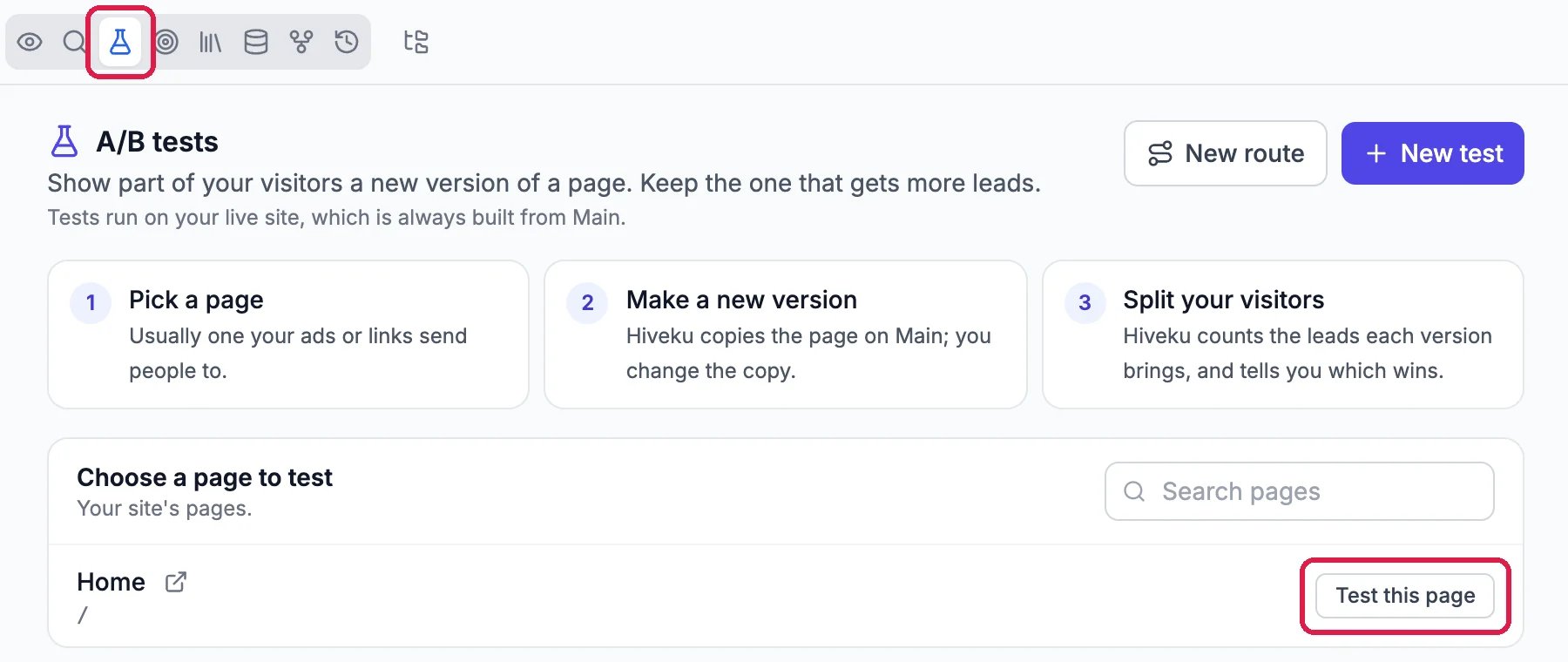
Open your site in the builder and click the flask icon, A/B tests, in the row of icons above the preview. You can also click the site’s name at the top, then A/B Tests. Under Choose a page to test, click Test this page next to the page, usually one your ads or links send people to.
The site's pages, ready to test
2
Choose the second version
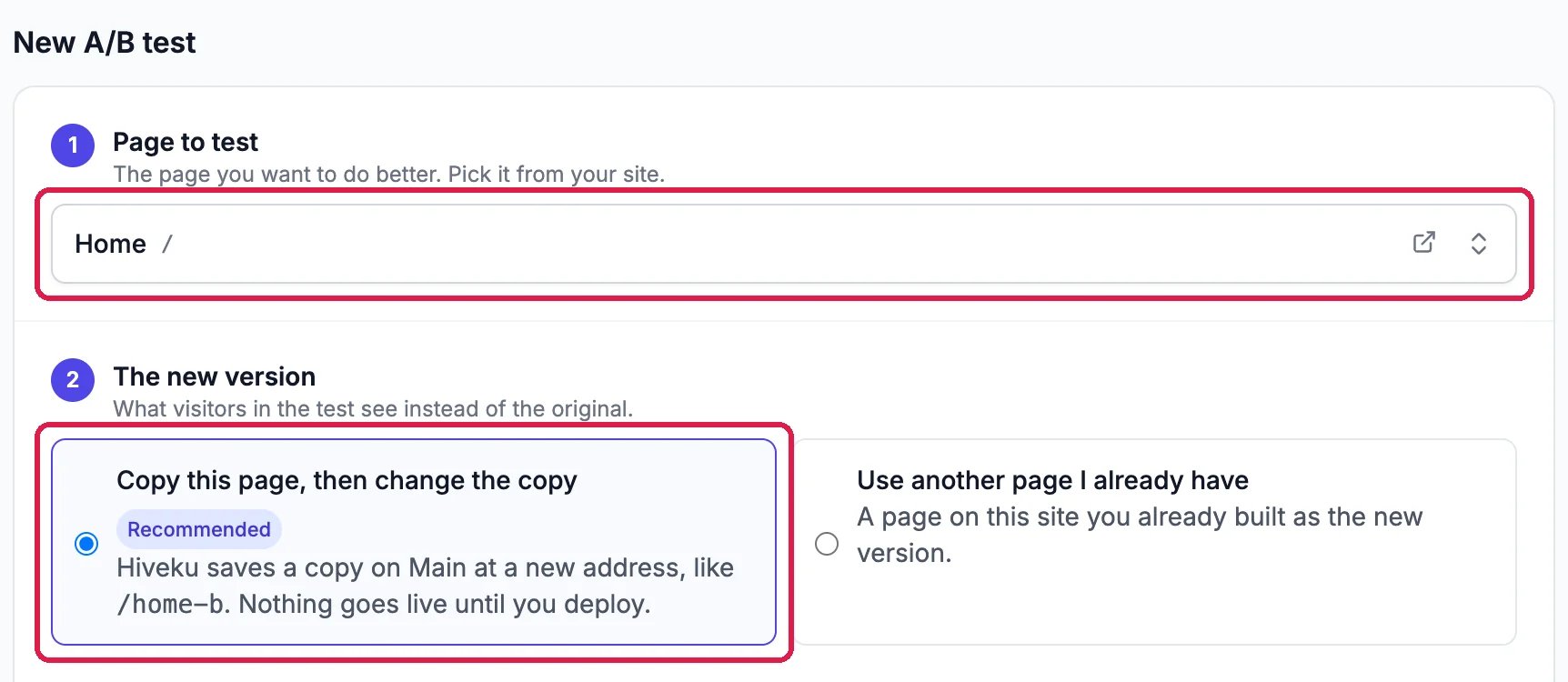
Page to test shows the page you picked. Under The new version, leave Copy this page, then change the copy: Hiveku saves a copy at a new address, such as /home-b, for you to change. If you’ve already built the second page, choose Use another page I already have instead.
The home page, and a copy to change
3
Choose who's in the test and what counts as a win
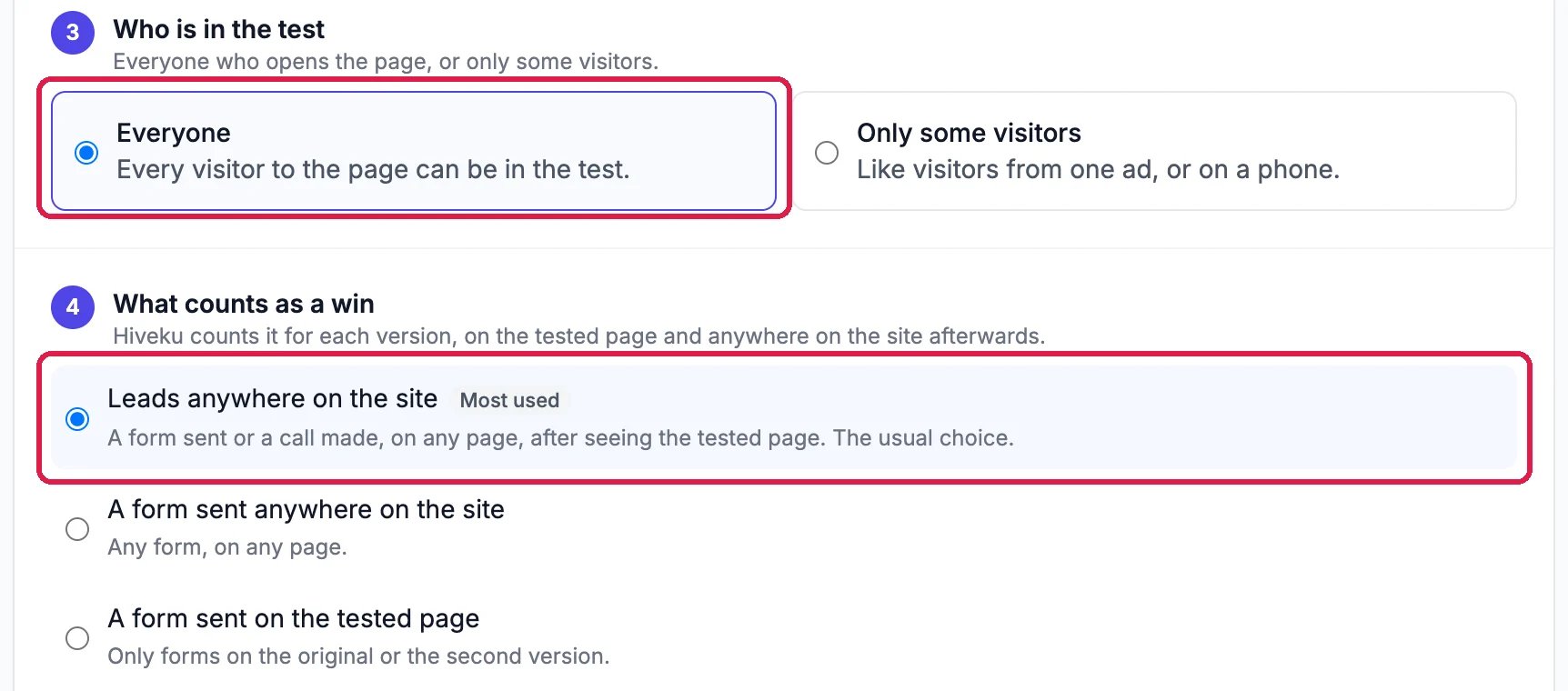
Under Who is in the test, leave Everyone, or choose Only some visitors to test only people from one ad or on a phone. Under What counts as a win, Leads anywhere on the site is the usual choice: a form sent or a call made, on any page, after seeing the tested page. Other choices include a form on the tested page only, reaching a page such as a thank-you page, phone calls, time on the page and how far people scroll.
Everyone, and leads anywhere on the site
4
Split your visitors, then create the test
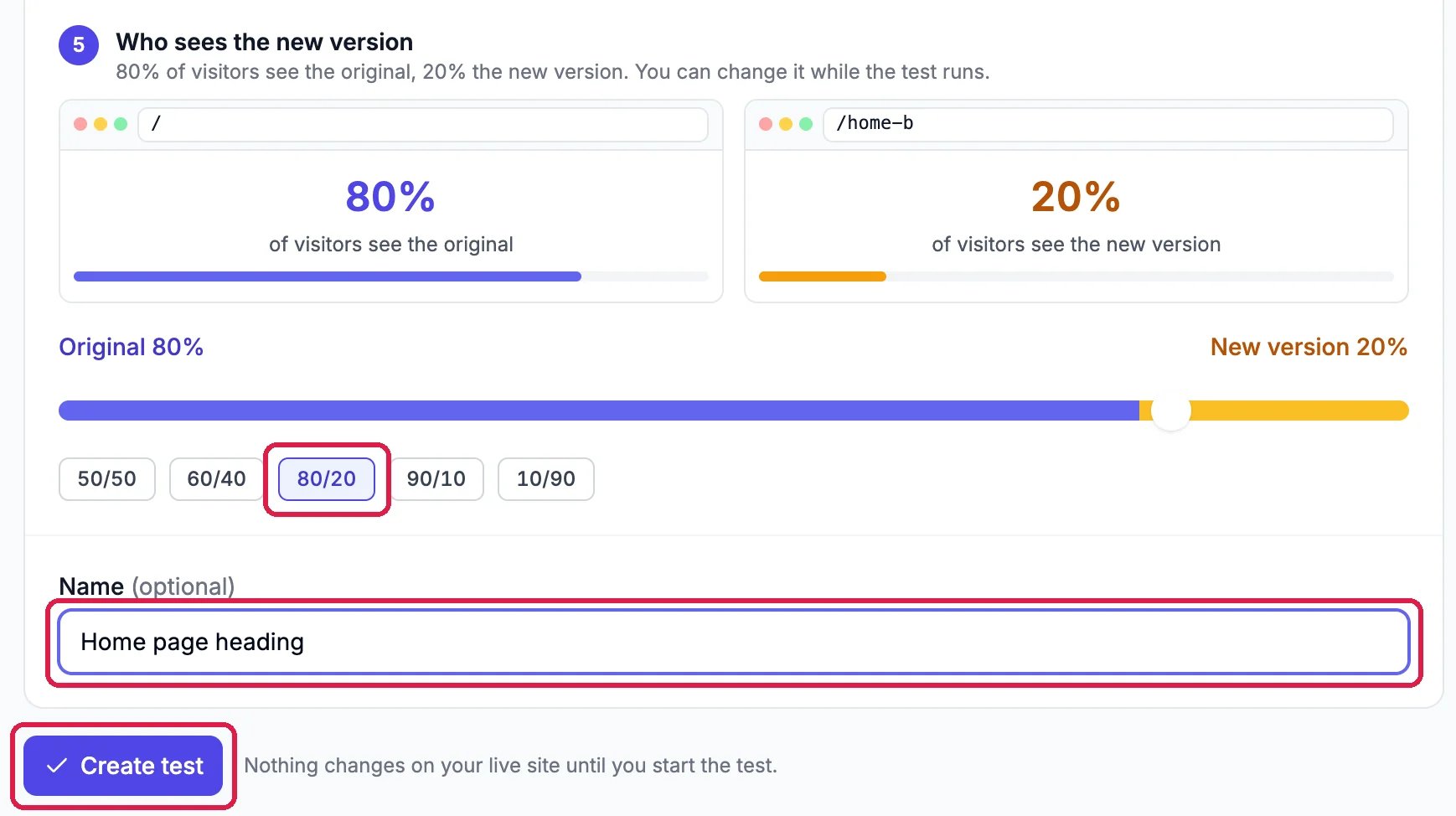
Under Who sees the new version, pick how to share visitors between the two pages, or drag the slider. 50/50 gets an answer soonest; 80/20 shows the new version to fewer people while you try it out. You can change the split while the test runs. Give the test a name if you like, then click Create test.
80% see the original, 20% the new version
Nothing changes on your live site yet. Hiveku copies the page and opens the new test as a Draft, with the original and Version B side by side.
The test page lists what’s left to do before the test can start.
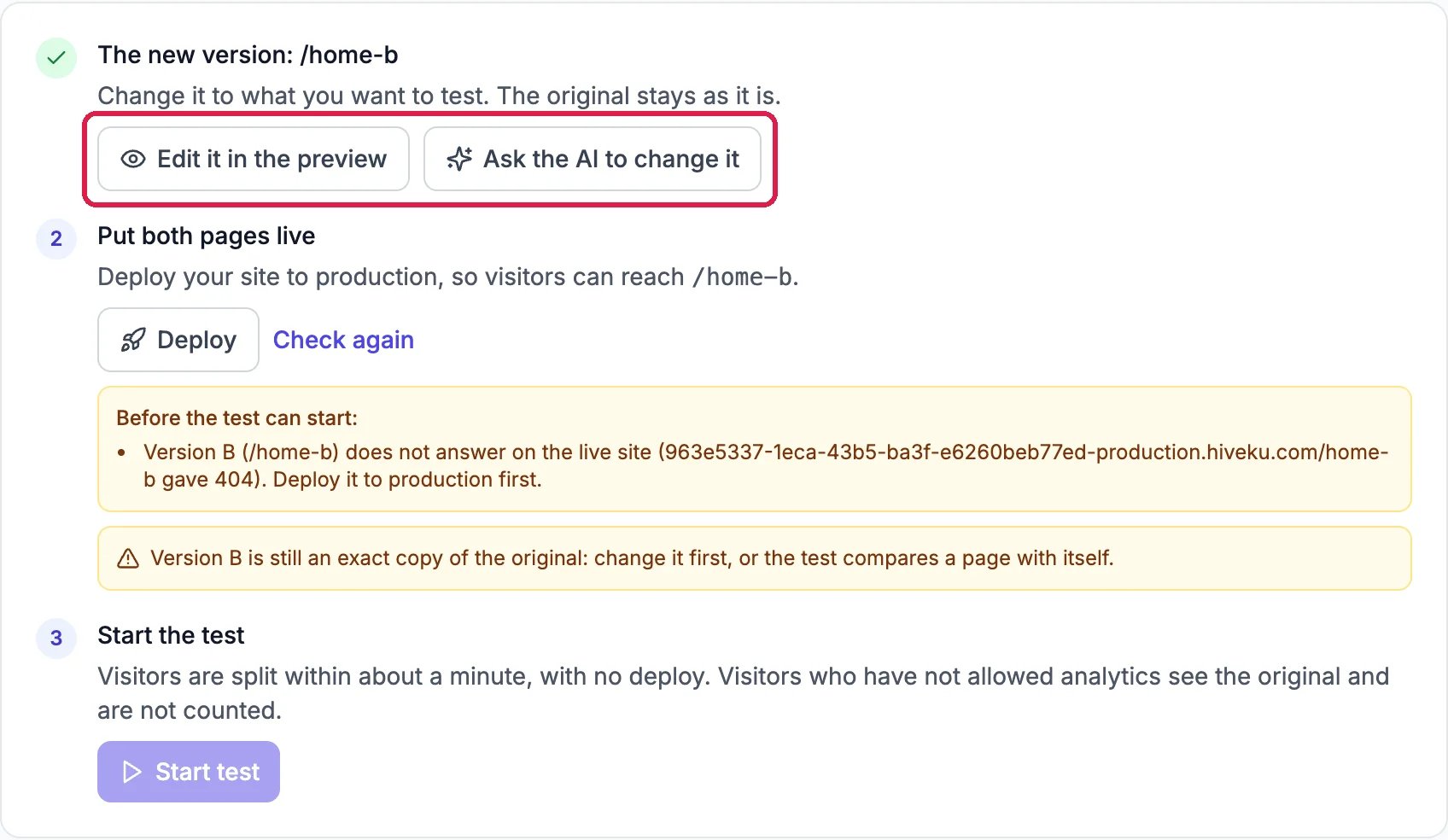
Three steps to start
1
Change the copy
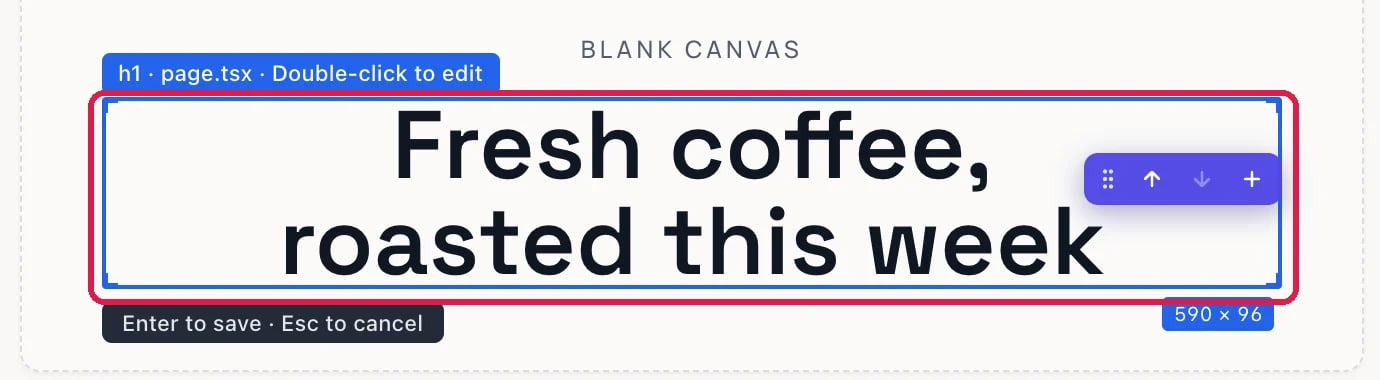
Click Edit it in the preview to change Version B yourself, or Ask the AI to change it to describe the change. The preview opens on /home-b. To change text yourself, click Visual Edit, double-click the text, type, and press Enter to save.
Version B's new heading
Change only what you want to test, such as the heading or the offer. If you change several things at once, you won’t know which one made the difference.
2
Put both pages live
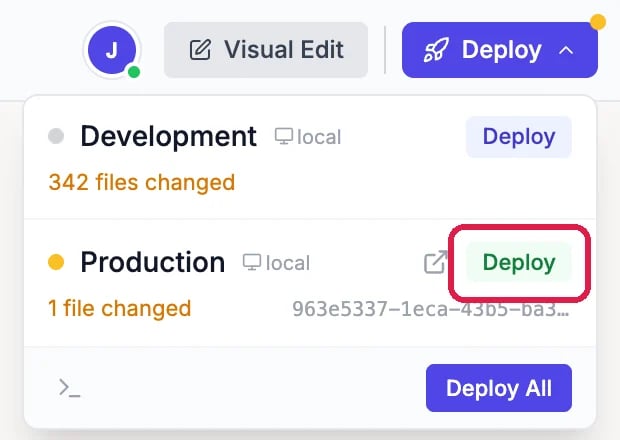
Click Deploy in the test’s list, then Deploy on the Production row. See Publish Your Changes.
Deploy to Production
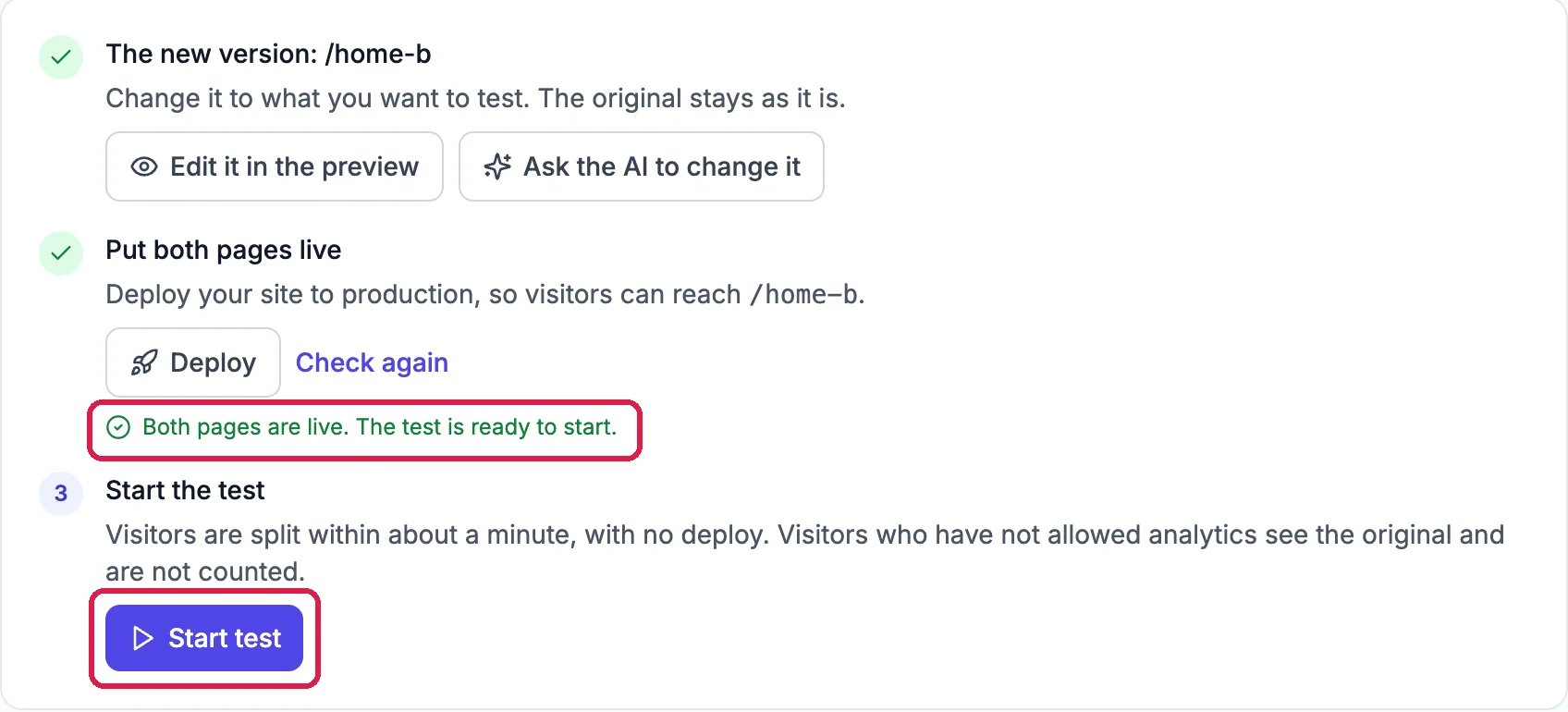
When the deploy is live, go back to the test and click Check again. It reads Both pages are live. The test is ready to start.
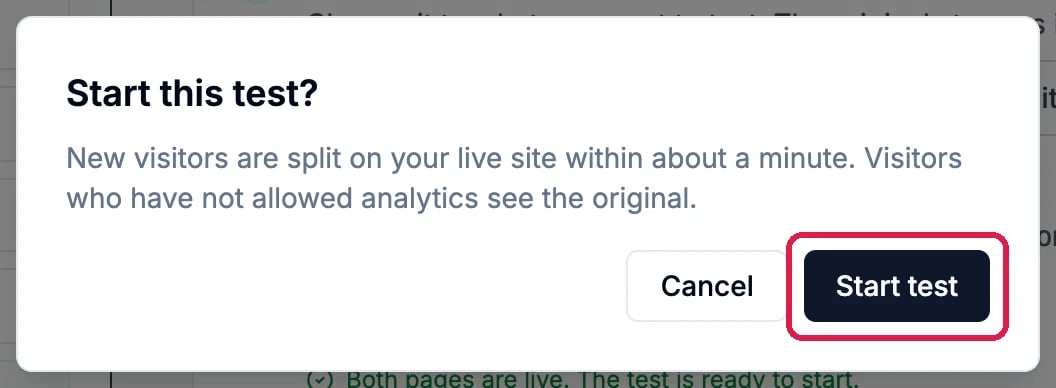
Click Start test, and Start test again to confirm. Visitors are split within about a minute, with no new deploy.
Hiveku asks first
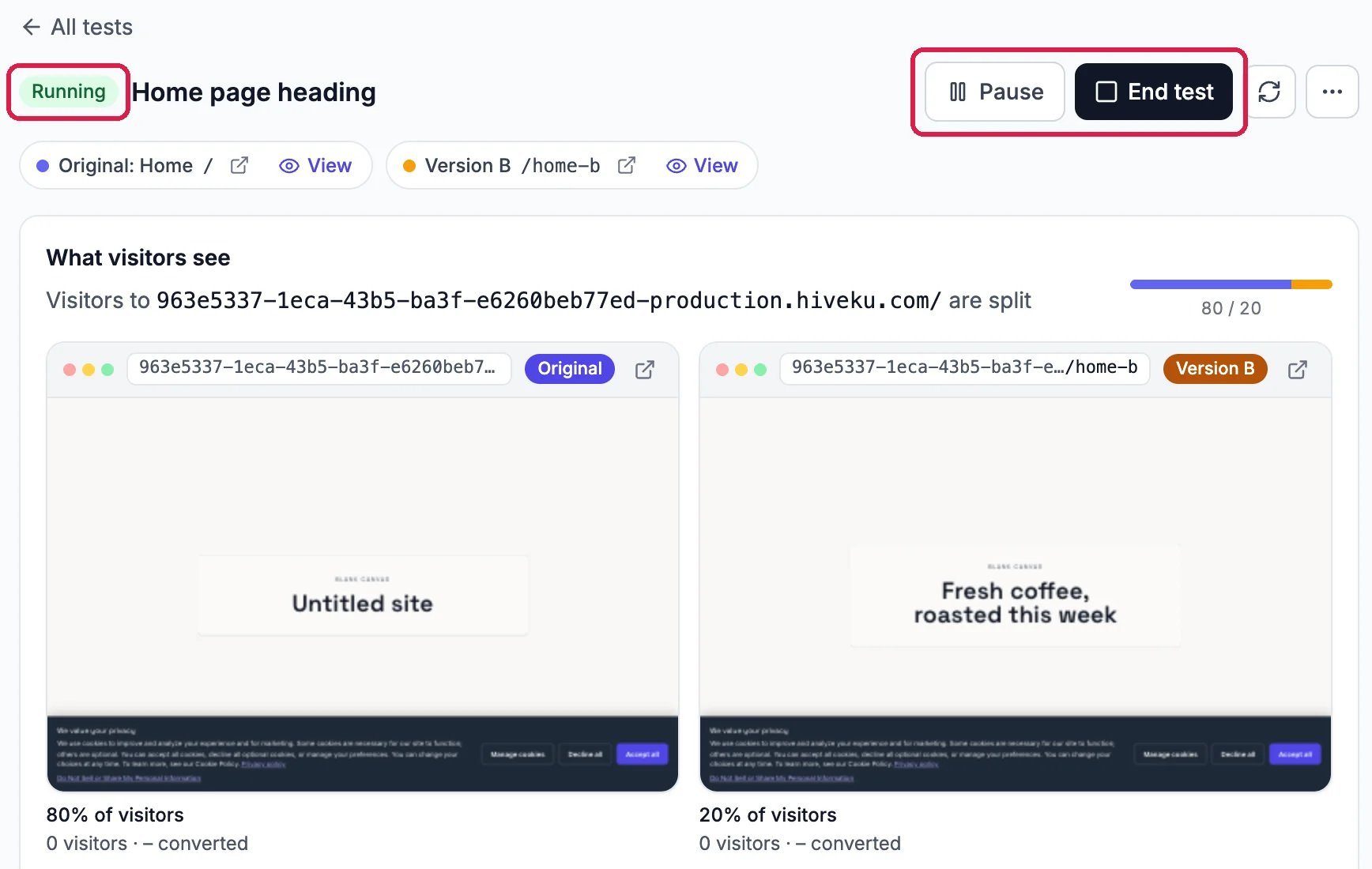
Visitors who haven’t accepted analytics cookies always see the original and aren’t counted.The test is now Running. What visitors see shows both live pages and how many visitors each has had. Pause stops the split until you resume the test; End test stops it for good.
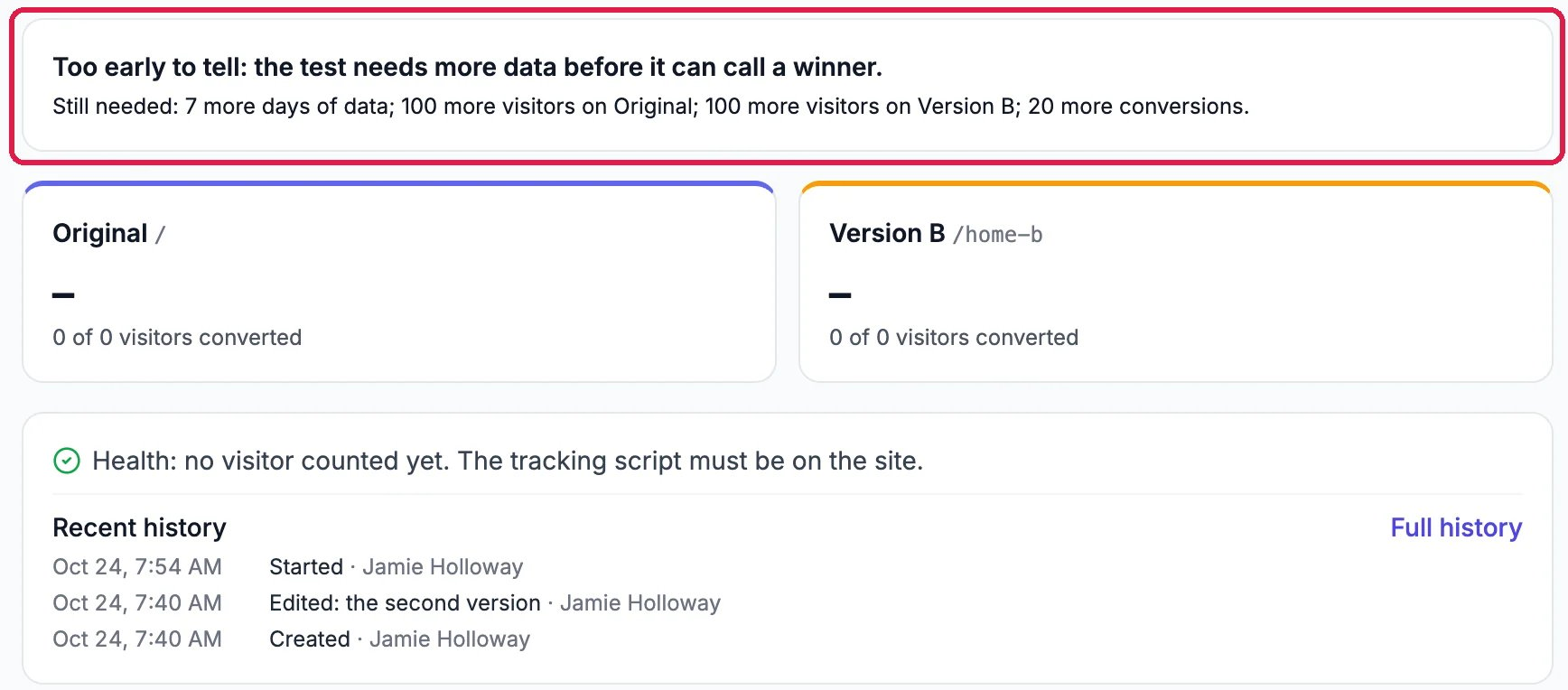
Below the pages, Hiveku says whether there’s a winner yet, and if not, what it still needs: at least 7 days, 100 visitors on each version and 20 conversions in all. Each version’s card shows how many of its visitors converted. Recent history lists when the test was created, changed and started, and by whom.
Too early to tell, at the start
Let the test run until Hiveku calls a winner. Ending it early means guessing.
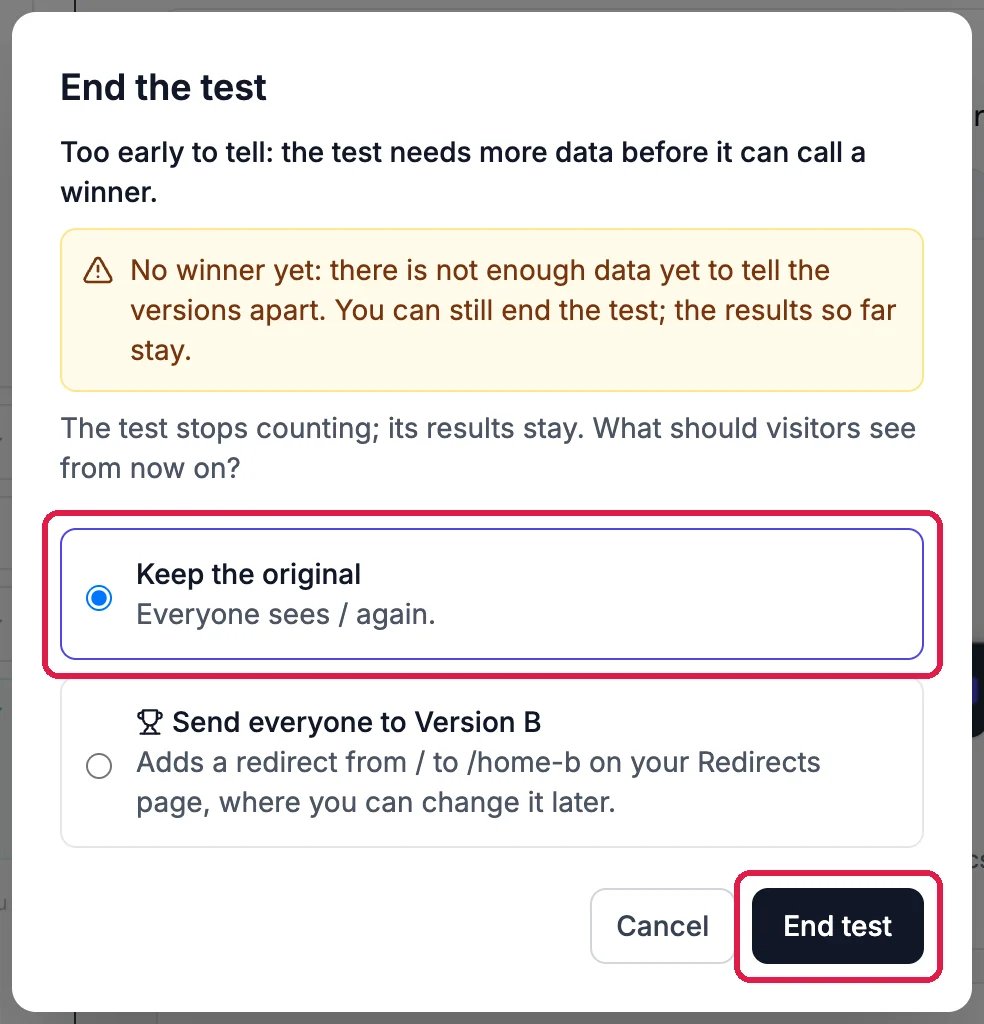
Click End test. Hiveku shows the result so far, then asks which page everyone should see: Keep the original, or Send everyone to Version B, which adds a redirect from the original address to Version B on your Redirects page. Click End test. The results stay.
Keeping the original
2
Remove the test copy
If you kept the original, the copy isn’t needed any more. Click Remove the test copy, then Remove the test copy again to confirm.
The test has ended
The copy is removed in the builder at once. It stays on your live site until your next production deploy: click Deploy to do that now.
{"docsConfig":{"theme":"maple","$schema":"https://mintlify.com/docs.json","name":"Hiveku Builder","colors":{"primary":"#F9A825","light":"#FBC02D","dark":"#F57F17"},"logo":{"light":"https://mintcdn.com/locusdigital/AodgChCDua_G2sAP/images/hiveku-logo-light.svg?fit=max\u0026auto=format\u0026n=AodgChCDua_G2sAP\u0026q=85\u0026s=5d69f2502059f8269d670b35be741ad2","dark":"https://mintcdn.com/locusdigital/AodgChCDua_G2sAP/images/hiveku-logo-dark.svg?fit=max\u0026auto=format\u0026n=AodgChCDua_G2sAP\u0026q=85\u0026s=a78cef8cf1c9ae13d3dcbe31c3ca498d","href":"https://hiveku.com"},"favicon":"https://mintcdn.com/locusdigital/AodgChCDua_G2sAP/images/favicon.svg?fit=max\u0026auto=format\u0026n=AodgChCDua_G2sAP\u0026q=85\u0026s=1b959fd7abfd376351a1216e201aa8cb","api":{},"appearance":{"default":"system"},"seo":{},"styling":{"latex":true},"navigation":{"global":{"anchors":[{"anchor":"Changelog","icon":"list","href":"/changelog"},{"anchor":"App","icon":"arrow-up-right-from-square","href":"https://app.hiveku.com"}]},"pages":[]}},"deployment":{"deploymentMetadataValue":{"subdomain":"locusdigital","hasAudioNarration":false,"actualSubdomain":"locusdigital","customDomains":["docs.hiveku.com"],"gitSource":{"type":"github","owner":"locus2012","repo":"hiveku_docs","deployBranch":"main","contentDirectory":"","isPrivate":true,"mountPath":"","label":""},"chroma":{"liveDeploymentHistoryId":"6adce6bfed3bac47b4076445","collectionId":"41df8b40-e34a-4425-a677-05442ea3721c","schemaVersion":"v3","latestBuiltDeploymentHistoryId":"6adce6bfed3bac47b4076445"},"entitlements":{"AI_CHAT":{"status":"DISABLED"}},"buildId":"6adceb05a22308d93b4ef0b8","clientVersion":"0.0.3964","searchFilterCounts":[{"language":"default","tag":"Documentation","count":461},{"language":"default","tag":"How-Tos","count":271},{"language":"default","tag":"Growing Your Business","count":29},{"language":"default","tag":"Site Builder: Next Steps","count":27},{"language":"default","tag":"Integrations","count":25},{"language":"default","tag":"Websites: Step by Step","count":23},{"language":"default","tag":"Commerce: Step by Step","count":19},{"language":"default","tag":"Marketing: Step by Step","count":17},{"language":"default","tag":"Integrations \u0026 BYOK","count":16},{"language":"default","tag":"Helpdesk","count":15}]},"assistantConfig":{"enableAskAiButton":false,"enableStarterQuestions":false,"enableContextualStarterQuestions":false,"enableAskAiSearchBar":true},"hasChatPermissions":false,"hasWebMcpPermissions":false,"toggles":[{"name":"kill-isr","enabled":true,"variant":{"name":"disabled","enabled":false,"feature_enabled":true},"impressionData":false},{"name":"agent-mintlify-slack","enabled":true,"variant":{"name":"disabled","enabled":false,"feature_enabled":true},"impressionData":false},{"name":"editor-v7-file-tree","enabled":true,"variant":{"name":"disabled","enabled":false,"feature_enabled":true},"impressionData":false},{"name":"agent-integrations-settings","enabled":true,"variant":{"name":"disabled","enabled":false,"feature_enabled":true},"impressionData":false},{"name":"automations-pr-grouping","enabled":true,"variant":{"name":"disabled","enabled":false,"feature_enabled":true},"impressionData":false},{"name":"custom-prefix","enabled":true,"variant":{"name":"disabled","enabled":false,"feature_enabled":true},"impressionData":false},{"name":"analytics-v7","enabled":true,"variant":{"name":"disabled","enabled":false,"feature_enabled":true},"impressionData":false},{"name":"user-flows-analytics","enabled":true,"variant":{"name":"disabled","enabled":false,"feature_enabled":true},"impressionData":false},{"name":"no-publish-flow","enabled":true,"variant":{"name":"disabled","enabled":false,"feature_enabled":true},"impressionData":false},{"name":"workos-onboarding","enabled":true,"variant":{"name":"disabled","enabled":false,"feature_enabled":true},"impressionData":false},{"name":"llms-txt-v2","enabled":true,"variant":{"name":"disabled","enabled":false,"feature_enabled":true},"impressionData":false},{"name":"pause-universal-search-reconcile","enabled":true,"variant":{"name":"disabled","enabled":false,"feature_enabled":true},"impressionData":false},{"name":"snapshot-serving-live","enabled":true,"variant":{"name":"disabled","enabled":false,"feature_enabled":true},"impressionData":false},{"name":"stripTemperatureMiddleware","enabled":true,"variant":{"name":"disabled","enabled":false,"feature_enabled":true},"impressionData":false},{"name":"per-site-search-delta","enabled":true,"variant":{"name":"disabled","enabled":false,"feature_enabled":true},"impressionData":false},{"name":"support-platform-pylon-zendesk","enabled":true,"variant":{"name":"disabled","enabled":false,"feature_enabled":true},"impressionData":false},{"name":"snapshot-serving","enabled":true,"variant":{"name":"disabled","enabled":false,"feature_enabled":true},"impressionData":false},{"name":"instant-rollback","enabled":true,"variant":{"name":"disabled","enabled":false,"feature_enabled":true},"impressionData":false},{"name":"granular-notifications-server","enabled":true,"variant":{"name":"disabled","enabled":false,"feature_enabled":true},"impressionData":false},{"name":"granular-notifications","enabled":true,"variant":{"name":"disabled","enabled":false,"feature_enabled":true},"impressionData":false},{"name":"editor-private-page-search","enabled":true,"variant":{"name":"disabled","enabled":false,"feature_enabled":true},"impressionData":false},{"name":"automations-fable","enabled":true,"variant":{"name":"disabled","enabled":false,"feature_enabled":true},"impressionData":false},{"name":"fixed-ai-action-pricing","enabled":true,"variant":{"name":"disabled","enabled":false,"feature_enabled":true},"impressionData":false},{"name":"automation-resolve-merge-conflict","enabled":true,"variant":{"name":"disabled","enabled":false,"feature_enabled":true},"impressionData":false},{"name":"scoped-publishing","enabled":true,"variant":{"name":"disabled","enabled":false,"feature_enabled":true},"impressionData":false},{"name":"mintql","enabled":true,"variant":{"name":"disabled","enabled":false,"feature_enabled":true},"impressionData":false},{"name":"page-level-analytics","enabled":true,"variant":{"name":"disabled","enabled":false,"feature_enabled":true},"impressionData":false},{"name":"editor-version-history-v2","enabled":true,"variant":{"name":"disabled","enabled":false,"feature_enabled":true},"impressionData":false},{"name":"editor-nav-generations","enabled":true,"variant":{"name":"disabled","enabled":false,"feature_enabled":true},"impressionData":false},{"name":"billing-page-v2","enabled":true,"variant":{"name":"disabled","enabled":false,"feature_enabled":true},"impressionData":false},{"name":"workspace-projects","enabled":true,"variant":{"name":"disabled","enabled":false,"feature_enabled":true},"impressionData":false},{"name":"assistant-v5","enabled":true,"variant":{"name":"disabled","enabled":false,"feature_enabled":true},"impressionData":false},{"name":"byok-sep-25","enabled":true,"variant":{"name":"disabled","enabled":false,"feature_enabled":true},"impressionData":false},{"name":"fork-pr-previews","enabled":true,"variant":{"name":"disabled","enabled":false,"feature_enabled":true},"impressionData":false},{"name":"revalidation-jwt","enabled":true,"variant":{"name":"disabled","enabled":false,"feature_enabled":true},"impressionData":false},{"name":"vite-origin","enabled":true,"variant":{"name":"disabled","enabled":false,"feature_enabled":true},"impressionData":false},{"name":"editor-agent-model-picker","enabled":true,"variant":{"name":"disabled","enabled":false,"feature_enabled":true},"impressionData":false},{"name":"billing-updated-9-15","enabled":true,"variant":{"name":"disabled","enabled":false,"feature_enabled":true},"impressionData":false},{"name":"hobby-abuse-scan","enabled":true,"variant":{"name":"disabled","enabled":false,"feature_enabled":true},"impressionData":false},{"name":"dashboard-inbox","enabled":true,"variant":{"name":"disabled","enabled":false,"feature_enabled":true},"impressionData":false}],"isAtlas":false,"googleFontsInlined":false},"customCss":[],"page":{"pagePath":"how-tos/websites/test-two-versions","slug":"/how-tos/websites/test-two-versions","pageMetadata":{"title":"Test Two Versions of a Page","sidebarTitle":"Test Two Versions of a Page","description":"Show part of your visitors a second version of a page, count the leads each version brings, and keep the one that wins","href":"/how-tos/websites/test-two-versions"},"description":{"compiledSource":"\"use strict\";\nconst {jsx: _jsx} = arguments[0];\nconst {useMDXComponents: _provideComponents} = arguments[0];\nfunction _createMdxContent(props) {\n const _components = {\n p: \"p\",\n ..._provideComponents(),\n ...props.components\n };\n return _jsx(_components.p, {\n children: \"Show part of your visitors a second version of a page, count the leads each version brings, and keep the one that wins\"\n });\n}\nfunction MDXContent(props = {}) {\n const {wrapper: MDXLayout} = {\n ..._provideComponents(),\n ...props.components\n };\n return MDXLayout ? _jsx(MDXLayout, {\n ...props,\n children: _jsx(_createMdxContent, {\n ...props\n })\n }) : _createMdxContent(props);\n}\nreturn {\n default: MDXContent\n};\n","frontmatter":{},"scope":{}},"pageType":"default","mdx":{"mdxSource":{"compiledSource":"\"use strict\";const{Fragment:_Fragment,jsx:_jsx,jsxs:_jsxs}=arguments[0];const{useMDXComponents:_provideComponents}=arguments[0];function _createMdxContent(props){const _components={a:`a`,li:`li`,p:`p`,strong:`strong`,ul:`ul`,..._provideComponents(),...props.components},{Frame,Heading,Note,OptimizedImage,Step,Steps}=_components;if(!Frame)_missingMdxReference(`Frame`,true);if(!Heading)_missingMdxReference(`Heading`,true);if(!Note)_missingMdxReference(`Note`,true);if(!OptimizedImage)_missingMdxReference(`OptimizedImage`,true);if(!Step)_missingMdxReference(`Step`,true);if(!Steps)_missingMdxReference(`Steps`,true);return _jsxs(_Fragment,{children:[_jsx(_components.p,{children:`Not sure which heading, offer or layout brings more customers? An A/B test shows the page you have now to some visitors and a second version, Version B, to the rest. Hiveku counts the leads each version brings and tells you when one is clearly better.`}),`\n`,_jsx(_components.p,{children:`This guide tests a new home page heading on a test site: “Fresh coffee, roasted this week” against the original.`}),`\n`,_jsx(Note,{children:_jsx(_components.p,{children:`Tests run on your live site, so the site needs to be deployed to production before a test can start.`})}),`\n`,_jsx(Heading,{level:`2`,id:`set-up-the-test`,children:`Set up the test`}),`\n`,_jsxs(Steps,{children:[_jsxs(Step,{title:`Pick the page`,children:[_jsxs(_components.p,{children:[`Open your site in the builder and click the flask icon, `,_jsx(_components.strong,{children:`A/B tests`}),`, in the row of icons above the preview. You can also click the site’s name at the top, then `,_jsx(_components.strong,{children:`A/B Tests`}),`. Under `,_jsx(_components.strong,{children:`Choose a page to test`}),`, click `,_jsx(_components.strong,{children:`Test this page`}),` next to the page, usually one your ads or links send people to.`]}),_jsx(Frame,{caption:`The site's pages, ready to test`,children:_jsx(OptimizedImage,{src:`https://mintcdn.com/locusdigital/jo8JiV1CyrC5LQHx/images/how-tos/websites/ab-01-pick-closeup.webp?fit=max\u0026auto=format\u0026n=jo8JiV1CyrC5LQHx\u0026q=85\u0026s=c93dc6ad2085b9440e2bf88fdfbc9a84`,alt:`The A/B tests icon, outlined; A/B tests: Show part of your visitors a new version of a page. Keep the one that gets more leads. Steps 1 Pick a page, 2 Make a new version, 3 Split your visitors; Choose a page to test, Home /, with Test this page, outlined`,width:`900`,\"data-og-width\":`1800`,\"data-og-height\":`760`,\"data-path\":`images/how-tos/websites/ab-01-pick-closeup.webp`,\"data-optimize\":`true`,\"data-opv\":`3`,srcset:`https://mintcdn.com/locusdigital/jo8JiV1CyrC5LQHx/images/how-tos/websites/ab-01-pick-closeup.webp?w=280\u0026fit=max\u0026auto=format\u0026n=jo8JiV1CyrC5LQHx\u0026q=85\u0026s=3ea28f6eb52a05261e988feafdcfe293 280w, https://mintcdn.com/locusdigital/jo8JiV1CyrC5LQHx/images/how-tos/websites/ab-01-pick-closeup.webp?w=560\u0026fit=max\u0026auto=format\u0026n=jo8JiV1CyrC5LQHx\u0026q=85\u0026s=f16beb9c475ae96c684a2773137af554 560w, https://mintcdn.com/locusdigital/jo8JiV1CyrC5LQHx/images/how-tos/websites/ab-01-pick-closeup.webp?w=840\u0026fit=max\u0026auto=format\u0026n=jo8JiV1CyrC5LQHx\u0026q=85\u0026s=baa49c2f96cf207f09a68526bddb20a6 840w, https://mintcdn.com/locusdigital/jo8JiV1CyrC5LQHx/images/how-tos/websites/ab-01-pick-closeup.webp?w=1100\u0026fit=max\u0026auto=format\u0026n=jo8JiV1CyrC5LQHx\u0026q=85\u0026s=ec7099b43cbe35985fde200b3a1dbbe1 1100w, https://mintcdn.com/locusdigital/jo8JiV1CyrC5LQHx/images/how-tos/websites/ab-01-pick-closeup.webp?w=1650\u0026fit=max\u0026auto=format\u0026n=jo8JiV1CyrC5LQHx\u0026q=85\u0026s=d1efaa4be4854d8e438884b96cd02fc3 1650w, https://mintcdn.com/locusdigital/jo8JiV1CyrC5LQHx/images/how-tos/websites/ab-01-pick-closeup.webp?w=2500\u0026fit=max\u0026auto=format\u0026n=jo8JiV1CyrC5LQHx\u0026q=85\u0026s=01dba6ec0bbf504d4a1c15d7a72a233a 2500w`})})]}),_jsxs(Step,{title:`Choose the second version`,children:[_jsxs(_components.p,{children:[_jsx(_components.strong,{children:`Page to test`}),` shows the page you picked. Under `,_jsx(_components.strong,{children:`The new version`}),`, leave `,_jsx(_components.strong,{children:`Copy this page, then change the copy`}),`: Hiveku saves a copy at a new address, such as /home-b, for you to change. If you’ve already built the second page, choose `,_jsx(_components.strong,{children:`Use another page I already have`}),` instead.`]}),_jsx(Frame,{caption:`The home page, and a copy to change`,children:_jsx(OptimizedImage,{src:`https://mintcdn.com/locusdigital/jo8JiV1CyrC5LQHx/images/how-tos/websites/ab-02-form-closeup.webp?fit=max\u0026auto=format\u0026n=jo8JiV1CyrC5LQHx\u0026q=85\u0026s=bbc1c8987c815a7c8810aaf14faf7196`,alt:`New A/B test: 1 Page to test, Home /, outlined; 2 The new version: Copy this page, then change the copy, Recommended, Hiveku saves a copy on Main at a new address, like /home-b. Nothing goes live until you deploy, selected and outlined; and Use another page I already have`,width:`862`,\"data-og-width\":`1724`,\"data-og-height\":`750`,\"data-path\":`images/how-tos/websites/ab-02-form-closeup.webp`,\"data-optimize\":`true`,\"data-opv\":`3`,srcset:`https://mintcdn.com/locusdigital/jo8JiV1CyrC5LQHx/images/how-tos/websites/ab-02-form-closeup.webp?w=280\u0026fit=max\u0026auto=format\u0026n=jo8JiV1CyrC5LQHx\u0026q=85\u0026s=4c63ffb6a58c5732e510157bb28e4594 280w, https://mintcdn.com/locusdigital/jo8JiV1CyrC5LQHx/images/how-tos/websites/ab-02-form-closeup.webp?w=560\u0026fit=max\u0026auto=format\u0026n=jo8JiV1CyrC5LQHx\u0026q=85\u0026s=bb33cfea3cd0c67db981c7a047a16583 560w, https://mintcdn.com/locusdigital/jo8JiV1CyrC5LQHx/images/how-tos/websites/ab-02-form-closeup.webp?w=840\u0026fit=max\u0026auto=format\u0026n=jo8JiV1CyrC5LQHx\u0026q=85\u0026s=888596330f7acf20082bc76dcb94e620 840w, https://mintcdn.com/locusdigital/jo8JiV1CyrC5LQHx/images/how-tos/websites/ab-02-form-closeup.webp?w=1100\u0026fit=max\u0026auto=format\u0026n=jo8JiV1CyrC5LQHx\u0026q=85\u0026s=fa9c98a130661819d248fb6463878fc8 1100w, https://mintcdn.com/locusdigital/jo8JiV1CyrC5LQHx/images/how-tos/websites/ab-02-form-closeup.webp?w=1650\u0026fit=max\u0026auto=format\u0026n=jo8JiV1CyrC5LQHx\u0026q=85\u0026s=dcee2183efe36d877df451e9ee3ad677 1650w, https://mintcdn.com/locusdigital/jo8JiV1CyrC5LQHx/images/how-tos/websites/ab-02-form-closeup.webp?w=2500\u0026fit=max\u0026auto=format\u0026n=jo8JiV1CyrC5LQHx\u0026q=85\u0026s=8aafb275550ad7f31d929a5da4cd752e 2500w`})})]}),_jsxs(Step,{title:`Choose who's in the test and what counts as a win`,children:[_jsxs(_components.p,{children:[`Under `,_jsx(_components.strong,{children:`Who is in the test`}),`, leave `,_jsx(_components.strong,{children:`Everyone`}),`, or choose `,_jsx(_components.strong,{children:`Only some visitors`}),` to test only people from one ad or on a phone. Under `,_jsx(_components.strong,{children:`What counts as a win`}),`, `,_jsx(_components.strong,{children:`Leads anywhere on the site`}),` is the usual choice: a form sent or a call made, on any page, after seeing the tested page. Other choices include a form on the tested page only, reaching a page such as a thank-you page, phone calls, time on the page and how far people scroll.`]}),_jsx(Frame,{caption:`Everyone, and leads anywhere on the site`,children:_jsx(OptimizedImage,{src:`https://mintcdn.com/locusdigital/jo8JiV1CyrC5LQHx/images/how-tos/websites/ab-03-goal-closeup.webp?fit=max\u0026auto=format\u0026n=jo8JiV1CyrC5LQHx\u0026q=85\u0026s=b62eb26acda2cde0f265b460bb2f7480`,alt:`3 Who is in the test: Everyone, Every visitor to the page can be in the test, selected and outlined, and Only some visitors; 4 What counts as a win: Leads anywhere on the site, Most used, A form sent or a call made, on any page, after seeing the tested page, selected and outlined; then A form sent anywhere on the site and A form sent on the tested page`,width:`862`,\"data-og-width\":`1724`,\"data-og-height\":`760`,\"data-path\":`images/how-tos/websites/ab-03-goal-closeup.webp`,\"data-optimize\":`true`,\"data-opv\":`3`,srcset:`https://mintcdn.com/locusdigital/jo8JiV1CyrC5LQHx/images/how-tos/websites/ab-03-goal-closeup.webp?w=280\u0026fit=max\u0026auto=format\u0026n=jo8JiV1CyrC5LQHx\u0026q=85\u0026s=df69ee183a551221730871bea7741267 280w, https://mintcdn.com/locusdigital/jo8JiV1CyrC5LQHx/images/how-tos/websites/ab-03-goal-closeup.webp?w=560\u0026fit=max\u0026auto=format\u0026n=jo8JiV1CyrC5LQHx\u0026q=85\u0026s=04c4b256b5a88c563fa58f028a063ad1 560w, https://mintcdn.com/locusdigital/jo8JiV1CyrC5LQHx/images/how-tos/websites/ab-03-goal-closeup.webp?w=840\u0026fit=max\u0026auto=format\u0026n=jo8JiV1CyrC5LQHx\u0026q=85\u0026s=08c072558ac28f31c1959d2d6ece2a3f 840w, https://mintcdn.com/locusdigital/jo8JiV1CyrC5LQHx/images/how-tos/websites/ab-03-goal-closeup.webp?w=1100\u0026fit=max\u0026auto=format\u0026n=jo8JiV1CyrC5LQHx\u0026q=85\u0026s=fee996525bd13e0814e56d83cdada128 1100w, https://mintcdn.com/locusdigital/jo8JiV1CyrC5LQHx/images/how-tos/websites/ab-03-goal-closeup.webp?w=1650\u0026fit=max\u0026auto=format\u0026n=jo8JiV1CyrC5LQHx\u0026q=85\u0026s=c8147e30f952420249d4a7e842585fcc 1650w, https://mintcdn.com/locusdigital/jo8JiV1CyrC5LQHx/images/how-tos/websites/ab-03-goal-closeup.webp?w=2500\u0026fit=max\u0026auto=format\u0026n=jo8JiV1CyrC5LQHx\u0026q=85\u0026s=ea8aba4b5cce9d1f027d0c861370978e 2500w`})})]}),_jsxs(Step,{title:`Split your visitors, then create the test`,children:[_jsxs(_components.p,{children:[`Under `,_jsx(_components.strong,{children:`Who sees the new version`}),`, pick how to share visitors between the two pages, or drag the slider. `,_jsx(_components.strong,{children:`50/50`}),` gets an answer soonest; `,_jsx(_components.strong,{children:`80/20`}),` shows the new version to fewer people while you try it out. You can change the split while the test runs. Give the test a name if you like, then click `,_jsx(_components.strong,{children:`Create test`}),`.`]}),_jsx(Frame,{caption:`80% see the original, 20% the new version`,children:_jsx(OptimizedImage,{src:`https://mintcdn.com/locusdigital/jo8JiV1CyrC5LQHx/images/how-tos/websites/ab-04-split-closeup.webp?fit=max\u0026auto=format\u0026n=jo8JiV1CyrC5LQHx\u0026q=85\u0026s=a57dfb0938ab2de78d0faa1614489aca`,alt:`5 Who sees the new version: 80% of visitors see the original /, 20% the new version /home-b, with the slider and the choices 50/50, 60/40, 80/20 (outlined), 90/10 and 10/90; Name (optional) Home page heading, outlined; and Create test, outlined, with Nothing changes on your live site until you start the test`,width:`869`,\"data-og-width\":`1738`,\"data-og-height\":`974`,\"data-path\":`images/how-tos/websites/ab-04-split-closeup.webp`,\"data-optimize\":`true`,\"data-opv\":`3`,srcset:`https://mintcdn.com/locusdigital/jo8JiV1CyrC5LQHx/images/how-tos/websites/ab-04-split-closeup.webp?w=280\u0026fit=max\u0026auto=format\u0026n=jo8JiV1CyrC5LQHx\u0026q=85\u0026s=d58991129823e2c550c3784a2e62eed6 280w, https://mintcdn.com/locusdigital/jo8JiV1CyrC5LQHx/images/how-tos/websites/ab-04-split-closeup.webp?w=560\u0026fit=max\u0026auto=format\u0026n=jo8JiV1CyrC5LQHx\u0026q=85\u0026s=4b12dc3f4cc7132da8591607e24daea7 560w, https://mintcdn.com/locusdigital/jo8JiV1CyrC5LQHx/images/how-tos/websites/ab-04-split-closeup.webp?w=840\u0026fit=max\u0026auto=format\u0026n=jo8JiV1CyrC5LQHx\u0026q=85\u0026s=bb302128e9dc5c100841cbfd47930812 840w, https://mintcdn.com/locusdigital/jo8JiV1CyrC5LQHx/images/how-tos/websites/ab-04-split-closeup.webp?w=1100\u0026fit=max\u0026auto=format\u0026n=jo8JiV1CyrC5LQHx\u0026q=85\u0026s=8eab96fb580a6446c27e5f811866d260 1100w, https://mintcdn.com/locusdigital/jo8JiV1CyrC5LQHx/images/how-tos/websites/ab-04-split-closeup.webp?w=1650\u0026fit=max\u0026auto=format\u0026n=jo8JiV1CyrC5LQHx\u0026q=85\u0026s=2e53dd7b1b9c12d420ff4c99dc969a75 1650w, https://mintcdn.com/locusdigital/jo8JiV1CyrC5LQHx/images/how-tos/websites/ab-04-split-closeup.webp?w=2500\u0026fit=max\u0026auto=format\u0026n=jo8JiV1CyrC5LQHx\u0026q=85\u0026s=8b691e14798f82dfc3601c0c46aa6c42 2500w`})}),_jsxs(_components.p,{children:[`Nothing changes on your live site yet. Hiveku copies the page and opens the new test as a `,_jsx(_components.strong,{children:`Draft`}),`, with the original and `,_jsx(_components.strong,{children:`Version B`}),` side by side.`]}),_jsx(Frame,{caption:`The draft test and its two pages`,children:_jsx(OptimizedImage,{src:`https://mintcdn.com/locusdigital/jo8JiV1CyrC5LQHx/images/how-tos/websites/ab-05-draft-closeup.webp?fit=max\u0026auto=format\u0026n=jo8JiV1CyrC5LQHx\u0026q=85\u0026s=2179365309f31cb3b65c0dfc3c1a0b2d`,alt:`Draft, Home page heading; Original: Home / with View, and Version B /home-b with View, outlined`,width:`869`,\"data-og-width\":`1738`,\"data-og-height\":`260`,\"data-path\":`images/how-tos/websites/ab-05-draft-closeup.webp`,\"data-optimize\":`true`,\"data-opv\":`3`,srcset:`https://mintcdn.com/locusdigital/jo8JiV1CyrC5LQHx/images/how-tos/websites/ab-05-draft-closeup.webp?w=280\u0026fit=max\u0026auto=format\u0026n=jo8JiV1CyrC5LQHx\u0026q=85\u0026s=50bde658566e7e467f154f05fa550f1e 280w, https://mintcdn.com/locusdigital/jo8JiV1CyrC5LQHx/images/how-tos/websites/ab-05-draft-closeup.webp?w=560\u0026fit=max\u0026auto=format\u0026n=jo8JiV1CyrC5LQHx\u0026q=85\u0026s=6290accf159c42ef6be3d2bb964747b5 560w, https://mintcdn.com/locusdigital/jo8JiV1CyrC5LQHx/images/how-tos/websites/ab-05-draft-closeup.webp?w=840\u0026fit=max\u0026auto=format\u0026n=jo8JiV1CyrC5LQHx\u0026q=85\u0026s=4bd9373971bffd3edc6eb66ac14b691f 840w, https://mintcdn.com/locusdigital/jo8JiV1CyrC5LQHx/images/how-tos/websites/ab-05-draft-closeup.webp?w=1100\u0026fit=max\u0026auto=format\u0026n=jo8JiV1CyrC5LQHx\u0026q=85\u0026s=1325b684ae7308eb364cbe1d635e845f 1100w, https://mintcdn.com/locusdigital/jo8JiV1CyrC5LQHx/images/how-tos/websites/ab-05-draft-closeup.webp?w=1650\u0026fit=max\u0026auto=format\u0026n=jo8JiV1CyrC5LQHx\u0026q=85\u0026s=829a587a1f8c0a9dc0ae4cd143c22d91 1650w, https://mintcdn.com/locusdigital/jo8JiV1CyrC5LQHx/images/how-tos/websites/ab-05-draft-closeup.webp?w=2500\u0026fit=max\u0026auto=format\u0026n=jo8JiV1CyrC5LQHx\u0026q=85\u0026s=de916a2b9a452e85a725faea75d92fcd 2500w`})})]})]}),`\n`,_jsx(Heading,{level:`2`,id:`change-version-b`,children:`Change Version B`}),`\n`,_jsx(_components.p,{children:`The test page lists what’s left to do before the test can start.`}),`\n`,_jsx(Frame,{caption:`Three steps to start`,children:_jsx(OptimizedImage,{src:`https://mintcdn.com/locusdigital/jo8JiV1CyrC5LQHx/images/how-tos/websites/ab-06-checklist-closeup.webp?fit=max\u0026auto=format\u0026n=jo8JiV1CyrC5LQHx\u0026q=85\u0026s=01890d26bac3decc78c282917304973b`,alt:`The new version: /home-b, Change it to what you want to test. The original stays as it is, with Edit it in the preview and Ask the AI to change it, outlined; 2 Put both pages live, with Deploy and Check again, and Before the test can start: Version B does not answer on the live site yet, and Version B is still an exact copy of the original; 3 Start the test, with Start test greyed out`,width:`848`,\"data-og-width\":`1696`,\"data-og-height\":`984`,\"data-path\":`images/how-tos/websites/ab-06-checklist-closeup.webp`,\"data-optimize\":`true`,\"data-opv\":`3`,srcset:`https://mintcdn.com/locusdigital/jo8JiV1CyrC5LQHx/images/how-tos/websites/ab-06-checklist-closeup.webp?w=280\u0026fit=max\u0026auto=format\u0026n=jo8JiV1CyrC5LQHx\u0026q=85\u0026s=c8658321bc5149c53510b970aec9f56c 280w, https://mintcdn.com/locusdigital/jo8JiV1CyrC5LQHx/images/how-tos/websites/ab-06-checklist-closeup.webp?w=560\u0026fit=max\u0026auto=format\u0026n=jo8JiV1CyrC5LQHx\u0026q=85\u0026s=2a7c1100d450e81f3f7b3307d112475b 560w, https://mintcdn.com/locusdigital/jo8JiV1CyrC5LQHx/images/how-tos/websites/ab-06-checklist-closeup.webp?w=840\u0026fit=max\u0026auto=format\u0026n=jo8JiV1CyrC5LQHx\u0026q=85\u0026s=c43787573219fada66a49f7f6818349b 840w, https://mintcdn.com/locusdigital/jo8JiV1CyrC5LQHx/images/how-tos/websites/ab-06-checklist-closeup.webp?w=1100\u0026fit=max\u0026auto=format\u0026n=jo8JiV1CyrC5LQHx\u0026q=85\u0026s=dd47a5c4a4b7b3c7163a61eb71483561 1100w, https://mintcdn.com/locusdigital/jo8JiV1CyrC5LQHx/images/how-tos/websites/ab-06-checklist-closeup.webp?w=1650\u0026fit=max\u0026auto=format\u0026n=jo8JiV1CyrC5LQHx\u0026q=85\u0026s=3437a6a8fdb304950206f002f1768063 1650w, https://mintcdn.com/locusdigital/jo8JiV1CyrC5LQHx/images/how-tos/websites/ab-06-checklist-closeup.webp?w=2500\u0026fit=max\u0026auto=format\u0026n=jo8JiV1CyrC5LQHx\u0026q=85\u0026s=f62ef7ec8cbfef915926d13055bbb3a6 2500w`})}),`\n`,_jsxs(Steps,{children:[_jsxs(Step,{title:`Change the copy`,children:[_jsxs(_components.p,{children:[`Click `,_jsx(_components.strong,{children:`Edit it in the preview`}),` to change Version B yourself, or `,_jsx(_components.strong,{children:`Ask the AI to change it`}),` to describe the change. The preview opens on /home-b. To change text yourself, click `,_jsx(_components.strong,{children:`Visual Edit`}),`, double-click the text, type, and press Enter to save.`]}),_jsx(Frame,{caption:`Version B's new heading`,children:_jsx(OptimizedImage,{src:`https://mintcdn.com/locusdigital/jo8JiV1CyrC5LQHx/images/how-tos/websites/ab-07-edit-closeup.webp?fit=max\u0026auto=format\u0026n=jo8JiV1CyrC5LQHx\u0026q=85\u0026s=62c28878f3181e9040069f945fec4f00`,alt:`The heading on /home-b being edited in place, now Fresh coffee, roasted this week, outlined, with Enter to save, Esc to cancel`,width:`690`,\"data-og-width\":`1380`,\"data-og-height\":`380`,\"data-path\":`images/how-tos/websites/ab-07-edit-closeup.webp`,\"data-optimize\":`true`,\"data-opv\":`3`,srcset:`https://mintcdn.com/locusdigital/jo8JiV1CyrC5LQHx/images/how-tos/websites/ab-07-edit-closeup.webp?w=280\u0026fit=max\u0026auto=format\u0026n=jo8JiV1CyrC5LQHx\u0026q=85\u0026s=a21e627d19ddfdd4ba065a99ac1abf12 280w, https://mintcdn.com/locusdigital/jo8JiV1CyrC5LQHx/images/how-tos/websites/ab-07-edit-closeup.webp?w=560\u0026fit=max\u0026auto=format\u0026n=jo8JiV1CyrC5LQHx\u0026q=85\u0026s=c1676f654e2a872b2a5c43eddac9dad3 560w, https://mintcdn.com/locusdigital/jo8JiV1CyrC5LQHx/images/how-tos/websites/ab-07-edit-closeup.webp?w=840\u0026fit=max\u0026auto=format\u0026n=jo8JiV1CyrC5LQHx\u0026q=85\u0026s=d339f3e2d91ffd0e606c896472916ad9 840w, https://mintcdn.com/locusdigital/jo8JiV1CyrC5LQHx/images/how-tos/websites/ab-07-edit-closeup.webp?w=1100\u0026fit=max\u0026auto=format\u0026n=jo8JiV1CyrC5LQHx\u0026q=85\u0026s=03c9673f2d4f1a45967b2a8428b162e8 1100w, https://mintcdn.com/locusdigital/jo8JiV1CyrC5LQHx/images/how-tos/websites/ab-07-edit-closeup.webp?w=1650\u0026fit=max\u0026auto=format\u0026n=jo8JiV1CyrC5LQHx\u0026q=85\u0026s=b31b541d3bca3f35a6654c69d67470c8 1650w, https://mintcdn.com/locusdigital/jo8JiV1CyrC5LQHx/images/how-tos/websites/ab-07-edit-closeup.webp?w=2500\u0026fit=max\u0026auto=format\u0026n=jo8JiV1CyrC5LQHx\u0026q=85\u0026s=ad8ce53802df6d770684cff9f7654e9e 2500w`})}),_jsx(_components.p,{children:`Change only what you want to test, such as the heading or the offer. If you change several things at once, you won’t know which one made the difference.`})]}),_jsxs(Step,{title:`Put both pages live`,children:[_jsxs(_components.p,{children:[`Click `,_jsx(_components.strong,{children:`Deploy`}),` in the test’s list, then `,_jsx(_components.strong,{children:`Deploy`}),` on the `,_jsx(_components.strong,{children:`Production`}),` row. See `,_jsx(_components.a,{href:`/how-tos/site-builder/publish`,children:`Publish Your Changes`}),`.`]}),_jsx(Frame,{caption:`Deploy to Production`,children:_jsx(OptimizedImage,{src:`https://mintcdn.com/locusdigital/jo8JiV1CyrC5LQHx/images/how-tos/websites/ab-08-deploy-closeup.webp?fit=max\u0026auto=format\u0026n=jo8JiV1CyrC5LQHx\u0026q=85\u0026s=01b1347d64400604735a787bdec1c9c7`,alt:`The Deploy menu: Development, and Production with 1 file changed and its Deploy button, outlined; and Deploy All`,width:`310`,\"data-og-width\":`620`,\"data-og-height\":`440`,\"data-path\":`images/how-tos/websites/ab-08-deploy-closeup.webp`,\"data-optimize\":`true`,\"data-opv\":`3`,srcset:`https://mintcdn.com/locusdigital/jo8JiV1CyrC5LQHx/images/how-tos/websites/ab-08-deploy-closeup.webp?w=280\u0026fit=max\u0026auto=format\u0026n=jo8JiV1CyrC5LQHx\u0026q=85\u0026s=4b194504ea7b0cd360432253893db797 280w, https://mintcdn.com/locusdigital/jo8JiV1CyrC5LQHx/images/how-tos/websites/ab-08-deploy-closeup.webp?w=560\u0026fit=max\u0026auto=format\u0026n=jo8JiV1CyrC5LQHx\u0026q=85\u0026s=fff6856d2fc2fa64cbcd06c19a66b979 560w, https://mintcdn.com/locusdigital/jo8JiV1CyrC5LQHx/images/how-tos/websites/ab-08-deploy-closeup.webp?w=840\u0026fit=max\u0026auto=format\u0026n=jo8JiV1CyrC5LQHx\u0026q=85\u0026s=f1d256bf2bc238df7083f9a6e4028404 840w, https://mintcdn.com/locusdigital/jo8JiV1CyrC5LQHx/images/how-tos/websites/ab-08-deploy-closeup.webp?w=1100\u0026fit=max\u0026auto=format\u0026n=jo8JiV1CyrC5LQHx\u0026q=85\u0026s=138fa49fdebd875062c35bddb8cf92ca 1100w, https://mintcdn.com/locusdigital/jo8JiV1CyrC5LQHx/images/how-tos/websites/ab-08-deploy-closeup.webp?w=1650\u0026fit=max\u0026auto=format\u0026n=jo8JiV1CyrC5LQHx\u0026q=85\u0026s=db3ce877abbb2c1ec04c9567f110ec2e 1650w, https://mintcdn.com/locusdigital/jo8JiV1CyrC5LQHx/images/how-tos/websites/ab-08-deploy-closeup.webp?w=2500\u0026fit=max\u0026auto=format\u0026n=jo8JiV1CyrC5LQHx\u0026q=85\u0026s=af1e0cd0cc1b81dd7e8d484627e82e75 2500w`})}),_jsxs(_components.p,{children:[`When the deploy is live, go back to the test and click `,_jsx(_components.strong,{children:`Check again`}),`. It reads `,_jsx(_components.strong,{children:`Both pages are live. The test is ready to start.`})]}),_jsx(Frame,{caption:`Ready to start`,children:_jsx(OptimizedImage,{src:`https://mintcdn.com/locusdigital/jo8JiV1CyrC5LQHx/images/how-tos/websites/ab-09-ready-closeup.webp?fit=max\u0026auto=format\u0026n=jo8JiV1CyrC5LQHx\u0026q=85\u0026s=9fc0ae7afc0fc162abd6e48fc570dfbc`,alt:`The new version: /home-b and Put both pages live, both ticked; Both pages are live. The test is ready to start., outlined; 3 Start the test: Visitors are split within about a minute, with no deploy. Visitors who have not allowed analytics see the original and are not counted; and Start test, outlined`,width:`848`,\"data-og-width\":`1696`,\"data-og-height\":`770`,\"data-path\":`images/how-tos/websites/ab-09-ready-closeup.webp`,\"data-optimize\":`true`,\"data-opv\":`3`,srcset:`https://mintcdn.com/locusdigital/jo8JiV1CyrC5LQHx/images/how-tos/websites/ab-09-ready-closeup.webp?w=280\u0026fit=max\u0026auto=format\u0026n=jo8JiV1CyrC5LQHx\u0026q=85\u0026s=3ecc7a14f229d82ca953bfaa636aa7dd 280w, https://mintcdn.com/locusdigital/jo8JiV1CyrC5LQHx/images/how-tos/websites/ab-09-ready-closeup.webp?w=560\u0026fit=max\u0026auto=format\u0026n=jo8JiV1CyrC5LQHx\u0026q=85\u0026s=8700b736cf197bddf6930d40a1e39d1d 560w, https://mintcdn.com/locusdigital/jo8JiV1CyrC5LQHx/images/how-tos/websites/ab-09-ready-closeup.webp?w=840\u0026fit=max\u0026auto=format\u0026n=jo8JiV1CyrC5LQHx\u0026q=85\u0026s=e8b3c3cc94fd6b66673550f55885af68 840w, https://mintcdn.com/locusdigital/jo8JiV1CyrC5LQHx/images/how-tos/websites/ab-09-ready-closeup.webp?w=1100\u0026fit=max\u0026auto=format\u0026n=jo8JiV1CyrC5LQHx\u0026q=85\u0026s=b36d7ede6f8d6ab355d5ede9fb3c61d6 1100w, https://mintcdn.com/locusdigital/jo8JiV1CyrC5LQHx/images/how-tos/websites/ab-09-ready-closeup.webp?w=1650\u0026fit=max\u0026auto=format\u0026n=jo8JiV1CyrC5LQHx\u0026q=85\u0026s=3a2cf7a396ccaf031d0b805132efffbc 1650w, https://mintcdn.com/locusdigital/jo8JiV1CyrC5LQHx/images/how-tos/websites/ab-09-ready-closeup.webp?w=2500\u0026fit=max\u0026auto=format\u0026n=jo8JiV1CyrC5LQHx\u0026q=85\u0026s=149c1d39de91707c538134154bd80e97 2500w`})})]})]}),`\n`,_jsx(Heading,{level:`2`,id:`start-the-test`,children:`Start the test`}),`\n`,_jsxs(_components.p,{children:[`Click `,_jsx(_components.strong,{children:`Start test`}),`, and `,_jsx(_components.strong,{children:`Start test`}),` again to confirm. Visitors are split within about a minute, with no new deploy.`]}),`\n`,_jsx(Frame,{caption:`Hiveku asks first`,children:_jsx(OptimizedImage,{src:`https://mintcdn.com/locusdigital/jo8JiV1CyrC5LQHx/images/how-tos/websites/ab-10-confirm-closeup.webp?fit=max\u0026auto=format\u0026n=jo8JiV1CyrC5LQHx\u0026q=85\u0026s=060c3ad84b82955d8cc06d15b7a54259`,alt:`Start this test? New visitors are split on your live site within about a minute. Visitors who have not allowed analytics see the original. Cancel, and Start test, outlined`,width:`528`,\"data-og-width\":`1056`,\"data-og-height\":`388`,\"data-path\":`images/how-tos/websites/ab-10-confirm-closeup.webp`,\"data-optimize\":`true`,\"data-opv\":`3`,srcset:`https://mintcdn.com/locusdigital/jo8JiV1CyrC5LQHx/images/how-tos/websites/ab-10-confirm-closeup.webp?w=280\u0026fit=max\u0026auto=format\u0026n=jo8JiV1CyrC5LQHx\u0026q=85\u0026s=6ca8d56d3a9f9f63e7def55a48f7fe72 280w, https://mintcdn.com/locusdigital/jo8JiV1CyrC5LQHx/images/how-tos/websites/ab-10-confirm-closeup.webp?w=560\u0026fit=max\u0026auto=format\u0026n=jo8JiV1CyrC5LQHx\u0026q=85\u0026s=32734128f7a38d74dc92bd6948be1c10 560w, https://mintcdn.com/locusdigital/jo8JiV1CyrC5LQHx/images/how-tos/websites/ab-10-confirm-closeup.webp?w=840\u0026fit=max\u0026auto=format\u0026n=jo8JiV1CyrC5LQHx\u0026q=85\u0026s=b79a0853f2471f3a536384cee16f2e18 840w, https://mintcdn.com/locusdigital/jo8JiV1CyrC5LQHx/images/how-tos/websites/ab-10-confirm-closeup.webp?w=1100\u0026fit=max\u0026auto=format\u0026n=jo8JiV1CyrC5LQHx\u0026q=85\u0026s=8254b640a60b595698aeee9d39315537 1100w, https://mintcdn.com/locusdigital/jo8JiV1CyrC5LQHx/images/how-tos/websites/ab-10-confirm-closeup.webp?w=1650\u0026fit=max\u0026auto=format\u0026n=jo8JiV1CyrC5LQHx\u0026q=85\u0026s=6aad1f78fa11c59186c9e199f1954f1f 1650w, https://mintcdn.com/locusdigital/jo8JiV1CyrC5LQHx/images/how-tos/websites/ab-10-confirm-closeup.webp?w=2500\u0026fit=max\u0026auto=format\u0026n=jo8JiV1CyrC5LQHx\u0026q=85\u0026s=25f1831b56026ea3d19f690c273c0f4e 2500w`})}),`\n`,_jsx(_components.p,{children:`Visitors who haven’t accepted analytics cookies always see the original and aren’t counted.`}),`\n`,_jsxs(_components.p,{children:[`The test is now `,_jsx(_components.strong,{children:`Running`}),`. `,_jsx(_components.strong,{children:`What visitors see`}),` shows both live pages and how many visitors each has had. `,_jsx(_components.strong,{children:`Pause`}),` stops the split until you resume the test; `,_jsx(_components.strong,{children:`End test`}),` stops it for good.`]}),`\n`,_jsx(Frame,{caption:`The running test, with both live pages`,children:_jsx(OptimizedImage,{src:`https://mintcdn.com/locusdigital/jo8JiV1CyrC5LQHx/images/how-tos/websites/ab-11-running-closeup.webp?fit=max\u0026auto=format\u0026n=jo8JiV1CyrC5LQHx\u0026q=85\u0026s=304cd214a06079c1aa856a83db31a3d4`,alt:`Running, outlined, Home page heading, with Pause and End test, outlined; What visitors see: the original page with the heading Untitled site and Version B with Fresh coffee, roasted this week; 80% of visitors, 0 visitors, and 20% of visitors, 0 visitors`,width:`868`,\"data-og-width\":`1736`,\"data-og-height\":`1100`,\"data-path\":`images/how-tos/websites/ab-11-running-closeup.webp`,\"data-optimize\":`true`,\"data-opv\":`3`,srcset:`https://mintcdn.com/locusdigital/jo8JiV1CyrC5LQHx/images/how-tos/websites/ab-11-running-closeup.webp?w=280\u0026fit=max\u0026auto=format\u0026n=jo8JiV1CyrC5LQHx\u0026q=85\u0026s=c99730ab47f9b925a2b5f3b357eb560d 280w, https://mintcdn.com/locusdigital/jo8JiV1CyrC5LQHx/images/how-tos/websites/ab-11-running-closeup.webp?w=560\u0026fit=max\u0026auto=format\u0026n=jo8JiV1CyrC5LQHx\u0026q=85\u0026s=32eeb5eda4918491b065ca19a8c55fc7 560w, https://mintcdn.com/locusdigital/jo8JiV1CyrC5LQHx/images/how-tos/websites/ab-11-running-closeup.webp?w=840\u0026fit=max\u0026auto=format\u0026n=jo8JiV1CyrC5LQHx\u0026q=85\u0026s=f9f9746dbd6d13fc1f9fc6f489e0f5d7 840w, https://mintcdn.com/locusdigital/jo8JiV1CyrC5LQHx/images/how-tos/websites/ab-11-running-closeup.webp?w=1100\u0026fit=max\u0026auto=format\u0026n=jo8JiV1CyrC5LQHx\u0026q=85\u0026s=198c21c842808f9bb7234330add91d58 1100w, https://mintcdn.com/locusdigital/jo8JiV1CyrC5LQHx/images/how-tos/websites/ab-11-running-closeup.webp?w=1650\u0026fit=max\u0026auto=format\u0026n=jo8JiV1CyrC5LQHx\u0026q=85\u0026s=7f75df6446cad4ef81d2d9aede5d8dff 1650w, https://mintcdn.com/locusdigital/jo8JiV1CyrC5LQHx/images/how-tos/websites/ab-11-running-closeup.webp?w=2500\u0026fit=max\u0026auto=format\u0026n=jo8JiV1CyrC5LQHx\u0026q=85\u0026s=6318441f3164255f154d8e08dd1e50ad 2500w`})}),`\n`,_jsx(Heading,{level:`2`,id:`read-the-results`,children:`Read the results`}),`\n`,_jsxs(_components.p,{children:[`Below the pages, Hiveku says whether there’s a winner yet, and if not, what it still needs: at least 7 days, 100 visitors on each version and 20 conversions in all. Each version’s card shows how many of its visitors converted. `,_jsx(_components.strong,{children:`Recent history`}),` lists when the test was created, changed and started, and by whom.`]}),`\n`,_jsx(Frame,{caption:`Too early to tell, at the start`,children:_jsx(OptimizedImage,{src:`https://mintcdn.com/locusdigital/jo8JiV1CyrC5LQHx/images/how-tos/websites/ab-12-results-closeup.webp?fit=max\u0026auto=format\u0026n=jo8JiV1CyrC5LQHx\u0026q=85\u0026s=1c026c8e140bf0fa8b6a508b06d75e6f`,alt:`Too early to tell: the test needs more data before it can call a winner. Still needed: 7 more days of data; 100 more visitors on Original; 100 more visitors on Version B; 20 more conversions, outlined; the cards Original / and Version B /home-b, each 0 of 0 visitors converted; Health: no visitor counted yet; and Recent history: Started, Edited: the second version, Created`,width:`868`,\"data-og-width\":`1736`,\"data-og-height\":`764`,\"data-path\":`images/how-tos/websites/ab-12-results-closeup.webp`,\"data-optimize\":`true`,\"data-opv\":`3`,srcset:`https://mintcdn.com/locusdigital/jo8JiV1CyrC5LQHx/images/how-tos/websites/ab-12-results-closeup.webp?w=280\u0026fit=max\u0026auto=format\u0026n=jo8JiV1CyrC5LQHx\u0026q=85\u0026s=9b8e763cbd82365ec4cbaef2a62c4814 280w, https://mintcdn.com/locusdigital/jo8JiV1CyrC5LQHx/images/how-tos/websites/ab-12-results-closeup.webp?w=560\u0026fit=max\u0026auto=format\u0026n=jo8JiV1CyrC5LQHx\u0026q=85\u0026s=eee7c9a03a2cb16490bec6d68a8f3f76 560w, https://mintcdn.com/locusdigital/jo8JiV1CyrC5LQHx/images/how-tos/websites/ab-12-results-closeup.webp?w=840\u0026fit=max\u0026auto=format\u0026n=jo8JiV1CyrC5LQHx\u0026q=85\u0026s=724fb2f5da6ff0bd1cfc78995e27140a 840w, https://mintcdn.com/locusdigital/jo8JiV1CyrC5LQHx/images/how-tos/websites/ab-12-results-closeup.webp?w=1100\u0026fit=max\u0026auto=format\u0026n=jo8JiV1CyrC5LQHx\u0026q=85\u0026s=3b109266caf538a9e2055361169a2920 1100w, https://mintcdn.com/locusdigital/jo8JiV1CyrC5LQHx/images/how-tos/websites/ab-12-results-closeup.webp?w=1650\u0026fit=max\u0026auto=format\u0026n=jo8JiV1CyrC5LQHx\u0026q=85\u0026s=b84a3f48f9928c40fa6073b67ed7ec16 1650w, https://mintcdn.com/locusdigital/jo8JiV1CyrC5LQHx/images/how-tos/websites/ab-12-results-closeup.webp?w=2500\u0026fit=max\u0026auto=format\u0026n=jo8JiV1CyrC5LQHx\u0026q=85\u0026s=14f5df5c179a46b132f41f6a85b42eb1 2500w`})}),`\n`,_jsx(_components.p,{children:`Let the test run until Hiveku calls a winner. Ending it early means guessing.`}),`\n`,_jsx(Heading,{level:`2`,id:`end-the-test`,children:`End the test`}),`\n`,_jsxs(Steps,{children:[_jsxs(Step,{title:`Choose what visitors see from now on`,children:[_jsxs(_components.p,{children:[`Click `,_jsx(_components.strong,{children:`End test`}),`. Hiveku shows the result so far, then asks which page everyone should see: `,_jsx(_components.strong,{children:`Keep the original`}),`, or `,_jsx(_components.strong,{children:`Send everyone to Version B`}),`, which adds a redirect from the original address to Version B on your `,_jsx(_components.a,{href:`/how-tos/websites/redirect-an-old-address`,children:`Redirects`}),` page. Click `,_jsx(_components.strong,{children:`End test`}),`. The results stay.`]}),_jsx(Frame,{caption:`Keeping the original`,children:_jsx(OptimizedImage,{src:`https://mintcdn.com/locusdigital/jo8JiV1CyrC5LQHx/images/how-tos/websites/ab-13-end-closeup.webp?fit=max\u0026auto=format\u0026n=jo8JiV1CyrC5LQHx\u0026q=85\u0026s=1564654c4dab583b1088e669474d8398`,alt:`End the test: Too early to tell; No winner yet: there is not enough data yet to tell the versions apart. You can still end the test; the results so far stay. What should visitors see from now on? Keep the original, Everyone sees / again, selected and outlined; Send everyone to Version B, Adds a redirect from / to /home-b on your Redirects page; and End test, outlined`,width:`492`,\"data-og-width\":`984`,\"data-og-height\":`1024`,\"data-path\":`images/how-tos/websites/ab-13-end-closeup.webp`,\"data-optimize\":`true`,\"data-opv\":`3`,srcset:`https://mintcdn.com/locusdigital/jo8JiV1CyrC5LQHx/images/how-tos/websites/ab-13-end-closeup.webp?w=280\u0026fit=max\u0026auto=format\u0026n=jo8JiV1CyrC5LQHx\u0026q=85\u0026s=9e3858caa842893fc69e158c4cd0dd9c 280w, https://mintcdn.com/locusdigital/jo8JiV1CyrC5LQHx/images/how-tos/websites/ab-13-end-closeup.webp?w=560\u0026fit=max\u0026auto=format\u0026n=jo8JiV1CyrC5LQHx\u0026q=85\u0026s=a7a5ceef6f66bbba15638f7bfd6ab9fd 560w, https://mintcdn.com/locusdigital/jo8JiV1CyrC5LQHx/images/how-tos/websites/ab-13-end-closeup.webp?w=840\u0026fit=max\u0026auto=format\u0026n=jo8JiV1CyrC5LQHx\u0026q=85\u0026s=4a4a2800a2dba821a8533543b22ff48c 840w, https://mintcdn.com/locusdigital/jo8JiV1CyrC5LQHx/images/how-tos/websites/ab-13-end-closeup.webp?w=1100\u0026fit=max\u0026auto=format\u0026n=jo8JiV1CyrC5LQHx\u0026q=85\u0026s=ae72a86bdfaa49130b51ad632ed8c336 1100w, https://mintcdn.com/locusdigital/jo8JiV1CyrC5LQHx/images/how-tos/websites/ab-13-end-closeup.webp?w=1650\u0026fit=max\u0026auto=format\u0026n=jo8JiV1CyrC5LQHx\u0026q=85\u0026s=bf8cd17b7ac725b38a331cfb4fbbd2b0 1650w, https://mintcdn.com/locusdigital/jo8JiV1CyrC5LQHx/images/how-tos/websites/ab-13-end-closeup.webp?w=2500\u0026fit=max\u0026auto=format\u0026n=jo8JiV1CyrC5LQHx\u0026q=85\u0026s=c803ac6eaf1f04fc25316c45a1eaa850 2500w`})})]}),_jsxs(Step,{title:`Remove the test copy`,children:[_jsxs(_components.p,{children:[`If you kept the original, the copy isn’t needed any more. Click `,_jsx(_components.strong,{children:`Remove the test copy`}),`, then `,_jsx(_components.strong,{children:`Remove the test copy`}),` again to confirm.`]}),_jsx(Frame,{caption:`The test has ended`,children:_jsx(OptimizedImage,{src:`https://mintcdn.com/locusdigital/jo8JiV1CyrC5LQHx/images/how-tos/websites/ab-14-ended-closeup.webp?fit=max\u0026auto=format\u0026n=jo8JiV1CyrC5LQHx\u0026q=85\u0026s=64810197a49602c636ef7a778c8e11eb`,alt:`Ended. Everyone sees /.; The test copy /home-b is no longer needed. Remove it, as one version on Main, with Remove the test copy, outlined`,width:`862`,\"data-og-width\":`1724`,\"data-og-height\":`280`,\"data-path\":`images/how-tos/websites/ab-14-ended-closeup.webp`,\"data-optimize\":`true`,\"data-opv\":`3`,srcset:`https://mintcdn.com/locusdigital/jo8JiV1CyrC5LQHx/images/how-tos/websites/ab-14-ended-closeup.webp?w=280\u0026fit=max\u0026auto=format\u0026n=jo8JiV1CyrC5LQHx\u0026q=85\u0026s=e0a96d5719559cbed8b783ee15fb3191 280w, https://mintcdn.com/locusdigital/jo8JiV1CyrC5LQHx/images/how-tos/websites/ab-14-ended-closeup.webp?w=560\u0026fit=max\u0026auto=format\u0026n=jo8JiV1CyrC5LQHx\u0026q=85\u0026s=db71b303e6f888d89f8364a6250a3b95 560w, https://mintcdn.com/locusdigital/jo8JiV1CyrC5LQHx/images/how-tos/websites/ab-14-ended-closeup.webp?w=840\u0026fit=max\u0026auto=format\u0026n=jo8JiV1CyrC5LQHx\u0026q=85\u0026s=8025ec71e086c9d67605389661a93a3e 840w, https://mintcdn.com/locusdigital/jo8JiV1CyrC5LQHx/images/how-tos/websites/ab-14-ended-closeup.webp?w=1100\u0026fit=max\u0026auto=format\u0026n=jo8JiV1CyrC5LQHx\u0026q=85\u0026s=83114cf5a05039acde046f5c53daabf3 1100w, https://mintcdn.com/locusdigital/jo8JiV1CyrC5LQHx/images/how-tos/websites/ab-14-ended-closeup.webp?w=1650\u0026fit=max\u0026auto=format\u0026n=jo8JiV1CyrC5LQHx\u0026q=85\u0026s=74e74743ae238c4b7580a17d82ce1cf3 1650w, https://mintcdn.com/locusdigital/jo8JiV1CyrC5LQHx/images/how-tos/websites/ab-14-ended-closeup.webp?w=2500\u0026fit=max\u0026auto=format\u0026n=jo8JiV1CyrC5LQHx\u0026q=85\u0026s=37d132a395eec2d865dd67a44ac204fa 2500w`})}),_jsxs(_components.p,{children:[`The copy is removed in the builder at once. It stays on your live site until your next production deploy: click `,_jsx(_components.strong,{children:`Deploy`}),` to do that now.`]}),_jsx(Frame,{caption:`Gone from the live site after the next deploy`,children:_jsx(OptimizedImage,{src:`https://mintcdn.com/locusdigital/jo8JiV1CyrC5LQHx/images/how-tos/websites/ab-15-removed-closeup.webp?fit=max\u0026auto=format\u0026n=jo8JiV1CyrC5LQHx\u0026q=85\u0026s=98d480dd91af228134178e3392d16525`,alt:`Waiting for your next production deploy: /home-b is removed on Main. It stays on your live site until that deploy goes live, with Deploy, outlined`,width:`862`,\"data-og-width\":`1724`,\"data-og-height\":`180`,\"data-path\":`images/how-tos/websites/ab-15-removed-closeup.webp`,\"data-optimize\":`true`,\"data-opv\":`3`,srcset:`https://mintcdn.com/locusdigital/jo8JiV1CyrC5LQHx/images/how-tos/websites/ab-15-removed-closeup.webp?w=280\u0026fit=max\u0026auto=format\u0026n=jo8JiV1CyrC5LQHx\u0026q=85\u0026s=173c3674478fcf826a85e365da0819e9 280w, https://mintcdn.com/locusdigital/jo8JiV1CyrC5LQHx/images/how-tos/websites/ab-15-removed-closeup.webp?w=560\u0026fit=max\u0026auto=format\u0026n=jo8JiV1CyrC5LQHx\u0026q=85\u0026s=a62a1b88c347b06c6cdc5dfd7207a856 560w, https://mintcdn.com/locusdigital/jo8JiV1CyrC5LQHx/images/how-tos/websites/ab-15-removed-closeup.webp?w=840\u0026fit=max\u0026auto=format\u0026n=jo8JiV1CyrC5LQHx\u0026q=85\u0026s=4dc2cecf7a8460545c59768b95f5a67e 840w, https://mintcdn.com/locusdigital/jo8JiV1CyrC5LQHx/images/how-tos/websites/ab-15-removed-closeup.webp?w=1100\u0026fit=max\u0026auto=format\u0026n=jo8JiV1CyrC5LQHx\u0026q=85\u0026s=813f950a7fce136e90f50cb35588d399 1100w, https://mintcdn.com/locusdigital/jo8JiV1CyrC5LQHx/images/how-tos/websites/ab-15-removed-closeup.webp?w=1650\u0026fit=max\u0026auto=format\u0026n=jo8JiV1CyrC5LQHx\u0026q=85\u0026s=29ad3e12c5390552c209501f6482acc5 1650w, https://mintcdn.com/locusdigital/jo8JiV1CyrC5LQHx/images/how-tos/websites/ab-15-removed-closeup.webp?w=2500\u0026fit=max\u0026auto=format\u0026n=jo8JiV1CyrC5LQHx\u0026q=85\u0026s=15e3f4e61c1ff3a36549a6244937c19d 2500w`})})]})]}),`\n`,_jsx(Heading,{level:`2`,id:`good-to-know`,children:`Good to know`}),`\n`,_jsxs(_components.ul,{children:[`\n`,_jsxs(_components.li,{children:[_jsx(_components.strong,{children:`All your tests:`}),` `,_jsx(_components.strong,{children:`All tests`}),` at the top of a test lists them, with tabs for `,_jsx(_components.strong,{children:`Running`}),`, `,_jsx(_components.strong,{children:`Drafts`}),` and `,_jsx(_components.strong,{children:`Ended`}),`.`]}),`\n`,_jsxs(_components.li,{children:[_jsx(_components.strong,{children:`Extra goals:`}),` `,_jsx(_components.strong,{children:`Add a goal`}),` tracks more than one thing, such as calls as well as forms. Only the main goal decides the winner.`]}),`\n`,_jsxs(_components.li,{children:[_jsx(_components.strong,{children:`Analytics:`}),` opening the pages from the test page counts as a visit in your site’s analytics and ad pixels, but not in the test.`]}),`\n`,_jsxs(_components.li,{children:[_jsx(_components.strong,{children:`Where visitors leave:`}),` to find the page worth testing, see `,_jsx(_components.a,{href:`/how-tos/websites/where-visitors-drop-off`,children:`See Where Visitors Drop Off`}),`.`]}),`\n`]})]})}function MDXContent(props={}){const{wrapper:MDXLayout}={..._provideComponents(),...props.components};return MDXLayout?_jsx(MDXLayout,{...props,children:_jsx(_createMdxContent,{...props})}):_createMdxContent(props)}return{default:MDXContent};function _missingMdxReference(id,component){throw new Error(`Expected `+(component?`component`:`object`)+\" `\"+id+\"` to be defined: you likely forgot to import, pass, or provide it.\")}","frontmatter":{},"scope":{"config":{},"pageMetadata":{"title":"Test Two Versions of a Page","sidebarTitle":"Test Two Versions of a Page","description":"Show part of your visitors a second version of a page, count the leads each version brings, and keep the one that wins","href":"/how-tos/websites/test-two-versions"}}},"mdxSourceWithNoJs":null},"mdxExtracts":{"tableOfContents":[{"title":"Set up the test","slug":"set-up-the-test","depth":2,"children":[]},{"title":"Change Version B","slug":"change-version-b","depth":2,"children":[]},{"title":"Start the test","slug":"start-the-test","depth":2,"children":[]},{"title":"Read the results","slug":"read-the-results","depth":2,"children":[]},{"title":"End the test","slug":"end-the-test","depth":2,"children":[]},{"title":"Good to know","slug":"good-to-know","depth":2,"children":[]}],"codeExamples":{}},"jsLinks":[],"subdomain":"locusdigital","siteName":"Hiveku Builder","title":"Test Two Versions of a Page - Hiveku Builder","navMaps":{"firstHrefInVersion":{},"firstHrefInLanguage":{}},"lastModified":"2026-10-24T15:02:46.173Z","originalFileLocation":"how-tos/websites/test-two-versions.mdx"},"headHtml":"\u003cscript data-mint-head>(function(){var d=document.documentElement,p=null;if(!p){try{p=localStorage.getItem(\"isDarkMode\")}catch(e){}if(p==='true')p='dark';else if(p==='false')p='light';if(p!=='light'\u0026\u0026p!=='dark'\u0026\u0026p!=='system')p=\"system\"}var r=p==='system'?(matchMedia(\"(prefers-color-scheme: dark)\").matches?'dark':'light'):p;d.classList.remove(r==='dark'?'light':'dark');d.classList.add(r);d.setAttribute(\"data-theme-preference\",p)})();\u003c/script>\u003cmeta data-mint-head name=\"description\" content=\"Show part of your visitors a second version of a page, count the leads each version brings, and keep the one that wins\">\u003cmeta data-mint-head name=\"application-name\" content=\"Hiveku Builder\">\u003cmeta data-mint-head name=\"generator\" content=\"Mintlify\">\u003clink data-mint-head rel=\"icon\" type=\"image/png\" sizes=\"192x192\" href=\"/mintlify-assets/_mintlify/favicons/locusdigital/Q6CcRfou6T0R_uxO/_generated/favicon/android-chrome-192x192.png\" media=\"(prefers-color-scheme: light)\">\u003clink data-mint-head rel=\"apple-touch-icon\" type=\"image/png\" sizes=\"180x180\" href=\"/mintlify-assets/_mintlify/favicons/locusdigital/Q6CcRfou6T0R_uxO/_generated/favicon/apple-touch-icon.png\">\u003clink data-mint-head rel=\"icon\" type=\"image/png\" sizes=\"16x16\" href=\"/mintlify-assets/_mintlify/favicons/locusdigital/Q6CcRfou6T0R_uxO/_generated/favicon/favicon-16x16.png\" media=\"(prefers-color-scheme: light)\">\u003clink data-mint-head rel=\"icon\" type=\"image/png\" sizes=\"32x32\" href=\"/mintlify-assets/_mintlify/favicons/locusdigital/Q6CcRfou6T0R_uxO/_generated/favicon/favicon-32x32.png\" media=\"(prefers-color-scheme: light)\">\u003clink data-mint-head rel=\"shortcut icon\" type=\"image/x-icon\" href=\"/mintlify-assets/_mintlify/favicons/locusdigital/Q6CcRfou6T0R_uxO/_generated/favicon/favicon.ico\" media=\"(prefers-color-scheme: light)\">\u003clink data-mint-head rel=\"icon\" type=\"image/png\" sizes=\"192x192\" href=\"/mintlify-assets/_mintlify/favicons/locusdigital/Q6CcRfou6T0R_uxO/_generated/favicon-dark/android-chrome-192x192.png\" media=\"(prefers-color-scheme: dark)\">\u003clink data-mint-head rel=\"icon\" type=\"image/png\" sizes=\"16x16\" href=\"/mintlify-assets/_mintlify/favicons/locusdigital/Q6CcRfou6T0R_uxO/_generated/favicon-dark/favicon-16x16.png\" media=\"(prefers-color-scheme: dark)\">\u003clink data-mint-head rel=\"icon\" type=\"image/png\" sizes=\"32x32\" href=\"/mintlify-assets/_mintlify/favicons/locusdigital/Q6CcRfou6T0R_uxO/_generated/favicon-dark/favicon-32x32.png\" media=\"(prefers-color-scheme: dark)\">\u003clink data-mint-head rel=\"shortcut icon\" type=\"image/x-icon\" href=\"/mintlify-assets/_mintlify/favicons/locusdigital/Q6CcRfou6T0R_uxO/_generated/favicon-dark/favicon.ico\" media=\"(prefers-color-scheme: dark)\">\u003cmeta data-mint-head property=\"og:title\" content=\"Test Two Versions of a Page - Hiveku Builder\">\u003cmeta data-mint-head property=\"og:description\" content=\"Show part of your visitors a second version of a page, count the leads each version brings, and keep the one that wins\">\u003cmeta data-mint-head property=\"og:site_name\" content=\"Hiveku Builder\">\u003cmeta data-mint-head property=\"og:url\" content=\"https://docs.hiveku.com/how-tos/websites/test-two-versions\">\u003cmeta data-mint-head property=\"og:type\" content=\"website\">\u003cmeta data-mint-head property=\"og:image\" content=\"https://locusdigital.mintlify.app/_mintlify/api/og/v2?division=Websites%3A+Step+by+Step\u0026amp;title=Test+Two+Versions+of+a+Page\u0026amp;description=Show+part+of+your+visitors+a+second+version+of+a+page%2C+count+the+leads+each+version+brings%2C+and+keep+the+one+that+wins\u0026amp;theme=317cbd683737bd50d24821d5\u0026amp;signature=d46e6b3e421d0b7c61029b51c04baf11226a80aa0f4d2193ac4e01be483dc4b3\">\u003cmeta data-mint-head property=\"og:image:width\" content=\"1200\">\u003cmeta data-mint-head property=\"og:image:height\" content=\"630\">\u003cmeta data-mint-head name=\"twitter:card\" content=\"summary_large_image\">\u003cmeta data-mint-head name=\"twitter:title\" content=\"Test Two Versions of a Page - Hiveku Builder\">\u003cmeta data-mint-head name=\"twitter:description\" content=\"Show part of your visitors a second version of a page, count the leads each version brings, and keep the one that wins\">\u003cmeta data-mint-head name=\"twitter:image\" content=\"https://locusdigital.mintlify.app/_mintlify/api/og/v2?division=Websites%3A+Step+by+Step\u0026amp;title=Test+Two+Versions+of+a+Page\u0026amp;description=Show+part+of+your+visitors+a+second+version+of+a+page%2C+count+the+leads+each+version+brings%2C+and+keep+the+one+that+wins\u0026amp;theme=317cbd683737bd50d24821d5\u0026amp;signature=d46e6b3e421d0b7c61029b51c04baf11226a80aa0f4d2193ac4e01be483dc4b3\">\u003cmeta data-mint-head name=\"twitter:image:width\" content=\"1200\">\u003cmeta data-mint-head name=\"twitter:image:height\" content=\"630\">\u003cmeta data-mint-head name=\"msapplication-config\" content=\"/mintlify-assets/_mintlify/favicons/locusdigital/Q6CcRfou6T0R_uxO/_generated/favicon/browserconfig.xml\">\u003cmeta data-mint-head name=\"apple-mobile-web-app-title\" content=\"Hiveku Builder\">\u003cmeta data-mint-head name=\"msapplication-TileColor\" content=\"#F9A825\">\u003clink data-mint-head rel=\"canonical\" href=\"https://docs.hiveku.com/how-tos/websites/test-two-versions\">\u003clink data-mint-head rel=\"alternate\" type=\"application/xml\" href=\"/sitemap.xml\">\u003clink data-mint-head rel=\"alternate\" type=\"text/markdown\" href=\"/how-tos/websites/test-two-versions.md\">\u003cscript data-mint-head type=\"application/ld+json\">{\"@context\":\"https://schema.org\",\"@graph\":[{\"@type\":\"Organization\",\"@id\":\"https://docs.hiveku.com/#organization\",\"name\":\"Hiveku Builder\",\"url\":\"https://docs.hiveku.com\",\"logo\":{\"@type\":\"ImageObject\",\"url\":\"https://mintcdn.com/locusdigital/AodgChCDua_G2sAP/images/hiveku-logo-light.svg?fit=max\u0026auto=format\u0026n=AodgChCDua_G2sAP\u0026q=85\u0026s=5d69f2502059f8269d670b35be741ad2\"}},{\"@type\":\"WebSite\",\"@id\":\"https://docs.hiveku.com#website\",\"name\":\"Hiveku Builder\",\"url\":\"https://docs.hiveku.com\",\"publisher\":{\"@id\":\"https://docs.hiveku.com/#organization\"}},{\"@type\":\"WebPage\",\"@id\":\"https://docs.hiveku.com/how-tos/websites/test-two-versions#webpage\",\"url\":\"https://docs.hiveku.com/how-tos/websites/test-two-versions\",\"name\":\"Test Two Versions of a Page\",\"description\":\"Show part of your visitors a second version of a page, count the leads each version brings, and keep the one that wins\",\"dateModified\":\"2026-10-24T15:02:46.173Z\",\"isPartOf\":{\"@id\":\"https://docs.hiveku.com#website\"},\"breadcrumb\":{\"@id\":\"https://docs.hiveku.com/how-tos/websites/test-two-versions#breadcrumb\"}},{\"@type\":\"BreadcrumbList\",\"@id\":\"https://docs.hiveku.com/how-tos/websites/test-two-versions#breadcrumb\",\"itemListElement\":[{\"@type\":\"ListItem\",\"position\":1,\"name\":\"How-Tos\",\"item\":\"https://docs.hiveku.com/how-tos/overview\"},{\"@type\":\"ListItem\",\"position\":2,\"name\":\"Websites: Step by Step\",\"item\":\"https://docs.hiveku.com/how-tos/websites/create-a-new-site\"},{\"@type\":\"ListItem\",\"position\":3,\"name\":\"Test Two Versions of a Page\",\"item\":\"https://docs.hiveku.com/how-tos/websites/test-two-versions\"}]},{\"@type\":[\"Article\",\"TechArticle\"],\"@id\":\"https://docs.hiveku.com/how-tos/websites/test-two-versions#article\",\"headline\":\"Test Two Versions of a Page\",\"name\":\"Test Two Versions of a Page\",\"description\":\"Show part of your visitors a second version of a page, count the leads each version brings, and keep the one that wins\",\"url\":\"https://docs.hiveku.com/how-tos/websites/test-two-versions\",\"mainEntityOfPage\":{\"@id\":\"https://docs.hiveku.com/how-tos/websites/test-two-versions#webpage\"},\"dateModified\":\"2026-10-24T15:02:46.173Z\",\"publisher\":{\"@id\":\"https://docs.hiveku.com/#organization\"},\"isPartOf\":{\"@id\":\"https://docs.hiveku.com#website\"}}]}\u003c/script>\u003cscript data-mint-head type=\"application/ld+json\">{\"@context\":\"https://schema.org\",\"@type\":\"WebSite\",\"name\":\"Hiveku Builder\",\"creator\":{\"@type\":\"Organization\",\"name\":\"Mintlify\",\"url\":\"https://mintlify.com\"}}\u003c/script>","siteName":"Hiveku Builder","nav":{"global":{"anchors":[{"anchor":"Changelog","icon":"list","href":"/changelog"},{"anchor":"App","icon":"arrow-up-right-from-square","href":"https://app.hiveku.com"}]},"tabs":[{"tab":"Documentation","groups":[{"group":"Get Started","pages":[{"title":"Hiveku Builder","sidebarTitle":"Introduction","href":"/introduction"},{"title":"Quickstart","href":"/quickstart"},{"title":"Projects","href":"/projects"},{"title":"Hiveku Mobile App","sidebarTitle":"Mobile App","href":"/mobile/hiveku-app"}]},{"group":"Dashboards","pages":[{"title":"Your Dashboard","sidebarTitle":"Overview","href":"/dashboards/overview"},{"title":"Customize a Dashboard","sidebarTitle":"Customize","href":"/dashboards/customize"},{"title":"Widget Types","sidebarTitle":"Widget Types","href":"/dashboards/widgets"},{"title":"Share and Publish Dashboards","sidebarTitle":"Share and Publish","href":"/dashboards/sharing"},{"title":"Your Data","sidebarTitle":"Your Data","href":"/dashboards/your-data"},{"title":"Buttons and Forms on Dashboards","sidebarTitle":"Buttons and Forms","href":"/dashboards/buttons"},{"title":"Team Activity","sidebarTitle":"Team Activity","href":"/dashboards/team-activity"},{"title":"The Workspaces Dashboard","sidebarTitle":"Workspaces","href":"/dashboards/workspaces"},{"title":"Build Dashboards with AI","sidebarTitle":"Build with AI","href":"/dashboards/ai-agents"}]},{"group":"AI Assistant","pages":[{"title":"AI Assistant","href":"/ai/overview"},{"title":"Message Queue","href":"/ai/message-queue"},{"title":"Undo an AI Turn","href":"/ai/undo-turn"},{"title":"AI Modes","href":"/ai/modes"},{"title":"AI Tools","href":"/ai/tools"},{"title":"AI Models","href":"/ai/models"},{"title":"AI Ops Inbox","sidebarTitle":"Ops Inbox","href":"/ai/ops-inbox"},{"title":"Reporting Problems to Hiveku","sidebarTitle":"Reporting Problems","href":"/ai/reporting-problems"}]},{"group":"Code Editor","pages":[{"title":"Code Editor","href":"/editor/overview"},{"title":"File Management","href":"/editor/files"},{"title":"Live Preview","sidebarTitle":"Live Preview","href":"/editor/live-preview"},{"title":"Branches and environments","sidebarTitle":"Branches","href":"/editor/branches"},{"title":"Versions","sidebarTitle":"Versions","href":"/editor/versions"},{"title":"Reviews and merging","sidebarTitle":"Reviews and merging","href":"/editor/reviews"},{"title":"The merge line and branch settings","sidebarTitle":"Merge line","href":"/editor/merge-line"},{"title":"Project history","sidebarTitle":"Project history","href":"/editor/project-history"},{"title":"Branches and AI tools","sidebarTitle":"Branches and AI tools","href":"/editor/branches-and-ai"},{"title":"Git Panel","sidebarTitle":"Git Panel","href":"/editor/github"}]},{"group":"Design Studio","pages":[{"title":"Design Studio Overview","sidebarTitle":"Overview","href":"/design/overview"},{"title":"Motion Graphics","sidebarTitle":"Motion Graphics","href":"/design/motion-graphics"},{"title":"Animation Editor","sidebarTitle":"Animation Editor","href":"/design/animation-editor"},{"title":"Animated Templates","sidebarTitle":"Templates","href":"/design/templates"},{"title":"AI Video Generation","sidebarTitle":"AI Video","href":"/design/ai-video"},{"title":"Exporting Designs","sidebarTitle":"Exporting","href":"/design/exporting"},{"title":"Media Library and AI Images","sidebarTitle":"Media Library","href":"/design/media-library"},{"title":"Section Library","sidebarTitle":"Section Library","href":"/design/section-library"}]},{"group":"CMS","pages":[{"title":"CMS Overview","sidebarTitle":"Overview","href":"/cms/overview"},{"title":"The Manifest (hiveku.cms.json)","sidebarTitle":"Manifest","href":"/cms/manifest"},{"title":"Field Types","sidebarTitle":"Field Types","href":"/cms/field-types"},{"title":"Collections","sidebarTitle":"Collections","href":"/cms/collections"},{"title":"Editing Content in the CMS Panel","sidebarTitle":"Editing Content","href":"/cms/editing-content"},{"title":"Scheduled Publishing","sidebarTitle":"Scheduled Publishing","href":"/cms/scheduled-publishing"},{"title":"Bulk Import Content","sidebarTitle":"Bulk Import","href":"/cms/bulk-import"},{"title":"How AI Agents Use the CMS","sidebarTitle":"AI Integration","href":"/cms/agent-integration"}]},{"group":"Email Marketing","pages":[{"title":"Email Marketing Overview","sidebarTitle":"Overview","href":"/email-marketing/overview"},{"title":"Quickstart","sidebarTitle":"Quickstart","href":"/email-marketing/quickstart"},{"title":"Before you can send","sidebarTitle":"Setup Checklist","href":"/email-marketing/setup-checklist"},{"title":"Audiences","href":"/email-marketing/audiences"},{"title":"Campaigns","href":"/email-marketing/campaigns"},{"title":"Templates","href":"/email-marketing/templates"},{"title":"Sequences (Drip Campaigns)","sidebarTitle":"Sequences","href":"/email-marketing/sequences"},{"title":"Deliverability Dashboard","sidebarTitle":"Deliverability","href":"/email-marketing/deliverability"},{"title":"Using the AI Email Coach","sidebarTitle":"AI Email Coach","href":"/email-marketing/email-coach"}]},{"group":"Social Media","pages":[{"title":"Social Media Overview","sidebarTitle":"Overview","href":"/social/overview"},{"title":"Connecting Social Accounts","sidebarTitle":"Connecting Accounts","href":"/social/connecting-accounts"},{"title":"The Social Composer","sidebarTitle":"Composer","href":"/social/composer"},{"title":"Social AI Assistant","sidebarTitle":"AI Assistant","href":"/social/ai-assistant"},{"title":"Social Analytics","sidebarTitle":"Analytics","href":"/social/analytics"},{"title":"Social Engagement Inbox","sidebarTitle":"Engagement","href":"/social/engagement"}]},{"group":"Advertising","pages":[{"title":"Advertising (PPC) Overview","sidebarTitle":"Overview","href":"/advertising/overview"},{"title":"Connecting Ad Accounts","sidebarTitle":"Connecting Accounts","href":"/advertising/connecting-accounts"},{"title":"Advertising Campaigns","sidebarTitle":"Campaigns","href":"/advertising/campaigns"},{"title":"Streaming TV \u0026 CTV Ads","sidebarTitle":"Streaming TV","href":"/advertising/streaming-tv"},{"title":"AI Advertising Strategist","sidebarTitle":"AI Strategist","href":"/advertising/ai-strategist"},{"title":"Reports Hub \u0026 Client Reports","sidebarTitle":"Reports Hub","href":"/advertising/reports"},{"title":"Listings \u0026 Local Presence","sidebarTitle":"Listings","href":"/advertising/listings"}]},{"group":"Marketing Delivery","pages":[{"title":"How Attribution Works","sidebarTitle":"How Attribution Works","href":"/marketing/attribution"},{"title":"Conversion Uploads","sidebarTitle":"Conversion Uploads","href":"/marketing/conversion-uploads"},{"title":"PPC Depth Tools","sidebarTitle":"PPC Depth Tools","href":"/marketing/ppc-depth-tools"},{"title":"SEO Delivery Tools","sidebarTitle":"SEO Delivery Tools","href":"/marketing/seo-delivery-tools"},{"title":"Client Reporting \u0026 Approvals","sidebarTitle":"Client Reporting \u0026 Approvals","href":"/marketing/client-reporting"},{"title":"Standing Playbooks","sidebarTitle":"Standing Playbooks","href":"/marketing/standing-playbooks"},{"title":"The Content Department","sidebarTitle":"Content Department","href":"/marketing/content-department"},{"title":"Pre-Publish SEO Check","sidebarTitle":"Pre-Publish Check","href":"/marketing/content-seo-check"},{"title":"Scheduling and the Content Calendar","sidebarTitle":"Schedule \u0026 Calendar","href":"/marketing/content-calendar"},{"title":"Distribution, Performance, Proof and Research","sidebarTitle":"Distribution and Proof","href":"/marketing/content-program"},{"title":"Authors, the SERP Brief, Positioning and Titles","sidebarTitle":"Authors, Briefs and Titles","href":"/marketing/content-briefs-and-titles"},{"title":"Site Architecture, Bottom-Funnel Pages, the Decision Loop and Conversion","sidebarTitle":"Architecture, Decisions and Conversion","href":"/marketing/content-architecture"}]},{"group":"Commerce","pages":[{"title":"Commerce Overview","sidebarTitle":"Overview","href":"/commerce/overview"},{"title":"Products \u0026 Services Catalog","sidebarTitle":"Products","href":"/commerce/products"},{"title":"Invoices","sidebarTitle":"Invoices","href":"/commerce/invoices"},{"title":"Estimates (Quotes)","sidebarTitle":"Estimates","href":"/commerce/estimates"},{"title":"Contracts \u0026 E-Signatures","sidebarTitle":"Contracts","href":"/commerce/contracts"},{"title":"Subscriptions","sidebarTitle":"Subscriptions","href":"/commerce/subscriptions"},{"title":"Client Portal","sidebarTitle":"Client Portal","href":"/commerce/client-portal"},{"title":"Payment Processing","sidebarTitle":"Payments","href":"/commerce/payments"},{"title":"Payment Pages","sidebarTitle":"Payment Pages","href":"/commerce/payment-pages"},{"title":"Reports \u0026 Analytics","sidebarTitle":"Reports","href":"/commerce/reports"}]},{"group":"Calendar","pages":[{"title":"Calendar Overview","sidebarTitle":"Overview","href":"/calendar/overview"},{"title":"Meeting Types","href":"/calendar/meeting-types"},{"title":"Availability","href":"/calendar/availability"},{"title":"Manage Bookings","href":"/calendar/bookings"},{"title":"Team Calendars","href":"/calendar/team-calendars"},{"title":"Embed the Booking Widget","href":"/calendar/embed-booking-widget"},{"title":"Calendar Automations","href":"/calendar/automations"}]},{"group":"Communications","pages":[{"title":"Communications Overview","sidebarTitle":"Overview","href":"/communications/overview"},{"title":"Phone Numbers (DIDs)","href":"/communications/phone-numbers"},{"title":"Number Porting","href":"/communications/porting"},{"title":"Extensions and Devices","href":"/communications/extensions"},{"title":"Ring Groups","href":"/communications/ring-groups"},{"title":"IVR Auto-Attendants","href":"/communications/ivr"},{"title":"Call Queues","href":"/communications/queues"},{"title":"SMS Messaging","href":"/communications/sms"},{"title":"Phone Tracking (DNI)","href":"/communications/phone-tracking"},{"title":"AI Voice Agent","href":"/communications/voice-ai-agent"},{"title":"Compliance and Recording","href":"/communications/compliance"}]},{"group":"Helpdesk","pages":[{"title":"Helpdesk Overview","sidebarTitle":"Overview","href":"/helpdesk/overview"},{"title":"The Inbox","sidebarTitle":"Inbox","href":"/helpdesk/inbox"},{"title":"Working a Conversation","sidebarTitle":"Working a conversation","href":"/helpdesk/conversations"},{"title":"Website Chat","sidebarTitle":"Website chat","href":"/helpdesk/chat-widget"},{"title":"Website Assistant","sidebarTitle":"Website assistant","href":"/helpdesk/website-assistant"},{"title":"Help Articles","sidebarTitle":"Help articles","href":"/helpdesk/knowledge-base"},{"title":"Saved Replies and Saved Answers","sidebarTitle":"Saved replies","href":"/helpdesk/saved-replies"},{"title":"Email","sidebarTitle":"Email","href":"/helpdesk/email"},{"title":"Routing and Response Times","sidebarTitle":"Routing and response times","href":"/helpdesk/routing"},{"title":"Alerts","sidebarTitle":"Alerts","href":"/helpdesk/alerts"},{"title":"Helpdesk Settings","sidebarTitle":"Settings","href":"/helpdesk/settings"},{"title":"Satisfaction Surveys","sidebarTitle":"Satisfaction surveys","href":"/helpdesk/satisfaction-surveys"},{"title":"Helpdesk Reports","sidebarTitle":"Reports","href":"/helpdesk/reports"},{"title":"What Customers See","sidebarTitle":"What customers see","href":"/helpdesk/customer-experience"},{"title":"Your Helpdesk Agent","sidebarTitle":"Helpdesk agent","href":"/helpdesk/helpdesk-agent"}]},{"group":"Sales","pages":[{"title":"Sales AI Co-pilot Overview","sidebarTitle":"Overview","href":"/sales/overview"},{"title":"Using the Sales Co-pilot","href":"/sales/using-co-pilot"},{"title":"Pending Actions Queue","href":"/sales/pending-actions"},{"title":"Outbound Lead Pipeline","href":"/sales/outbound-pipeline"}]},{"group":"Publishing","pages":[{"title":"Hosting","href":"/publishing/hosting"},{"title":"Serverless Hosting Guide","sidebarTitle":"Serverless Guide","href":"/publishing/serverless-guide"},{"title":"Custom Domains","href":"/publishing/custom-domains"},{"title":"Deployments","href":"/publishing/deployments"},{"title":"Social Share Cards","sidebarTitle":"Social Share Cards","href":"/design/social-share-cards"}]},{"group":"Native Mobile","pages":[{"title":"Native Mobile Overview","sidebarTitle":"Overview","href":"/mobile/overview"},{"title":"Mobile Quickstart","sidebarTitle":"Quickstart","href":"/mobile/quickstart"},{"title":"Mobile Credentials","sidebarTitle":"Credentials","href":"/mobile/credentials"},{"title":"Phone-Frame Preview","sidebarTitle":"Preview","href":"/mobile/preview"},{"title":"Builds \u0026 Submissions","sidebarTitle":"Builds","href":"/mobile/builds"},{"title":"App Store Assets","sidebarTitle":"App Store Assets","href":"/mobile/app-store-assets"},{"title":"Native Modules","sidebarTitle":"Native Modules","href":"/mobile/native-modules"}]},{"group":"Email","pages":[{"title":"Email Overview","sidebarTitle":"Overview","href":"/email/overview"},{"title":"Quickstart","href":"/email/quickstart"},{"title":"Domains","href":"/email/domains"},{"title":"API Keys","href":"/email/api-keys"},{"title":"Sending Emails","href":"/email/sending"},{"title":"Templates","href":"/email/templates"},{"title":"Webhooks","href":"/email/webhooks"},{"title":"Dedicated IPs","href":"/email/dedicated-ips"},{"title":"Deliverability","href":"/email/deliverability"}]},{"group":"Integrations","pages":[{"title":"GitHub","href":"/integrations/github"},{"title":"Figma Import","href":"/integrations/figma"},{"title":"Workflows","href":"/integrations/workflows"},{"title":"Workflow Node Reference","href":"/integrations/workflow-nodes"},{"title":"Set up Claude Code with Hiveku","sidebarTitle":"Claude Code: Setup","href":"/integrations/claude-code-setup"},{"title":"Hiveku for Claude Code","sidebarTitle":"Claude Code Plugin","href":"/integrations/claude-code-plugin"},{"title":"Hiveku Gateway","sidebarTitle":"Hiveku Gateway","href":"/integrations/hiveku-gateway"},{"title":"Gateway runbook","sidebarTitle":"Runbook","href":"/integrations/gateway-runbook"},{"title":"LLM Connectors (MCP)","sidebarTitle":"LLM Connectors","href":"/integrations/llm-connectors"},{"group":"Webflow","pages":[{"title":"Webflow Overview","sidebarTitle":"Overview","href":"/integrations/webflow/overview"},{"title":"Connecting Webflow","sidebarTitle":"Connecting","href":"/integrations/webflow/connecting"},{"title":"The Webflow Workspace","sidebarTitle":"Workspace","href":"/integrations/webflow/workspace"},{"title":"Webflow as the Content Source","sidebarTitle":"Content Source","href":"/integrations/webflow/content"},{"title":"The Webflow AI Chat","sidebarTitle":"AI Chat","href":"/integrations/webflow/ai-chat"},{"title":"Webflow Automations","sidebarTitle":"Automations","href":"/integrations/webflow/automations"},{"title":"Webflow for Developers","sidebarTitle":"For Developers","href":"/integrations/webflow/developers"}]},{"group":"Shopify","pages":[{"title":"Shopify Overview","sidebarTitle":"Overview","href":"/integrations/shopify/overview"},{"title":"Connecting Shopify","sidebarTitle":"Connecting","href":"/integrations/shopify/connecting"},{"title":"Using Shopify in a Project","sidebarTitle":"Using in a Project","href":"/integrations/shopify/using-in-projects"},{"title":"Storefront Scaffolding","sidebarTitle":"Storefront","href":"/integrations/shopify/storefront"},{"title":"Hiveku Subscriptions","sidebarTitle":"Subscriptions","href":"/integrations/shopify/subscriptions"},{"title":"Hiveku Reviews","sidebarTitle":"Reviews","href":"/integrations/shopify/reviews"},{"title":"CRO Defaults Bundle","sidebarTitle":"CRO Bundle","href":"/integrations/shopify/cro-bundle"},{"title":"Retrofitting an Existing Project","sidebarTitle":"Retrofitting","href":"/integrations/shopify/retrofitting"},{"title":"Shopify for Developers","sidebarTitle":"For Developers","href":"/integrations/shopify/developers"}]}]},{"group":"How-Tos","pages":[{"title":"How-Tos","sidebarTitle":"Overview","href":"/how-tos/overview"},{"group":"Getting Started","pages":[{"title":"Sign Up \u0026 Create Your First Project","sidebarTitle":"Sign Up","href":"/how-tos/sign-up"}]},{"group":"Site Builder Walkthrough","pages":[{"title":"Open Your Site in the Builder","sidebarTitle":"1. Open Your Site","href":"/how-tos/site-builder/open-your-site"},{"title":"Make a Change with the AI Chat","sidebarTitle":"2. Change with AI","href":"/how-tos/site-builder/change-with-ai"},{"title":"Plan a Big Change Before You Build It","sidebarTitle":"Plan a Big Change","href":"/how-tos/site-builder/plan-a-big-change"},{"title":"Edit Text and Styles by Clicking","sidebarTitle":"3. Edit Visually","href":"/how-tos/site-builder/edit-visually"},{"title":"Add a New Page","sidebarTitle":"4. Add a Page","href":"/how-tos/site-builder/add-a-page"},{"title":"Check Your Site on Phone and Tablet","sidebarTitle":"5. Phone and Tablet","href":"/how-tos/site-builder/phone-and-tablet"},{"title":"Undo a Change","sidebarTitle":"6. Undo a Change","href":"/how-tos/site-builder/undo-a-change"},{"title":"Go Back to an Earlier Version of Your Site","sidebarTitle":"Go Back to an Earlier Version","href":"/how-tos/site-builder/go-back-to-an-earlier-version"},{"title":"Publish Your Changes","sidebarTitle":"7. Publish","href":"/how-tos/site-builder/publish"}]},{"group":"Site Builder: Next Steps","pages":[{"title":"Edit Your Content in the CMS","sidebarTitle":"Edit CMS Content","href":"/how-tos/site-builder/edit-cms-content"},{"title":"Write and Publish a Blog Post","sidebarTitle":"Write a Blog Post","href":"/how-tos/site-builder/write-a-blog-post"},{"title":"Try a Change on a Branch First","sidebarTitle":"Try It on a Branch","href":"/how-tos/site-builder/try-on-a-branch"},{"title":"Require an Approval Before Changes Reach Your Live Site","sidebarTitle":"Require an Approval","href":"/how-tos/site-builder/require-an-approval"},{"title":"Check Changes on Development or Staging Before They Go Live","sidebarTitle":"Check on Development First","href":"/how-tos/site-builder/check-on-development"},{"title":"Improve How a Page Shows in Google","sidebarTitle":"Titles for Google","href":"/how-tos/site-builder/page-titles-for-google"},{"title":"Choose the Picture Shown When Someone Shares Your Page","sidebarTitle":"Picture When Shared","href":"/how-tos/site-builder/share-picture"},{"title":"Check a Page for Problems","sidebarTitle":"Check a Page for Problems","href":"/how-tos/site-builder/check-a-page-for-problems"},{"title":"Replace a Photo on Your Site","sidebarTitle":"Replace a Photo","href":"/how-tos/site-builder/replace-a-photo"},{"title":"See Who Filled In Your Forms","sidebarTitle":"Form Submissions","href":"/how-tos/site-builder/form-submissions"},{"title":"Follow Up a Lead from Your Website","sidebarTitle":"Follow Up a Lead","href":"/how-tos/site-builder/follow-up-a-lead"},{"title":"Teach Your Website Assistant","sidebarTitle":"Teach Your Website Assistant","href":"/how-tos/site-builder/teach-your-website-assistant"},{"title":"Add a Chat to Your Website","sidebarTitle":"Add a Website Chat","href":"/how-tos/site-builder/add-website-chat"},{"title":"Reply to New Leads Automatically","sidebarTitle":"Reply to New Leads","href":"/how-tos/site-builder/reply-to-new-leads"},{"title":"Fix a Preview That Won't Load","sidebarTitle":"Fix a Stuck Preview","href":"/how-tos/site-builder/fix-a-stuck-preview"},{"title":"Read Your Build and Site Logs","sidebarTitle":"Read Your Logs","href":"/how-tos/site-builder/read-your-logs"},{"title":"Make a Slow Page Load Faster","sidebarTitle":"Make a Slow Page Faster","href":"/how-tos/site-builder/speed-up-a-page"},{"title":"Plan Your Pages on the Site Map","sidebarTitle":"Plan Your Pages on the Site Map","href":"/how-tos/site-builder/site-map"},{"title":"Control What Google Sees: Sitemap, robots.txt and Indexing","sidebarTitle":"Control What Google Sees","href":"/how-tos/site-builder/control-what-google-sees"},{"title":"Add Your Business Details for Google","sidebarTitle":"Business Details for Google","href":"/how-tos/site-builder/add-business-details-for-google"},{"title":"Add a File Your Visitors Can Download","sidebarTitle":"Add a Downloadable File","href":"/how-tos/site-builder/add-a-downloadable-file"},{"title":"Try a New Design for a Section","sidebarTitle":"Try a New Section Design","href":"/how-tos/site-builder/try-a-new-section-design"},{"title":"Add a Search Box to Your Site","sidebarTitle":"Add a Search Box","href":"/how-tos/site-builder/add-search"},{"title":"Set Up the CMS on Your Site","sidebarTitle":"Set Up the CMS","href":"/how-tos/site-builder/set-up-the-cms"},{"title":"Move Your Blog Posts or Testimonials into the CMS","sidebarTitle":"Move Content into the CMS","href":"/how-tos/site-builder/move-content-into-the-cms"},{"title":"Add Many CMS Entries at Once from a Spreadsheet","sidebarTitle":"Import Entries from a Spreadsheet","href":"/how-tos/site-builder/import-cms-entries"},{"title":"Add a New Kind of Content to Your CMS","sidebarTitle":"Add a Content Type","href":"/how-tos/site-builder/add-a-content-type"}]},{"group":"Helpdesk: Step by Step","pages":[{"title":"Write a Help Article","sidebarTitle":"Write a Help Article","href":"/how-tos/helpdesk/write-a-help-article"},{"title":"Turn Your Website Pages into Help Articles","sidebarTitle":"Help Articles from Your Website","href":"/how-tos/helpdesk/help-articles-from-your-website"},{"title":"Save Replies You Send Often","sidebarTitle":"Save Replies You Send Often","href":"/how-tos/helpdesk/save-replies"},{"title":"Add Quick Buttons to Your Chat: Book a Meeting, Open an Article","sidebarTitle":"Quick Buttons in Your Chat","href":"/how-tos/helpdesk/chat-quick-buttons"},{"title":"Answer a Visitor Who Asked for a Person","sidebarTitle":"Answer a Waiting Visitor","href":"/how-tos/helpdesk/answer-a-waiting-visitor"},{"title":"Get Alerted When a Visitor Is Waiting","sidebarTitle":"Get Alerted When a Visitor Waits","href":"/how-tos/helpdesk/get-alerted-when-a-visitor-waits"},{"title":"Find Any Conversation and Clear Out Finished Ones","sidebarTitle":"Find and Clear Conversations","href":"/how-tos/helpdesk/find-and-sort-conversations"},{"title":"Assign a Conversation, Set Its Priority and Tag It","sidebarTitle":"Assign, Prioritize and Tag","href":"/how-tos/helpdesk/assign-prioritize-and-tag"},{"title":"Step Into a Chat the Assistant Is Answering","sidebarTitle":"Take Over from the Assistant","href":"/how-tos/helpdesk/take-over-from-the-assistant"},{"title":"Let Visitors Talk to Your Assistant by Voice","sidebarTitle":"Talk Live","href":"/how-tos/helpdesk/talk-live"},{"title":"See How Customers Rated Your Help","sidebarTitle":"Customer Ratings","href":"/how-tos/helpdesk/customer-ratings"},{"title":"Check How Your Support Is Doing","sidebarTitle":"Check How Support Is Doing","href":"/how-tos/helpdesk/support-reports"},{"title":"Download or Erase a Visitor's Chats","sidebarTitle":"Download or Erase Chats","href":"/how-tos/helpdesk/chat-privacy-request"},{"title":"Log a Phone Call as a Ticket","sidebarTitle":"Log a Call as a Ticket","href":"/how-tos/helpdesk/log-a-call-as-a-ticket"},{"title":"Set Response Time Targets","sidebarTitle":"Response Time Targets","href":"/how-tos/helpdesk/response-time-targets"}]},{"group":"Workflows: Step by Step","pages":[{"title":"Start a Workflow from a Template","sidebarTitle":"Start from a Template","href":"/how-tos/workflows/start-from-a-template"},{"title":"Add and Connect Workflow Steps Yourself","sidebarTitle":"Add Steps Yourself","href":"/how-tos/workflows/build-a-workflow-by-hand"},{"title":"Run a Workflow on a Schedule","sidebarTitle":"Run on a Schedule","href":"/how-tos/workflows/run-on-a-schedule"},{"title":"Start a Workflow from Another App with a Webhook","sidebarTitle":"Receive a Webhook","href":"/how-tos/workflows/receive-a-webhook"},{"title":"Start a Workflow When a Deal Is Won","sidebarTitle":"Start When a Deal Is Won","href":"/how-tos/workflows/start-when-a-deal-is-won"},{"title":"Act on New Support Tickets Automatically","sidebarTitle":"Route Support Tickets","href":"/how-tos/workflows/route-support-tickets"},{"title":"Tell Your Team When Something Happens","sidebarTitle":"Tell Your Team","href":"/how-tos/workflows/tell-your-team"},{"title":"Send Information to Another App from a Workflow","sidebarTitle":"Send to Another App","href":"/how-tos/workflows/send-to-another-app"},{"title":"See What a Workflow Did","sidebarTitle":"See What a Workflow Did","href":"/how-tos/workflows/see-what-a-workflow-did"},{"title":"Get Told When a Workflow Fails, and Fix It","sidebarTitle":"Fix a Failed Run","href":"/how-tos/workflows/fix-a-failed-run"},{"title":"Copy a Workflow or Go Back to an Earlier Version","sidebarTitle":"Copy or Go Back","href":"/how-tos/workflows/copy-or-restore-a-workflow"},{"title":"Keep API Keys and Settings for Your Workflows","sidebarTitle":"Keys and Settings for Workflows","href":"/how-tos/workflows/store-keys-for-workflows"}]},{"group":"Calendar: Step by Step","pages":[{"title":"Set Up Your Booking Page","sidebarTitle":"Set Up Your Booking Page","href":"/how-tos/calendar/booking-page"},{"title":"Create a Meeting Type People Can Book","sidebarTitle":"Create a Meeting Type","href":"/how-tos/calendar/meeting-type"},{"title":"Set Your Weekly Hours and Days Off","sidebarTitle":"Set Your Hours and Days Off","href":"/how-tos/calendar/availability"},{"title":"Share Your Booking Link and QR Code","sidebarTitle":"Share Your Booking Link","href":"/how-tos/calendar/share-booking-link"},{"title":"Add Booking to Your Website","sidebarTitle":"Add Booking to Your Website","href":"/how-tos/calendar/add-booking-to-website"}]},{"group":"CRM and Sales: Step by Step","pages":[{"title":"Bring Your Contacts In from a Spreadsheet","sidebarTitle":"Import Contacts","href":"/how-tos/crm/import-contacts"},{"title":"Add a Business and Link Its People and Deals","sidebarTitle":"Add a Business","href":"/how-tos/crm/add-a-company"},{"title":"Set Up Your Sales Pipeline and Its Stages","sidebarTitle":"Pipeline and Stages","href":"/how-tos/crm/pipeline-stages"},{"title":"Plan Your Follow-Ups with Tasks","sidebarTitle":"Follow-Up Tasks","href":"/how-tos/crm/follow-up-tasks"},{"title":"Add Your Own Fields to Contacts, Companies and Deals","sidebarTitle":"Add Your Own Fields","href":"/how-tos/crm/custom-fields"},{"title":"Stop Contacting Someone Who Asked You To","sidebarTitle":"Stop Contacting Someone","href":"/how-tos/crm/do-not-contact"},{"title":"Ask Your Sales Agent About Your Pipeline","sidebarTitle":"Ask Your Sales Agent","href":"/how-tos/crm/ask-your-sales-agent"},{"title":"Set Your Sales Agent's Spending Limit and Keep Contact Stages in Step","sidebarTitle":"Sales Agent Settings","href":"/how-tos/crm/sales-agent-settings"},{"title":"Move Deals Through Your Pipeline and Mark Them Won or Lost","sidebarTitle":"Work Your Deals","href":"/how-tos/crm/work-your-deals"},{"title":"Meet a Customer on Video","sidebarTitle":"Video Meeting","href":"/how-tos/crm/video-meeting-with-a-customer"},{"title":"Find the Right Contacts and Update Them in Bulk","sidebarTitle":"Filter and Bulk Edit Contacts","href":"/how-tos/crm/filter-and-bulk-edit-contacts"},{"title":"See How Your Sales Are Going","sidebarTitle":"See How Sales Are Going","href":"/how-tos/crm/sales-insights"},{"title":"Merge Two Records for the Same Person","sidebarTitle":"Merge Duplicate Contacts","href":"/how-tos/crm/merge-duplicate-contacts"},{"title":"Have Your Sales Agent Remind You","sidebarTitle":"Sales Agent Reminders","href":"/how-tos/crm/agent-reminders"}]},{"group":"Commerce: Step by Step","pages":[{"title":"Set Up Invoicing: Your Name, Colors, Tax and Numbers","sidebarTitle":"Set Up Invoicing","href":"/how-tos/commerce/set-up-invoicing"},{"title":"Send Invoices and Quotes from Your Own Email Address","sidebarTitle":"Invoices from Your Domain","href":"/how-tos/commerce/send-invoices-from-your-domain"},{"title":"Add Your Products and Services","sidebarTitle":"Add Products and Services","href":"/how-tos/commerce/add-products-and-services"},{"title":"Create and Send an Invoice","sidebarTitle":"Send an Invoice","href":"/how-tos/commerce/send-an-invoice"},{"title":"Record a Payment by Check, Cash or Transfer","sidebarTitle":"Record a Payment","href":"/how-tos/commerce/record-a-payment"},{"title":"Send a Quote and Turn It into an Invoice","sidebarTitle":"Send a Quote","href":"/how-tos/commerce/send-an-estimate"},{"title":"Bill a Client Every Month","sidebarTitle":"Bill Every Month","href":"/how-tos/commerce/recurring-invoice"},{"title":"Find and Chase Overdue Invoices","sidebarTitle":"Chase Overdue Invoices","href":"/how-tos/commerce/chase-overdue-invoices"},{"title":"Give Clients a Portal to See and Pay Invoices","sidebarTitle":"Client Portal","href":"/how-tos/commerce/client-portal"},{"title":"Enter a Bill and Record That You Paid It","sidebarTitle":"Enter and Pay a Bill","href":"/how-tos/commerce/enter-and-pay-a-bill"},{"title":"Set Up a Bill That Repeats Every Month","sidebarTitle":"Recurring Bills","href":"/how-tos/commerce/recurring-bills"},{"title":"Ask the Accounting Assistant About Your Money","sidebarTitle":"Ask the Accounting Assistant","href":"/how-tos/commerce/ask-the-accounting-assistant"},{"title":"Take a Deposit Now and Bill the Rest Later","sidebarTitle":"Deposit and Balance","href":"/how-tos/commerce/deposit-and-installments"},{"title":"Sell a Subscription Plan and Subscribe a Client","sidebarTitle":"Subscription Plans","href":"/how-tos/commerce/subscription-plans"},{"title":"Bill for Your Hours and Usage","sidebarTitle":"Bill Hours and Usage","href":"/how-tos/commerce/bill-hours-and-usage"},{"title":"Read Your Sales and Revenue Reports","sidebarTitle":"Sales and Revenue Reports","href":"/how-tos/commerce/sales-reports"},{"title":"See Your Profit and Send Your Numbers to Your Accountant","sidebarTitle":"Profit and Loss","href":"/how-tos/commerce/profit-and-loss"},{"title":"Run Payroll for Your Team","sidebarTitle":"Run Payroll","href":"/how-tos/commerce/run-payroll"},{"title":"Track Time Off and Approve Requests","sidebarTitle":"Time Off","href":"/how-tos/commerce/time-off"}]},{"group":"AI Team: Step by Step","pages":[{"title":"Tell Your AI Team About Your Business","sidebarTitle":"Tell Your AI Team About Your Business","href":"/how-tos/ai-team/tell-your-ai-team-about-your-business"},{"title":"Give Your AI Your Documents (Knowledge Base)","sidebarTitle":"Give Your AI Your Documents","href":"/how-tos/ai-team/give-your-ai-your-documents"},{"title":"Switch On an Agent and Give It a Name","sidebarTitle":"Switch On and Name an Agent","href":"/how-tos/ai-team/switch-on-and-name-an-agent"},{"title":"Give an Agent a Rule or a Skill","sidebarTitle":"Give an Agent a Rule or a Skill","href":"/how-tos/ai-team/give-an-agent-a-rule-or-skill"},{"title":"Ask Your Chief of Staff to Get Something Done","sidebarTitle":"Ask Your Chief of Staff","href":"/how-tos/ai-team/ask-your-chief-of-staff"},{"title":"Steer a Room: Pace, Decisions and Spending","sidebarTitle":"Steer a Room","href":"/how-tos/ai-team/steer-a-room"},{"title":"Choose Hiveku Mini, Max or Ultra","sidebarTitle":"Choose Mini, Max or Ultra","href":"/how-tos/ai-team/choose-mini-max-ultra"}]},{"group":"Phone: Step by Step","pages":[{"title":"Get a Local or Toll-Free Number","sidebarTitle":"Get a Phone Number","href":"/how-tos/phone/get-a-phone-number"},{"title":"Choose Where Calls to Your Number Ring","sidebarTitle":"Choose Where Calls Ring","href":"/how-tos/phone/choose-where-calls-ring"},{"title":"Give a Teammate a Phone Extension","sidebarTitle":"Give a Teammate an Extension","href":"/how-tos/phone/add-an-extension"},{"title":"Choose the Number and Name People See When You Call","sidebarTitle":"Caller ID","href":"/how-tos/phone/caller-id"},{"title":"See What Your Phones Cost This Month","sidebarTitle":"Phone Costs This Month","href":"/how-tos/phone/phone-costs"},{"title":"See When Calls Come In and Who Answers Them","sidebarTitle":"See Your Busiest Call Times","href":"/how-tos/phone/call-analytics"},{"title":"Ask the Phone Assistant to Check Your Setup","sidebarTitle":"Ask the Phone Assistant","href":"/how-tos/phone/ask-the-phone-assistant"},{"title":"Block a Caller","sidebarTitle":"Block a Caller","href":"/how-tos/phone/block-a-caller"},{"title":"Build a Phone Menu","sidebarTitle":"Build a Phone Menu","href":"/how-tos/phone/phone-menu"},{"title":"Let the AI Receptionist Answer Your Phone","sidebarTitle":"AI Receptionist","href":"/how-tos/phone/ai-receptionist"},{"title":"Let Callers Book Appointments with the AI Receptionist","sidebarTitle":"Book Appointments by Phone","href":"/how-tos/phone/receptionist-books-appointments"},{"title":"Teach Your AI How to Say Your Names","sidebarTitle":"Say Your Names Right","href":"/how-tos/phone/say-your-names-right"},{"title":"Ring Several People at Once","sidebarTitle":"Ring Several People at Once","href":"/how-tos/phone/ring-group"},{"title":"Hold Callers in a Queue Until Someone Is Free","sidebarTitle":"Hold Callers in a Queue","href":"/how-tos/phone/call-queue"}]},{"group":"Websites: Step by Step","pages":[{"title":"Create a New Website","sidebarTitle":"Create a New Website","href":"/how-tos/websites/create-a-new-site"},{"title":"Copy a Site to Start a New One","sidebarTitle":"Copy a Site","href":"/how-tos/websites/copy-a-site"},{"title":"Bring Your Existing Website into Hiveku","sidebarTitle":"Bring In Your Old Site","href":"/how-tos/websites/import-your-old-site"},{"title":"Rename or Delete a Site","sidebarTitle":"Rename or Delete a Site","href":"/how-tos/websites/rename-or-delete-a-site"},{"title":"Take Your Site Offline for a While, Then Bring It Back","sidebarTitle":"Take a Site Offline","href":"/how-tos/websites/take-a-site-offline"},{"title":"See Who Visits Your Website","sidebarTitle":"See Who Visits","href":"/how-tos/websites/see-who-visits"},{"title":"See Where Visitors Drop Off Before They Contact You","sidebarTitle":"Where Visitors Drop Off","description":"Follow the path from your home page to your contact or quote page, see how many people make it to each step, and which pages they move between","href":"/how-tos/websites/where-visitors-drop-off"},{"title":"Test Two Versions of a Page","sidebarTitle":"Test Two Versions of a Page","href":"/how-tos/websites/test-two-versions"},{"title":"See Which Companies Visit Your Website","sidebarTitle":"Companies That Visit","description":"Find the people and companies Hiveku identified on your website, see what each one looked at and how interested they seem, and follow up with the warmest ones","href":"/how-tos/websites/companies-that-visit"},{"title":"Buy a Domain","sidebarTitle":"Buy a Domain","href":"/how-tos/websites/buy-a-domain"},{"title":"Connect Your Own Domain","sidebarTitle":"Connect Your Domain","href":"/how-tos/websites/connect-your-domain"},{"title":"Check Your Domain's DNS and Email Records","sidebarTitle":"Check Your Domain","href":"/how-tos/websites/check-your-domain"},{"title":"Download a Backup of Your Whole Site","sidebarTitle":"Back Up Your Site","href":"/how-tos/websites/back-up-your-site"},{"title":"Send an Old Page Address to a New One","sidebarTitle":"Redirect an Old Address","href":"/how-tos/websites/redirect-an-old-address"},{"title":"Store an API Key or Setting for Your Site","sidebarTitle":"Store a Key or Setting","href":"/how-tos/websites/store-a-secret-key"},{"title":"Share Settings and Keys Across Several Sites","sidebarTitle":"Share Settings Across Sites","href":"/how-tos/websites/share-settings-across-sites"},{"title":"Remove the Made in Hiveku Badge","sidebarTitle":"Remove the Hiveku Badge","href":"/how-tos/websites/remove-the-hiveku-badge"},{"title":"Add a Cookie Consent Banner to Your Site","sidebarTitle":"Add a Cookie Banner","href":"/how-tos/websites/add-a-cookie-banner"},{"title":"Stop Spam from Your Website Forms","sidebarTitle":"Stop Form Spam","href":"/how-tos/websites/stop-form-spam"},{"title":"Turn On Accessibility, Sharing and Speed Extras","sidebarTitle":"Site Extras","href":"/how-tos/websites/site-extras"},{"title":"Add a Tracking Code to Every Page","sidebarTitle":"Add Code to Every Page","href":"/how-tos/websites/add-code-to-every-page"},{"title":"Let Your Uptime Monitor Past the Firewall","sidebarTitle":"Let a Monitor Through","href":"/how-tos/websites/let-a-monitor-through"},{"title":"Get Review Notes from Your Client","sidebarTitle":"Get Review Notes","href":"/how-tos/websites/get-review-notes"}]},{"group":"Content and Brand: Step by Step","pages":[{"title":"Set Up Your Logo, Colors and Fonts","sidebarTitle":"Logo, Colors and Fonts","href":"/how-tos/content/logo-colors-and-fonts"},{"title":"Tell the AI How Your Brand Sounds","sidebarTitle":"Brand Voice","href":"/how-tos/content/brand-voice"},{"title":"Upload and Organize Your Photos","sidebarTitle":"Upload and Organize Photos","href":"/how-tos/content/upload-and-organize-media"},{"title":"Create or Edit a Picture with AI","sidebarTitle":"Create a Picture with AI","href":"/how-tos/content/ai-images"},{"title":"Make a Short Video Clip with AI","sidebarTitle":"Make a Video Clip with AI","href":"/how-tos/content/ai-video-clip"},{"title":"Have the AI Write a Blog Post","sidebarTitle":"Have the AI Write a Post","href":"/how-tos/content/ai-write-a-post"},{"title":"Schedule a Post and See It on the Calendar","sidebarTitle":"Schedule a Post","href":"/how-tos/content/schedule-a-post"},{"title":"Get a Post Approved Before It Goes Live","sidebarTitle":"Get a Post Approved","href":"/how-tos/content/get-a-post-approved"},{"title":"Add an Author to Your Posts","sidebarTitle":"Add an Author","href":"/how-tos/content/add-an-author"},{"title":"Draft a Case Study, Email or Social Post","sidebarTitle":"Draft a Case Study, Email or Post","href":"/how-tos/content/draft-off-site-content"},{"title":"Create an Ideal Customer Profile","sidebarTitle":"Create a Customer Profile","href":"/how-tos/content/ideal-customer-profile"},{"title":"Map Your Customer Journey","sidebarTitle":"Map Your Customer Journey","href":"/how-tos/content/customer-journey-map"},{"title":"Show a Before-and-After Transformation","sidebarTitle":"Before-and-After Grid","href":"/how-tos/content/before-after-grid"}]},{"group":"Marketing: Step by Step","pages":[{"title":"Collect Reviews and Testimonials","sidebarTitle":"Collect Testimonials","href":"/how-tos/marketing/collect-testimonials"},{"title":"Answer Your Reviews from One Inbox","sidebarTitle":"Answer Your Reviews","href":"/how-tos/marketing/answer-your-reviews"},{"title":"Ask Customers How You're Doing (NPS or Satisfaction Survey)","sidebarTitle":"Customer Survey","href":"/how-tos/marketing/customer-survey"},{"title":"Run a Refer-a-Friend Campaign","sidebarTitle":"Refer a Friend","href":"/how-tos/marketing/refer-a-friend"},{"title":"Host a Webinar","sidebarTitle":"Host a Webinar","href":"/how-tos/marketing/host-a-webinar"},{"title":"Find Keywords Worth Targeting","sidebarTitle":"Find Keywords Worth Targeting","href":"/how-tos/marketing/keyword-research"},{"title":"Track Where You Rank on Google","sidebarTitle":"Track Where You Rank","href":"/how-tos/marketing/track-rankings"},{"title":"See How AI Assistants Talk About Your Business","sidebarTitle":"How AI Assistants See You","href":"/how-tos/marketing/ai-visibility"},{"title":"See Who Links to Your Site","sidebarTitle":"See Who Links to Your Site","href":"/how-tos/marketing/see-who-links-to-you"},{"title":"Keep a Log of the Links You've Earned","sidebarTitle":"Log the Links You've Earned","href":"/how-tos/marketing/log-links-you-earned"},{"title":"Plan Your SEO: Buyer Pages, Search Phrases and Links","sidebarTitle":"Plan Your SEO","href":"/how-tos/marketing/plan-your-seo"},{"title":"Check Your Business Listings Score","sidebarTitle":"Business Listings Score","href":"/how-tos/marketing/listings-score"},{"title":"Update Your Google Business Profile from Hiveku","sidebarTitle":"Update Your Google Profile","href":"/how-tos/marketing/update-google-business-profile"},{"title":"Run a Site Audit and Fix What It Finds","sidebarTitle":"Run a Site Audit","href":"/how-tos/marketing/site-audit"},{"title":"Send a Client a Marketing Report","sidebarTitle":"Client Marketing Report","href":"/how-tos/marketing/client-report"},{"title":"See Where Your Leads Come From","sidebarTitle":"Where Your Leads Come From","href":"/how-tos/marketing/where-leads-come-from"},{"title":"See Which Ad or Email Brought Each Lead","sidebarTitle":"Track Campaign Links","href":"/how-tos/marketing/track-campaign-links"}]},{"group":"Email Marketing: Step by Step","pages":[{"title":"Get Set Up to Send Marketing Email","sidebarTitle":"Get Set Up to Send","href":"/how-tos/email-marketing/set-up-sending"},{"title":"Collect Newsletter Sign-ups on Your Website","sidebarTitle":"Collect Sign-ups","href":"/how-tos/email-marketing/collect-newsletter-sign-ups"},{"title":"Design an Email in the Visual Builder","sidebarTitle":"Design an Email","href":"/how-tos/email-marketing/design-an-email"},{"title":"Build an Audience to Email","sidebarTitle":"Build an Audience","href":"/how-tos/email-marketing/build-an-audience"},{"title":"Create, Test and Send an Email Campaign","sidebarTitle":"Send a Campaign","href":"/how-tos/email-marketing/send-a-campaign"}]},{"group":"Teamwork: Step by Step","pages":[{"title":"Plan a Project and Add Its Tasks","sidebarTitle":"Plan a Project","href":"/how-tos/teamwork/plan-a-project"},{"title":"Work a Task from Start to Done","sidebarTitle":"Work a Task to Done","href":"/how-tos/teamwork/work-a-task"},{"title":"Map Ideas on a Hiveboard","sidebarTitle":"Map Ideas on a Hiveboard","href":"/how-tos/teamwork/hiveboard"},{"title":"Talk with Your Team in Discussions","sidebarTitle":"Talk in Discussions","href":"/how-tos/teamwork/team-discussions"},{"title":"Start a Huddle with Your Team or an AI Agent","sidebarTitle":"Start a Huddle","href":"/how-tos/teamwork/start-a-huddle"}]},{"group":"Account: Step by Step","pages":[{"title":"Find Your Way Around the Dashboard Home","sidebarTitle":"Find Your Way Around","href":"/how-tos/account/dashboard-home-tour"},{"title":"Make Your Own Dashboard and Share It","sidebarTitle":"Make a Dashboard","href":"/how-tos/account/make-a-dashboard"},{"title":"Show Your Own Numbers on a Dashboard","sidebarTitle":"Your Own Numbers","href":"/how-tos/account/your-own-numbers"},{"title":"Switch On Team Activity and the Weekly Leaderboard","sidebarTitle":"Team Activity","href":"/how-tos/account/team-activity"},{"title":"Set Up Your Account Details","sidebarTitle":"Account Details","href":"/how-tos/account/account-details"},{"title":"Update Your Profile, Signature and Sign-In","sidebarTitle":"Your Profile","href":"/how-tos/account/your-profile"},{"title":"Invite a Teammate","sidebarTitle":"Invite a Teammate","href":"/how-tos/account/invite-a-teammate"},{"title":"Choose Which Notifications You Get","sidebarTitle":"Choose Your Notifications","href":"/how-tos/account/choose-your-notifications"},{"title":"See Your Plan and Usage","sidebarTitle":"Plan and Usage","href":"/how-tos/account/plan-and-usage"},{"title":"Build a Custom Role","sidebarTitle":"Build a Custom Role","href":"/how-tos/account/build-a-custom-role"},{"title":"Use Hiveku from ChatGPT, Claude or Claude Code","sidebarTitle":"Use Hiveku from Your AI","href":"/how-tos/account/use-hiveku-from-your-ai"},{"title":"Report a Problem to Hiveku and Follow the Answer","sidebarTitle":"Report a Problem","href":"/how-tos/account/report-a-problem"}]},{"group":"Building Your Site","pages":[{"title":"Import a Figma Design","sidebarTitle":"Import from Figma","href":"/how-tos/import-figma"},{"title":"Set Up User Authentication","sidebarTitle":"Set Up Auth","href":"/how-tos/setup-auth"},{"title":"Set Up Google Sign-In for Your Site","sidebarTitle":"Google Sign-In App","href":"/how-tos/google-sign-in-app"},{"title":"Create Database Tables","sidebarTitle":"Create Tables","href":"/how-tos/create-tables"},{"title":"Customize Authentication Email Templates","sidebarTitle":"Auth Email Templates","href":"/how-tos/auth-email-templates"},{"title":"Link Collections with References","sidebarTitle":"CMS References","href":"/how-tos/cms-references"}]},{"group":"Publishing","pages":[{"title":"Set Up a Database for Your Site","sidebarTitle":"Set Up Database","href":"/how-tos/setup-database"},{"title":"Configure Environment Variables","sidebarTitle":"Env Vars","href":"/how-tos/env-vars"},{"title":"Share Variables Across Sites","sidebarTitle":"Environment Groups","href":"/how-tos/environment-groups"},{"title":"Schedule Recurring Tasks with Cron Jobs","sidebarTitle":"Cron Jobs","href":"/how-tos/cron-jobs"},{"title":"Use the Terminal in Your Dev Container","sidebarTitle":"Use the Terminal","href":"/how-tos/use-terminal"}]},{"group":"Growing Your Business","pages":[{"title":"Send Transactional Emails","sidebarTitle":"Send Emails","href":"/how-tos/send-emails"},{"title":"Track Site Analytics","sidebarTitle":"Track Analytics","href":"/how-tos/track-analytics"},{"title":"Manage Form Submissions","sidebarTitle":"Form Submissions","href":"/how-tos/manage-form-submissions"},{"title":"Connect Social Media Accounts","sidebarTitle":"Connect Social Accounts","href":"/how-tos/connect-social-accounts"},{"title":"Schedule Social Media Posts","sidebarTitle":"Social Posts","href":"/how-tos/social-posts"},{"title":"Run a Cold Email Campaign","sidebarTitle":"Cold Email","href":"/how-tos/cold-email"},{"title":"Run Sales Sequences from Your Own Inbox","sidebarTitle":"Sales Sequences","href":"/how-tos/crm-sales-sequences"},{"title":"Set Up Email Webhooks","sidebarTitle":"Email Webhooks","href":"/how-tos/email-webhooks"},{"title":"Request a Dedicated Email IP","sidebarTitle":"Dedicated Email IP","href":"/how-tos/dedicated-email-ip"},{"title":"Manage Email Suppressions","sidebarTitle":"Email Suppressions","href":"/how-tos/email-suppressions"},{"title":"Run SEO from Claude Code","sidebarTitle":"SEO from Claude Code","href":"/how-tos/seo-from-claude-code"},{"title":"Add Stripe Payments","sidebarTitle":"Add Stripe","href":"/how-tos/add-stripe"},{"title":"Add LinkedIn Organization Pages","sidebarTitle":"LinkedIn Org Pages","href":"/how-tos/linkedin-org-pages"},{"title":"Connect Hiveku to Zapier","sidebarTitle":"Connect Zapier","href":"/how-tos/connect-zapier"},{"title":"Connect External Services with Webhooks","sidebarTitle":"Webhook Patterns","href":"/how-tos/webhook-patterns"},{"title":"Connect HubSpot","sidebarTitle":"Connect HubSpot","href":"/how-tos/connect-hubspot"},{"title":"Manage PPC Campaigns","sidebarTitle":"Manage PPC","href":"/how-tos/manage-ppc-campaigns"},{"title":"Add Customer Reviews \u0026 Testimonials","sidebarTitle":"Testimonials","href":"/how-tos/add-testimonials"},{"title":"Send SMS with Twilio","sidebarTitle":"Connect Twilio","href":"/how-tos/connect-twilio"},{"title":"Build Product Pages with Checkout","sidebarTitle":"Product Pages","href":"/how-tos/add-product-pages"},{"title":"Set up your Shopify store on Hiveku","sidebarTitle":"Set up Shopify store","href":"/how-tos/setup-shopify-store"},{"title":"Add Structured Data (Schema.org)","sidebarTitle":"Structured Data","href":"/how-tos/add-structured-data"},{"title":"Add Rate Limiting to Your API","sidebarTitle":"Rate Limiting","href":"/how-tos/rate-limit-api"},{"title":"Set Up a Drip Email Sequence","sidebarTitle":"Drip Sequence","href":"/how-tos/setup-drip-sequence"},{"title":"A/B Test Subject Lines","sidebarTitle":"A/B Test Subjects","href":"/how-tos/ab-test-subject-lines"},{"title":"Diagnose Email Deliverability Issues","sidebarTitle":"Diagnose Deliverability","href":"/how-tos/diagnose-deliverability"},{"title":"Send a Contract for E-Signature","sidebarTitle":"Send Contract","href":"/how-tos/send-contract-for-signing"},{"title":"Use Your Own Domain for Billing","sidebarTitle":"Billing Custom Domain","href":"/how-tos/portal-custom-domain"},{"title":"Enable the Sales AI Co-pilot","href":"/how-tos/enable-sales-copilot"}]},{"group":"Workflow Recipes","pages":[{"title":"Workflow Recipe: Auto-Sync Leads to Your CRM","sidebarTitle":"Leads to CRM","href":"/how-tos/workflow-leads-to-crm"},{"title":"Workflow Recipe: Auto-Post New Blog Articles to LinkedIn","sidebarTitle":"Blog to LinkedIn","href":"/how-tos/workflow-blog-to-linkedin"},{"title":"Workflow Recipe: Welcome Email Sequence for New Signups","sidebarTitle":"Welcome Sequence","href":"/how-tos/workflow-welcome-sequence"},{"title":"Workflow Recipe: Abandoned Cart Recovery","sidebarTitle":"Abandoned Cart","href":"/how-tos/workflow-abandoned-cart"},{"title":"Workflow Recipe: Re-engagement Campaign for Inactive Users","sidebarTitle":"Re-engagement","href":"/how-tos/workflow-re-engagement"},{"title":"Workflow Recipe: Auto-Request Reviews After Purchase","sidebarTitle":"Request Reviews","href":"/how-tos/workflow-request-reviews"},{"title":"Workflow Recipe: Lead Scoring Based on Behavior","sidebarTitle":"Lead Scoring","href":"/how-tos/workflow-lead-scoring"},{"title":"Workflow Recipe: Subscription Renewal Reminders","sidebarTitle":"Renewal Reminders","href":"/how-tos/workflow-subscription-renewal"},{"title":"Workflow Recipe: Low-Stock Inventory Alerts","sidebarTitle":"Low-Stock Alerts","href":"/how-tos/workflow-low-stock"},{"title":"Workflow Recipe: Auto-Route Support Tickets","sidebarTitle":"Ticket Routing","href":"/how-tos/workflow-support-routing"}]},{"group":"Integrations \u0026 BYOK","pages":[{"title":"Set Up Your Gmail App","sidebarTitle":"Gmail App (Google)","href":"/how-tos/google-oauth-app"},{"title":"Set Up Your Outlook App","sidebarTitle":"Outlook App (Microsoft)","href":"/how-tos/microsoft-oauth-app"},{"title":"Connect Gmail","sidebarTitle":"Connect Gmail","href":"/how-tos/connect-gmail"},{"title":"Connect Google Calendar","sidebarTitle":"Connect Google Calendar","href":"/how-tos/connect-google-calendar"},{"title":"Connect Google Search Console","sidebarTitle":"Connect Search Console","href":"/how-tos/connect-gsc"},{"title":"Connect Google Business Profile","sidebarTitle":"Connect Business Profile","href":"/how-tos/connect-gbp"},{"title":"Connect Facebook \u0026 Instagram for Social Posting","sidebarTitle":"Facebook \u0026 Instagram","href":"/how-tos/connect-meta-social"},{"title":"Connect LinkedIn for Social Posting","sidebarTitle":"LinkedIn","href":"/how-tos/connect-linkedin-social"},{"title":"Connect X (Twitter) for Social Posting","sidebarTitle":"X (Twitter)","href":"/how-tos/connect-x"},{"title":"Connect TikTok for Social Posting","sidebarTitle":"TikTok","href":"/how-tos/connect-tiktok"},{"title":"Post to Google Business Profile","sidebarTitle":"Google Business Posts","href":"/how-tos/connect-gbp-social"},{"title":"Connect Google Ads","sidebarTitle":"Connect Google Ads","href":"/how-tos/connect-google-ads"},{"title":"Connect Outlook","sidebarTitle":"Connect Outlook","href":"/how-tos/connect-outlook"},{"title":"Connect Meta Ads (Facebook \u0026 Instagram)","sidebarTitle":"Connect Meta Ads","href":"/how-tos/connect-meta-ads"},{"title":"Connect TikTok Ads","sidebarTitle":"Connect TikTok Ads","href":"/how-tos/connect-tiktok-ads"},{"title":"Connect GoHighLevel (GHL)","sidebarTitle":"Connect GHL","href":"/how-tos/connect-ghl"}]},{"group":"Collaborating","pages":[{"title":"Connect GitHub","sidebarTitle":"Connect GitHub","href":"/how-tos/connect-github"},{"title":"Project Management","sidebarTitle":"Project Management","href":"/how-tos/pm-projects"}]},{"group":"Account","pages":[{"title":"Manage Team Members \u0026 Roles","sidebarTitle":"Team Roles","href":"/how-tos/team-roles"},{"title":"Bring Your Own AI API Key (BYOK)","sidebarTitle":"BYOK","href":"/how-tos/byok-ai"},{"title":"Switch Between Accounts","sidebarTitle":"Switch Accounts","href":"/how-tos/switch-accounts"}]},{"title":"Migrate from CallRail","href":"/how-tos/migrate-from-callrail"}]},{"group":"Account \u0026 Settings","pages":[{"title":"Team Members","href":"/settings/team"},{"title":"Your Home Account","sidebarTitle":"Home Account","href":"/settings/home-account"},{"title":"Roles \u0026 Permissions","sidebarTitle":"Permissions","href":"/settings/permissions"},{"title":"AI Credits","href":"/settings/ai-credits"},{"title":"Domains","href":"/settings/domains"},{"title":"Buying a Domain","href":"/settings/buying-domains"},{"title":"Transferring a Domain In","href":"/settings/transferring-domains"},{"title":"Billing","href":"/settings/billing"},{"title":"Data Retention \u0026 Storage","sidebarTitle":"Data Retention","href":"/settings/data-retention"},{"title":"Export Your Data","sidebarTitle":"Export Your Data","href":"/settings/export-your-data"}]},{"group":"Partners","pages":[{"title":"Partner Program","sidebarTitle":"Overview","href":"/partners/overview"},{"title":"Commissions \u0026 Tiers","sidebarTitle":"Commissions","href":"/partners/commissions"},{"title":"Referral Links","sidebarTitle":"Referrals","href":"/partners/referrals"},{"title":"Managing Clients","sidebarTitle":"Managing clients","href":"/partners/managing-clients"},{"title":"Whitelabel","sidebarTitle":"Whitelabel","href":"/partners/whitelabel"},{"title":"Partner Badges","sidebarTitle":"Badges","href":"/partners/badges"}]}]},{"tab":"API Reference","pages":[{"title":"API Reference","href":"/api-reference/overview"}]},{"tab":"Help Center","pages":[{"title":"Help Center","href":"/help-center/faq"}]}]},"title":"Test Two Versions of a Page - Hiveku Builder","buildId":"dpl_HcHmUS6i3UwswnTHJUEdcTtwfdTQ","deploymentId":"dpl_HcHmUS6i3UwswnTHJUEdcTtwfdTQ","dynamics":["07c022d89b","a74be98ba7"],"chunks":["Frame-D1UCVuPB.js","DynamicMarkdown-Crwq6WG_.js","zoom-image-lightbox-CFBqa0On.js","lightbox-handle-r17bVUz3.js"]}